
Computer Repair Free, a program developed by Evonsoft, presents itself as a solution for cleaning and optimizing Windows-based computers. Released in October 2007, this freeware application aimed to address common performance issues by removing spyware, clearing temporary files, and fixing registry errors. While no longer actively developed or updated, its legacy offers a glimpse into the early days of readily available PC maintenance tools. This review explores its functionality, user feedback, and place within the broader context of system optimization software.
Functionality and Features
Computer Repair Free operated on a simple principle: scan, detect, and repair. Users launched the program, initiated a scan, and then allowed the software to identify and address various issues. These issues primarily encompassed:
-
Spyware Removal: A key feature was its ability to detect and eliminate spyware, malicious software that often tracks user activity or compromises system performance. This was a significant selling point at the time, as spyware infections were prevalent and often difficult to remove manually.
-
Temporary File Cleanup: The program cleaned temporary internet files, cookies, and other temporary data accumulated over time. These files can accumulate significantly, consuming disk space and potentially impacting system speed. Removing them is a standard practice in PC optimization.
-
Registry Error Correction: The Windows Registry, a vast database storing system settings, is prone to errors and fragmentation. Computer Repair Free attempted to identify and correct registry errors, a process believed (though often debated) to improve overall system stability and performance.
The program’s design emphasized ease of use. A single button initiated the scan and repair process, making it accessible to even novice users. While options for a more granular review of detected problems might have existed, the streamlined approach prioritized quick and automated cleanup.
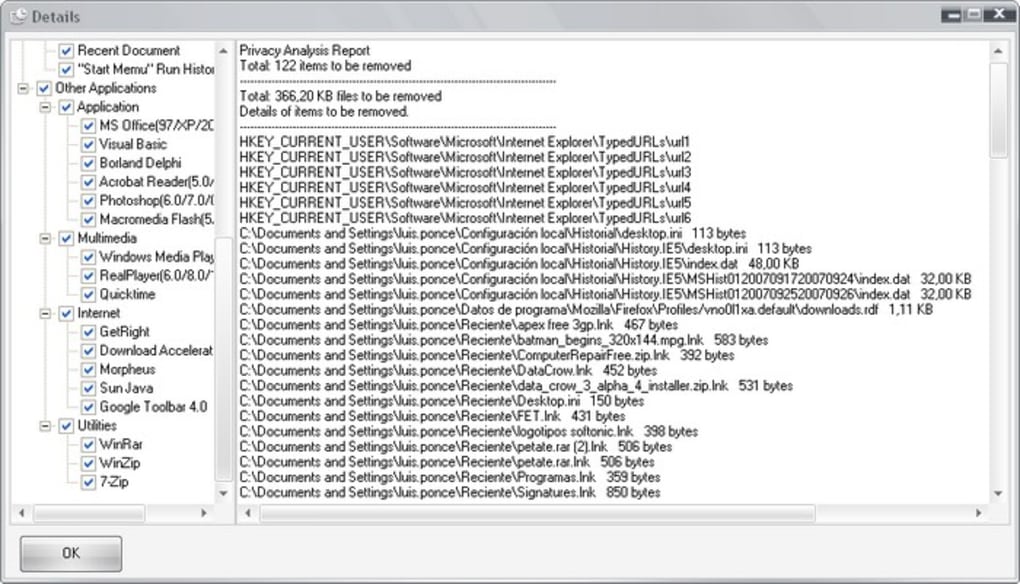
The absence of detailed logging or user-selectable options for cleaning specific data types (like browser history or passwords as mentioned in user reviews) suggests a more limited scope of functionality compared to modern system cleaning and optimization utilities. These utilities often allow for a deeper level of customization, permitting users to selectively choose which files and registry entries to clean or repair.
User Reviews and Feedback
User reviews from 2007 highlight a generally positive reception. Users praised the program’s speed, ease of use, and effectiveness in resolving performance issues. The lightweight nature of the program also received acclaim, ensuring minimal system resource consumption during operation. Several users reported that Computer Repair Free successfully removed spyware undetected by other anti-spyware programs, highlighting its capabilities in this area. One reviewer even stated they uninstalled their existing anti-spyware software after successfully using Computer Repair Free.
However, some limitations were noted. The lack of granular control over the cleaning process was a common point of feedback. Unlike more sophisticated programs, Computer Repair Free didn’t typically offer users the ability to selectively choose which files or registry entries to delete. This limitation might have led to unintentional removal of important data, although no major incidents were reported in the available user reviews.

The user reviews also underscore the prevailing sentiment regarding PC optimization in 2007: a significant focus on spyware removal and general system cleanup. Many reviewers compared the program favorably to other utilities of the time, frequently mentioning Ccleaner and Glary Utilities. This suggests that Computer Repair Free competed in a market increasingly concerned about performance and security issues related to malware and system clutter. The recommendation to combine Computer Repair Free with other utilities like registry defraggers suggests that users recognized its limitations and sought a more holistic approach to system maintenance.
One user review poignantly summarizes the challenges of spyware removal in 2007: “Although we have a good antivirus installed, it is essential to have a malware detection program if we want to put the computer in order and not die in the attempt. An anti-spyware program should never replace the antivirus, simply complement it, because adware does not directly infect the computer like a virus (Trojans, worms, etc.) would, which is why the antivirus alarm does not detect it.” This perspective reinforces the importance of Computer Repair Free’s anti-spyware capabilities in an era where comprehensive security solutions weren’t as ubiquitous or advanced as they are today.
Comparison with Modern Alternatives
Comparing Computer Repair Free to modern system optimization tools reveals a significant evolution in functionality and features. Modern alternatives offer far more granular control over the cleaning process, often categorizing files and registry entries for precise selection. Many also incorporate advanced features such as real-time monitoring, startup management, and performance analysis.
Furthermore, modern software often utilizes more sophisticated algorithms for identifying and resolving registry errors, mitigating the risk of accidental data deletion. They also tend to incorporate comprehensive security measures to prevent accidental damage or unintended actions.
The absence of regular updates for Computer Repair Free also indicates a major difference. Modern tools are continuously updated to address emerging threats and improve their effectiveness. This continuous improvement is essential in combating the ever-evolving landscape of malware and performance issues.
Conclusion
Computer Repair Free offered a relatively simple yet effective solution for cleaning and optimizing Windows PCs in 2007. Its ease of use, speed, and ability to remove spyware made it popular among users. However, its limitations—the lack of granular control and the absence of regular updates—demonstrate the significant advancements in system optimization software over the years. While it served its purpose effectively in its time, it’s far surpassed by modern, comprehensive alternatives offering greater control, security, and ongoing improvements. The program’s legacy serves as a reminder of the evolution of PC maintenance tools and the ongoing battle against spyware and system clutter. Understanding its place within that history helps appreciate the sophistication of contemporary system optimization utilities.


