
Convert2mp3 is a free web-based tool that allows users to convert online videos into MP3 audio files. Its ease of use, browser compatibility, and support for various video platforms have made it a popular choice for those seeking a simple solution to extract audio from their favorite online videos. This review delves into the features, pros, cons, and overall usability of Convert2mp3, providing a comprehensive assessment for potential users.
Convert2mp3: Functionality and Features
Convert2mp3’s primary function is converting online videos to MP3 format. This process is remarkably straightforward, relying on a simple copy-and-paste mechanism. Users simply need to copy the URL of the video they wish to convert and paste it into the designated field on the Convert2mp3 website. The platform supports a wide range of popular video-sharing websites, including YouTube, DailyMotion, and Clipfish, among others. This broad compatibility eliminates the need to search for platform-specific converters.
While the core function focuses on MP3 conversion, Convert2mp3 also offers the ability to convert videos to a limited selection of other audio and video formats. This added functionality provides users with more flexibility in managing their downloaded media. Although the range of supported formats is not extensive, it provides a useful degree of versatility beyond simple MP3 extraction.
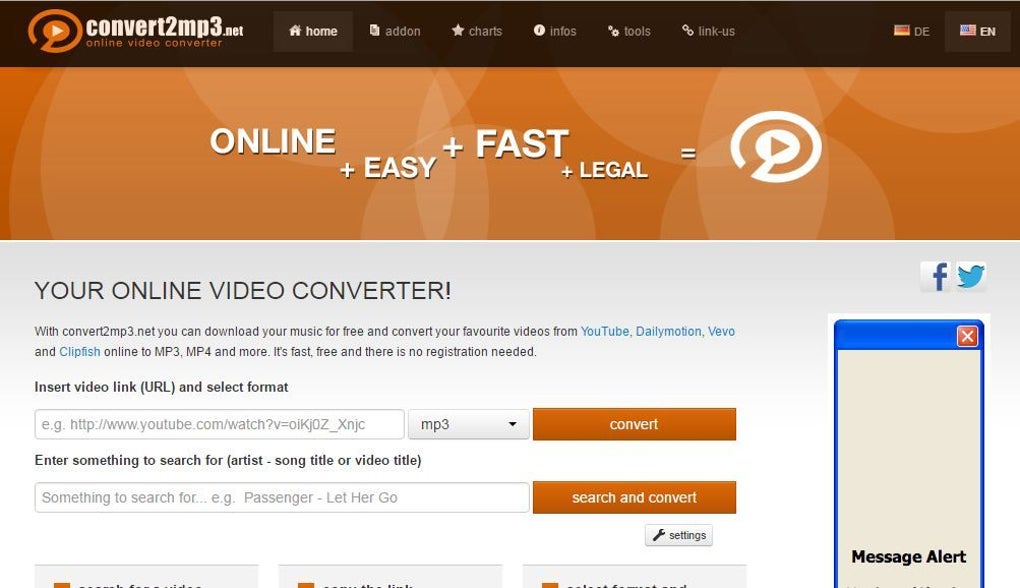
The website’s interface is designed for maximum simplicity, prioritizing ease of use. The clean design and intuitive layout ensure that even users unfamiliar with video conversion tools can navigate the process without difficulty. The presence of a search function further enhances usability, allowing users to find the desired video directly within the tool, eliminating the need to navigate to the video’s source website before initiating the conversion. The conversion process itself is typically quick and efficient, offering a seamless experience.
Convert2mp3: Pros and Cons
Convert2mp3, like any software or web application, has its strengths and weaknesses. Understanding these aspects is crucial for determining its suitability for individual needs.
Pros:
- Ease of Use: The straightforward interface and simple copy-and-paste functionality make Convert2mp3 exceptionally user-friendly, requiring minimal technical expertise.
- Browser Compatibility: It functions seamlessly across various web browsers, including Safari, Chrome, and Firefox, ensuring accessibility regardless of user preference.
- Wide Platform Support: Its compatibility with numerous video-sharing websites eliminates the need for multiple conversion tools, streamlining the process for users who frequent different platforms.
- Free of Charge: Convert2mp3 is entirely free to use, removing any financial barrier to accessing its functionality. This makes it an attractive option for users on a budget or those seeking a trial before committing to paid alternatives.
- No Software Downloads: As a web-based tool, there’s no need to download and install any software. This eliminates concerns about compatibility issues, storage space limitations, and potential security risks associated with installing third-party software.
- Multiple Audio/Video Output Options (Limited): Although not extensive, the option to convert to formats beyond MP3 provides a degree of flexibility in managing the output files.
Cons:
- Limited Output Formats: The range of supported output formats is comparatively small. This might be a significant drawback for users requiring specific formats not offered by Convert2mp3.
- Absence of HD Video Conversion: Convert2mp3 doesn’t support high-definition video conversion, limiting the quality for users who prioritize high-resolution video downloads.
- Potential Legal Considerations: Downloading copyrighted material without permission remains a legal gray area. Users must exercise caution and ensure they are only converting videos they have the right to download. The tool itself does not enforce copyright restrictions; it’s the user’s responsibility to abide by the law.
- Dependence on Internet Connectivity: As a web-based application, Convert2mp3 requires a stable internet connection to function effectively. Interruptions in connectivity can disrupt the conversion process.
- No Batch Conversion: Convert2mp3 handles one video conversion at a time. This lack of batch processing can be time-consuming for users needing to convert multiple videos.
Convert2mp3: Web App Usability and Experience
Convert2mp3’s design emphasizes simplicity and efficiency. The single-page interface presents users with a clear and uncluttered space to input the video URL and initiate the conversion. The absence of unnecessary features streamlines the process, reducing potential confusion for new users. The visual elements are minimal but functional, ensuring a smooth user experience.
The loading times are generally quick, even during peak usage periods. This responsiveness contributes significantly to the overall positive user experience. The progress bar provides real-time feedback on the conversion progress, keeping users informed. Once the conversion is complete, the download link is readily available, allowing users to save the converted file directly to their device.
Overall, the web app experience with Convert2mp3 is characterized by its intuitive design, speed, and ease of use. The absence of complex features doesn’t compromise functionality for the majority of users seeking a straightforward video-to-MP3 conversion tool.
Convert2mp3: Alternative Applications
While Convert2mp3 offers a convenient solution for many users, several alternative applications provide similar functionality, often with added features or benefits. The choice of the best alternative depends on individual needs and preferences. Some alternative applications may offer a wider range of supported formats, higher-quality conversions, batch processing capabilities, or additional features like audio editing. Researching these alternatives and comparing their features with Convert2mp3’s strengths and weaknesses will help users make an informed decision. It’s crucial to evaluate factors like ease of use, supported formats, conversion speed, and any potential costs associated with using the alternative application.
Convert2mp3: Conclusion
Convert2mp3 presents a compelling solution for users seeking a free, easy-to-use, and browser-based tool to convert online videos to MP3 files. Its simplicity and wide platform support are significant advantages. However, the limitations in output formats, the lack of HD video conversion, and the absence of batch processing should be considered. Ultimately, the suitability of Convert2mp3 depends on individual needs and priorities. If simplicity and free access are paramount, Convert2mp3 is a strong contender. However, users requiring more advanced features or higher quality conversions should explore alternative options. Remember always to respect copyright laws and only convert videos you have the right to access and download.
File Information
- License: “Free”
- Version: “2017”
- Latest update: “July 15, 2022”
- Platform: “Web Apps”
- OS: “Firefox”
- Language: “English”
- Downloads: “12.2K”


