
Cool Record Edit Pro is a free audio recording and editing application designed for Windows. While boasting a range of features for basic audio manipulation, its age shows in the lack of support for modern file formats and advanced editing capabilities. This review delves into its strengths, weaknesses, and overall usability, helping you determine if it meets your audio editing needs.
Core Functionality: Recording and Basic Editing
Cool Record Edit Pro’s primary function is audio recording. It allows users to capture sound from various sources, including microphones, line-in devices, and even digital audio streams from sources like internet radio or television broadcasts. The software provides controls to adjust recording levels and audio quality, enabling users to customize their recordings based on the source and desired output. This makes it suitable for a variety of tasks, from archiving vinyl records and cassette tapes to capturing live performances or creating audio for simple YouTube videos.
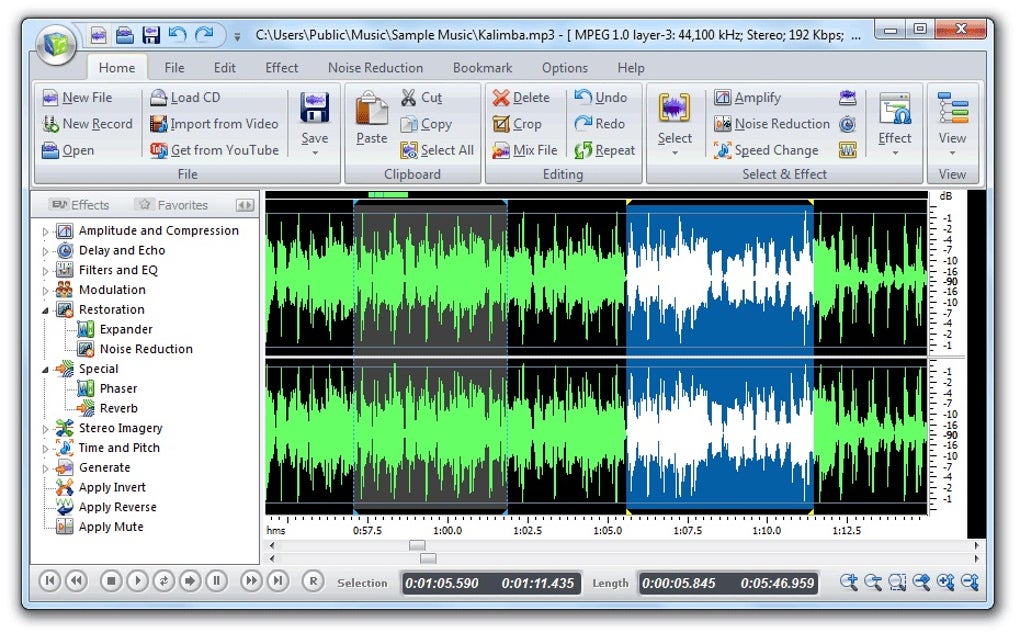
The editing capabilities, however, are more rudimentary. The software offers basic waveform visualization, allowing users to see the audio data visually. This allows for some level of precision when making edits, but it lacks the advanced tools found in professional audio editing software. Users can apply filters, such as a click and crackle filter specifically designed for cleaning up audio from vinyl records, and a noise reduction filter beneficial for older cassette tapes. An equalizer is also included, enabling adjustments to the frequency balance of the audio. These features can improve the overall sound quality of recordings, particularly those from older or less-than-perfect sources. However, this is limited to basic manipulation, and more complex editing tasks such as multi-track editing, advanced effects processing, or mastering are beyond its capabilities.
The software’s strength lies in its simplicity. The user interface is straightforward and easy to navigate, even for users with limited experience in audio editing. The clear labeling of functions and intuitive design make it accessible to beginners while still offering sufficient functionality for straightforward tasks. This ease of use is a significant advantage for those seeking a simple and user-friendly audio recording and editing solution without a steep learning curve.
Limitations and Outdated Aspects
Despite its ease of use and basic functionality, Cool Record Edit Pro suffers from several significant limitations stemming from its age. One major drawback is its lack of support for many modern audio file formats. This significantly restricts its usefulness for users working with a broad range of audio files. The inability to handle newer formats means that importing and exporting audio becomes challenging, potentially limiting its integration within larger workflows or projects.
Furthermore, the absence of video support is a notable limitation. While it excels at recording and editing audio, the inability to handle video makes it unsuitable for tasks involving audio-video synchronization or editing audio within a video context. This severely limits its applicability for tasks such as creating YouTube videos with accompanying soundtracks or editing audio components within video projects. Users seeking a solution for such tasks will need to look elsewhere.
The overall functionality is geared towards basic recording and minimal editing. Advanced features common in modern audio editing software, such as advanced effects processing, multi-track editing, automation, and non-destructive editing techniques, are absent. This restricts its suitability for professional use or more demanding audio projects, limiting it to simpler recording and basic cleanup tasks.
Another shortcoming is the lack of regular updates and maintenance. The software hasn’t received significant updates in recent years, highlighting the lack of ongoing development and support. This raises concerns regarding future compatibility and potential security vulnerabilities. The absence of ongoing development also reduces the likelihood of bug fixes or improvements to address user feedback or resolve potential issues.
Comparison with Modern Alternatives
Cool Record Edit Pro should be considered within the context of modern alternatives. Several free and open-source audio editing programs offer a far wider range of features, better support for modern file formats, and active development. Audacity, for example, is a popular free and open-source audio editor that provides a comprehensive suite of features, including multi-track editing, advanced effects, and support for a wide array of file formats. While it might have a steeper learning curve than Cool Record Edit Pro, its capabilities far surpass those of the latter.
Similarly, commercial software like Adobe Audition offers unparalleled editing capabilities, advanced features, and extensive support for professional audio production workflows. While the price point is significantly higher, the professional-grade tools and features justify the cost for those who require high-quality audio editing and production capabilities.
Therefore, while Cool Record Edit Pro might suffice for very basic tasks, it significantly lags behind modern alternatives in terms of features, support, and overall functionality. The trade-off between simplicity and functionality should be carefully considered before deciding whether to use it.
User Experience and Interface
The user interface of Cool Record Edit Pro is straightforward and intuitive. Its simplicity is a significant strength, making it accessible to users with varying levels of technical expertise. The clear arrangement of tools and controls allows users to easily navigate the program’s functions, streamlining the workflow for recording and editing audio.
However, the simplicity also contributes to the software’s limitations. The lack of advanced features and tools is reflected in the UI’s minimalistic design. This might be appreciated by some, but users expecting a wealth of advanced editing tools might find it lacking in functionality and customization options.
The lack of customization options is another point worth noting. While the interface is simple and easy to use, it offers limited flexibility in terms of layout and customization. Users cannot rearrange tools, personalize workspaces, or create custom shortcuts, restricting the overall user experience to the predefined layout.
The absence of comprehensive documentation and tutorials further detracts from the user experience. While the program is relatively simple to use, having access to detailed guides and tutorials could prove beneficial, especially for users who are new to audio editing or require assistance with specific functions. The lack of resources leaves users to learn through trial and error, which can be time-consuming and frustrating.
Conclusion: Is Cool Record Edit Pro Right for You?
Cool Record Edit Pro offers a straightforward approach to basic audio recording and editing. Its simplicity and user-friendly interface make it accessible to beginners. However, its outdated features, limited support for modern file formats, and lack of advanced editing capabilities significantly restrict its usability for more demanding tasks. The absence of video support further confines its applications.
Considering the availability of modern alternatives, both free and commercial, Cool Record Edit Pro’s usefulness is largely limited to the most basic audio recording and minimal cleaning tasks. For users requiring more comprehensive functionality, superior support for modern file formats, and access to advanced editing tools, exploring alternative software is strongly recommended. While its simplicity might be appealing for absolute beginners, the limitations outweigh the benefits for most users in today’s audio editing landscape.
File Information
- License: “Trial version”
- Latest update: “July 20, 2021”
- Platform: “Windows”
- Language: “English”
- Downloads: “37.1K”
- Size: “16.13 MB”


