
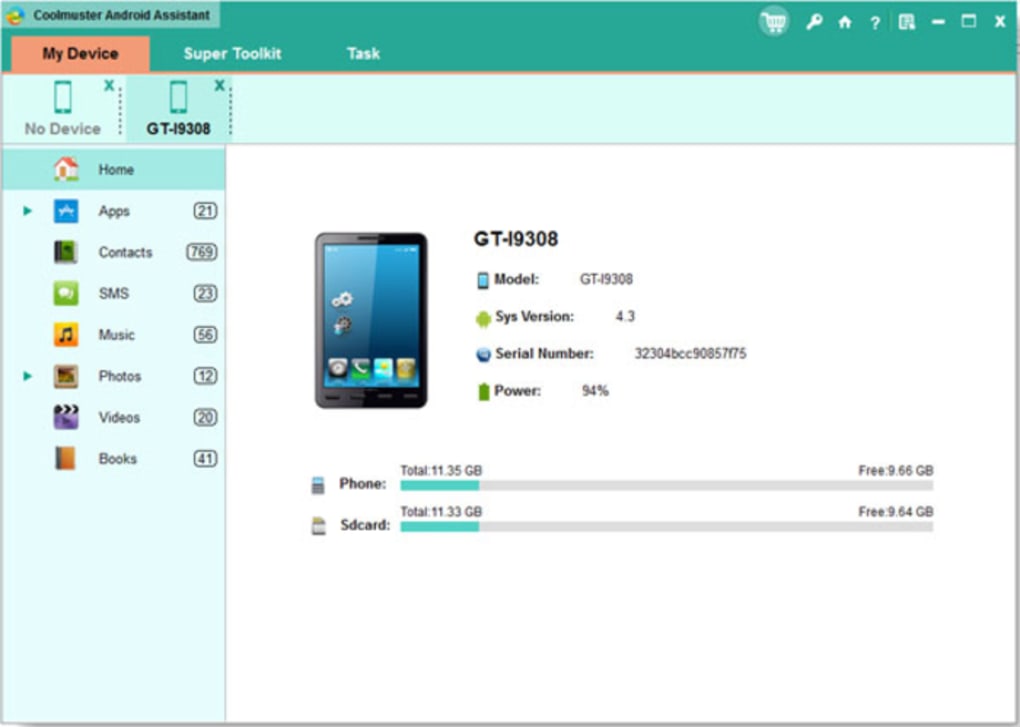
Coolmuster Android Assistant is a versatile utility program designed to streamline the management and backup of Android device data. This software offers a comprehensive suite of tools, moving beyond simple backup and restore functionalities to provide users with a robust solution for organizing and protecting their mobile information. This review will delve into its features, ease of use, pros and cons, and compare it to other similar applications.
Effortless Backup and Restoration of Android Data
One of the core strengths of Coolmuster Android Assistant lies in its ability to efficiently back up and restore various types of data from an Android device to a computer. This includes, but isn’t limited to:
-
Contacts: The software seamlessly backs up contact information, offering multiple export formats like CSV, VCF, HTML, and BAK, providing flexibility for users to manage their contacts across various platforms and applications. This feature extends beyond simple backup; the program also allows for contact management directly on the computer, enabling users to edit, delete, add, and deduplicate contacts for better organization.
-
SMS Messages: Losing crucial text messages can be devastating. Coolmuster Android Assistant mitigates this risk by backing up all SMS messages, preserving important conversations and information. Similar to contacts, the backed-up messages are readily accessible and can be organized on the computer.
-
Multimedia Files: The program efficiently manages multimedia files, including photos, videos, and music. Users can easily transfer these files between their Android device and their computer, providing a convenient method for storage, sharing, and organization. This functionality is invaluable for users who frequently capture photos and videos or store extensive music libraries on their Android devices.
-
Applications: Coolmuster Android Assistant extends its capabilities to Android applications. It enables users to install, uninstall, export, and view apps directly on their computer. This feature simplifies app management, allowing for easy organization and removal of unwanted applications. The ability to export apps is particularly useful for archiving apps or transferring them between devices.
The backup and restore processes themselves are remarkably straightforward, often requiring just a single click to initiate. This ease of use makes it accessible even to users with limited technical expertise. The software automatically detects connected devices and provides a clear, intuitive interface for selecting the data to back up or restore.
Beyond Backup: A Versatile Android Management Tool
While backup and restore functionalities are central to Coolmuster Android Assistant, its capabilities extend significantly beyond these core features. The software functions as a comprehensive Android management tool, simplifying various tasks related to data organization and device management.
-
Contact Management: The application allows for granular control over contacts. Users can efficiently manage duplicates, edit existing contact information, and add new contacts, all from the convenience of their computer. This is particularly beneficial for individuals with extensive contact lists.
-
App Organization: The software provides a streamlined approach to organizing apps on an Android device. Users can easily transfer apps from their computer to their phone or vice-versa, allowing them to curate their device’s app ecosystem based on their immediate needs. This is useful for managing memory space and for switching between different sets of apps depending on the context (e.g., work apps vs. personal apps).
-
Media File Management: The software simplifies the management of multimedia files on the Android device. Users can quickly and easily import or export music, photos, and videos, facilitating efficient organization and transfer of media between devices. This feature is particularly advantageous for users with large media libraries.
- Data Recovery and Corruption Handling: Coolmuster Android Assistant offers a built-in restore functionality. Should any data corruption or accidental deletion occur, users can revert their device to a previous backup point, minimizing data loss and ensuring continuity. This restoration process is designed for simplicity and speed, enabling quick recovery from data-related issues.
System Requirements and Compatibility
Coolmuster Android Assistant boasts broad compatibility. It supports various versions of Windows operating systems, including Windows 10, Vista, and XP, and is also compatible with macOS versions 10.7 and above. The software’s compatibility extends to a wide array of Android devices from manufacturers such as Samsung, Sony, HTC, and LG, though it is advisable to check for device-specific compatibility before purchase. Further, it offers both USB and WiFi connection options, providing flexibility in connecting the Android device to the computer.
User Reviews and Feedback
User reviews reveal a mixed response to Coolmuster Android Assistant. While many users praise the program’s ease of use, comprehensive features, and efficient data management capabilities, some users express concerns about customer support responsiveness and the fact that it is a paid software with a one-year license. Negative reviews often center on customer support issues, highlighting difficulties in receiving timely and effective assistance when encountering problems. The limited lifetime license also receives criticism, as it restricts the software’s use to a single computer.
Pricing and Licensing
Coolmuster Android Assistant is not free software. Users must purchase a license to utilize its full range of features. While the exact pricing may vary, it typically involves a one-year license fee, with a separate option for a lifetime license, which, however, is also limited to a single computer. This pricing model has resulted in some negative feedback from users who would prefer a more flexible or permanent license. The lack of a free version might also deter potential users who wish to test the software before committing to a purchase.
Comparison to Alternative Apps
Coolmuster Android Assistant competes with a range of similar Android management and backup applications. Direct competitors include MobileGo, other Coolmuster products like Lab.Fone for Android, and various free and open-source alternatives. While many free options exist, they often lack the breadth and depth of features offered by Coolmuster Android Assistant. The decision to choose Coolmuster Android Assistant would depend on the individual’s specific needs and willingness to pay for a comprehensive and user-friendly solution. The free alternatives frequently lack the ease of use and comprehensive feature set that are key aspects of Coolmuster Android Assistant.
Conclusion
Coolmuster Android Assistant presents a compelling solution for users seeking an effective means of managing and backing up their Android device data. Its intuitive interface and comprehensive features, encompassing backup, restoration, contact management, app organization, and media file management, make it a strong contender in the market. However, potential users should weigh the cost of the license against the value of its features and carefully consider the reported customer support responsiveness before making a purchase decision. The software’s broad compatibility and relatively user-friendly design are strong points, but the lack of a free version and limitations on the lifetime license are aspects to consider. Ultimately, the effectiveness of Coolmuster Android Assistant will depend heavily on individual user needs and expectations.
File Information
- License: “Trial version”
- Latest update: “July 9, 2025”
- Platform: “Windows”
- OS: “Windows XP”
- Language: “English”
- Downloads: “47.9K”
- Size: “24.86 MB”


