
Copy File Name is a free utility program designed for Windows operating systems. This straightforward tool addresses a common user need: quickly copying the full path and file name of any selected file. While seemingly simple, its functionality proves invaluable for various tasks, ranging from streamlining everyday file management to aiding in more complex programming or scripting projects. This review delves into its features, usability, historical context, and compares it to alternative methods available today.
Functionality and User Interface
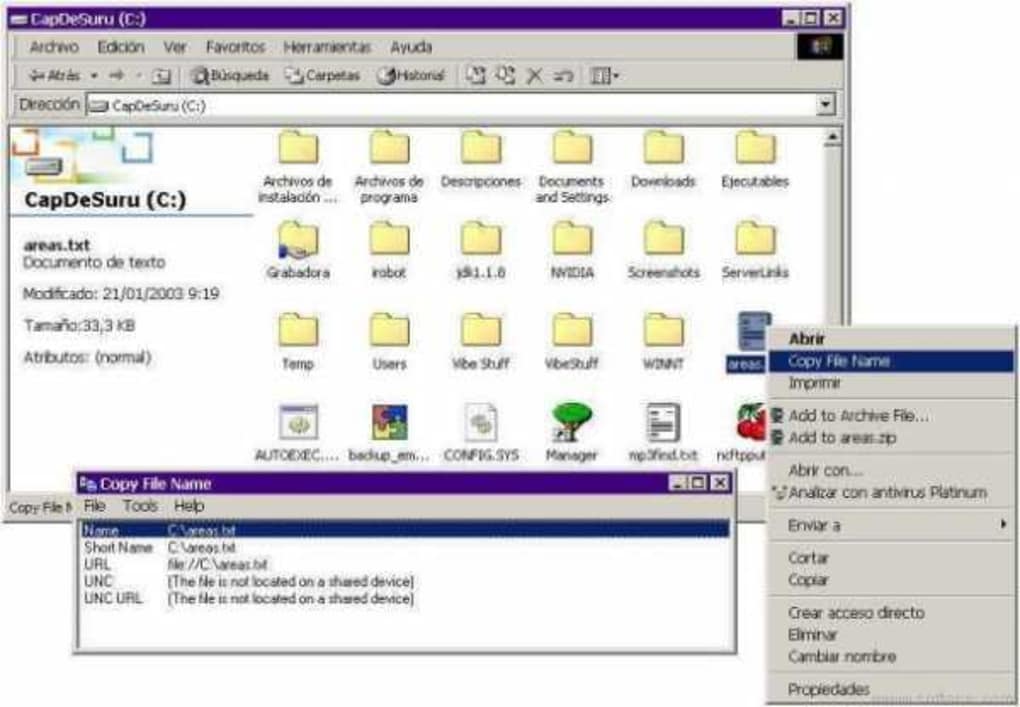
Copy File Name’s primary function is precisely what its name suggests: it provides a quick and easy method to copy the complete file path and name to the clipboard. This seemingly simple action eliminates the manual process of selecting and typing the file location, significantly reducing the time and effort involved in tasks requiring frequent file referencing. The program’s interface is remarkably minimalistic, reflecting its focused functionality. There are no complicated menus or settings to navigate; the core action is readily accessible. This simplicity is both its strength and, potentially, a limitation depending on the user’s needs.
The absence of advanced features ensures a lightweight and efficient application. It consumes minimal system resources, making it suitable even for older or less powerful machines. This contrasts with more feature-rich file management applications that might offer additional capabilities but at the cost of increased resource consumption. Copy File Name’s clean design makes it user-friendly for both novice and experienced computer users.
Historical Context and Availability
Initially released in 2006 by Bullzip, Copy File Name last saw an update in December 2008, reaching version 2.0.0.7. Despite its lack of recent updates, the program remains functional on older Windows systems, particularly those running Windows 95 and subsequent versions. The continued availability of the application highlights its enduring relevance. While newer operating systems and file explorers offer some integrated functionality that might partially overlap, Copy File Name provides a dedicated and consistently reliable solution without relying on evolving system interfaces. Its lightweight nature and straightforward execution ensure compatibility and stability, a benefit for users who prioritize reliability over constantly updated features.
Comparison with Modern Alternatives
While Copy File Name fulfills its core function efficiently, it’s crucial to compare it to the tools and features available in contemporary Windows operating systems and other software. Modern Windows file explorers include context menus offering “Copy as Path” options, partially replicating Copy File Name’s functionality. This built-in functionality makes a dedicated application like Copy File Name less critical for basic file path copying.
However, Copy File Name retains an advantage in its dedicated and immediate execution. The context menu approach requires additional clicks and navigation steps. For users who frequently copy file paths, this difference in efficiency might outweigh the simplicity of the built-in feature. Furthermore, the context menu approach might vary slightly depending on the file explorer version and configurations, creating potential inconsistencies. Copy File Name maintains a consistent and reliable method across different versions of Windows.
Use Cases and Potential Applications
Beyond basic file path copying, Copy File Name’s functionality finds applications in various contexts:
-
Software Development and Scripting: Developers and scripters often need to include file paths in their code. Copy File Name offers a rapid method to extract this information, streamlining the development process. The ability to swiftly copy the full path prevents potential errors caused by manual transcription.
-
Batch Processing and Automation: Tasks involving batch file processing or automated workflows can benefit greatly from Copy File Name’s efficient path copying. Integrating the program into scripting languages like Python or PowerShell can automate tedious file handling processes.
-
Data Management and Organization: For users involved in extensive data management, Copy File Name provides a consistent method for retrieving file paths. This consistency is vital when dealing with a large number of files and directories.
-
File Sharing and Transfer: When sharing files across different platforms or through various methods, a precise and complete file path ensures that recipients can locate the files effortlessly. Copy File Name minimizes the risk of errors associated with manually copying paths.
-
Troubleshooting and Debugging: In situations where precise file locations are needed for troubleshooting or debugging, Copy File Name provides a quick and accurate way to obtain the necessary path information.
These use cases highlight Copy File Name’s practical value beyond its seemingly simple functionality. Its impact on productivity and efficiency is particularly noticeable in scenarios demanding frequent file path retrieval.
System Requirements and Installation
Copy File Name’s system requirements are minimal. Designed for older Windows versions, it should function flawlessly on contemporary systems. The installation process is equally straightforward; it’s a simple executable file requiring no complex configurations or dependencies. Its lightweight nature ensures minimal impact on system performance during installation or execution.
Security Considerations
As with any downloaded software, it’s essential to exercise caution and download only from trusted sources. While Copy File Name has been available for many years, maintaining awareness of potential security risks remains crucial. Using reputable download sites and regularly scanning downloaded files with updated antivirus software is a recommended best practice. The absence of recent updates should prompt users to assess the balance between the utility’s functionality and potential security vulnerabilities.
Conclusion
Copy File Name, despite its age and lack of recent updates, remains a relevant and useful utility for specific tasks. Its streamlined functionality and minimal system footprint are advantageous. Although modern operating systems offer partially overlapping capabilities, Copy File Name’s dedicated approach offers a consistent and arguably more efficient method for users frequently needing to copy full file paths. However, users should weigh the benefits against potential security concerns associated with using outdated software and consider the alternatives provided by modern operating systems. While not necessarily indispensable in today’s environment, Copy File Name offers a valuable solution for those seeking a simple, reliable, and dedicated tool for copying file paths.
File Information
- License: “Free”
- Version: “2.0.0.7”
- Latest update: “December 12, 2008”
- Platform: “Windows”
- OS: “Windows 98”
- Language: “English”
- Downloads: “5.8K”
- Size: “1.88 MB”


