
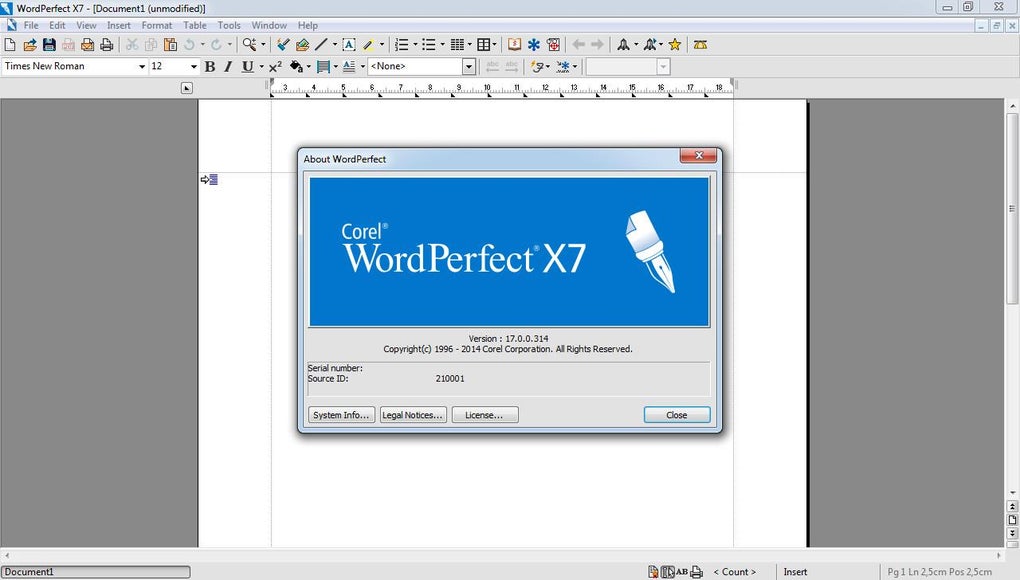
Corel WordPerfect Office is a robust and versatile productivity suite designed for Windows users seeking a powerful alternative to mainstream office software. This comprehensive package provides a complete set of tools for document creation, data management, and presentation development, catering to the needs of legal professionals, academics, and everyday users alike. With its long history and continuous development, WordPerfect Office offers a blend of familiar usability and advanced features, ensuring a smooth transition for users accustomed to traditional office suites while also providing opportunities for enhanced productivity and precision.
A Full Suite of Essential Applications
Corel WordPerfect Office isn’t just a single program; it’s a complete suite of applications designed to work seamlessly together. This integrated approach streamlines workflows and enhances efficiency by providing all the essential tools within a single, cohesive environment. The suite includes:
-
WordPerfect: This highly capable word processor forms the core of the suite. It’s renowned for its powerful features and fine-grained control over document formatting. Beyond basic word processing tasks, WordPerfect excels in handling complex documents such as legal briefs, academic papers, and books. Key features include:
-
Advanced Formatting: WordPerfect offers extensive control over text formatting, allowing users to precisely adjust font styles, paragraph settings, and page layouts with a level of granularity exceeding that of many competitors. This level of control is crucial for producing professional-looking documents that meet rigorous formatting standards.
-
Metadata Removal: For users concerned about sensitive information, WordPerfect includes tools to remove metadata embedded within documents. This feature is vital for maintaining confidentiality and ensuring compliance with data protection regulations.
-
Reveal Codes: This unique feature, a hallmark of WordPerfect, allows users to view and edit the underlying formatting codes of their documents. This provides unparalleled precision and control, enabling users to understand and manipulate the structure of their documents at a granular level, ensuring accuracy and consistency.
-
-
Quattro Pro: This spreadsheet application provides a powerful platform for data analysis, financial modeling, and complex calculations. Quattro Pro offers a range of features for creating charts, graphs, and visualizations to effectively communicate data insights. Its capabilities extend beyond basic spreadsheet functions, making it suitable for both everyday tasks and sophisticated financial modeling.
-
Presentations: This presentation creation tool enables users to build dynamic and engaging slideshows. With support for multimedia elements, customizable templates, and animation features, Presentations simplifies the process of creating impactful presentations for various purposes, from business meetings to academic conferences. The intuitive interface and rich feature set make it easy to create professional-quality presentations without needing extensive design expertise.
-
Integrated PDF Capabilities: WordPerfect Office integrates robust PDF capabilities directly within the word processor, eliminating the need for separate PDF software. Users can create, edit, and annotate PDF documents seamlessly, enhancing workflow efficiency and reducing reliance on external applications. This integration streamlines the document creation and distribution process, especially beneficial for sharing documents with colleagues or clients who may not have the same software.
-
Legal-Specific Features: For users in legal professions, WordPerfect Office offers specialized tools like Bates Numbering and redaction support. These features are crucial for efficient and compliant handling of legal documents, enhancing productivity and maintaining accuracy in sensitive legal contexts.
High Compatibility and Customization
Corel WordPerfect Office ensures broad compatibility by supporting a wide array of file formats, including DOCX, XLSX, PPTX, and PDF. This interoperability allows seamless collaboration with individuals and organizations using other popular office suites. The flexibility extends to interface customization, enabling users to tailor toolbars, menus, and keyboard shortcuts to optimize their workflow. This personalized approach increases productivity and enhances user comfort, particularly in larger teams where consistency in workflow is important.
Key Features and Advantages
Beyond the core applications, several key features distinguish Corel WordPerfect Office:
- Intuitive Layout and Reveal Codes: The familiar ribbon layout ensures a short learning curve, making it accessible to both novice and experienced users. The Reveal Codes function, as mentioned above, provides unparalleled control over document formatting.
-
Built-in Publishing Tools: Users can directly publish documents to PDF or export them to eBook formats like EPUB, simplifying the publishing process and eliminating the need for additional software. This functionality is valuable for creating professional-quality documents and ebooks for a variety of purposes.
-
Macro and Automation Support: Advanced users can utilize macros to automate repetitive tasks, boosting productivity significantly, particularly in environments with high-volume document processing or repetitive tasks.
-
Robust Template Library: A vast library of pre-built templates for WordPerfect, Quattro Pro, and Presentations provides a head start for creating various documents, from resumes and invoices to business plans and presentations. These professional-looking templates accelerate document creation and ensure consistency in design.
-
System Requirements and Compatibility: Corel WordPerfect Office is designed for optimal performance across a range of Windows operating systems, from older versions to the latest releases. The relatively modest system requirements make it accessible to users with older machines, ensuring broad compatibility across different hardware configurations.
Availability and Pricing
Corel WordPerfect Office is available in various editions – Standard, Professional, and Home & Student – each tailored to specific user needs and budgets. A free trial version is often available, allowing users to evaluate the software before committing to a purchase. The full version is typically offered as a one-time purchase, providing a cost-effective alternative to subscription-based office suites, offering long-term value and avoiding recurring subscription fees. Corel also provides dedicated support resources to assist users.
Why Choose Corel WordPerfect Office?
Corel WordPerfect Office stands out as a compelling choice for Windows users due to its unique blend of power, precision, and ease of use. Its long-standing reputation among legal professionals highlights its reliability and accuracy in handling complex and critical documents. The suite’s ability to balance advanced features with intuitive usability makes it accessible to a wide range of users, from individuals to large organizations. The integrated PDF capabilities, extensive format compatibility, and the unique Reveal Codes feature offer a level of control over document formatting rarely found in other office suites.
Furthermore, Corel’s wider software ecosystem, encompassing creative tools like CorelDRAW Graphics Suite and Corel Painter Essentials, provides a comprehensive solution for both productivity and creative endeavors. This holistic approach makes Corel a powerful option for users needing a versatile set of software tools.
Alternatives and Comparisons
While Corel WordPerfect Office stands alone in its specific strengths, several alternative office suites exist. These include Microsoft Office, LibreOffice, and Google Workspace. Each offers distinct advantages and disadvantages compared to WordPerfect Office. Microsoft Office, for example, benefits from widespread adoption and extensive integration with other Microsoft products. However, it comes at a higher cost and often lacks the fine-grained control over formatting that WordPerfect offers. LibreOffice, a free and open-source suite, provides a cost-effective alternative but may lack some of the advanced features and polish found in commercial suites like WordPerfect. Google Workspace offers cloud-based collaboration but may not be ideal for users requiring offline access or those who prefer a desktop-centric workflow.
The best choice ultimately depends on individual needs and preferences. If powerful formatting control, extensive customization, and a one-time purchase model are prioritized, Corel WordPerfect Office presents a highly competitive option.
Conclusion
Corel WordPerfect Office provides a comprehensive and powerful productivity solution for Windows users. Its balance of advanced features, intuitive design, and cost-effectiveness makes it a compelling alternative to other office suites. Whether you’re a legal professional needing precise control over documents, an academic preparing research papers, or a home user seeking a reliable and feature-rich office solution, Corel WordPerfect Office is worth considering. Its enduring legacy and continued development ensure it remains a relevant and valuable tool in the ever-evolving landscape of office productivity software.
File Information
- License: “Trial version”
- Latest update: “April 10, 2025”
- Platform: “Windows”
- OS: “Windows 8”
- Language: “English”
- Downloads: “86.1K”
- Size: “969.62 KB”


