
In the vibrant and ever-expanding universe of digital entertainment, the allure of comic books remains as strong as ever. From the epic sagas of superheroes to the intricate narratives of manga and independent graphic novels, these visual storytelling masterpieces captivate millions. As the world shifts increasingly towards digital consumption, the need for robust, intuitive, and feature-rich software to manage and read these digital treasures has become paramount. Enter Cover-Comics Reader, a highly acclaimed application designed specifically for Windows users, positioning itself as a premier solution for comic book enthusiasts worldwide.
With over 250,000 downloads and a consistent 4-star-plus rating from its user base, Cover-Comics Reader has not only garnered significant popularity but has also earned repeated features by Microsoft in various regions, including the US, France, and Canada. This widespread recognition underscores its quality and utility. Developed by FrenchFrySoftware, this application is far more than just a simple viewer; it’s a comprehensive platform engineered to enhance every aspect of the digital comic reading experience. From seamless importation to advanced library management and a highly customizable reading interface, Cover-Comics Reader promises to transform how you engage with your cherished comic collection.
At its core, Cover-Comics Reader is built around convenience and versatility. It addresses the common pain points of digital comic readers by supporting a vast array of file formats, offering flexible storage solutions, and ensuring a crystal-clear display on Windows devices. Whether you’re a casual reader with a handful of digital comics or a dedicated collector managing a vast archive, Cover-Comics Reader provides the tools necessary to keep your library organized and your reading experience optimized. This article delves into the depths of Cover-Comics Reader, exploring its myriad features, weighing its advantages against its limitations, and understanding why it has become a go-to choice for so many digital comic aficionados.
Unveiling Cover-Comics Reader: A Deep Dive into Features
Cover-Comics Reader distinguishes itself through a rich suite of features meticulously designed to cater to the discerning digital comic reader. The developers have clearly focused on creating an ecosystem where accessibility, organization, and a superior reading experience are paramount.
Comprehensive Format Support: No Comic Left Behind
One of the foundational strengths of any digital reader is its compatibility with various file formats, and Cover-Comics Reader excels in this regard. The application supports virtually all popular comic book archive formats, ensuring that users won’t face frustrating compatibility issues regardless of where their digital comics originate. This broad support eliminates the need for multiple readers or tedious file conversions, streamlining the user experience.
The supported formats include:
- CBZ/ZIP: The most common archive format for digital comics, essentially a collection of image files compressed into a ZIP archive.
- CBR/RAR: Another widely used format, similar to CBZ but utilizing RAR compression.
- 7Z/CB7: Supporting the highly efficient 7Z compression, offering smaller file sizes for large collections.
- CBT: A less common but still supported archive format.
- PDF: While primarily an e-book format, many graphic novels and collected editions are distributed as PDFs, making this inclusion crucial.
- EPUB (images only): Primarily for e-books, its support for image-only EPUBs ensures that visual-heavy EPUBs can also be viewed.
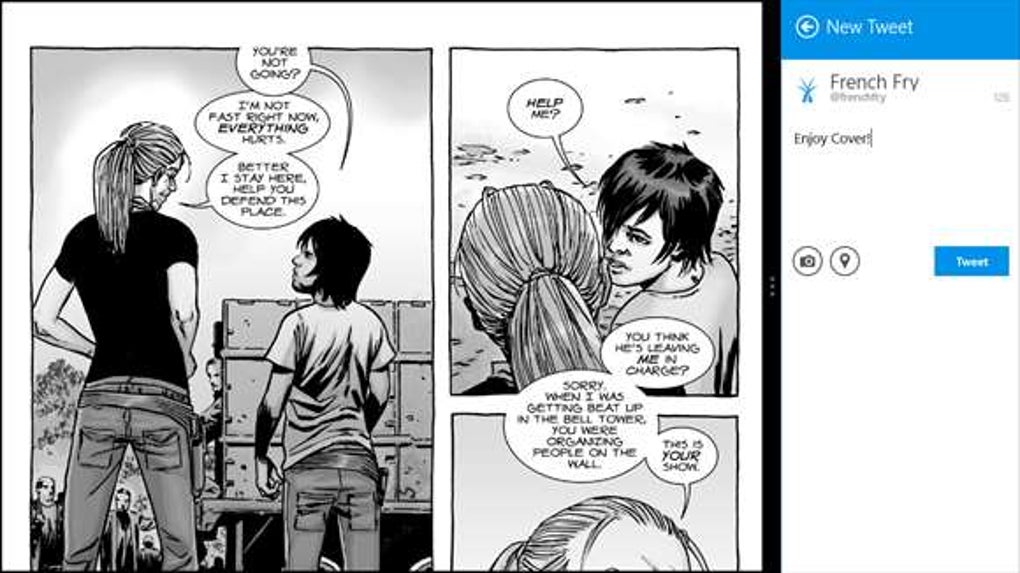
Beyond these archive formats, Cover-Comics Reader also handles a wide range of individual image formats, including JPEG, PNG, GIF, BMP, and WEBP. This ensures that even standalone image files, perhaps from webcomics or individual scans, can be easily viewed within the application. This extensive format compatibility makes Cover-Comics Reader a truly versatile tool for any digital comic library.
Crystal-Clear Library Management: Your Collection, Perfectly Organized
A large digital comic collection can quickly become unwieldy without robust organizational tools. Cover-Comics Reader addresses this with an intuitive and powerful library management system that mimics the physical shelves of a traditional comic book store, but with added digital intelligence.
Key aspects of its library management include:
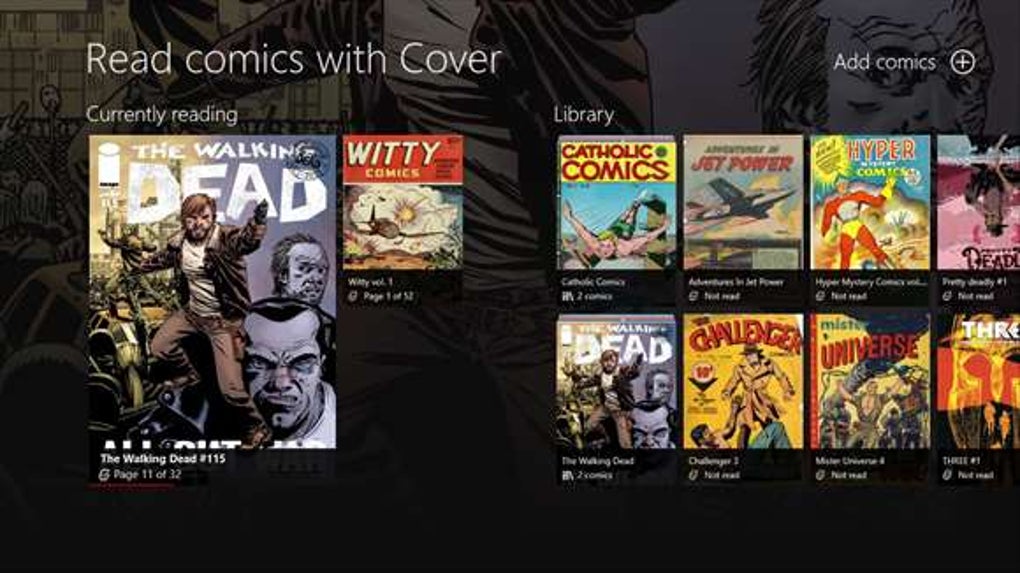
- Shelves: Users can create custom “shelves” to categorize their comics by series, genre, publisher, read status, or any other criteria they choose. This provides a visually appealing and highly functional way to browse and access specific collections.
- Read/Unread Status: The application automatically tracks which comics you’ve read and which are new, making it easy to pick up where you left off or discover unread gems in your collection.
- Page Count and Current Page: For each comic, Cover-Comics Reader displays the total number of pages and your current reading progress, allowing for seamless transitions between reading sessions.
- Detailed Comic Information: The app extracts and presents detailed metadata about each comic, offering richer context and making it easier to identify and manage individual issues.
- Search, Favorites, and Smartviews: To navigate vast libraries, the app includes powerful search functionality, allowing users to quickly find specific titles. A “Favorites” feature enables quick access to beloved series, while “Smartviews” can automatically filter comics based on predefined criteria, offering dynamic curated lists.
- One-Step Import Process: Importing an entire collection is simplified to a single step, allowing users to quickly get their library up and running without tedious manual addition.
- Automatic Synchronization: The application seamlessly synchronizes with your file system. If you add or edit comic books using Windows Explorer, Cover-Comics Reader automatically updates its library, ensuring your in-app collection always reflects your actual files.
Flexible Storage Options: Your Comics, Anywhere You Want Them
In today’s interconnected digital landscape, users often store their files across various locations—local drives, network shares, and cloud services. Cover-Comics Reader embraces this reality by offering unparalleled flexibility in where you can store your comic books.
The application supports:
- Local Folders: The most straightforward option, storing comics directly on your PC’s hard drive.
- Network Locations: Ideal for users with Network Attached Storage (NAS) devices or shared folders on a home network, allowing a centralized comic repository.
- OneDrive and Dropbox Integration: Native support for two of the most popular cloud storage services means you can access your comics from anywhere with an internet connection, without having to manually download them first.
Furthermore, a critical feature for mobile users (on compatible Windows devices) is the ability to make remote comic books available offline. This means you can download comics from your cloud or network storage directly to your device, enabling uninterrupted reading on-the-go, even without an internet connection. This combination of local, network, and cloud storage, coupled with offline access, provides maximum flexibility and accessibility for your comic collection.
Customizable Reading Experience: Tailoring Your View
The act of reading itself is highly personal, and Cover-Comics Reader provides extensive customization options to ensure every user can tailor their experience to their preferences and device capabilities.
Key customization features include:
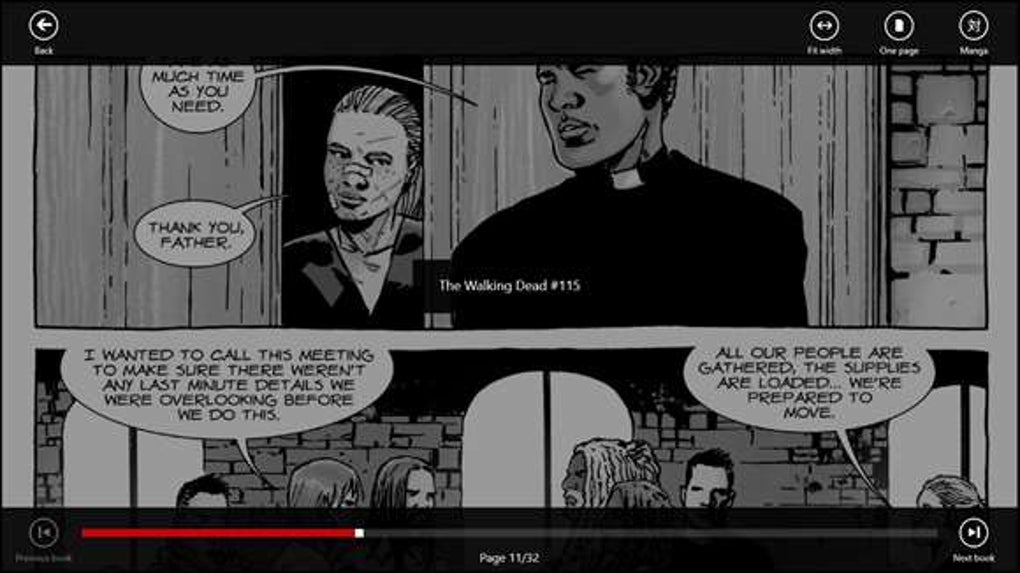
- Single/Dual Page View: Choose between viewing one page at a time (ideal for smaller screens or detailed focus) or two pages simultaneously (mimicking a physical comic book spread, great for larger monitors or tablets).
- Fit Options: Adjust how pages are displayed with options like “fit width,” “fit height,” or “fit page,” ensuring optimal viewing regardless of the comic’s aspect ratio or your screen size.
- Background Color and Cropping: Customize the background color for a more comfortable reading environment, and utilize cropping tools to remove unwanted margins or focus on specific panels.
- Night Mode: A crucial feature for reading in low-light conditions, reducing eye strain by inverting colors or applying a darker theme.
- Manga Mode (Right-to-Left): For fans of Japanese manga, the application supports right-to-left reading, preserving the authentic reading experience.
- Smooth Navigation: Enjoy smooth page transitions using intuitive touch gestures (on touchscreen devices) or familiar keyboard shortcuts, offering a fluid and natural reading flow.
- Kid’s Corner (Phone only): A thoughtful feature for parents, allowing them to select specific comic books to show in Kid’s Corner, ensuring age-appropriate content for younger readers.
- Live Tile Support: Even when you’ve left the app, the live tile (on Windows Start Menu) keeps you informed of your reading progress, providing a quick visual reminder of your current comic.
Seamless Integration and Accessibility
Cover-Comics Reader also emphasizes seamless integration within the Windows ecosystem. Users can open standalone files directly from within the Cover application or conveniently launch them from Windows Explorer, making it a natural extension of their file management workflow. The application’s commitment to ease of use is evident in its one-step import process for entire folders, beautiful user interface, and robust performance, ensuring a powerful and fast reading experience.
Pros and Cons: A Balanced Perspective
Like any software, Cover-Comics Reader comes with its own set of strengths and areas where it could improve. Understanding these aspects provides a comprehensive overview for potential users.
Advantages that Stand Out
The multitude of positive attributes has contributed significantly to Cover-Comics Reader’s strong reputation and user loyalty:
- One-Step Import Process: This feature is a huge time-saver. Instead of individually adding comics or configuring complex directories, users can point the app to a folder containing their entire collection, and Cover-Comics Reader handles the rest, quickly populating the library.
- Broad Format Support: As detailed earlier, the extensive compatibility with CBZ, CBR, PDF, EPUB (images only), and various image formats means users rarely encounter a comic file they cannot open. This universal compatibility is a major convenience.
- Detailed Comic Information & Library Management: The ability to see page counts, current page, read/unread status, and organize comics into custom shelves transforms a chaotic collection into a well-ordered digital archive. Features like Search, Favorites, and Smartviews further empower users to effortlessly navigate vast libraries.
- Flexible Storage Options: The support for local, network, OneDrive, and Dropbox storage, coupled with offline access for remote files, provides unparalleled flexibility. Users are not tied to a single storage solution, making their comics accessible from virtually anywhere.
- Beautiful and Intuitive UI: The application boasts an aesthetically pleasing user interface that is also highly functional. Its design enhances the browsing and reading experience, making it a joy to interact with the library.
- Smooth and Fast Reader: Performance is crucial for an enjoyable reading experience. Cover-Comics Reader delivers a powerful and fast reader, ensuring smooth page transitions and quick loading times for comics, which is essential for immersive storytelling.
- Frequent Recognition and Features by Microsoft: The repeated endorsement by Microsoft in various regional app stores speaks volumes about the quality, reliability, and user value of Cover-Comics Reader. This is a testament to its robust development and user-centric design.
- No Ads or Feature Restrictions in the Free Tier (up to 25 comics): Unlike many freemium models that cripple the free version with ads or limited functionality, Cover-Comics Reader offers a fully featured experience for up to 25 comics, allowing users to genuinely test its capabilities before committing to an in-app purchase.
Potential Drawbacks to Consider
While Cover-Comics Reader offers a stellar experience, some users have noted areas for improvement, particularly concerning its performance and pricing model for larger collections:
- Only Supports 25 Comics Without In-App Purchase: This is the most significant limitation of the free version. While generous in terms of features, a collection larger than 25 comics requires an in-app purchase to unlock 250 or unlimited comic book capacity. For hardcore collectors, this can be an immediate barrier.
- Potentially Difficult to Use on Non-Touchscreen Devices: The original text mentions this as a con. While the app has evolved to include keyboard shortcuts, its design ethos, particularly with features like touch gestures, might make it feel less optimized for traditional mouse-and-keyboard PC setups compared to tablet or convertible devices. However, recent updates likely mitigate this to some extent.
- Noticeably Slow at Loading Comics: Despite generally being a “fast reader,” some user feedback (as indicated in the source) points to “noticeably slow” loading times for individual comics. This might be dependent on file size, device specifications, or specific file formats, but it’s a point to consider for users with extensive, high-resolution comic files.
- Excessively Resource-Intensive on Device: Another feedback point suggests the application can be quite demanding on system resources. For users with older or less powerful Windows devices, this could lead to a less fluid experience or impact overall system performance when the app is running. This is a trade-off often seen with feature-rich applications.
These cons, while notable, often represent trade-offs for the extensive features and beautiful interface that Cover-Comics Reader offers. For many users, the benefits far outweigh these potential drawbacks, especially given the option to unlock unlimited comics with a single purchase.
Pricing and Accessibility: Free Tiers and Unlimited Access
Cover-Comics Reader employs a freemium model that is transparent and user-friendly. The application can be downloaded and used for free, providing full access to all its features without any advertisements or functional restrictions. However, this free version comes with a library size limitation: users can manage and read up to 25 comic books.
For those whose collections exceed this limit or who wish to support the developers, permanent in-app purchases are available. These purchases unlock the ability to manage either 250 or an unlimited number of comic books. A significant advantage of these in-app purchases is that they typically unlock across all your devices (e.g., phone and PC), providing a unified and unrestricted experience across your Windows ecosystem. This pricing strategy allows users to thoroughly evaluate the app before committing financially, ensuring satisfaction with their investment.
The PhanMemFree Perspective: User Reviews and Standing
PhanMemFree.org, a leading platform for software reviews and downloads, prominently features Cover-Comics Reader. On PhanMemFree.org, the application holds a solid rating of 3.6 out of 5 stars based on user feedback, reflecting its general acceptance and positive reception. Its robust feature set and user-friendly design contribute to its standing as a highly regarded e-reader in the category.
The security status of Cover-Comics Reader on PhanMemFree.org is consistently “Clean,” indicating that the software has been scanned by multiple leading antivirus services and found to be free of malware or potential threats. This assurance is crucial for users concerned about the safety and integrity of the applications they download.
Cover-Comics Reader is frequently listed among the “Top downloads E-readers for Windows” on PhanMemFree.org, standing alongside other popular applications like Kindle, Adobe Digital Editions, and Audible. This prominent placement highlights its significance in the digital reading landscape and its popularity among the PhanMemFree.org user base. The positive user sentiment, coupled with its verified security, reinforces Cover-Comics Reader’s position as a reliable and effective solution for managing and reading digital comics on Windows.
Alternatives and Competitors: Exploring Other Options
While Cover-Comics Reader offers a compelling package, the digital comic reader market is not without alternatives. Users seeking different features, pricing models, or platforms might consider other options available on PhanMemFree.org and elsewhere.
Some notable alternatives include:
- ComicRack (3.8 stars on PhanMemFree.org): Often hailed as “the perfect choice for comic fans,” ComicRack is a very popular and comprehensive comic reader and manager. It offers extensive library features, tagging, and synchronization, and is highly customizable, appealing to power users.
- CBR Reader (3 stars on PhanMemFree.org): For users looking for a simpler, lightweight solution specifically for CBR, CBT, CBW, and CBZ formats, NTComic CBR Reader is a free and excellent choice that focuses purely on reading without extensive library management.
- MangaMeeya (3.9 stars on PhanMemFree.org): As its name suggests, MangaMeeya is a streamlined manga reader. It’s often praised for its simplicity and efficiency when it comes to viewing manga, catering to a specific niche within the comic reading community.
- Comic Seer (2.3 stars on PhanMemFree.org): This is another comic book archive reader and manager, known for efficient access to CBZ (zip), CBR (rar), and image files. It aims to provide a functional and effective way to organize and read comics.
- Comical (3.8 stars on PhanMemFree.org): A lightweight, clean comic reader with support for CBR and CBZ, Comical focuses on a straightforward reading experience without the bells and whistles of more complex management tools.
Beyond these dedicated comic readers, general e-readers like Kindle, Adobe Digital Editions, and even browser-based solutions like Google Play Books can sometimes handle PDFs or other image-based content, but they typically lack the specialized features for comic book specific formats and library management that Cover-Comics Reader and its direct competitors offer. The choice among these alternatives often comes down to specific user needs—whether prioritizing comprehensive library management, sheer reading simplicity, or specialized manga viewing.
In conclusion, Cover-Comics Reader presents itself as a robust, feature-rich, and user-friendly application for anyone looking to dive into the world of digital comics on a Windows device. Its extensive format support, sophisticated library management, flexible storage options, and highly customizable reading experience make it a formidable contender in the digital e-reader space. While its free version has a limitation on the number of comics and some users have noted resource intensity or loading speeds, these are often outweighed by the overall quality and convenience it offers. With its high user ratings and frequent recognition from Microsoft, Cover-Comics Reader stands as a testament to thoughtful software design for the passionate comic book community, readily available on platforms like PhanMemFree.org for a truly immersive reading journey.
File Information
- License: “Free”
- Version: “2.6-.674”
- Latest update: “October 20, 2018”
- Platform: “Windows”
- OS: “Windows 8”
- Language: “English”
- Downloads: “19K”


