
CPick is a compact yet powerful color picker application designed for Windows. More than just a simple tool for grabbing color codes, CPick offers a range of features that enhance its utility for both casual users and professional designers. This review delves into CPick’s functionality, strengths, weaknesses, and overall value, providing a comprehensive assessment of its capabilities.
Core Functionality: Color Picking and Code Generation
At its heart, CPick functions as a color picker, allowing users to select any color displayed on their screen and instantly retrieve its code in various formats. This fundamental feature is executed flawlessly, offering a smooth and intuitive user experience. The application supports five common color code systems:
- Hexadecimal (Hex): The most widely used format in web development, representing colors with a six-digit code (e.g., #FF0000 for red).
- Decimal (Dec): Represents colors using three decimal values (e.g., 255, 0, 0 for red).
- RGB (Red, Green, Blue): A widely used additive color model representing colors by the intensity of red, green, and blue components.
- CMYK (Cyan, Magenta, Yellow, Key/Black): A subtractive color model often used in printing, representing colors by the amount of cyan, magenta, yellow, and black inks.
- HSV (Hue, Saturation, Value): A color model that describes colors based on their hue, saturation, and value (brightness).
This multi-format support ensures CPick’s versatility across diverse applications, accommodating the needs of web developers, graphic designers, and anyone requiring precise color identification. The color picking process itself is straightforward and efficient, requiring minimal user interaction. A simple click on the screen captures the color, and the corresponding codes are displayed immediately within the application’s interface.
Beyond Basic Color Picking: Enhanced Features
CPick extends beyond its core color picking function by incorporating several features that significantly improve its usefulness and streamline workflows. These additional tools elevate CPick from a simple utility to a more comprehensive color management application.
Color Palette Creation and Management
One notable feature is the ability to create and save custom color palettes. This allows users to build collections of frequently used colors for easy access in future projects. The organization and management of these palettes are handled efficiently within the application, making it simple to retrieve and reuse specific color combinations. This functionality is particularly advantageous for graphic designers and web developers who often work with consistent color schemes across multiple projects. The ability to easily recall and reuse previously selected colors significantly streamlines the design process, saving time and effort.
CSS Stylesheet Generation
CPick’s integration of CSS stylesheet generation capabilities enhances its utility for web developers. By leveraging the chosen color codes, the application can automatically generate CSS code snippets ready for integration into web projects. This feature eliminates the manual process of writing CSS for colors, contributing to increased efficiency and reducing the risk of errors. The generated CSS code is clean, concise, and easily adaptable to different web development environments.
Interactive Color Sliders
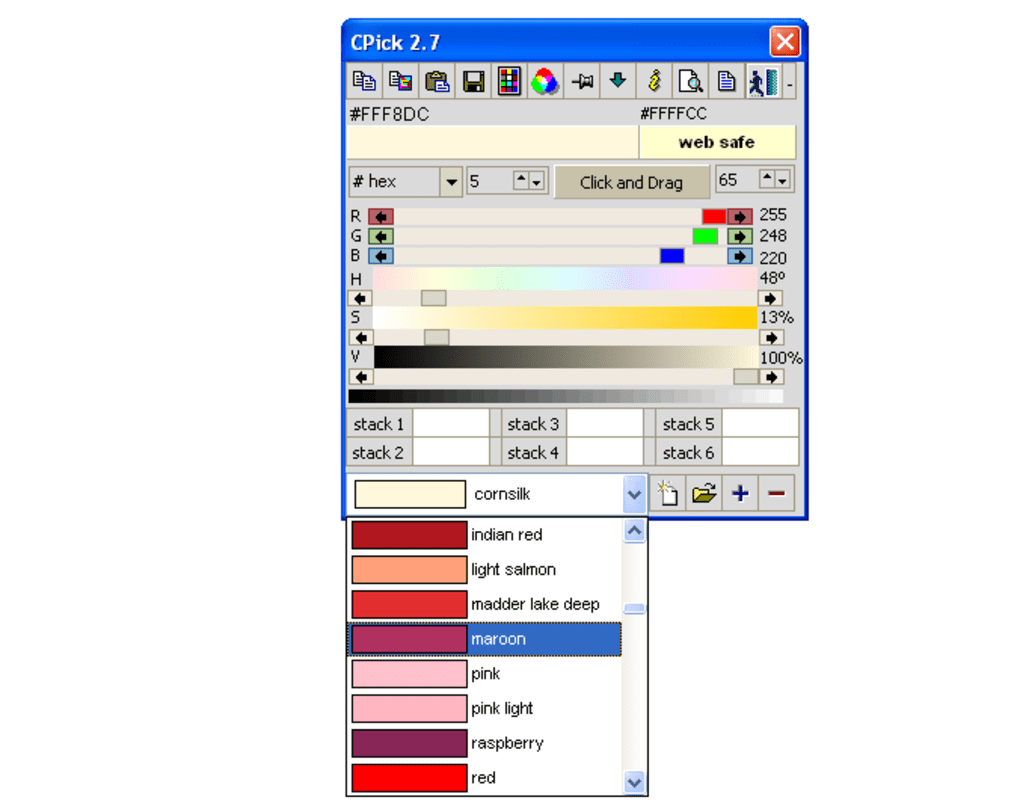
Another valuable feature is the inclusion of interactive color sliders. These sliders allow for intuitive color manipulation, enabling users to fine-tune and create custom colors by adjusting their individual components. This is particularly helpful when trying to achieve a specific shade or tone, providing precise control over the final color output. The visual feedback provided by the sliders enhances the creative process, allowing users to experiment and visualize color variations effortlessly.
User Interface and Experience
While CPick’s functionality is undeniably strong, its user interface presents a noticeable shortcoming. The design is somewhat dated, lacking the modern aesthetic and intuitive layout found in many contemporary applications. While the functionality is easily accessible, the visual presentation could benefit from a significant overhaul to enhance its overall appeal and usability. A more visually modern and streamlined interface would undoubtedly improve the user experience, making CPick even more user-friendly and attractive to a broader range of users.
Comparison with Alternative Applications
The market offers a range of alternative color picker applications, each with its own set of features and strengths. Compared to some of its competitors, CPick’s strength lies in its comprehensive feature set, including palette creation and CSS generation. However, the dated interface may deter users accustomed to more visually modern and polished applications. Some competing applications boast more advanced features, such as integrated screen magnification or advanced color manipulation tools. While CPick excels in its core functionality and added features, the user interface could be considered a significant differentiating factor compared to competitors with more visually appealing designs.
Conclusion: Strengths, Weaknesses, and Overall Value
CPick offers a robust and versatile set of tools for color management, going beyond the basic function of a color picker. Its multi-format support, color palette creation, and CSS generation capabilities make it a valuable asset for web developers and graphic designers. However, the outdated user interface is a significant drawback that detracts from the overall user experience.
Strengths:
- Multi-format color code support: Provides flexibility across various applications.
- Color palette creation and management: Streamlines workflow for designers.
- CSS stylesheet generation: Increases efficiency for web developers.
- Interactive color sliders: Allows for precise color adjustment and creation.
Weaknesses:
- Outdated user interface: Detracts from the overall user experience and visual appeal.
- Limited advanced features: Lacks some advanced tools found in competing applications.
Overall Value:
Despite the dated interface, CPick’s core functionality and additional features provide considerable value, especially for those who prioritize its practical capabilities over visual aesthetics. The application’s effectiveness in fulfilling its primary functions and the additional value provided through palette creation and CSS generation make it a worthwhile tool for many users. However, a modernized interface would significantly enhance its appeal and overall user experience, making it a stronger contender in the crowded market of color picker applications. For users who can overlook the visual aspects, CPick delivers a powerful and efficient solution for color management.
File Information
- License: “Free”
- Version: “2.7”
- Latest update: “October 16, 2009”
- Platform: “Windows”
- OS: “Windows 2000”
- Language: “English”
- Downloads: “11.4K”
- Size: “272.22 KB”


