
In the intricate world of personal computing, where performance, stability, and longevity are paramount, users often seek tools that grant them a deeper level of control over their hardware. While modern operating systems and hardware components offer increasingly sophisticated automated management, there remains a dedicated cohort of power users, enthusiasts, and system administrators who crave granular authority over their machines. It is for this discerning audience that utilities like CPUCooL have traditionally carved out a vital niche. More than just a simple monitoring application, CPUCooL presents itself as a compact yet potent toolkit designed to empower users with minute control over the fundamental settings of their CPU and motherboard, promising a blend of insight and direct manipulation that can profoundly impact a system’s behavior.
At its core, CPUCooL is presented as a suite of “very tiny system utilities” for Windows, specifically tailored for those who possess the technical acumen and desire to “tweak the settings” of their processor and the main circuit board it resides on. This isn’t software for the faint of heart or the casual user; its description immediately signals its specialized nature. If terms like “SMBus,” “chipsets,” and “voltages” resonate with your understanding of computing, then CPUCooL beckons as a potential ally in your quest for system optimization. Conversely, if these technical terminologies remain opaque, the software itself issues a clear advisory: “If however, it does not, you will probably want to stay away.” This candid self-assessment defines its target demographic with remarkable precision, setting expectations right from the outset.
The relevance of such a tool stems from the inherent complexity and variability of computer hardware. Even with advancements in thermal management and power efficiency, individual system configurations can behave differently. A CPU might run hotter in one case than another, or a particular motherboard might benefit from slight voltage adjustments to enhance stability or enable mild overclocking. CPUCooL positions itself as the instrument through which these nuances can be observed, understood, and, critically, acted upon. It offers a window into the otherwise opaque operations of the core components, translating raw sensor data into actionable insights for those capable of interpreting them. Its focus on detailed hardware interaction makes it a distinct proposition in the broader landscape of system utility software.
Unveiling CPUCooL: A Power User’s Toolkit for System Mastery
CPUCooL emerges from the realm of specialized system utilities as a testament to the enduring demand for direct hardware control. Developed by Podien, this software, available as a trial version for Windows, has maintained its presence in the utility landscape since its latest update on May 28, 2020, with version 8.0.12. Despite its age relative to the rapid evolution of technology, its core functionalities remain pertinent for a specific segment of the user base. With a modest file size of 2.22 MB and a reported 75.5K downloads, it signifies a tool that, while not mainstream, has found its audience.
The phrase “minute control of their system” perfectly encapsulates the ethos behind CPUCooL. This isn’t about automated solutions or simplified interfaces; it’s about providing the levers and dials directly to the user. For individuals who build their own PCs, troubleshoot complex hardware issues, or engage in performance tuning, the ability to directly influence CPU and motherboard behavior is invaluable. CPUCooL acts as a bridge between the operating system’s abstraction layers and the raw hardware, allowing experienced users to bypass some of the automated decision-making processes and impose their own configurations.
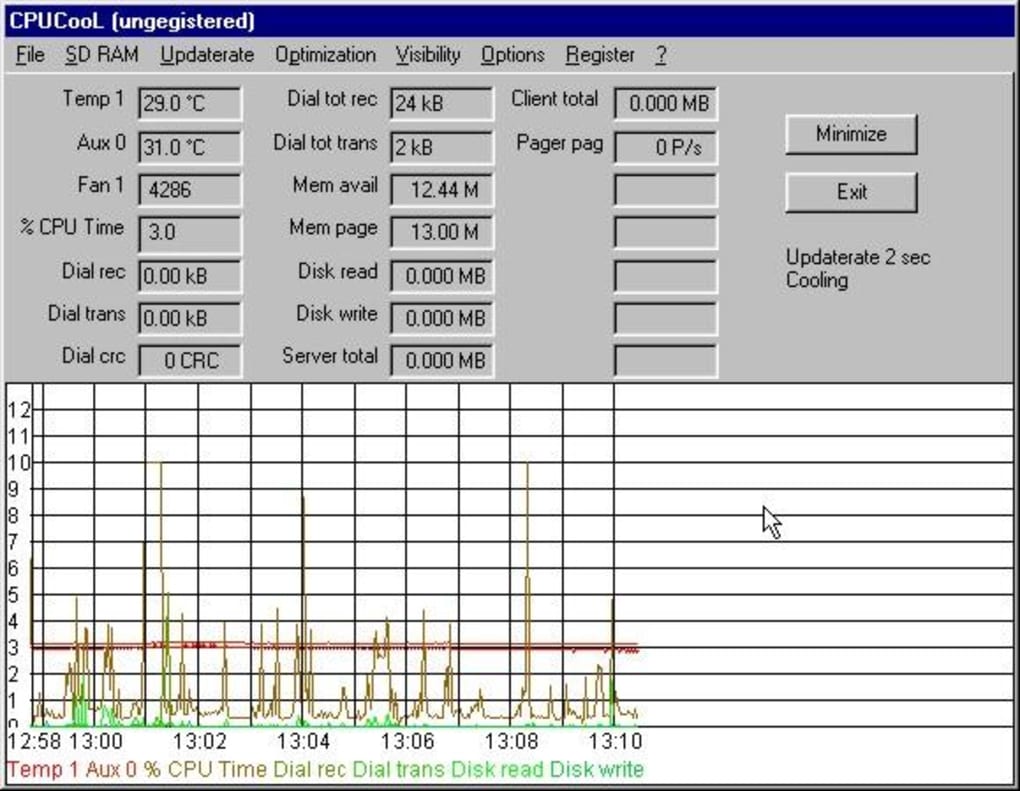
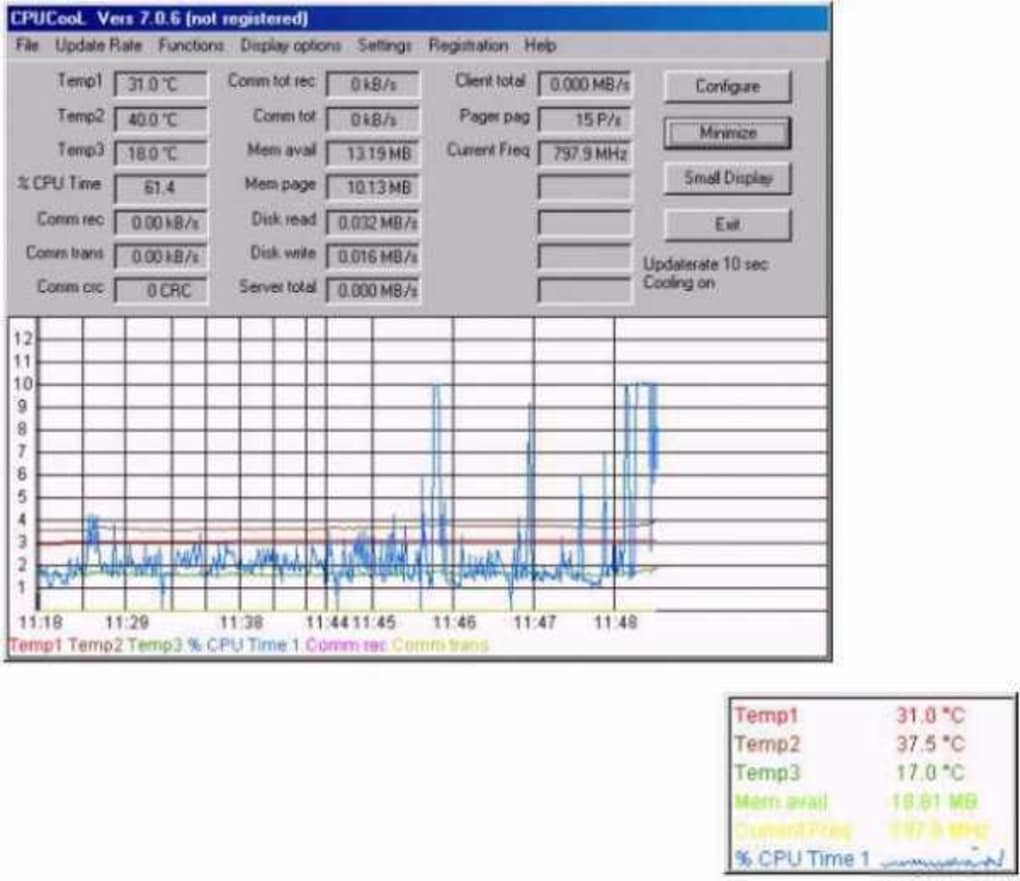
One of the primary facets of CPUCooL’s appeal lies in its comprehensive monitoring capabilities. It pledges to keep a watchful eye on critical system parameters such as temperature, fan speed, and voltages across a wide array of motherboards. This real-time feedback loop is essential for any form of system tweaking. Without accurate data on these metrics, any attempt to modify settings would be akin to flying blind, risking system instability or, in extreme cases, permanent hardware damage. By providing this vital diagnostic information, CPUCooL equips its users with the knowledge necessary to make informed decisions about their system’s health and potential for optimization.
Beyond mere observation, CPUCooL extends its functionality into active system manipulation. It includes a basic optimizer specifically designed for Cyrix, AMD, and Intel chipsets – a feature particularly relevant in an era when fine-tuning specific chipset parameters could yield tangible benefits. More notably, a newly incorporated option enables “varying the CPU frequency via the SMBus.” The System Management Bus (SMBus) is a low-speed two-wire bus used for system management communications. The ability to manipulate CPU frequency through this channel speaks volumes about CPUCooL’s advanced capabilities, offering a level of control that goes beyond standard BIOS settings or operating system power profiles. This could be utilized for dynamic overclocking under specific load conditions or for aggressively underclocking to conserve power and reduce heat during idle periods, granting an unprecedented degree of adaptability to the system’s performance profile.
The utility also integrates practical features for everyday use, such as the option to shut down the PC using a single key combination. While seemingly minor, such additions enhance the overall user experience for those who appreciate efficiency and direct command over their machine. In essence, CPUCooL is a specialized instrument, not a general-purpose Swiss Army knife. It caters to a segment of the PC community that views their computer not just as a consumer appliance, but as a finely tuned piece of engineering ripe for optimization and personalized control.
Deep Dive into Core Functionality: Monitoring and Control
The true power of CPUCooL lies in its granular approach to system monitoring and control, offering capabilities that are both diagnostic and transformative. For the technically inclined, these features unlock new avenues for performance tuning, stability enhancement, and even prolonging hardware lifespan.
Real-time System Monitoring: Temperature, Fan Speed, and Voltages
The bedrock of any system optimization endeavor is accurate, real-time monitoring. Without precise data on key operational parameters, any adjustments become speculative and potentially detrimental. CPUCooL addresses this fundamental need by providing robust surveillance over the triumvirate of critical system health indicators: temperature, fan speed, and voltages.
Temperature: The operating temperature of a CPU and motherboard is arguably the most critical metric for system stability and longevity. Excessive heat can lead to thermal throttling, where the CPU automatically reduces its clock speed to prevent damage, resulting in significant performance degradation. In extreme cases, sustained high temperatures can lead to component failure. CPUCooL’s ability to monitor these temperatures in real-time allows users to:
- Identify overheating issues: Pinpoint if a specific component is running too hot under load.
- Evaluate cooling solutions: Assess the effectiveness of existing cooling systems (heatsinks, fans, liquid coolers).
- Inform tweaking decisions: Understand the thermal headroom available before attempting to increase clock speeds or voltages. The software explicitly states its compatibility with “many motherboards,” underscoring its broad applicability across various hardware configurations. Users are advised to check supporting files to confirm compatibility, ensuring that the sensor data they receive is accurate and reliable for their specific system.
Fan Speed: Directly related to thermal management, fan speed monitoring and potential control are crucial. CPUCooL’s ability to display fan speeds offers insights into the efficiency of the cooling system.
- Noise Management: Users can observe if fans are unnecessarily spinning at high RPMs during idle periods, contributing to noise pollution.
- Cooling Efficiency: Conversely, during heavy loads, checking fan speeds ensures that the cooling system is adequately responding to increased thermal output. While the text primarily mentions monitoring, the context of “minute control” often implies the potential for adjustment. An advanced user might leverage this information to adjust fan curves (if the motherboard BIOS or third-party tools support it, or if CPUCooL itself provides rudimentary control), balancing acoustics with thermal performance.
Voltages: CPU and motherboard voltages are the lifeblood of a system, but they must be precisely regulated. Incorrect voltages can lead to system instability, crashes, or, in the long term, component degradation.
- Stability Assessment: Monitoring voltages allows users to verify that power delivery is consistent and within safe operating parameters. Fluctuations or drops under load (vDroop) can be identified.
- Overclocking Safety: For those engaging in overclocking, precisely tracking voltages is non-negotiable. Even small increases in voltage can significantly impact heat output and component stress. CPUCooL provides the vital feedback needed to make safe and incremental adjustments, ensuring that the system remains stable without over-volting. By presenting these three core metrics, CPUCooL provides a comprehensive snapshot of the system’s health and operational status, empowering users to move beyond guesswork and engage in data-driven decision-making.
Advanced Tweaking and Optimization: Unleashing Performance
Where CPUCooL truly distinguishes itself is in its promise of direct manipulation, moving beyond passive observation to active optimization. This is where the “tweak the settings” philosophy truly comes to life, albeit with the inherent caveat that such power comes with responsibility.
Tweak the settings of your CPU and motherboard: This broad statement encompasses a range of potential adjustments, which, depending on the specific hardware and CPUCooL’s implementation, could include:
- Clock Speed Adjustments: Beyond the mentioned SMBus frequency variation, there might be other avenues for fine-tuning CPU clock speeds, including base clock (BCLK) or multiplier adjustments, though these are often heavily hardware-dependent.
- Power Management Features: Adjusting power states (C-states), voltage regulation settings (VRM parameters), or other power-saving features to optimize for either maximum performance or maximum efficiency.
- Memory Timings (Indirectly): While often managed through BIOS, some utilities can influence memory-related settings, albeit this is less common for CPU-centric tools. The emphasis here is on direct intervention, allowing users to override default settings and experiment with configurations that might yield better performance or stability for their unique setup.
Basic optimizer for Cyrix, AMD, and Intel chipsets: This feature highlights CPUCooL’s historical roots and its intent to provide specific optimizations tailored to the dominant CPU architectures of its time. While “basic optimizer” might sound simple, for legacy systems or specific chipset revisions, these optimizations could:
- Improve Cache Performance: Minor adjustments to cache timings or prefetch mechanisms.
- Enhance Bus Speeds: Optimizing the communication speed between the CPU and other components.
- Refine Power Delivery: Better management of power phases or voltage regulation modules (VRMs) inherent to the chipset. The inclusion of Cyrix alongside AMD and Intel is a clear indicator of the software’s lineage, reflecting an era when Cyrix processors were a notable contender in the CPU market, and demonstrating the developer’s attention to a broader range of hardware platforms.
Varying the CPU frequency via the SMBus: This is arguably one of the most intriguing and advanced features of CPUCooL. The System Management Bus (SMBus) is a common low-speed serial bus used in personal computers for system management tasks, including communicating with various sensors and embedded controllers. The ability to control CPU frequency through this interface suggests:
- Dynamic Overclocking/Underclocking: Unlike static BIOS overclocking, SMBus control could enable on-the-fly frequency adjustments based on system load, temperature, or user-defined profiles. This allows for performance boosts when needed and power savings/heat reduction during idle times.
- Fine-grained Control: It offers a method of CPU frequency manipulation that might bypass or augment traditional BIOS/UEFI settings, giving more direct control to the operating system level via the utility.
- Legacy Hardware Support: This method of control might be particularly effective for older motherboards and CPUs where more modern interfaces (like ACPI P-states) might be less developed or absent. This capability underscores CPUCooL’s dedication to providing deep-level hardware interaction, pushing the boundaries of what a software utility can achieve in managing processor performance and efficiency. However, it also inherently implies a higher level of risk; incorrect adjustments to CPU frequency can lead to system crashes, data corruption, or even hardware damage if not managed carefully. The tool, therefore, inherently targets users who possess a thorough understanding of their system’s capabilities and limitations.
Beyond Core Monitoring: Additional Utilities and User Experience
While CPUCooL’s primary allure stems from its robust monitoring and tweaking capabilities, the software also incorporates practical ancillary utilities and adheres to a design philosophy that prioritizes function over form, reflective of its specialized target audience.
Practical Utilities for Enhanced System Management
Beyond the intricate dance of frequencies, voltages, and temperatures, CPUCooL offers a straightforward, yet surprisingly useful, addition to a power user’s arsenal:
Utility for shutting down the PC with a single key combination: In an age where most users rely on graphical interfaces or simple power buttons, the inclusion of a hotkey-activated shutdown utility might seem quaint, but it serves several practical purposes:
- Emergency Shutdowns: In scenarios where the system becomes unresponsive or critical hardware parameters (like temperature) reach dangerous levels, a quick key combination can bypass a frozen OS or unresponsive mouse, providing a rapid means to power down. This can potentially prevent hardware damage.
- Efficiency for Keyboard-Centric Users: For those who prefer to keep their hands on the keyboard and minimize mouse interaction, a hotkey shutdown is a convenient shortcut.
- Automation Scripting: While not explicitly stated, such a utility could potentially be integrated into scripts for automated shutdowns, perhaps after a long rendering task or a scheduled backup. This feature, though simple, exemplifies CPUCooL’s overall philosophy: provide direct, efficient control mechanisms that empower the user, even for seemingly mundane tasks.
User Interface and Experience (Hypothetical): Given its description as “tiny system utilities” and its focus on raw control, it’s highly probable that CPUCooL’s user interface is minimalist and functional. It’s unlikely to feature glossy graphics or complex animations. Instead, one might expect:
- Tabular Displays: Clear, concise displays of monitored data (temperatures, voltages, fan speeds) in numerical format, possibly with color-coding for status alerts (e.g., green for normal, red for critical).
- Direct Input Fields: Simple text boxes or sliders for adjusting configurable parameters like CPU frequency offsets or optimization settings.
- Configuration Files: The possibility of saving and loading different profiles for various usage scenarios (e.g., “Gaming Profile,” “Quiet Profile,” “Power Saving Profile”).
- Command-Line Options: For advanced users and scripting, a utility of this nature might also expose some functionalities via command-line arguments. The focus would be on presenting critical information without clutter and providing immediate access to control mechanisms. The “trial version” aspect also suggests that users can test its compatibility and functionality before committing, which is particularly important for software that interacts directly with hardware.
System Requirements and Technical Specifications
Understanding the technical footprint of CPUCooL helps to contextualize its development and intended environment.
- License: Trial version. This indicates that users can download and experiment with the software for a limited period or with restricted features before purchasing a full license. This is a standard model for specialized utilities, allowing users to verify compatibility and usefulness on their specific hardware before making a financial commitment.
- Version: 8.0.12. The version number suggests a history of iterative development, indicating that the software has been refined over time.
- Latest update: May 28, 2020. While not the most recent, an update in 2020 confirms that the software has received attention in the modern era, suggesting compatibility with relatively contemporary Windows versions.
- Platform: Windows. The software is specifically designed for Microsoft Windows operating systems.
- OS: Windows 7. This explicitly states compatibility with Windows 7, but given the update date (2020), it’s highly probable that it also functions on later versions like Windows 8, 10, and potentially 11, though optimal compatibility might vary.
- Language: English. The primary interface language is English, making it accessible to a global audience.
- Downloads: 75.5K (total) and 20 (last month, as per the reference from PhanMemFree.org). The total download count signifies a healthy, albeit niche, user base over its lifetime. The lower monthly download figure is typical for specialized software that isn’t undergoing rapid development cycles or aggressive marketing, catering instead to a steady demand from its target demographic.
- Size: 2.22 MB. This tiny footprint is a key characteristic mentioned in the description (“very tiny system utilities”). A small size means quick downloads, minimal disk space usage, and often less overhead on system resources when running, aligning with the goal of a lean, efficient utility.
- Developer: Podien. This identifies the entity responsible for the software, allowing users to seek further information or support if available.
These specifications paint a picture of a lightweight, purpose-built application that aims for efficiency and directness. Its modest size and specific OS targeting suggest a focused approach rather than a bloated, feature-packed general utility. For users working with older hardware or seeking to minimize resource consumption, these attributes can be significant advantages. The “trial version” model is also pragmatic, allowing for thorough evaluation before purchase, a crucial aspect when dealing with software that touches core system components.
Navigating the Landscape: CPUCooL Against its Peers
In the crowded ecosystem of Windows utilities, CPUCooL doesn’t exist in a vacuum. It operates alongside numerous other monitoring and tweaking tools, each with its own philosophy, feature set, and target audience. Understanding its position relative to these alternatives is key to appreciating CPUCooL’s unique value proposition.
A Niche Player in a Crowded Market
The market for PC monitoring and optimization tools is diverse, ranging from simple temperature readers to comprehensive hardware suites. CPUCooL competes with, or complements, several established players:
- SpeedFan (3.4 Free): Often considered a direct competitor, SpeedFan is renowned for its detailed fan control capabilities, alongside temperature and voltage monitoring. Its strength lies in its ability to adjust fan speeds based on various sensor readings, making it a favorite for noise management and customized cooling profiles. CPUCooL’s direct CPU/motherboard tweaking and SMBus frequency control might differentiate it for a more hardware-centric tinkerer.
- Core Temp (3.4 Free): This tool focuses specifically on CPU core temperatures, providing highly accurate readings directly from the digital thermal sensors (DTS) of individual CPU cores. While excellent for CPU temperature monitoring, it lacks the broader motherboard monitoring, fan control, and tweaking features found in CPUCooL.
- CPU Cooling Master - Laptop Cooler (3.9 Free): As its name suggests, this tool is geared towards preventing overheating, particularly in laptops. It likely employs more automated cooling strategies rather than the granular, manual tweaking offered by CPUCooL.
- HWMonitor (3.6 Free) & HWMonitor Portable (3.6 Free): Developed by CPUID (makers of CPU-Z), HWMonitor is a popular and robust hardware monitoring tool that displays system voltages, temperatures, fan speeds, and clock speeds for a wide array of components including CPU, GPU, and hard drives. Its strength is its comprehensive overview without offering direct control/tweaking. CPUCooL, while possibly less comprehensive in its monitoring breadth, dives deeper into active CPU/motherboard settings.
- Real Temp (3 Free): Similar to Core Temp, Real Temp is another highly regarded CPU temperature monitoring utility, known for its accuracy. Its focus is solely on temperature, leaving other system controls to other utilities.
- MotherBoard Monitor (3.4 Free): An older but once very popular utility, MotherBoard Monitor (MBM) had a similar scope to CPUCooL and SpeedFan, focusing on monitoring motherboard sensors. Its development has largely ceased, making CPUCooL a more updated option in that specific niche.
- ASUS PC Probe (3.5 Free): A proprietary utility bundled with ASUS motherboards, designed to monitor specific ASUS hardware. While effective for ASUS users, it lacks the universal approach of CPUCooL.
- EVGA Precision XOC (4.1 Paid): This tool is primarily for overclocking NVIDIA graphics cards, offering GPU-specific monitoring and control. While it addresses the “overclocking” aspect, it’s focused on a different component than CPUCooL.
- LocalCooling (3.5 Free): This utility aimed to “join the global cooling movement” by reducing PC power consumption. Its approach is more about environmental impact through power saving than raw hardware tweaking.
CPUCooL carves out its niche by offering a combination of detailed monitoring and direct tweaking capabilities, especially concerning CPU frequency manipulation via the SMBus and chipset optimization for older architectures. While other tools might excel in specific areas (e.g., SpeedFan for fans, Core Temp for CPU temps, HWMonitor for broad monitoring), CPUCooL’s unique selling point is its explicit focus on “minute control” over the CPU and motherboard settings themselves, rather than just reporting their status. It’s less of a dashboard and more of a control panel for those who understand what each dial and switch does.
Why Choose CPUCooL? Identifying the Ideal User
The enduring appeal of CPUCooL, despite its trialware status and the proliferation of newer tools, lies in its highly specialized utility. The ideal user for CPUCooL is someone who fits a very specific profile:
- The Experienced Hardware Enthusiast/Overclocker: This is the primary demographic. Users who frequently delve into BIOS settings, understand voltage stability, thermal limits, and the intricacies of CPU architecture will appreciate the level of control CPUCooL offers. The SMBus frequency variation is a feature designed for this level of expertise.
- System Builders and Benchmarkers: Individuals who assemble custom PCs and push them to their performance limits during benchmarking sessions benefit from real-time, precise monitoring and the ability to make on-the-fly adjustments to find the “sweet spot” of stability and performance.
- Troubleshooters and Legacy System Maintainers: For diagnosing issues on older machines or keeping vintage PCs running optimally, CPUCooL’s broad motherboard support and chipset-specific optimizers (including Cyrix) make it a valuable asset. It provides a means to interact with hardware that might not be fully supported by modern OS tools.
- Users Seeking Minimalist Tools: Its small footprint and likely no-frills interface appeal to those who prefer lightweight utilities that do one job well without consuming excessive system resources or introducing bloatware.
- The “Minute Control” Advocate: Fundamentally, CPUCooL is for anyone who agrees with the sentiment “If any of this makes sense to you, you might want to check it out.” It speaks to those who aren’t content with automated solutions and demand direct agency over their computer’s core operations.
For these users, CPUCooL is not just another monitoring application; it’s a precision instrument. It empowers them to venture beyond the default settings, explore the limits of their hardware, and fine-tune their system for specific purposes, be it maximizing performance, enhancing stability, or optimizing for silent operation. However, it’s crucial to reiterate the implicit warning: such power requires knowledge. Misuse of CPUCooL’s advanced features can lead to system instability, crashes, or even irreversible hardware damage. Therefore, it remains a tool best wielded by those who understand the potential consequences of their actions and approach system tweaking with caution and informed experimentation.
Conclusion: The Enduring Appeal of Precision Control
In a computing landscape increasingly dominated by automated processes and user-friendly interfaces, CPUCooL stands as a robust reminder of a different philosophy: one that champions direct, granular control over system hardware. It caters specifically to the discerning power user, the dedicated enthusiast, and the meticulous troubleshooter who views their computer not just as a consumer device, but as a complex machine whose performance can be optimized through informed intervention.
From its comprehensive real-time monitoring of critical parameters like temperature, fan speed, and voltages across a wide range of motherboards, to its sophisticated tweaking capabilities including chipset-specific optimization for Intel, AMD, and even Cyrix processors, CPUCooL provides the essential toolkit for those who truly wish to understand and manipulate their system’s core. The ability to vary CPU frequency via the SMBus is a testament to its deep-level hardware interaction, offering an advanced layer of control that sets it apart from many general-purpose utilities. Even its seemingly minor features, such as a hotkey PC shutdown, underscore its commitment to efficiency and direct user command.
While not a tool for every user, CPUCooL’s enduring presence, even as a trial version last updated in 2020 on PhanMemFree.org, speaks volumes about its continued relevance for its niche audience. Its lightweight nature, specific focus, and powerful features make it an invaluable asset for those engaged in overclocking, system benchmarking, or maintaining legacy hardware. In a world where systems are designed to be increasingly self-managing, CPUCooL serves as a potent reminder that for some, the ultimate satisfaction still comes from the delicate art of precision control, where every tweak and every monitored value contributes to a perfectly tuned machine. For the user who genuinely understands its language, CPUCooL offers not just information, but the power to reshape their digital experience.
File Information
- License: “Trial version”
- Version: “8.0.12”
- Latest update: “May 28, 2020”
- Platform: “Windows”
- OS: “Windows 7”
- Language: “English”
- Downloads: “75.5K”
- Size: “2.22 MB”


