
CR2 Converter is a free software application designed for Windows operating systems, specifically created to facilitate the conversion of Canon CR2 (raw) image files into other more widely compatible formats. While not actively maintained with new updates since 2017, its enduring popularity amongst users speaks to its effectiveness in addressing a common photography need. This guide delves into the program’s capabilities, functionalities, alternatives, and other pertinent information.
Understanding CR2 Files and the Need for Conversion
Canon CR2 files are raw image files produced by Canon digital cameras. Raw files contain uncompressed, unprocessed image data directly from the camera’s sensor. This raw data provides the photographer with maximum flexibility for post-processing, allowing for extensive adjustments to exposure, white balance, contrast, and other image characteristics. However, this advantage comes with a trade-off: CR2 files are generally not directly compatible with many image viewers, editors, and online platforms. Many programs and websites require images in more common formats like JPEG, TIFF, or PNG for display and use. This incompatibility is where CR2 converters, such as the software discussed here, become essential tools for photographers. They bridge the gap between the high-quality raw data and the widespread accessibility needed for sharing, editing, and archiving images.
CR2 Converter: Features and Functionality
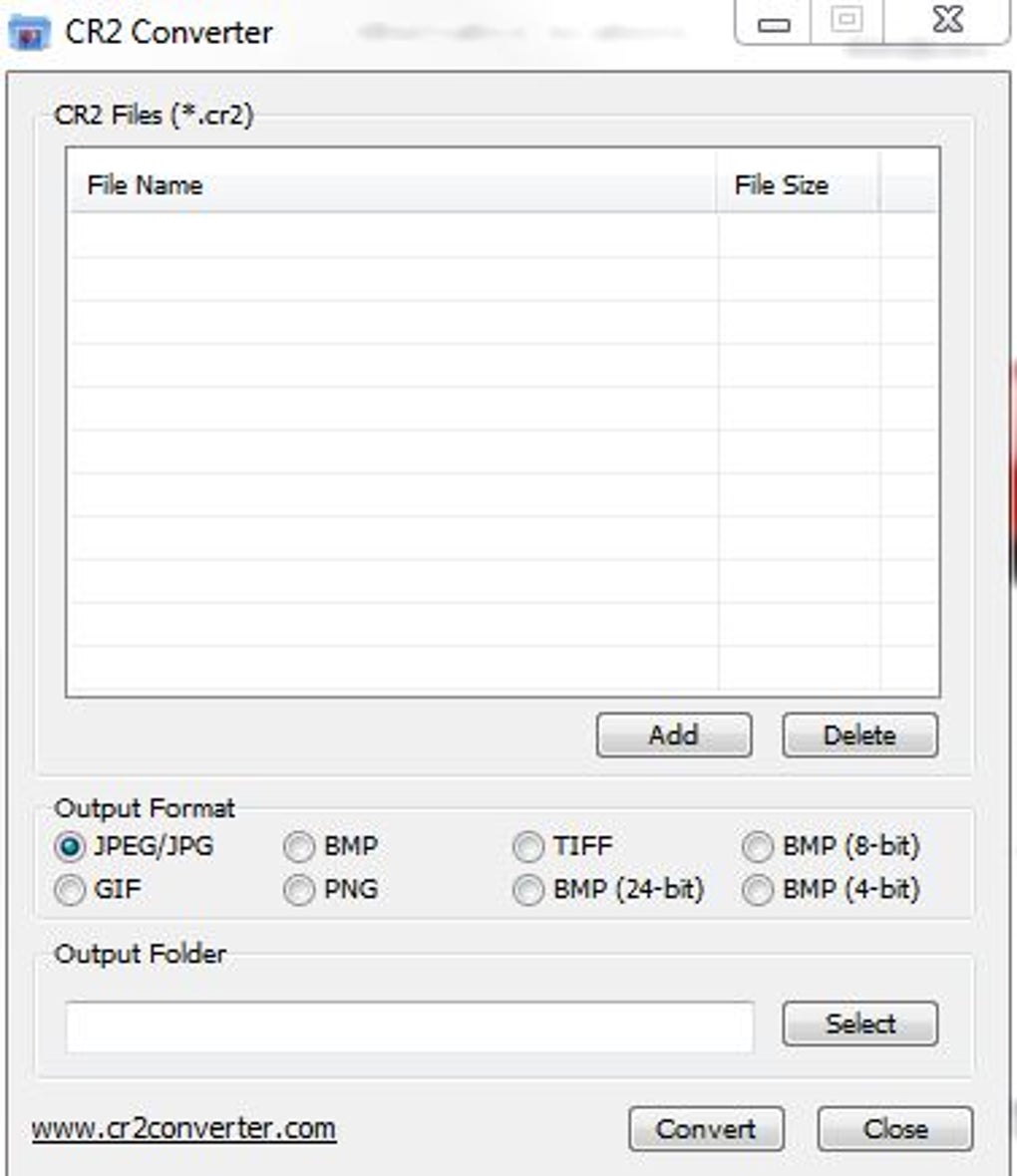
CR2 Converter, as its name suggests, is a streamlined application focused on a single, essential task: converting CR2 files to other image formats. While lacking extensive features found in professional-grade photo editing software, its simplicity and effectiveness are key to its continued relevance. The program’s core functionality centers around the straightforward conversion process. Users simply select the CR2 files they wish to convert and specify the desired output format. The supported output formats may vary based on the version of the software, but typically include common choices such as JPEG, TIFF, and potentially PNG.
While not explicitly stated in readily available documentation, the conversion process likely involves minimal image processing, retaining much of the original image data. Users expecting significant image enhancement or manipulation should look to more advanced photo editing tools. The core value proposition of CR2 Converter rests on its quick and efficient conversion of raw images, rather than providing elaborate editing capabilities. Its strength lies in its simplicity, making it ideal for users who need a fast and reliable method of converting CR2 files without navigating complex interfaces or mastering complex editing tools.
Alternatives to CR2 Converter
While CR2 Converter serves its purpose effectively, several alternative options offer similar functionalities and potentially enhanced features:
-
Canon RAW Codec: Provided by Canon itself, this codec integrates directly into the operating system, allowing for native CR2 file support within many image viewing and editing applications. This is often the preferred solution as it avoids the need for separate conversion software. However, it primarily focuses on enabling viewing and basic editing within compatible programs, not necessarily batch conversion capabilities.
-
Free CR2 to JPG Converter: As its name implies, this software specifically targets the conversion of CR2 files to JPEG format. Its focus on a single conversion type can be advantageous for users with straightforward conversion needs. However, limited output format choices may not meet the needs of all users. The availability and reliability of such free converters may also vary.
-
Easy CR2 Converter: This is another option in the market, potentially offering additional features or more refined control over the conversion process compared to the basic CR2 Converter. Users should examine reviews and comparisons to determine which option best suits their specific requirements.
-
Adobe Camera Raw (ACR): Part of Adobe Photoshop and Lightroom, ACR provides comprehensive support for a wide range of raw file formats, including CR2. This integrated approach allows for advanced processing and editing capabilities directly within a robust workflow, offering significant advantages beyond simple conversion. However, it requires a paid subscription to Adobe Creative Cloud.
- Other Raw Converters: Numerous other dedicated raw file converters are available, often offering specialized features or support for less common file formats. Searching online for “raw image converter” will yield a large number of options, both free and paid, for users to compare and choose from.
Choosing the best alternative depends on factors such as required features, budget, and existing software. For users needing a simple, quick, and free option, CR2 Converter remains a viable choice. Those with more complex needs or who want to integrate CR2 support into their existing workflow may find the Canon RAW Codec or professional-grade software like Adobe Camera Raw more beneficial.
System Requirements and Installation
CR2 Converter is designed for Windows-based systems. While older versions might have supported Windows XP and earlier versions, it’s important to check the program’s specifications for compatibility with your specific operating system. The installation process is usually straightforward and involves running the installer executable. The program is a relatively lightweight application, requiring minimal storage space compared to more extensive photo editing suites.
The lack of recent updates and a possibly limited availability of readily accessible current download links should be taken into account. It’s advisable to ensure the downloaded file is from a trustworthy source and to use a reliable antivirus program to prevent the download or installation of any unwanted or malicious software.
User Reviews and Feedback
As of the writing of this document, readily available user reviews on the original CR2 Converter software were limited. The software’s age, combined with the lack of an active development community, may make finding contemporary user feedback challenging. However, it’s worthwhile to explore various software review sites and forums for any potential discussions or comments regarding the program’s performance and reliability. If exploring alternative options, examining reviews of these alternatives will provide better insights into user experiences and relative performance.
The absence of widely available, current user reviews underscores the importance of considering alternatives, particularly for mission-critical tasks or situations requiring reliable, well-maintained software. While the CR2 Converter may have been functional at the time of its last update, the lack of updates might impact compatibility with modern systems and potentially leave security vulnerabilities unpatched.
Conclusion
CR2 Converter provides a simple, efficient method for converting Canon CR2 raw image files to more commonly used formats. Its ease of use and compact size make it suitable for users needing a basic solution without the complexity of extensive photo editing software. However, its lack of recent updates and limited availability should be considered. Potential users should weigh its simplicity against the advantages of more modern and actively maintained alternatives, ensuring the chosen solution aligns with their specific needs and priorities. Evaluating the availability and reputation of alternative options before relying on this older piece of software is highly recommended. A careful consideration of the long-term implications, such as ongoing support and security updates, should inform the choice of CR2 file conversion methods.
File Information
- License: “Free”
- Version: “1.0”
- Latest update: “March 9, 2017”
- Platform: “Windows”
- OS: “Windows 8.1”
- Language: “English”
- Downloads: “7.2K”
- Size: “949.28 KB”


