
Crazy Talk Animator Pro is a powerful 2D animation software package designed to bring your creative visions to life. It offers a unique approach to animation, blending traditional 2D techniques with innovative tools that allow for 3D motion application to 2D characters. This results in a flexible and dynamic animation process, opening up new possibilities for creators of all skill levels. While the software’s learning curve can be steep, the rewards of mastering its features are undeniable, leading to impressive and expressive animations.
Unleashing Creative Potential: Core Features and Functionality
At its heart, Crazy Talk Animator Pro empowers users to create compelling 2D animations by seamlessly integrating images, videos, and Flash animations. This multifaceted approach allows for diverse and rich content creation. The software provides a comprehensive toolkit for building scenes, designing landscapes, and adding characters – all within a single, integrated environment. The ability to combine different media types offers a unique advantage, allowing for the incorporation of pre-existing assets into new animations, accelerating the production pipeline.
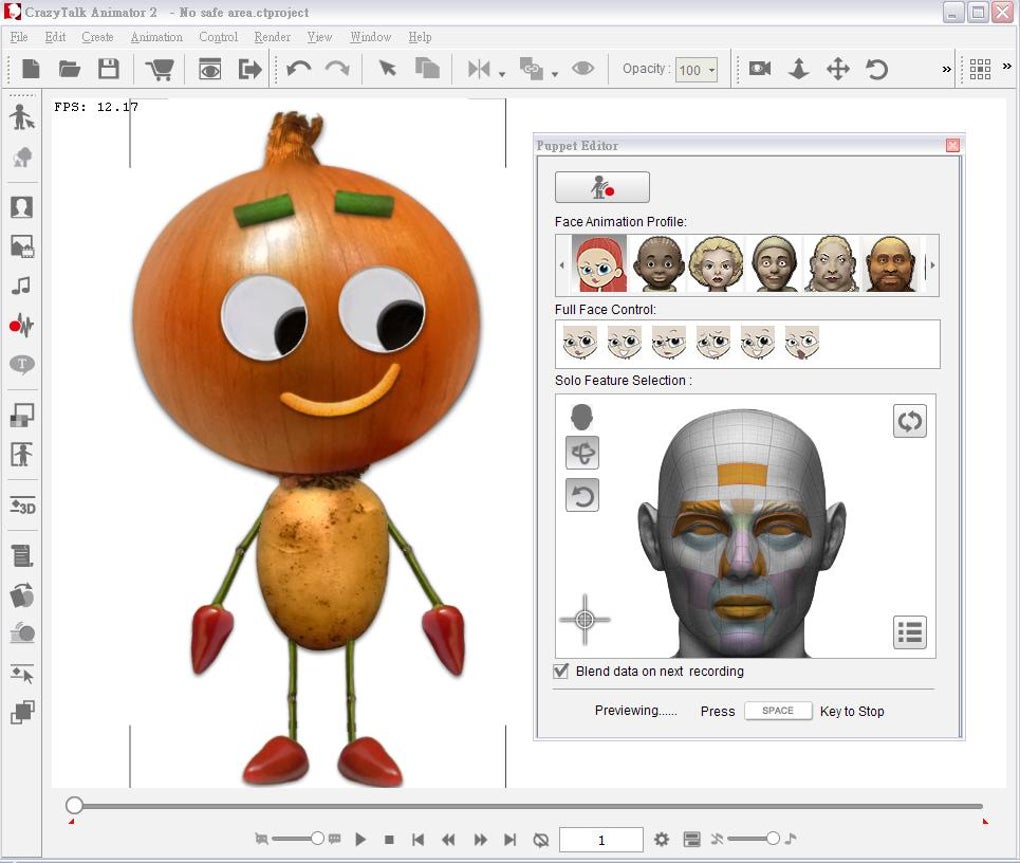
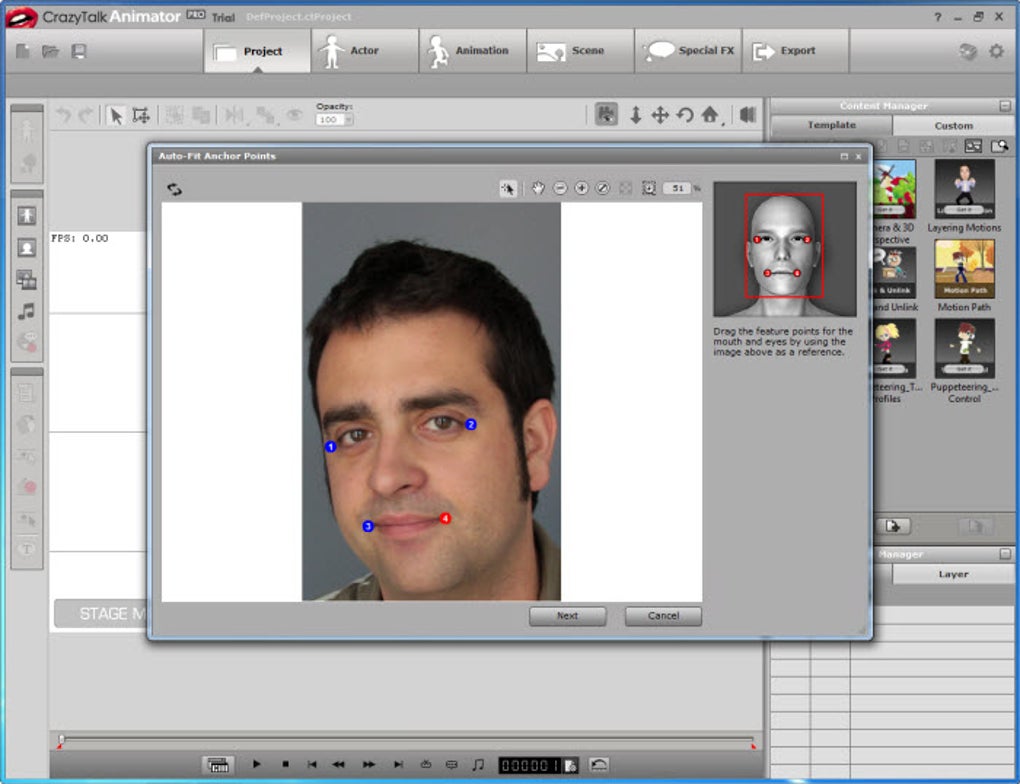
One of the most striking features is the powerful morphing capabilities. Users can animate facial expressions with precision, creating realistic and emotive character performances. The software facilitates this through a point-based system, where users mark specific points on a facial image, which are then used by the software to generate smooth, natural-looking transitions between expressions. This intuitive method streamlines the animation process, enabling creators to focus on the storytelling aspect rather than getting bogged down in technical complexities.
Furthermore, Crazy Talk Animator Pro boasts robust auto lip-sync functionality. This feature automatically synchronizes character lip movements with audio tracks, saving considerable time and effort typically invested in manual lip-sync animation. This automated process ensures consistency and realism in dialogue scenes, significantly enhancing the overall quality of the animation.
The software’s intuitive interface is designed to guide users through the animation process. It incorporates various learning resources, including step-by-step tutorials and extensive online support, making it accessible even to beginners. These resources offer valuable guidance in navigating the software’s features, providing a structured learning path for those new to the world of 2D animation.
Beyond the Basics: Advanced Techniques and Workflow
While the core functionalities are designed for accessibility, Crazy Talk Animator Pro also caters to experienced animators seeking advanced control and customization. The software provides an extensive array of tools for manipulating and refining animations, enabling precise adjustments to movement, timing, and effects.
The ability to apply 3D motion to 2D characters is a standout feature, adding a unique dimension to traditional 2D animation. This opens up creative avenues for simulating depth and perspective, enriching the overall visual impact of the animations. Users can adjust camera angles and perspectives with ease, adding dynamic camerawork to their productions.
Crazy Talk Animator Pro integrates well with other design packages, enabling seamless workflow integration with existing creative tools. This allows for the incorporation of assets created in other software, such as Adobe Photoshop or Illustrator, fostering a flexible and efficient production pipeline. The software’s open nature facilitates collaboration and allows for a customized workflow tailored to individual creative needs.
The User Experience: Learning Curve and Practical Applications
As with many professional-grade animation software packages, Crazy Talk Animator Pro presents a learning curve. The sheer number of features and the complexity of some functionalities require time and dedication to master fully. However, the software’s comprehensive tutorial system and online support mitigate this challenge, providing users with the necessary guidance to navigate its complexities effectively.
Despite the initial learning curve, the software’s user-friendly interface simplifies many aspects of the animation process. The intuitive design and logical layout of tools minimize the time spent searching for specific functions, allowing users to focus on their creative vision.
Crazy Talk Animator Pro finds its applications in a broad spectrum of industries and creative endeavors. From educational content creation to marketing animations and even independent filmmaking, the software’s versatility makes it a valuable tool for diverse purposes. Its capacity to produce high-quality, professional-looking animations makes it a viable option for both amateur and professional animators.
A Critical Look: Strengths, Weaknesses, and Alternatives
Strengths:
- Powerful Morphing Engine: The software’s ability to create realistic facial animations is a significant strength, greatly enhancing character expressiveness.
- Auto Lip-Sync: This feature automates a time-consuming process, improving efficiency and workflow.
- 3D Motion on 2D Characters: This unique feature adds depth and dynamism to animations.
- Integration with Other Software: The compatibility with other design packages streamlines the workflow.
- Comprehensive Tutorials and Support: The abundance of learning resources reduces the learning curve.
- Versatile Applications: Suitable for a wide range of creative projects.
Weaknesses:
- Steep Learning Curve: The software’s complexity can be challenging for beginners.
- Resource Pack Dependency: Accessing the full potential may require downloading additional resource packs.
- System Requirements: The software may require a powerful computer to run smoothly, potentially limiting access for some users.
- Price Point: Compared to some free or open-source alternatives, the software’s cost may be a deterrent.
- Occasional Stability Issues: Some users have reported instances of crashing or instability.
Alternatives:
Several alternative 2D animation software packages exist, each with its own strengths and weaknesses. Some popular alternatives include:
- CrazyTalk: A simpler, more streamlined version of Crazy Talk Animator Pro, suitable for users needing basic facial animation and lip-sync capabilities.
- Plotagon: A user-friendly option focused on ease of use, making it ideal for beginners.
- Anime Studio: A comprehensive package known for its powerful features and professional-grade capabilities, albeit with a steeper learning curve.
- Synfig Studio: An open-source alternative providing a robust feature set at no cost.
- Toon Boom Studio: A professional-grade animation software package popular among animation studios.
The choice of software ultimately depends on the user’s specific needs, experience level, and budget.
Crazy Talk Animator Pro stands out as a powerful and versatile tool for 2D animation. While it presents a learning curve, its innovative features, comprehensive support, and wide range of applications make it a compelling option for anyone serious about creating high-quality 2D animations. The decision to invest in the software ultimately hinges on a careful consideration of its capabilities, limitations, and the available alternatives in the market. For those willing to dedicate the time and effort to master its features, Crazy Talk Animator Pro offers an unparalleled pathway to creating truly stunning and expressive animations.
File Information
- License: “Trial version”
- Version: “5.23.2626.1”
- Latest update: “March 12, 2024”
- Platform: “Windows”
- OS: “Windows 8”
- Language: “English”
- Downloads: “101.4K”
- Size: “580.24 MB”


