
CrazyTalk, a leading facial animation software, empowers users to transform static images into dynamic, talking avatars. This comprehensive software transcends simple lip-syncing, offering a robust suite of tools to create realistic and engaging animations for various purposes, from personal projects to professional presentations. This in-depth review explores CrazyTalk’s features, strengths, weaknesses, and its place in the world of digital animation.
Unleashing the Power of Facial Animation
CrazyTalk’s core functionality centers around animating facial features. Users can import photographs or images, and the software then applies a range of sophisticated algorithms to realistically animate the mouth, eyes, and head movements. This process goes beyond simple lip-synchronization; it encompasses subtle nuances that enhance the overall realism of the animation. The result is an avatar that seems to convincingly convey emotion and expression, making it a versatile tool for various creative endeavors. Imagine bringing old family photos to life, creating engaging video greetings, or even developing unique characters for interactive storytelling. The possibilities are virtually limitless.
The program’s intuitive interface guides users through the animation process. While initially, users may find the automated features somewhat limited, delving into the software’s more advanced settings unlocks significant creative potential. This allows for a level of customization that goes beyond simple adjustments. Users can fine-tune every aspect of their animation, from subtle shifts in eyebrow position to the precise movements of individual teeth. This degree of control is invaluable for achieving a highly personalized and realistic outcome.
Advanced Features and Customization Options
Beyond the basic lip-sync and facial animation features, CrazyTalk offers a comprehensive toolkit for enhancing your creations. A powerful timeline interface grants users meticulous control over the animation and audio, mirroring the functionalities of professional video editing suites and animation software. This empowers creators to precisely orchestrate each movement and sound to achieve the desired effect.
The software’s support for alpha channels is a significant advantage, enabling the seamless integration of animated characters into web pages, presentations, or video projects. Users can create talking head avatars for website greetings or engaging interactive elements, adding a unique and memorable touch. Furthermore, the ease of exporting allows users to save their creations in various formats, adapting them for different applications, whether it’s sharing on social media, embedding in websites, or sending as personalized email attachments.
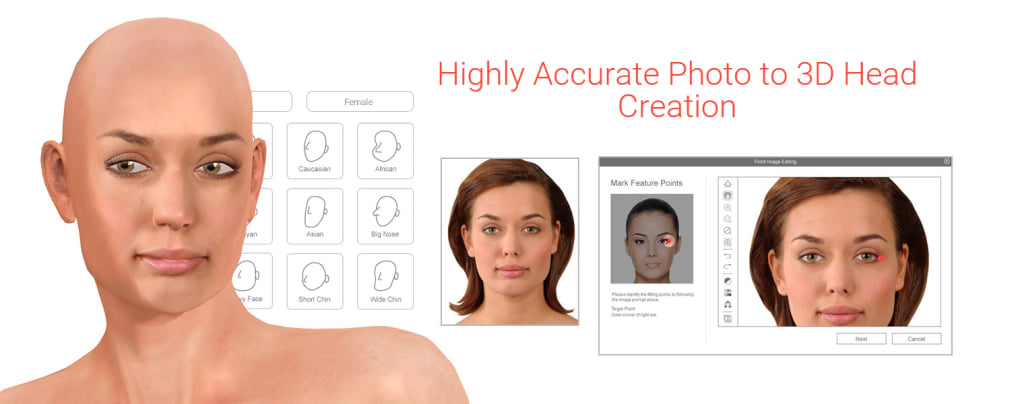
One of the key features differentiating CrazyTalk from simpler animation programs is its integrated 3D Head Creation tool. This allows users to move beyond using existing photographs and create entirely new, custom 3D avatars from scratch. This opens the door to boundless creativity, enabling the development of unique characters not limited by the availability of source imagery. The level of detail achievable with the 3D head creation process further elevates the realism and expressive capabilities of the animations. The software’s ability to handle both 2D and 3D assets allows for a flexible and powerful creative process.
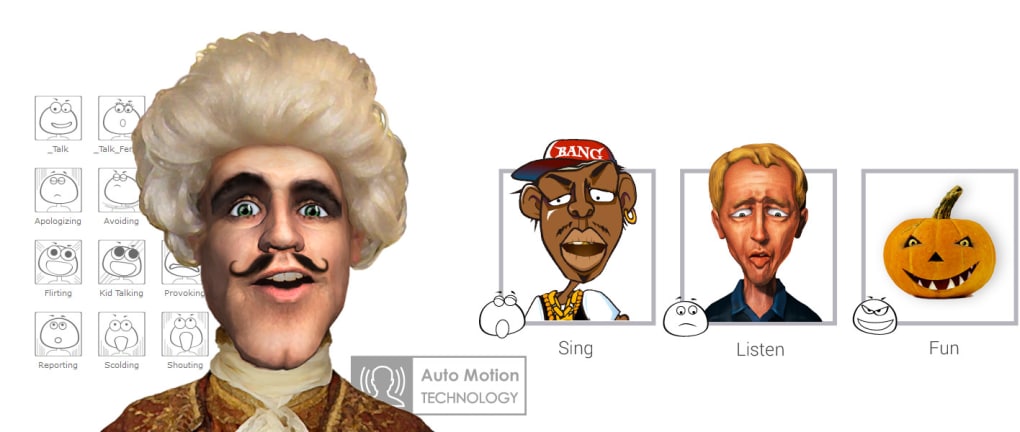
The Auto Motion engine is another significant enhancement. This automated tool significantly simplifies the creation of natural-looking character movements, even for complex actions. By analyzing the user’s input and applying sophisticated motion capture techniques, the Auto Motion engine produces realistic and fluid animations with minimal user intervention. This is particularly valuable for users who are not experienced animators, enabling them to achieve professional-quality results without extensive training.
Addressing the Limitations: Areas for Improvement
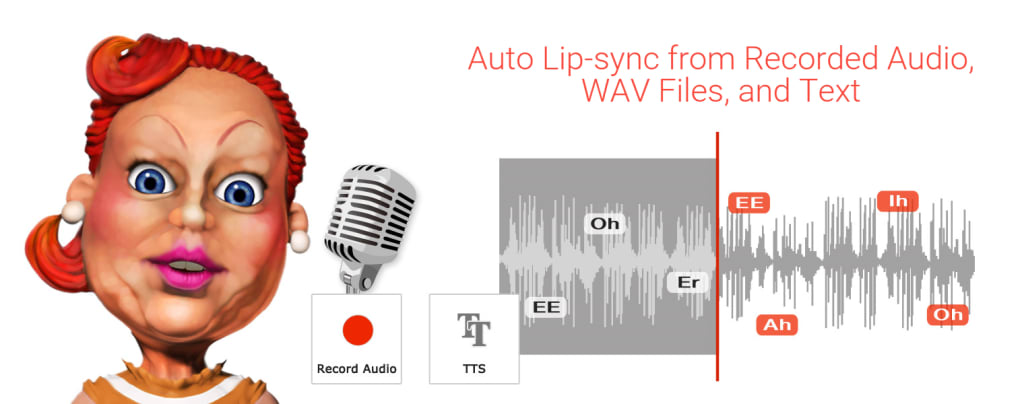
While CrazyTalk offers a wealth of powerful features, it’s important to acknowledge some limitations. The automatic lip-synchronization feature, while functional, can sometimes struggle with complex audio or subtle nuances in speech. This often requires manual adjustments to achieve optimal lip synchronization, which can be time-consuming.
The lack of MP3 audio support is another noticeable drawback. While the software does support a range of audio formats, the absence of MP3 compatibility limits flexibility and can necessitate format conversion before importing audio into the program.
Furthermore, some users might find the number of preset templates somewhat limited. While the customization options are extensive, a broader range of readily available templates could accelerate the workflow for those seeking quick results.
The learning curve, while not excessively steep, requires some investment in time and effort. Users unfamiliar with animation software may need to dedicate some time to mastering the program’s interface and features. However, the detailed documentation and tutorials provided should mitigate this challenge significantly.
Comparison with Alternative Animation Software
CrazyTalk competes with several other animation software packages, each with its unique strengths and weaknesses. Crazy Talk Animator, for instance, is a more focused 2D animation tool, offering more sophisticated animation capabilities but lacking CrazyTalk’s emphasis on realistic facial animation. Plotagon provides a simplified approach, ideal for beginners, but lacks the advanced customization and control offered by CrazyTalk.
Other software, such as Muvizu, leans towards 3D animation, potentially offering a different aesthetic and workflow than CrazyTalk’s blend of 2D and 3D capabilities. The choice of software depends largely on the specific needs and skill level of the user, as well as the type of animation they aim to create. CrazyTalk’s unique strength lies in its focused approach to realistic facial animation and its robust set of tools for achieving this goal.
User Reviews and Overall Assessment
User reviews of CrazyTalk are generally positive, highlighting its powerful features and the impressive results achievable with a bit of practice. Many users praise the software’s intuitive interface and the extensive customization options, while others appreciate the ease of exporting animations in various formats.
However, some criticisms consistently emerge. The accuracy of the automatic lip-syncing remains a point of contention, with some users reporting inconsistencies that require manual intervention. The price point can also be a deterrent for some users, particularly those with limited budgets.
Ultimately, CrazyTalk occupies a unique niche in the animation software market. It’s a powerful and versatile tool capable of producing remarkably realistic facial animations. While it has some limitations, particularly in the accuracy of its automatic lip-syncing and the lack of MP3 support, its extensive features and ability to create highly personalized avatars more than compensate. For users seeking to bring their photos to life with realistic and engaging animations, CrazyTalk remains a strong contender, offering a compelling blend of power, flexibility, and creative potential. Its versatility allows it to cater to both amateur enthusiasts and professional animators, making it a worthwhile investment for those willing to dedicate the time and effort to master its capabilities.
File Information
- License: “Trial version”
- Latest update: “March 12, 2024”
- Platform: “Windows”
- OS: “Windows 8.1”
- Language: “English”
- Downloads: “412.6K”
- Size: “539.53 MB”


