
In today’s hyper-connected world, the digital trail we leave behind can be surprisingly extensive. Every photo geotagged, every location check-in, every tweet mentioning a place – these seemingly innocuous actions contribute to a detailed map of our movements and activities. Creepy, a now-defunct application, aimed to highlight precisely this aspect of our online lives by extracting geolocation data from Twitter and Flickr user profiles. While the application itself is no longer available, its purpose and functionality remain relevant in understanding the implications of sharing location information online. This exploration delves into Creepy’s functionality, its limitations, and the broader implications of digital footprint management.
How Creepy Worked: Unmasking Geolocation Data
Creepy functioned as a straightforward tool designed to collect and visualize geolocation data publicly available through Twitter and Flickr. Users simply inputted a Twitter or Flickr username (or both) into the application. Creepy then proceeded to scour the user’s publicly accessible tweets and photos, searching for any embedded geolocation information. This information could take various forms, including explicit coordinates embedded in metadata, mentions of specific locations within the text of tweets or photo descriptions, and even implicit location data inferred from check-ins or other contextual cues.
The process could be time-consuming, particularly for users with extensive online histories. The amount of data processed directly correlated with the volume of tweets and photos associated with the provided username. Once the search concluded, Creepy presented the collected geolocation data in two formats:
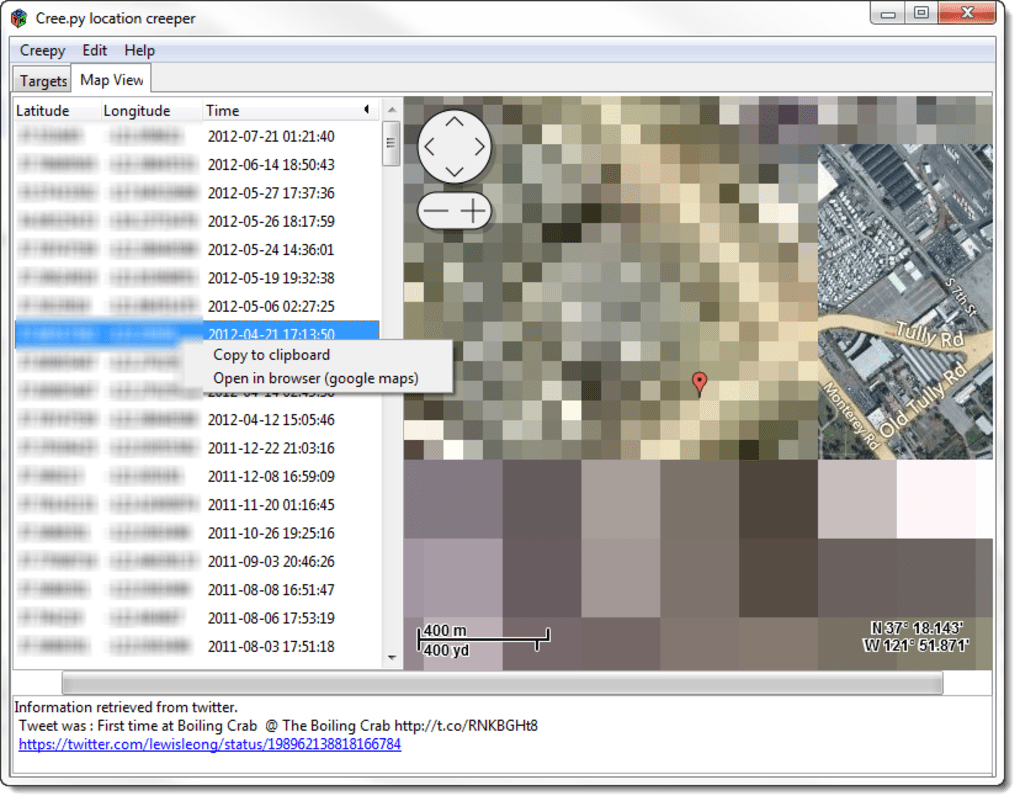
- A Map Visualization: Creepy attempted to display all identified locations on a map interface. However, as later reviews revealed, this aspect of the application suffered from significant performance issues. The map often experienced rendering problems, with locations appearing pixelated, misaligned, or failing to load altogether.

- A Chronological List: Alongside the map, Creepy also provided a list of the extracted locations, chronologically ordered. This list offered a more detailed breakdown of each location, including associated dates and direct links to the original tweets or photos. Users could further investigate each location by right-clicking the entry and selecting the option to open the location in Google Maps, providing a more accurate and detailed visual representation of the pinpointed location.
The Strengths and Weaknesses of Creepy: A Balanced Perspective
Despite its technical shortcomings, Creepy served a valuable purpose in raising awareness about the volume of location data readily available online. Its ability to comprehensively gather and present this information in a relatively user-friendly format, albeit with map rendering issues, was a significant strength. The application highlighted the ease with which one’s digital movements could be tracked and mapped, even without direct consent or active participation in location-sharing services. The ability to cross-reference location data with the associated tweets and photos provided further context and insight into the user’s activities.
However, Creepy’s limitations were also prominent. The most significant drawback was the inconsistent and frequently problematic map display. This flaw significantly detracted from the user experience and hampered the application’s ability to effectively visualize the collected geolocation data. The slow search times, particularly when dealing with prolific online users, further added to the frustration. The application’s reliance on publicly available data meant that it could not access or reveal private or protected information, limiting its scope and potentially disappointing users expecting a more comprehensive overview.
The Broader Implications: Privacy and Digital Footprint Management
Creepy’s existence, even though the application is now defunct, underlines a crucial aspect of online privacy: the importance of understanding and managing one’s digital footprint. The ease with which the application could collect geolocation data from publicly available sources serves as a stark reminder that online actions have lasting consequences, often far beyond immediate intentions. The information we share online, even seemingly innocuous details, can be aggregated and analyzed to create a remarkably detailed picture of our lives.
The implications of this readily accessible information extend beyond mere curiosity. The data collected by Creepy and similar tools could be misused for stalking, identity theft, or even more serious criminal activities. Understanding the potential risks associated with sharing geolocation data is paramount to maintaining online safety and privacy. This understanding necessitates a proactive approach to managing one’s digital footprint.
Practical Strategies for Managing Your Digital Footprint
Given the potential risks highlighted by Creepy, individuals should adopt proactive strategies to manage their digital presence and protect their privacy. These strategies include:
-
Reviewing Privacy Settings: Regularly review and adjust the privacy settings on social media platforms, ensuring that location information is not automatically shared or publicly accessible. Many platforms offer granular control over data sharing, allowing users to selectively decide what information is visible to different audiences.
-
Careful Geotag Usage: Consider the implications of geotagging photos and videos before sharing them publicly. While geotagging can be a convenient way to document travel or events, it also provides precise location information that could compromise privacy.
-
Limiting Public Information: Avoid sharing excessive personal information online, including specific locations, schedules, or details that could be used to identify or locate you.
-
Utilizing Privacy Tools: Explore and utilize privacy-enhancing tools and technologies, such as VPNs (Virtual Private Networks) and privacy-focused browsers, to minimize your digital footprint and protect your online activity.
-
Monitoring Online Presence: Periodically conduct searches of your name and associated usernames online to assess your online presence and identify any potentially sensitive information that may be publicly accessible.
-
Understanding Data Collection Practices: Educate yourself about the data collection practices of different websites and applications. Review privacy policies and terms of service to understand how your data is being used and shared. Opt out of data collection whenever possible.
In conclusion, while Creepy is no longer functional, its legacy remains a potent reminder of the pervasive nature of digital footprints and the importance of proactive privacy management. The ease with which the application could collect and display geolocation data highlights the need for careful consideration of online actions and the potential consequences of seemingly innocuous online behaviors. By implementing sound privacy practices and remaining vigilant about the information shared online, individuals can effectively minimize their risk and control their digital identities.
File Information
- License: “Free”
- Version: “1.94”
- Latest update: “July 25, 2012”
- Platform: “Windows”
- OS: “Windows 7”
- Language: “English”
- Downloads: “20.5K”
- Size: “13.01 MB”


