
Crello is a user-friendly graphic design tool that simplifies the process of creating visually appealing graphics for various purposes. Whether you’re designing social media posts, website banners, or marketing materials, Crello offers a streamlined approach, making professional-quality design accessible to everyone, regardless of their design expertise. This comprehensive review explores Crello’s features, advantages, limitations, and alternatives, providing a clear picture of its suitability for your design needs.
Crello’s Core Features and Functionality
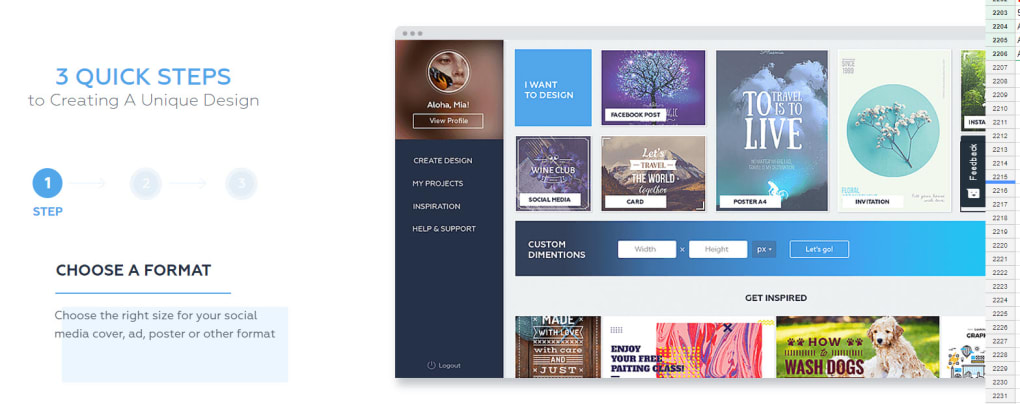
Crello’s strength lies in its intuitive interface and ease of use. The platform guides users through the design process with a straightforward, step-by-step approach. Users begin by selecting the desired dimensions for their design, choosing from a wide array of pre-set templates optimized for different platforms and applications, such as social media posts (Facebook, Instagram, Twitter, etc.), website headers and banners, presentations, and more.
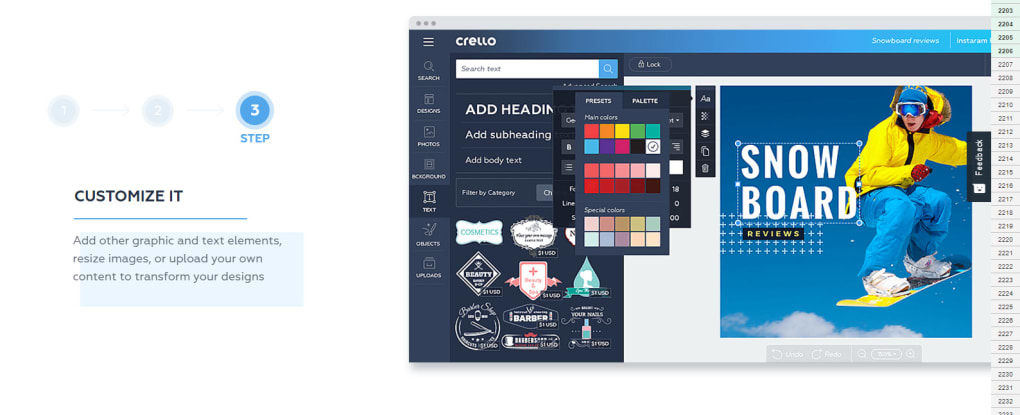
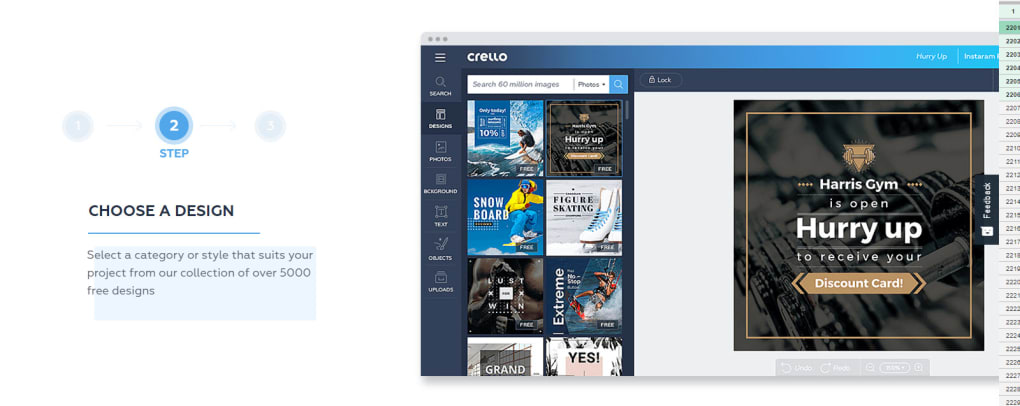
This template selection provides a significant advantage for users unfamiliar with graphic design principles. The templates offer a solid foundation, incorporating pre-designed layouts, color palettes, and fonts, ensuring a polished aesthetic even for beginners. Users can then customize these templates by adding their own images, text, and design elements.
Crello offers a substantial library of stock images, illustrations, and design elements, eliminating the need for users to source their own assets. This integrated library simplifies the design process, saving time and effort. The selection, while not exhaustive, provides a diverse range of options to suit various design styles and themes.
Text customization is another key feature. Users can easily add and edit text, choosing from a variety of fonts and styles. Crello’s text tools allow for adjustments to font size, color, spacing, and alignment, ensuring flexibility in conveying information effectively.
Once the design is complete, users can export their creations in various formats, including high-resolution JPEGs and PNGs suitable for print and online use. This flexibility ensures compatibility with diverse platforms and applications.
Crello: Advantages and Disadvantages
Crello presents numerous advantages, making it a popular choice for both casual and professional users. Its free-to-use model is a major draw, making professional-level design accessible without upfront costs. The intuitive interface significantly lowers the barrier to entry for those without formal design training. The built-in asset library further streamlines the design process, eliminating the need for extensive external resource sourcing.
However, Crello also has limitations. The range of options, while adequate for many users, is not as extensive as that offered by industry-standard graphic design software like Adobe Photoshop or Illustrator. Professional designers might find Crello’s features insufficient for complex projects requiring advanced manipulation and editing capabilities. The free version also includes watermarks on some exported images.
The lack of advanced features, while not a deal-breaker for many, might be a significant limitation for users with more demanding design needs. The reliance on stock images, while convenient, might limit creative freedom for users seeking highly unique and original designs.
Crello for Web Applications: A Seamless Online Experience
Crello’s web-based platform offers a seamless design experience accessible from any device with an internet connection. This accessibility is a significant advantage, allowing for design work to be completed from anywhere, eliminating the need for dedicated software installation or specific hardware. The web app maintains the same intuitive interface and feature set as the desktop version, providing a consistent experience across platforms.
This web-based approach also simplifies collaboration. Multiple users can access and work on the same projects simultaneously, although collaborative features are not explicitly stated on the information provided. This makes Crello suitable for teamwork on design projects.
The paid version of Crello, though not fully detailed in the provided information, presumably unlocks additional features and removes limitations present in the free version, such as removing watermarks and potentially expanding access to the asset library.
Crello Alternatives: Exploring Other Graphic Design Options
While Crello provides a user-friendly and accessible platform for graphic design, several alternatives cater to diverse needs and preferences. These alternatives range from free, beginner-friendly options to professional-grade software with advanced capabilities.
Free Alternatives: Similar to Crello, several free web-based graphic design tools offer a comparable level of simplicity and ease of use. These alternatives may offer different strengths and weaknesses in terms of features, templates, and asset libraries.
Professional-Grade Software: For users requiring advanced features and capabilities, industry-standard software like Adobe Photoshop and Illustrator remain the gold standard. These tools provide an extensive range of functionalities, but they come with a steeper learning curve and a higher price point. Other professional-grade options also exist in the market.
Choosing the right alternative depends on individual needs and technical expertise. Users with simple design requirements might find free web-based tools sufficient, while professional designers will benefit from the advanced capabilities of industry-standard software.
Conclusion: Crello’s Place in the Graphic Design Landscape
Crello successfully fills a niche in the graphic design market by providing a user-friendly and accessible platform for creating visually appealing graphics. Its strengths lie in its simplicity, intuitive interface, and free-to-use model. This makes it an excellent entry point for beginners and a convenient tool for casual users with straightforward design needs.
However, its limitations in terms of advanced features and a limited asset library might be deterrents for professional designers or users requiring sophisticated design capabilities. The availability of numerous alternatives highlights the importance of evaluating individual needs and requirements before choosing a graphic design tool. Crello’s success is rooted in its ability to empower users without extensive design skills, making professional-quality graphics accessible to a broader audience.
File Information
- License: “Full”
- Version: “1.0”
- Latest update: “July 20, 2021”
- Platform: “Web Apps”
- OS: “Internet Explorer”
- Language: “English”
- Downloads: “18.4K”


