
Creo PTC, a flagship product from PTC, stands as a leading 3D computer-aided design (CAD) software solution. Its comprehensive suite of tools empowers users to transform initial product concepts into fully realized digital prototypes, streamlining the design process from inception to manufacturing. This guide delves into the capabilities, advantages, and considerations surrounding Creo PTC, exploring its various modules and positioning within the broader 3D CAD landscape.
Understanding Creo PTC’s Multifaceted Approach to 3D CAD
Creo PTC distinguishes itself through its modular design, offering a flexible and powerful platform catering to diverse design needs. Instead of a monolithic application, Creo provides a collection of integrated tools, each optimized for specific design tasks. This modularity allows users to select and utilize only the features relevant to their project, enhancing efficiency and reducing complexity.
Parametric Modeling: This core functionality forms the foundation of Creo’s design capabilities. Parametric modeling enables users to create and modify 3D models by defining parameters and relationships between design elements. Changes to one parameter automatically update related elements, maintaining design consistency and integrity. This feature is invaluable for iterative design processes, allowing for rapid experimentation and modification without the need for extensive manual adjustments. The ability to define parameters and constraints allows for the creation of highly complex and detailed models while ensuring that all components remain in sync. This drastically improves design accuracy and reduces errors.
Direct Modeling: Complementing parametric modeling, Creo’s direct modeling capabilities offer a more intuitive, hands-on approach. Users can directly manipulate geometric elements of the 3D model, providing greater flexibility for quick modifications and freeform design. This approach proves beneficial when dealing with complex shapes or requiring rapid prototyping, where speed and agility are prioritized. Direct modeling offers a faster path to visualising changes, allowing for quick exploration of design iterations.
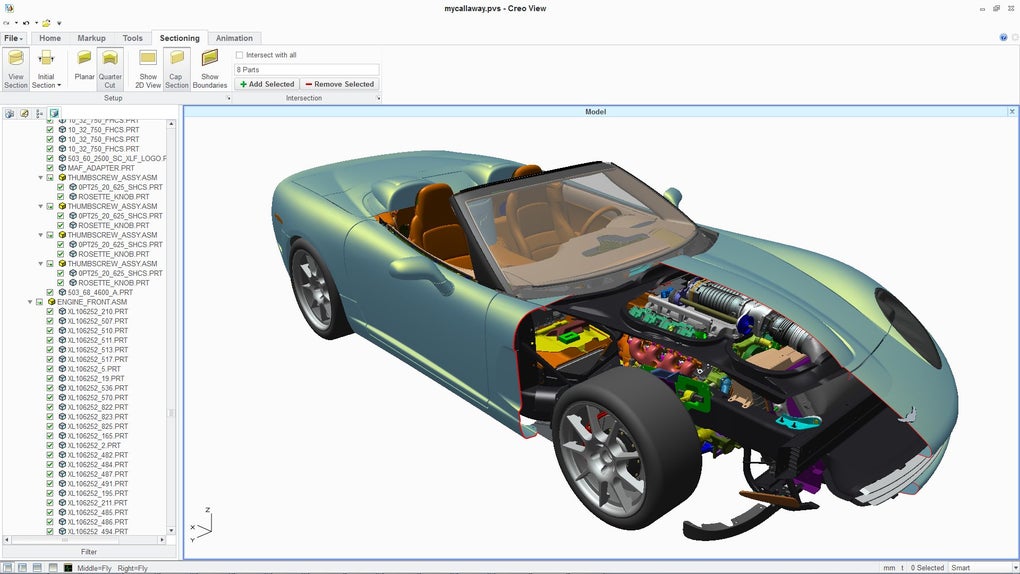
Modeler: This module enables the creation of design variations, facilitating the exploration of multiple design alternatives within a single project. Users can systematically modify existing designs to generate a range of options, enabling informed decision-making and optimization. This is crucial for exploring design space and finding optimal solutions based on various factors such as weight, cost, and functionality.
Elements and Direct Modeling: For creating basic prototypes quickly, Creo’s integrated Elements and Direct Modeling features provide a simplified workflow. This streamlined approach is particularly useful for rapid prototyping or preliminary design stages, where detailed modeling might be premature. This efficient workflow significantly reduces the time needed for initial concept visualisation.
The Advantages of Utilizing Creo PTC
The adoption of Creo PTC offers several significant advantages that make it a preferred choice for many engineers and designers:
-
Industry Standard: Creo’s widespread adoption has established it as an industry standard within the 3D CAD community. This broad acceptance simplifies collaboration, data sharing, and integration with other industry software and processes. The established nature of the platform ensures widespread compatibility and support.
-
Comprehensive Toolset: The extensive range of tools within Creo addresses the diverse requirements of modern product development, covering everything from concept design to manufacturing-ready models. This all-in-one approach eliminates the need for disparate software solutions, simplifying workflow and minimizing integration challenges.
-
Advanced Features: Creo incorporates cutting-edge features like simulation and analysis tools, enabling users to assess the performance and reliability of their designs before physical prototyping. This integration of simulation capabilities significantly reduces the risk of design failures and costly revisions.
-
Improved Collaboration: Creo’s collaborative features facilitate seamless teamwork, allowing multiple designers to work concurrently on the same project. This promotes efficient project management and reduces potential conflicts, ensuring effective team coordination.
-
Enhanced Productivity: The intuitive user interface and powerful automation capabilities of Creo significantly enhance design productivity, accelerating the overall product development cycle. This reduces time-to-market and allows for faster response to evolving market demands.
Addressing the Challenges of Implementing Creo PTC
Despite its numerous advantages, implementing Creo PTC also presents certain challenges that users should consider:
-
Steep Learning Curve: The comprehensive feature set and advanced functionalities of Creo can result in a steep learning curve, requiring significant time and effort to master. Comprehensive training and ongoing support are essential to fully leverage Creo’s potential.
-
Cost: As industry-standard software, Creo PTC comes with a substantial price tag, requiring significant investment for both software licensing and training. The cost of implementation should be carefully evaluated against the anticipated return on investment.
-
System Requirements: Creo demands a powerful computing platform to function efficiently, necessitating investments in high-performance hardware. The software’s resource demands can impact the budget and system infrastructure.
-
Maintenance and Updates: Maintaining and updating Creo software requires ongoing effort and resources. Regular updates are essential for ensuring security, access to new features, and compatibility with other industry tools.
Creo PTC Compared to Alternative 3D CAD Solutions
While Creo holds a prominent position in the 3D CAD market, several alternative solutions compete for market share. Each offers a unique set of features and advantages, catering to specific design needs and budget considerations.
SolidWorks: A widely used alternative, SolidWorks offers a comparable feature set to Creo, including parametric and direct modeling capabilities. It is known for its user-friendly interface and extensive community support. However, SolidWorks’ pricing is also competitive with Creo.
Fusion 360: A cloud-based CAD/CAM/CAE platform from Autodesk, Fusion 360 provides a more accessible and affordable alternative, particularly for smaller businesses and individual users. Its cloud integration facilitates collaborative design and accessibility. However, Fusion 360 may lack some of the advanced features found in Creo.
FreeCAD: A free and open-source alternative, FreeCAD provides a robust platform for 3D modeling. It is a good option for budget-conscious users or those preferring open-source software. However, FreeCAD may lack the polish and extensive support of commercial solutions like Creo.
The choice between Creo and alternative solutions hinges on several factors, including budget, required features, experience level, and the specific design requirements of the project. Careful consideration of these factors is essential for selecting the optimal 3D CAD solution.
Conclusion
Creo PTC provides a powerful and versatile 3D CAD platform that has earned its status as an industry leader. Its modular design, comprehensive toolset, and advanced features address the complex needs of modern product development. While the cost and learning curve present challenges, the advantages of improved productivity, enhanced collaboration, and access to cutting-edge technology make Creo a worthwhile investment for many organizations and individuals engaged in demanding 3D design projects. Careful evaluation of alternatives and a realistic assessment of resource requirements are crucial for a successful implementation.
File Information
- License: “Free”
- Version: “2017”
- Latest update: “October 22, 2017”
- Platform: “Windows”
- OS: “Windows 8”
- Language: “English”
- Downloads: “22.9K”


