
In an increasingly interconnected digital world, the need for efficient and reliable remote assistance tools has never been greater. Whether it’s a tech-savvy individual helping a grandparent troubleshoot a printer issue, an IT professional diagnosing a client’s software glitch, or colleagues collaborating on a shared document, the ability to access and control a distant computer seamlessly is invaluable. Amidst a crowded market of remote desktop applications, one name consistently stood out for its remarkable simplicity and accessibility: CrossLoop. Billed as a superb, free, and easy screen-sharing utility, CrossLoop emerged as a godsend for countless users, bridging geographical divides and technical skill gaps with its intuitive design.
CrossLoop’s genius lay in its direct approach to a complex problem. Many applications offered desktop sharing, but few managed to distill the process down to its absolute essentials like CrossLoop did. Designed for individuals of all technical backgrounds, it democratized remote PC support, making it accessible even to those who wouldn’t identify as a “geek.” The core promise was profound: connect to another user’s computer and share their desktop without the typical headaches of configuring firewalls or router settings. This particular feature alone eliminated a significant barrier to entry, often the most daunting aspect of setting up remote connections. For anyone needing to diagnose a PC problem from afar, share information, or even offer a quick tutorial, CrossLoop promised a solution that was not only effective but also incredibly straightforward. The developers famously claimed users could be sharing desktops within 60 seconds of installation – a testament to its unparalleled ease of use. This blend of powerful functionality with user-centric design cemented CrossLoop’s reputation as a go-to solution for remote assistance for many years.
The Genesis of Remote Assistance: CrossLoop’s Core Functionality
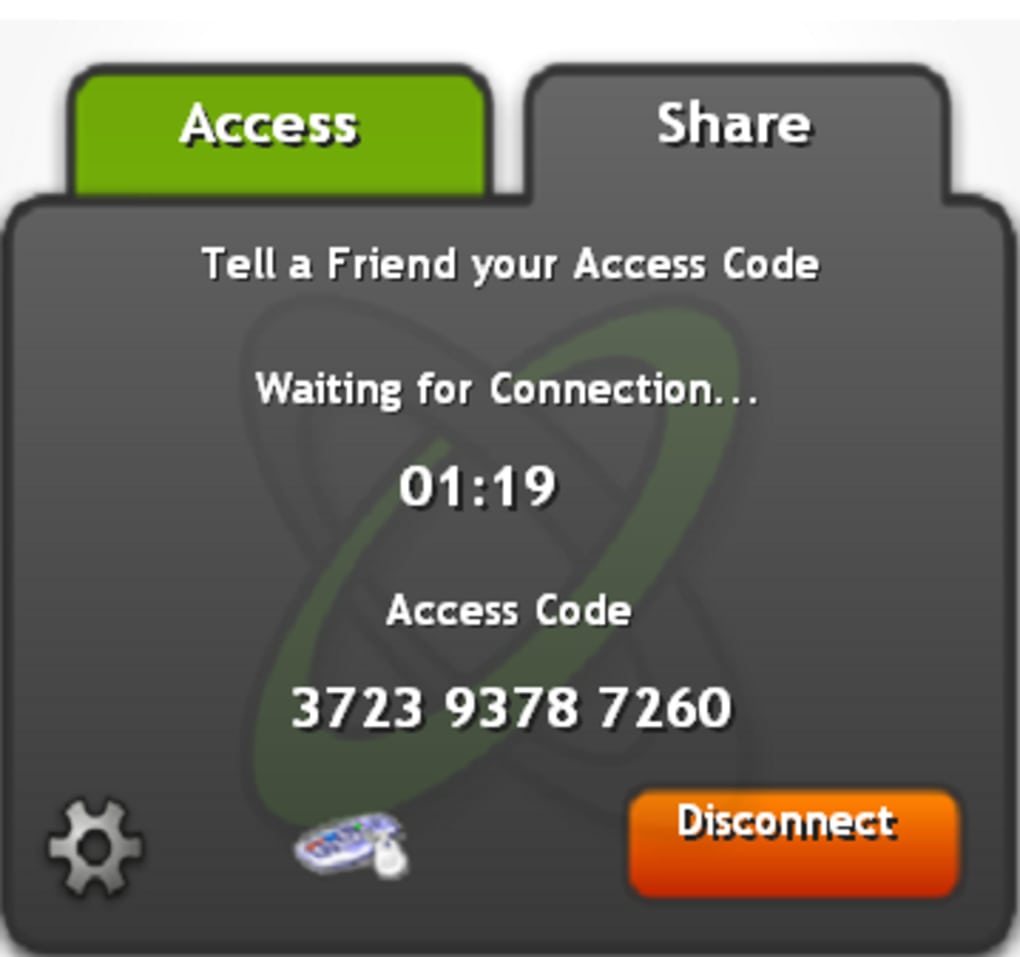
At its heart, CrossLoop was an application built on the principle of direct, user-initiated remote access. Its primary mechanism for establishing a connection was disarmingly simple, revolving around two distinct roles: “Host” and “Join.” Upon installing CrossLoop, users were greeted with a clear welcome screen presenting these two options. If you were the one needing help or wishing to share your screen, you would select the ‘Host’ tab. This action would generate a unique, temporary 12-digit access code. This code was the lynchpin of the connection, a digital key that the helper, or the ‘Join’ user, would need to enter to gain access to your PC. Conversely, if you were the benevolent tech wizard offering assistance, you would select the ‘Join’ tab and input the access code provided by your friend, family member, or client. The only prerequisite for a successful session, beyond the exchange of this code, was that both parties had CrossLoop installed on their respective machines.
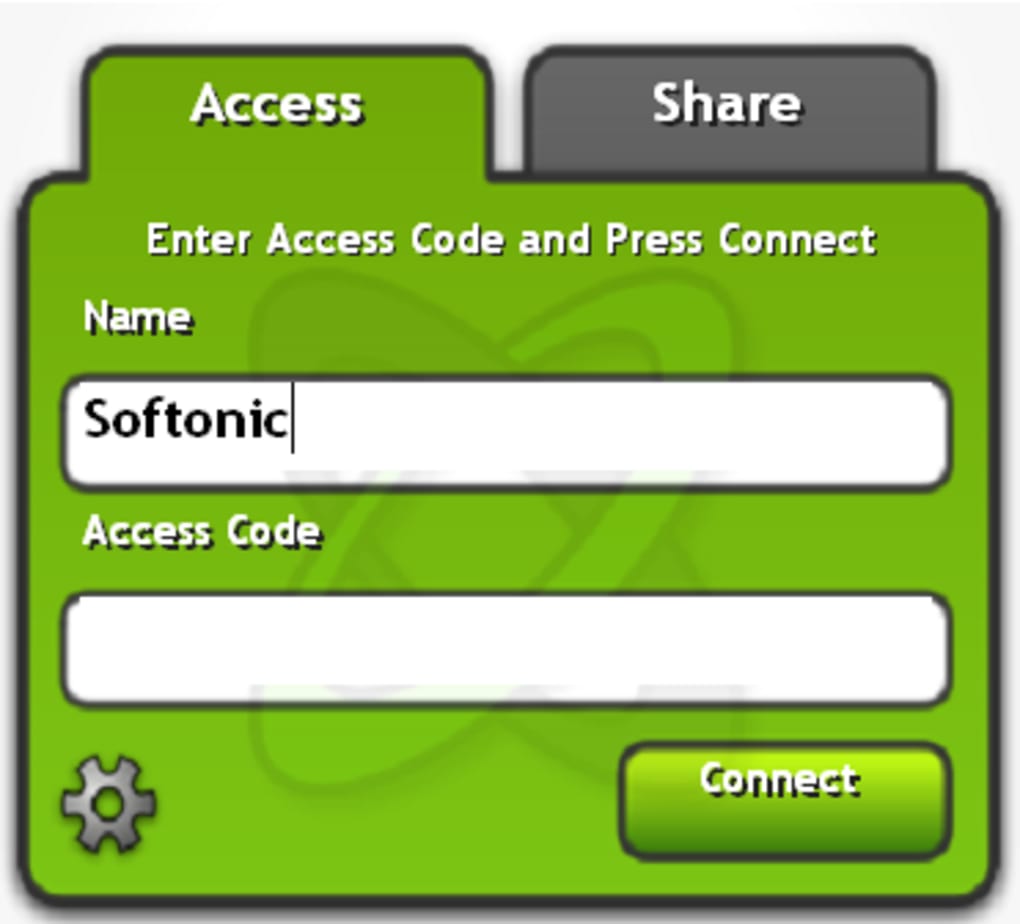
Once the code was entered and permission granted (a crucial security step we’ll delve into later), a separate window would materialise on the helper’s screen, displaying the desktop of the host computer. From that moment, the helper gained control, free to navigate, open applications, troubleshoot errors, and essentially “tinker to their heart’s content.” This real-time, interactive experience replicated the feeling of being physically present at the remote machine, making problem-solving incredibly efficient. The program’s design eschewed unnecessary complexities, focusing solely on its core screen-sharing function. While such simplicity meant limited customization options for the interface itself, the developers did introduce some aesthetic enhancements over time, spicing up the tabs with various skins like Aqua, Jungle, Nebula, and even Pink Lemonade, adding a touch of personalization to the otherwise utilitarian tool.
The brilliance of CrossLoop, particularly in its early days, was its ability to circumvent network complexities. Traditionally, setting up remote access often involved delving into router settings, forwarding ports, or configuring firewall rules – tasks that are arcane to the average user and a headache even for experienced professionals. CrossLoop sidestepped these issues entirely, abstracting the underlying network mechanics and allowing users to connect directly, making the entire process remarkably friction-free. This technological elegance, combined with a user interface that required minimal technical acumen, was what truly made CrossLoop a groundbreaking application in the realm of remote desktop support. It empowered ordinary people to help others without needing to be network administrators, solidifying its place as a quintessential “utilities & tools” application.
Security, Community, and Evolution: Safeguarding and Enhancing the Remote Experience
While CrossLoop garnered widespread acclaim for its ease of use, an equally critical factor in any remote access solution is security. The prospect of someone else accessing your computer, even a trusted individual, naturally raises concerns about data privacy and system integrity. CrossLoop’s developers were acutely aware of this and built a robust security framework to protect its users. They emphasized that all information exchanged during a session was highly encrypted. Specifically, a 128-bit algorithm was employed, a standard level of encryption at the time, to safeguard the data transmitted between the two machines. This encryption was intricately linked to the randomly generated 12-digit access code, ensuring that only those with the correct, ephemeral code could initiate a connection.
Beyond encryption, CrossLoop incorporated a vital layer of user control: explicit permission. Before any information could be exchanged or remote control granted, a pop-up alert would appear on the host’s screen, requesting explicit permission from them. This ensured that no one could access a PC without the owner’s full awareness and consent, providing peace of mind and preventing unauthorized intrusions. This combination of strong encryption and user-driven authorization addressed the primary security concerns associated with P2P (peer-to-peer) connections, making CrossLoop a trustworthy choice for remote assistance.
Over time, CrossLoop didn’t just stand still; it evolved. Recent releases introduced a completely new design and, significantly, extended its networking community functions. Users could now create their own profiles, offering a sense of identity and accountability within the CrossLoop ecosystem. These profiles allowed users to view their login history, providing a record of past support sessions, and even rate those who had helped them. This feedback mechanism fostered a sense of community and trust, allowing users to identify reliable helpers. For IT support professionals or particularly handy individuals, CrossLoop also offered the opportunity to receive a special “badge” and advertise their services directly on the site. This feature transformed CrossLoop from a mere utility into a platform, enabling professionals to connect with potential clients seeking technical assistance, thereby expanding its utility beyond just friends and family. This move hinted at CrossLoop’s ambition to cater to both casual users and a burgeoning “for business” segment.
The continuous development also included crucial compatibility updates. For instance, CrossLoop V2.60 brought essential features like full Windows 7 support, ensuring its relevance in a constantly evolving operating system landscape. Furthermore, the ability to run CrossLoop as a non-Administrator (Standard User) was a significant enhancement, improving security protocols and simplifying deployment in managed IT environments where elevated privileges are often restricted. While initially celebrated for its free model, the growing popularity and demand for more advanced features eventually led the developers to introduce paid versions. These premium offerings incorporated highly requested functionalities such as file transfer and unattended remote access, which allowed helpers to access a remote PC even when no one was physically present to grant permission – a game-changer for scheduled maintenance or after-hours support. This strategic evolution positioned CrossLoop to compete with more feature-rich, enterprise-grade solutions while still maintaining a free client with its beloved core features.
CrossLoop in the Digital Ecosystem: A Tool for Productivity and IT Support
CrossLoop’s utility extends far beyond simple screen sharing; it firmly established itself as a crucial tool within the broader digital ecosystem, particularly in categories like Productivity and Development & IT. Its primary function, remote PC access, directly contributes to enhanced productivity by enabling swift problem resolution, collaborative work, and efficient knowledge transfer across distances. For small businesses or individuals managing multiple systems, CrossLoop acted as a virtual presence, minimizing downtime and optimizing operational efficiency.
Within the “Productivity” umbrella, CrossLoop specifically addressed the “Remote PC” subcategory. By facilitating control over a distant computer, it allowed users to manage documents, access applications, and even perform administrative tasks as if they were sitting directly in front of the machine. This was invaluable for financial professionals using specialized accounting software on a specific desktop, educators needing to access classroom resources from home, or simply anyone requiring access to files stored exclusively on their office computer. The ease with which it circumvented network complexities meant less time spent on setup and more time focused on the productive task at hand.
Furthermore, CrossLoop was a natural fit within the “Development & IT” category, particularly under “Remote Control.” IT support professionals, help desk technicians, and even freelance developers found CrossLoop an indispensable part of their toolkit. Diagnosing software bugs, installing updates, configuring new systems, or providing hands-on training all became possible without the need for physical travel. Its secure connection and user-permission model made it suitable for professional environments where data integrity and client trust are paramount. The “badge” system and the ability to advertise services on the CrossLoop platform further solidified its role in this professional sphere, creating a marketplace for IT expertise.
Beyond these direct applications, CrossLoop also implicitly touched upon “Security & Privacy” and “Utilities & Tools.” Its emphasis on 128-bit encryption and explicit user consent underscored its commitment to secure access control, alleviating common fears associated with remote connectivity. As a general utility, it offered a solution to a common problem – remote assistance – in an incredibly user-friendly package, making it accessible to a wide demographic. Whether it was for “Internet & Network” troubleshooting, “Multimedia” configuration on a distant server, or simply acting as a flexible “File Sharing & Peer To Peer” alternative for demonstration purposes, CrossLoop seamlessly integrated into various aspects of digital life. The platform’s commitment to supporting multiple languages (including English, Spanish, French, German, Japanese, Korean, Chinese, and many others) also extended its global reach, making it a truly international utility for remote collaboration and support. This broad applicability, coupled with its foundational simplicity, allowed CrossLoop to carve out a significant niche in the crowded landscape of software applications.
Navigating the Landscape of Remote Connectivity: Pros, Cons, and Alternatives
CrossLoop’s enduring appeal can be attributed to a clear set of advantages, particularly in its initial free offering. Its most celebrated “pro” was undeniably its extreme simplicity. Users, irrespective of their technical proficiency, found it straightforward to set up and initiate sessions, often within seconds. This ease of use was a significant differentiator from many other remote desktop solutions that required complex network configurations or steep learning curves. The ability to easily help people remotely, without physical proximity, was a revolutionary concept for many families and small businesses, effectively democratizing IT support. Furthermore, later versions brought crucial enhancements like Windows 7 support and the capability to run the application as a non-Administrator, addressing key user experience and security considerations. As noted by users on PhanMemFree.org, its “one-click connect from web account” and “simple interface” were highlights, making it an “outstanding remote access product” even for the “technically challenged.”
However, like any software, CrossLoop was not without its limitations, particularly in its free iteration. The most frequently cited “cons” were the absence of a built-in file sending function and a chat feature. While these omissions were not deal-breakers – users could always resort to separate instant messaging applications like Skype or cloud storage services like Dropbox for file transfers – their integration would have undoubtedly provided a more complete and seamless remote assistance experience. User reviews also occasionally mentioned a desire for the CrossLoop window to adapt to the resolution of the helper’s monitor rather than being constrained by the remote computer’s resolution, suggesting an area for visual refinement. Another point, noted by users, was the initial lack of explicit support for non-Microsoft operating systems for the core CrossLoop for Windows, although a Mac version did exist separately, indicating a slightly fragmented multi-platform strategy.
The remote access market is a competitive one, and CrossLoop, despite its unique strengths, operated alongside a host of alternatives. Programs like Copilot, for instance, offered similar functionality but often came with a price tag, sometimes charging up to $5 for just 24 hours of use. This made CrossLoop’s free model incredibly attractive, creating a significant value proposition. Other prominent competitors include TeamViewer, AnyDesk, and Chrome Remote Desktop. TeamViewer is known for its comprehensive feature set, including robust file transfer, chat, and unattended access, but often targets a more professional or enterprise user base, with associated costs. AnyDesk emphasizes speed and low latency, while Chrome Remote Desktop offers a lightweight, browser-based solution, particularly appealing to Google Chrome users.
The evolution of CrossLoop itself also reflected the dynamics of this market. As the program gained popularity and user expectations grew, the developers faced the challenge of monetizing their offering while retaining their core user base. This led to the introduction of new paid versions, which incorporated the previously missing features like file transfer and unattended remote access. This strategic move allowed CrossLoop to cater to more demanding “for business” use cases, offering a tiered approach where the free client continued to provide essential, easy-to-use screen sharing, while premium versions unlocked advanced functionalities. The developer blog served as a crucial channel for communicating these changes and keeping the community updated on the latest developments, such as the V2.60 update released in January 2012. This continuous adaptation, while introducing commercial aspects, ensured CrossLoop’s longevity and its continued relevance in a fast-paced technological landscape, as evidenced by its substantial download numbers of 54.5K last month on PhanMemFree.org even years after its last major update. The feedback loop from the community, as seen in user reviews on PhanMemFree.org, played a vital role in shaping these developments, showing the developers’ commitment to user satisfaction.
In conclusion, CrossLoop carved out a significant niche in the remote assistance arena by prioritizing simplicity, security, and accessibility. Its innovative approach to bypassing network complexities and providing a user-friendly interface made it a champion for individuals and professionals alike. While newer, more feature-rich alternatives have emerged, and CrossLoop itself evolved to include paid tiers, its legacy as a truly superb, free, and easy screen-sharing tool remains untarnished. It demonstrated that powerful technology could indeed be put in the hands of everyone, transforming the way we help, collaborate, and connect across digital distances.
File Information
- License: “Free”
- Latest update: “January 20, 2012”
- Platform: “Windows”
- OS: “Windows 2000”
- Language: “English”
- Downloads: “54.5K”
- Size: “2.17 MB”


