
In an increasingly interconnected world, language barriers can often feel like insurmountable hurdles, whether you’re a developer navigating global documentation, a student researching international papers, a professional communicating with overseas colleagues, or simply an individual trying to understand content in a foreign language. The demand for efficient, reliable, and user-friendly translation tools has never been higher. Amidst a crowded market of online translators and desktop applications, Crow Translate emerges as a remarkably potent yet elegantly simple solution, designed to bridge these linguistic divides with unparalleled ease and accuracy.
Crow Translate is more than just another language utility; it’s a testament to the power of open-source development, delivering a robust and feature-rich translation experience right to your Windows desktop. Developed with a focus on speed, efficiency, and user empowerment, this application provides swift and precise translations by harnessing the computational prowess of leading translation engines like Google, Yandex, and Bing. Its design philosophy centers around delivering maximum functionality with minimal overhead, making it an indispensable tool for anyone who regularly interacts with multilingual content.
The Core Philosophy: Simplicity Meets Power
At the heart of Crow Translate’s appeal lies its commitment to a straightforward user experience without compromising on deep functionality. Unlike bloated software that can consume valuable system resources, Crow Translate prides itself on being a lightweight and agile program. Built on the solid foundation of C++ and the Qt framework, it ensures swift performance and a responsive interface, even on less powerful machines. This technical choice underpins its ability to offer near-instant translations, a critical factor for maintaining workflow and productivity.
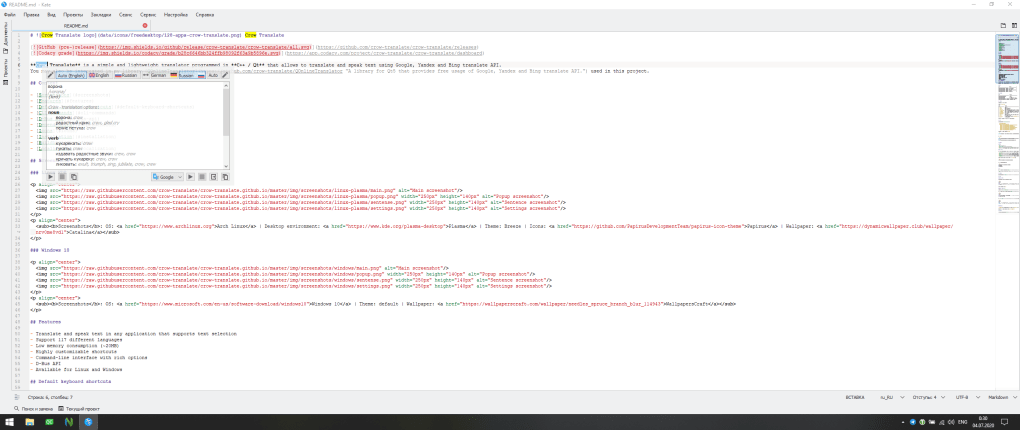
The open-source nature of Crow Translate further distinguishes it from many commercial alternatives. This means its code is transparent, allowing a community of developers to scrutinize, contribute to, and improve the software. For users, this translates into greater reliability, faster bug fixes, and a tool that continuously evolves to meet user needs, all while remaining free to use. It fosters a sense of trust and community around the application, which is a significant advantage in today’s software landscape.
Leveraging Industry-Leading Translation APIs
The accuracy and breadth of Crow Translate’s translations are directly attributable to its intelligent integration with multiple, high-caliber translation APIs. Rather than relying on a single engine, Crow Translate leverages the sophisticated neural machine translation capabilities of Google Translate, Yandex Translate, and Bing Translate. This multi-API approach offers several distinct advantages:
- Enhanced Accuracy: By tapping into different engines, Crow Translate can often provide a more nuanced and accurate translation, as each API may excel in specific language pairs or contextual understanding. Users have the flexibility to choose which engine they prefer, or even compare translations from different sources to gain a fuller understanding.
- Robustness and Reliability: Should one API experience temporary downtime or performance issues, Crow Translate can seamlessly switch to another, ensuring uninterrupted translation service. This redundancy is crucial for professionals and students who depend on constant access to translation functionalities.
- Broad Language Support: Collectively, these APIs support an extensive array of languages, allowing Crow Translate to cater to a global user base and handle virtually any translation request, from widely spoken languages to more niche dialects.
The integration is seamless from the user’s perspective. You don’t need to manually configure each API; Crow Translate handles the backend complexity, presenting you with the translated text in a clean and organized manner. This reliance on established, constantly evolving AI models means that Crow Translate’s translation quality is always at the cutting edge, benefiting from continuous improvements made by these tech giants.
A Lightweight and Efficient Foundation
The decision to develop Crow Translate using C++ and Qt is a significant factor in its overall efficiency and performance. C++ is renowned for its speed and direct hardware access, making it an ideal choice for applications where responsiveness is paramount. Qt, a cross-platform framework, ensures that Crow Translate not only runs smoothly on Windows but also maintains a consistent and polished user interface.
This technical backbone translates into practical benefits for the end-user:
- Minimal Resource Consumption: Crow Translate runs quietly in the background, consuming very little RAM and CPU, ensuring that it doesn’t slow down your computer or interfere with other demanding applications. This is particularly valuable for users with older hardware or those who frequently multitask.
- Rapid Launch and Operation: The application launches almost instantaneously, and translations are processed with remarkable speed. There’s no noticeable lag between entering text and receiving its translated counterpart, fostering a fluid and uninterrupted workflow.
- Small Footprint: The installer size is modest, and the application doesn’t clutter your system with unnecessary files or dependencies. This contributes to a clean and hassle-free installation and uninstallation experience.
In essence, Crow Translate is engineered to be a background helper, always ready to assist without ever getting in the way. Its lightweight nature ensures that it’s an enhancement to your digital life, not a burden.
Beyond Basic Translation: Advanced Features for Enhanced Productivity
While its core function is translation, Crow Translate distinguishes itself by integrating several advanced features that elevate it beyond a simple text conversion tool. These functionalities are meticulously designed to boost productivity, enhance comprehension, and cater to a diverse range of user needs, making it a comprehensive language assistant.
Bringing Text to Life: The Integrated Text-to-Speech Function
One of Crow Translate’s most compelling and often praised features is its integrated text-to-speech (TTS) capability. With a simple click of the ‘Play’ button, the application will vocally read aloud the text from either the source or the translated panel. This functionality offers a myriad of benefits:
- Accessibility for All: For individuals with visual impairments, dyslexia, or certain speech impairments, the TTS function is invaluable. It transforms written content into an auditory experience, making information more accessible and understandable. It can aid in proofreading, allowing users to catch errors they might miss visually.
- Enhanced Language Learning: Language learners can significantly benefit from hearing translations spoken aloud. This aids in pronunciation practice, improves listening comprehension, and helps in internalizing the rhythm and intonation of a new language. Users can switch between source and target language playback to compare and refine their understanding.
- Improved Productivity: In a professional context, the TTS function allows users to consume translated content hands-free. Imagine listening to a translated report or article while performing other tasks, or having a complex piece of text read back to you to ensure fluency and coherence. This enables a multitasking environment where you can absorb information passively, freeing up your eyes and hands for active work.
- Contextual Understanding: Hearing words spoken in their translated form can sometimes offer a deeper contextual understanding than simply reading them, especially for idiomatic expressions or culturally specific phrases where direct translation might not convey the full meaning.
The clarity and naturalness of the synthesized speech are remarkably good, ensuring that the auditory experience is pleasant and easy to understand. This feature alone makes Crow Translate a powerful tool for anyone looking to engage with text in new and more accessible ways.
Uninterrupted Workflow with Global Hotkey Support
In today’s fast-paced digital environment, constantly switching between applications can be a significant productivity drain. Crow Translate expertly addresses this challenge with its robust global hotkey support. This feature allows users to translate text seamlessly without ever needing to leave their current application.
The mechanism is elegantly simple yet incredibly powerful:
- Select Text: While working in any application – be it a web browser, a word processor, an email client, a coding IDE, or even a PDF viewer – simply highlight the word, phrase, or sentence you wish to translate.
- Press Hotkey: Trigger a predefined hotkey combination (which is customizable to suit your preferences).
- Instant Translation: Crow Translate’s main window will immediately appear, displaying the translation of the selected text.
This seamless integration offers numerous advantages:
- Uninterrupted Focus: You can maintain your focus on the task at hand, whether it’s writing an email, reading an article, or coding, without the distraction of opening a separate translation window, copying text, pasting it, and then copying the translation back.
- Contextual Translation: The hotkey support facilitates real-time contextual translation. If you encounter an unfamiliar term in a document, a quick hotkey press provides an immediate explanation, keeping you immersed in your content.
- Efficiency: Eliminating the copy-paste cycle saves precious seconds that accumulate over a busy day, significantly boosting overall efficiency. This is particularly beneficial for professionals who deal with high volumes of multilingual text.
- Customization: The ability to customize hotkeys ensures that they don’t conflict with existing shortcuts in other applications and allows users to tailor the experience to their personal workflow.
This feature transforms Crow Translate from a standalone application into an always-on, intelligent assistant that integrates effortlessly into your daily digital routine.
Deepening Understanding: Dictionary-Like Definitions
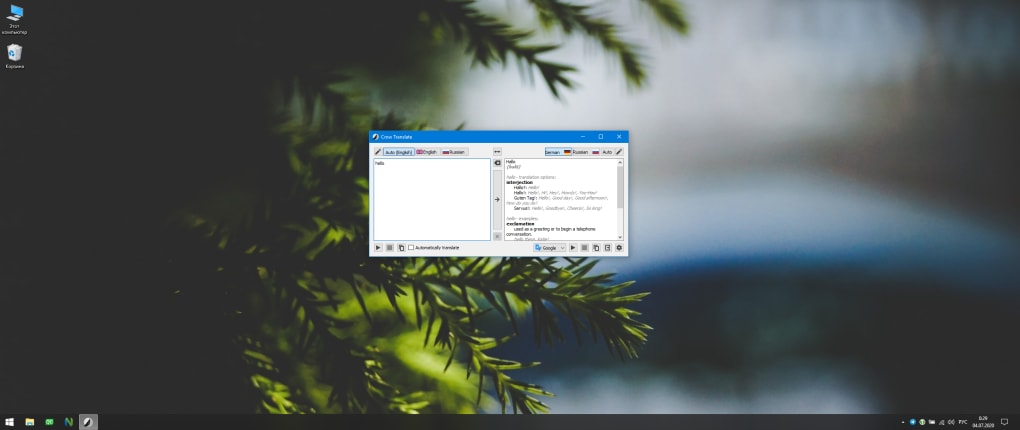
Crow Translate goes beyond merely providing a literal translation; it aims to foster a deeper understanding of the words and phrases you query. When you use the hotkey support or manually enter text, especially for single words, the application often provides an in-depth explanation in a dictionary-like manner.
This includes:
- Part of Speech Classification: Knowing whether a word is a noun, verb, adjective, or adverb is crucial for proper grammatical understanding and usage in the target language.
- Multiple Translations/Meanings: Many words have different meanings depending on the context. Crow Translate can display various possible translations, allowing you to choose the most appropriate one.
- Contextual Usage Examples: Perhaps the most valuable aspect is the inclusion of example sentences or phrases demonstrating how the word is used in real-world contexts. This moves beyond abstract definitions and provides practical insights into usage, nuances, and common collocations.
This dictionary functionality is incredibly beneficial for language learners who need to grasp the full spectrum of a word’s meaning and usage, as well as for professionals who require precise and contextually accurate translations. It effectively combines the utility of a translator with the educational depth of a dictionary, all within a single, streamlined interface.
Tailored for Your Needs: Customization and User Experience
Crow Translate understands that individual users have unique preferences and requirements. Its design reflects this understanding, offering intuitive customization options that enhance the overall user experience and adapt the tool to individual workflows.
Effortless Language Switching with Destination Lists
One of the stand-out features highlighted in the user feedback and application description is the ability to create and manage a list of “destination languages.” This seemingly simple feature offers profound benefits for users who frequently work with multiple languages.
Imagine you are a polyglot who regularly translates between English, Spanish, German, and Japanese. Instead of having to navigate through a long dropdown menu to select your target language each time, Crow Translate allows you to pre-select your most frequently used destination languages. These can then be toggled with a single mouse click or a quick keyboard shortcut.
The advantages are clear:
- Accelerated Workflow: Eliminates repetitive menu navigation, saving time and mental effort.
- Personalized Experience: The tool adapts to your specific linguistic needs, making it feel more tailored and efficient.
- Ideal for Multilingual Environments: Perfect for international teams, students of multiple languages, or anyone who regularly jumps between different linguistic contexts.
This feature exemplifies Crow Translate’s commitment to practical utility, recognizing and solving a common pain point for multilingual users.
A User Interface Designed for Clarity
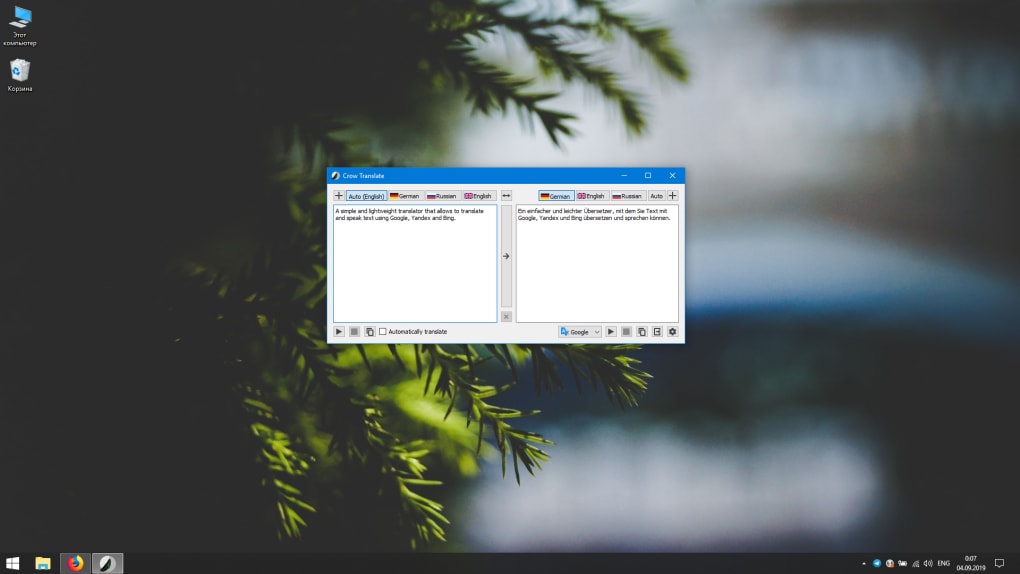
Crow Translate’s user interface (UI) is a masterclass in minimalist design. It follows a straightforward, two-pane layout:
- Left Panel: Dedicated to your source text. This is where you either type, paste, or have text automatically appear after using the hotkey feature.
- Right Panel: Displays the translation. The translated text appears almost instantly, making the interaction fluid and responsive.
Beyond this core layout, the interface remains uncluttered, focusing purely on the translation task. Essential controls like language selection dropdowns, the ‘Play’ button for text-to-speech, and settings are intuitively placed. This minimalist approach ensures:
- Ease of Use: New users can grasp the functionality within moments, requiring no steep learning curve.
- Reduced Distraction: The clean design keeps your focus on the text, preventing cognitive overload.
- Consistent Experience: The straightforward layout makes it easy to use across different contexts, whether translating a single word or a long paragraph.
The combination of a clean UI with powerful backend functionality makes Crow Translate a joy to use.
Why Choose Crow Translate? A Summary of Benefits and Considerations
Crow Translate stands out as a formidable contender in the world of desktop translation tools. Its blend of open-source ethos, technical efficiency, and user-centric features creates a compelling package for anyone seeking a reliable language assistant.
Pros and Minor Limitations
Pros:
- Straightforward and Minimalist Interface: Easy to learn and use, reduces visual clutter.
- Hotkey Support: Enables seamless, on-the-fly translation from any application, significantly boosting productivity.
- Integrated Text-to-Speech Function: Provides an auditory experience for translations, aiding accessibility, language learning, and hands-free consumption of content.
- In-depth Dictionary-Like Definitions: Offers more than just translation, including parts of speech, multiple meanings, and contextual examples for richer understanding.
- Multiple Translation API Integration: Leverages Google, Yandex, and Bing for high accuracy, reliability, and broad language support.
- Lightweight and Efficient: Built with C++ / Qt, ensuring fast performance and minimal system resource consumption.
- Open-Source and Free: Transparent development, community-driven improvements, and no cost to the user.
- Customizable Destination Language List: Enhances efficiency for users who frequently switch between specific target languages.
Cons:
- OS Limitations on Hotkeys: The reference content notes that “Some key sequences aren’t available due to OS limitations.” While this is a minor drawback, it means that certain preferred hotkey combinations might be unavailable depending on your operating system (e.g., Windows, Linux). Users may need to experiment to find an optimal, non-conflicting key combination. However, the ability to customize hotkeys largely mitigates this issue, as users can simply choose alternatives.
- Requires Internet Connection: As it relies on external translation APIs, an active internet connection is necessary for its core translation functionality. Offline translation is not a feature of Crow Translate.
Despite the minor hotkey limitation, the overwhelming array of benefits makes Crow Translate an exceptionally attractive option for Windows users.
Technical Specifications and Accessibility
For those interested in the technical specifics, Crow Translate maintains a lean profile:
- License: Free (Open-Source)
- Latest Version (as of reference): 2.6.2
- Last Update (as of reference): July 20, 2021 (Note: Open-source projects are often updated frequently; newer versions might be available).
- Platform: Primarily Windows, though being built on Qt means it can potentially be compiled for other platforms like Linux with varying degrees of official support.
- OS: Windows 10 (and likely compatible with other recent Windows versions)
- Language: English (and supports a vast array of translation languages)
- Size: Approximately 21.93 MB (very compact for its features)
- Developer: Shatur95 (a testament to individual developer ingenuity within the open-source community)
- Downloads (as of reference): 2.9K last month’s downloads, 133 total downloads on PhanMemFree.org (This indicates a healthy user base and ongoing interest).
Crow Translate’s commitment to being a free, open-source tool further amplifies its accessibility. Users are not locked into proprietary ecosystems or subscription models. It’s a tool built by the community, for the community, ensuring that high-quality language translation remains available to everyone.
In conclusion, Crow Translate offers a compelling blend of speed, accuracy, and intuitive design. Its seamless integration into the desktop environment through hotkey support, coupled with advanced features like text-to-speech and dictionary-like definitions, makes it an exceptionally powerful utility. For anyone seeking to effortlessly navigate the complexities of global communication and content, Crow Translate from PhanMemFree is not just a translator; it’s an intelligent companion that empowers you to understand and be understood across languages.
File Information
- License: “Free”
- Version: “2.6.2”
- Latest update: “July 20, 2021”
- Platform: “Windows”
- OS: “Windows 10”
- Language: “English”
- Downloads: “3K”
- Size: “21.93 MB”


