
In the rapidly evolving landscape of personal computing, Solid-State Drives (SSDs) have become indispensable components, revolutionizing data access speeds and overall system responsiveness. Unlike their mechanical predecessors, Hard Disk Drives (HDDs), SSDs offer unparalleled boot times, faster application launches, and significantly reduced loading screens for games. This leap in performance, however, comes with its own set of maintenance considerations. To ensure these high-speed storage devices continue to operate at their peak efficiency and enjoy a prolonged lifespan, dedicated management tools are essential. This is precisely where Crucial Storage Executive steps in – a powerful, free utility application developed by Micron Technology, designed specifically for users of Crucial SSDs.
Crucial Storage Executive serves as a comprehensive dashboard for your solid-state drives, offering a suite of functionalities ranging from in-depth health monitoring to advanced performance optimization and critical troubleshooting capabilities. It acts as a dedicated guardian for your Crucial SSD, providing insights into its operational status and empowering users with tools to proactively manage and enhance their investment. While it stands out as a robust solution for a specific range of Crucial SSD models, understanding its full scope, its unique features, and its inherent limitations is key to leveraging its power effectively within your system. This article will delve into the intricacies of Crucial Storage Executive, exploring its core functionalities, its impact on SSD longevity and performance, and how it compares within the broader ecosystem of storage management tools.
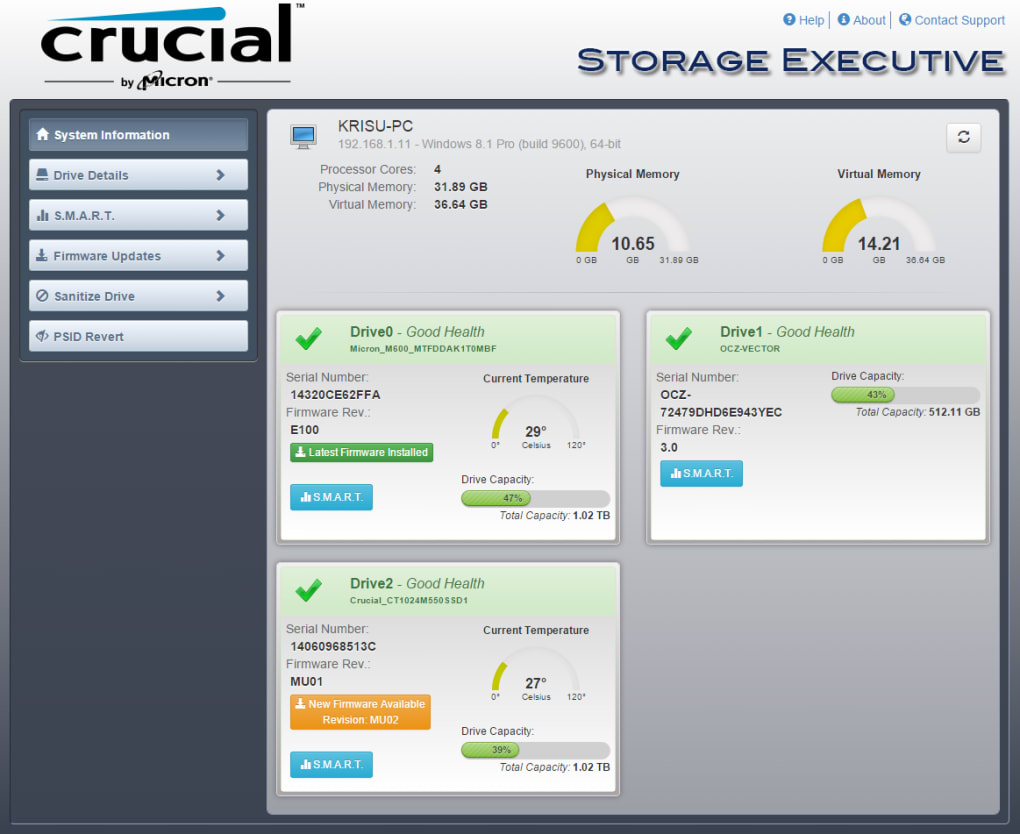
Understanding Crucial Storage Executive: Your SSD’s Best Ally
At its heart, Crucial Storage Executive is more than just a simple information display; it’s an intelligent control center tailored for Cruicial’s solid-state drives. Developed by Micron Technology, a global leader in memory and storage solutions, this application offers an intuitive interface that simplifies complex diagnostics and optimization tasks. For many PC users, the concept of SSD maintenance might seem abstract – after all, these devices are lauded for their robustness and lack of moving parts. However, like any sophisticated piece of technology, SSDs benefit greatly from regular oversight and specific optimization strategies to counteract performance degradation over time and ensure data integrity.
The primary objective of Crucial Storage Executive is to provide users with a transparent view into their SSD’s operational health and performance metrics. This is crucial for preventing potential issues before they escalate into data corruption, permanent drive damage, or significant slowdowns. Without such a tool, users might only become aware of problems when their system starts exhibiting noticeable performance dips or, worse, when data loss occurs. By centralizing vital information and offering actionable insights, the application empowers users to take a proactive stance in managing their storage.
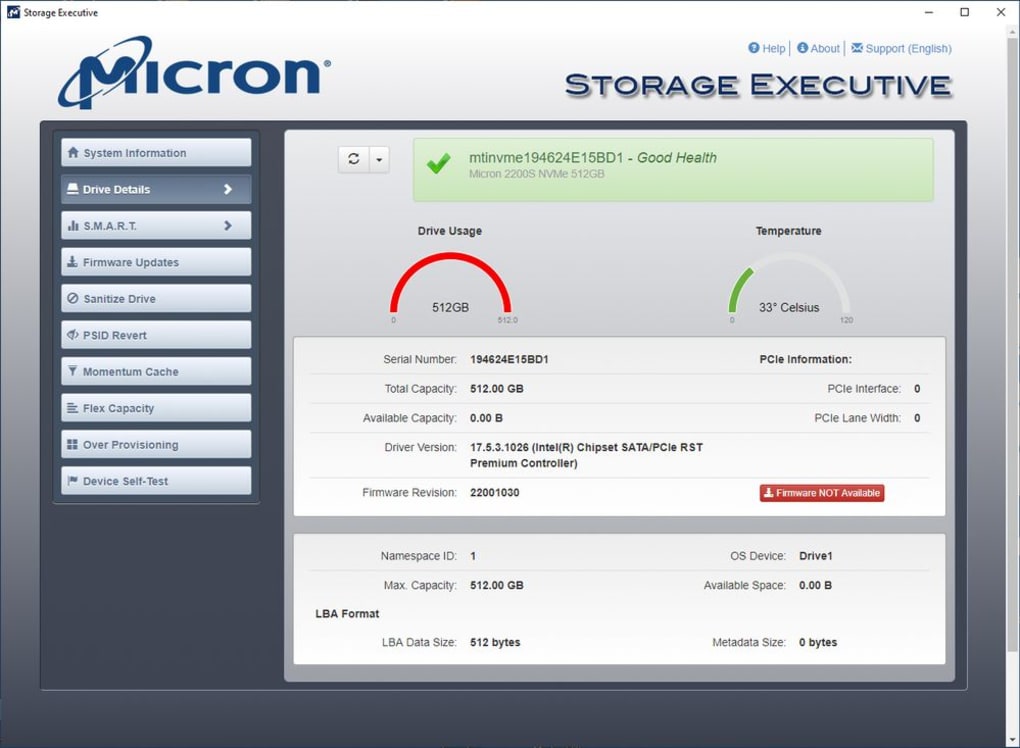
From the moment you launch Crucial Storage Executive, you are greeted with a dashboard-like interface that aims for clarity and ease of navigation. This design philosophy ensures that both novice and experienced users can quickly access the information they need. Key sections such as “System Information” provide an overview of your computer’s configuration, while “Drive Details” offers specific information about your installed Crucial SSDs. More technical data, like “S.M.A.R.T.” (Self-Monitoring, Analysis, and Reporting Technology) attributes, are presented in an accessible manner, allowing users to interpret complex health indicators without needing to be an expert in storage diagnostics.
Beyond mere reporting, the application also serves as a gateway to critical maintenance functions. It offers mechanisms for keeping your SSD’s firmware up-to-date, a process vital for ensuring compatibility, addressing known bugs, and often unlocking performance enhancements. Furthermore, features designed to reduce “redundant writes” contribute directly to extending the physical lifespan of the SSD’s NAND flash memory cells. By consolidating these disparate functions into a single, user-friendly interface, Crucial Storage Executive streamlines the process of SSD care, transforming what could be a daunting task into a manageable routine. It truly positions itself as an indispensable companion for anyone looking to maximize the performance and longevity of their Crucial SSD.
Unlocking Full Potential: Key Features and Optimization Tools
The real power of Crucial Storage Executive lies in its comprehensive suite of features, which extend far beyond basic monitoring to offer advanced optimization and troubleshooting capabilities. These tools are meticulously designed to extract the utmost performance from your Crucial SSDs while simultaneously working to prolong their operational life.
Comprehensive Drive Monitoring and Diagnostics
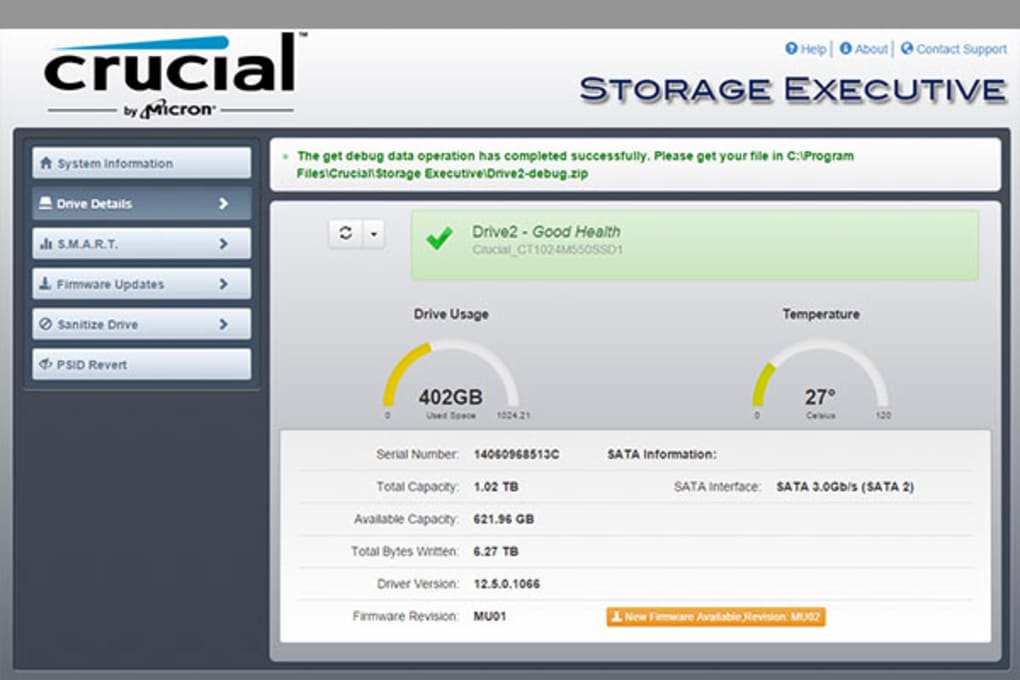
One of the most immediate benefits of Crucial Storage Executive is its ability to provide real-time, in-depth monitoring of your SSDs. The “S.M.A.R.T.” (Self-Monitoring, Analysis, and Reporting Technology) feature is a cornerstone of this capability. S.M.A.R.T. attributes are essentially a set of standardized metrics that provide a glimpse into the drive’s internal health. Crucial Storage Executive interprets these complex data points and presents them in an easily digestible format, allowing users to understand critical aspects such as:
- Overall Health Status: A quick indicator of the drive’s general well-being.
- Temperature: Monitoring the operating temperature is vital, as excessive heat can degrade performance and reduce lifespan. The tool allows users to keep an eye on this metric and ensure their SSD operates within optimal thermal ranges.
- Error Rates: Detects potential issues like read/write errors, which could indicate failing sectors or impending drive failure.
- Wear Leveling: SSDs distribute writes evenly across all memory blocks to prevent premature wear on specific cells. The tool provides insights into the wear-leveling status, indicating how much life is left in the drive based on its usage patterns.
- Life Remaining/Endurance: Often expressed as a percentage, this gives users a clear idea of how much “write endurance” their SSD has consumed.
Beyond S.M.A.R.T., the “Drive Details” section verifies essential information such as the model number, serial number, firmware version, and total storage capacity. This granular level of detail is invaluable for diagnostics, warranty claims, or simply ensuring you have the correct information about your hardware.
Performance Optimization Through Momentum Cache
A standout feature that significantly boosts performance is Momentum Cache. While not explicitly detailed as “Momentum Cache” in the original pros section, “enhancing momentum caches” is listed. Momentum Cache is an intelligent caching technology that leverages a portion of your system’s DRAM (Random Access Memory) to enhance burst performance for your Crucial SSD. When enabled, data writes are temporarily buffered in the faster DRAM before being committed to the slower NAND flash storage. This dramatically accelerates write operations, especially during intensive tasks like large file transfers, application installations, or heavy multitasking.
The benefits of Momentum Cache include:
- Faster Write Speeds: Users will experience noticeably quicker write operations, leading to a more responsive system overall.
- Improved Responsiveness: By reducing the time it takes for the SSD to process write commands, the entire system feels snappier.
- Reduced Wear on SSD: By intelligently managing write operations and consolidating small writes, Momentum Cache can potentially reduce the number of direct writes to the NAND flash, thereby contributing to the SSD’s longevity.
Crucial Storage Executive provides an easy toggle to enable or disable Momentum Cache, allowing users to experiment and find the optimal configuration for their specific workload. However, it’s worth noting that like any caching mechanism, it comes with a small risk: in the event of a sudden power loss, any data buffered in DRAM that hasn’t yet been written to the SSD could be lost. For most users, the performance gains far outweigh this minimal risk, especially in systems protected by uninterruptible power supplies (UPS).
Firmware Updates and Drive Cleaning Functions
Keeping your SSD’s firmware updated is as critical as updating your operating system or device drivers. Firmware updates often introduce performance improvements, bug fixes, enhanced compatibility, and even new features. Crucial Storage Executive simplifies this process, allowing users to check for and apply the latest firmware versions directly from the application, eliminating the need to search for downloads manually.
Additionally, the tool includes several “cleaning functions” aimed at maintaining performance and data security:
- Sanitize Drive: This is a crucial feature for data security. The Sanitize Drive function securely erases all data on the SSD, rendering it unrecoverable. This is invaluable when preparing to sell an SSD, repurpose it, or in situations where malware infection necessitates a complete wipe. Unlike a simple format, a sanitize operation performs a secure erase, which is essential for ensuring sensitive data is permanently removed.
- PSID Revert: This function addresses a specific, yet critical, issue where an SSD might become locked by Windows or other applications, rendering the volume unusable. The PSID (Physical Security ID) revert allows users to regain control of their drive by using the unique PSID printed on the drive’s label to restore factory settings related to encryption, effectively unlocking the drive. This is an advanced feature that can save users from potentially losing access to their storage.
- Reduce Redundant Writes: The application offers recommendations and functionalities to minimize unnecessary writes to the SSD. By reducing these redundant operations, the tool directly contributes to preserving the limited write cycles of the NAND flash memory, thereby extending the overall life of the drive. This includes advice on disabling unnecessary Windows features that perform frequent background writes.
Encryption Password Management
For users leveraging the self-encrypting capabilities of their Crucial SSDs, Crucial Storage Executive provides the ability to reset encryption passwords. This is a vital security feature, offering peace of mind that even if the drive falls into the wrong hands, the data remains inaccessible without the correct credentials. The ability to manage these passwords within a dedicated utility simplifies what could otherwise be a complex security task.
By combining these monitoring, optimization, and security features into a single, intuitive platform, Crucial Storage Executive empowers users to maintain their SSDs in optimal condition, ensuring both peak performance and prolonged operational life.
Evaluating the Executive: Pros, Cons, and User Experience
A thorough evaluation of Crucial Storage Executive necessitates a balanced look at its strengths, its limitations, and the overall experience it delivers to the user. While it offers undeniable benefits for Crucial SSD owners, awareness of its specific scope is important for managing expectations.
The Advantages: Why Crucial Storage Executive Shines
Crucial Storage Executive boasts several compelling advantages that make it a valuable tool for its target audience:
- Easy-to-Navigate Interface: The application is designed with user-friendliness in mind. Its dashboard-like layout logically organizes information and functions, making it accessible even for users who are not tech-savvy. Navigating through System Information, Drive Details, S.M.A.R.T. data, and various utility functions is straightforward, minimizing the learning curve. This ease of use encourages regular maintenance, ensuring users can quickly check their SSD’s status without feeling overwhelmed.
- Comprehensive SSD Health Monitoring: As detailed earlier, the ability to monitor the SSD’s health in real-time through S.M.A.R.T. attributes, temperature readings, and wear-leveling indicators is a major pro. This proactive approach allows users to identify potential issues early, preventing data loss or critical failures. Understanding the lifespan of the SSD helps in planning for future upgrades or backups.
- Helps Prolong SSD Life: By offering features like reducing redundant writes and intelligent caching (Momentum Cache), the utility actively contributes to extending the physical lifespan of the SSD. Minimizing wear on NAND flash cells means users can enjoy their high-performance storage for a longer period, maximizing their investment.
- Performance-Boosting Features: Momentum Cache is a significant performance enhancer, offering tangible improvements in write speeds and overall system responsiveness. The application also provides recommendations on disabling unnecessary background processes, further optimizing the SSD’s performance by reducing frivolous read/write cycles. These features ensure the SSD always operates at its peak potential.
- Critical Troubleshooting Capabilities: Functions like PSID Revert and Sanitize Drive are invaluable for specific, yet critical, scenarios. PSID Revert can save a drive from being permanently locked due to encryption issues, while Sanitize Drive offers a robust solution for secure data erasure, essential for privacy and security. The ability to update firmware easily also falls into this category, ensuring the drive benefits from the latest stability and performance enhancements.
- Free of Charge: Despite its advanced features, Crucial Storage Executive is available completely free, making it an accessible and attractive option for all Crucial SSD owners. This removes any financial barrier to proper SSD maintenance.
The Limitations: Where It Falls Short
Despite its robust feature set, Crucial Storage Executive does come with certain limitations that users should be aware of:
- Does Not Support All Crucial SSD Models: This is arguably the most significant limitation. The utility is designed specifically for a select range of Crucial SSD models. Users with older or very new, specialized Crucial drives might find that their hardware is not recognized or fully supported by the application. This necessitates checking compatibility before downloading, which can be a point of frustration for some users who expect universal support for a brand’s products. This exclusivity means some Crucial customers may still need to rely on generic SSD tools.
- Lacks Disk Management Features: Crucial Storage Executive is primarily focused on the internal health and optimization of the SSD itself, not on the management of disk partitions or volumes. It cannot create, delete, resize, or move partitions. For these tasks, users will need to download and install a separate disk management application, such as MiniTool Partition Wizard or the built-in Windows Disk Management tool. This adds an extra step and potentially another piece of software to manage for users who require comprehensive disk control. This limitation means it’s not an all-in-one storage utility, but rather a specialized SSD maintenance tool.
- Proprietary Nature: While being brand-specific is the reason it exists, it means it offers no functionality for SSDs from other manufacturers (e.g., Samsung, Western Digital, Kingston). Users with mixed-brand SSD setups will need multiple utilities to manage all their drives.
User Experience
The user experience with Crucial Storage Executive is generally positive due to its clean and intuitive design. The dashboard provides an at-a-glance summary, and drilling down into specific sections is straightforward. Performance monitoring data is presented clearly, and optimization toggles (like Momentum Cache) are easy to enable or disable. The process for firmware updates is also streamlined. However, the lack of an integrated disk management solution means users might occasionally have to switch between applications for comprehensive storage management, which can break the workflow. Despite this, for its intended purpose of Crucial SSD optimization, the experience is largely seamless and effective.
In conclusion, Crucial Storage Executive is an excellent, free utility for those with supported Crucial SSDs, offering critical monitoring, performance enhancements, and security features. Users simply need to be mindful of its brand-specific nature and its lack of partition management capabilities.
Navigating the Ecosystem: Alternatives and Complementary Tools
While Crucial Storage Executive provides an excellent, specialized solution for Crucial SSDs, it operates within a broader ecosystem of storage management tools. Understanding its position relative to other utilities, both brand-specific and generic, can help users build a comprehensive toolkit for their storage needs. Since Crucial Storage Executive is designed exclusively for Crucial SSDs and lacks disk management features, users often find themselves needing complementary software or alternative solutions for other drives or broader tasks.
Brand-Specific SSD Dashboards
Many SSD manufacturers offer their own proprietary software suites, similar to Crucial Storage Executive, tailored to their specific hardware. These tools often provide similar functionalities like health monitoring, performance optimization, and firmware updates, but exclusively for their brand’s drives.
- Western Digital SSD Dashboard: Mentioned in the original content as an alternative, the Western Digital SSD Dashboard is a prime example. It serves as a companion program for Western Digital SSDs, offering performance monitoring, S.M.A.R.T. attribute reporting, firmware updates, and secure erase functionalities. Just like Crucial Storage Executive, it aims to optimize and maintain WD’s specific line of solid-state drives.
- Samsung Magician Software: Samsung, another major player in the SSD market, offers its “Magician” software. This powerful utility provides benchmarking, performance optimization (including OS optimization and over-provisioning management), secure erase, data migration, and comprehensive drive health status for Samsung SSDs. It’s often cited as one of the most robust brand-specific SSD tools available.
- Kingston SSD Manager: Similarly, Kingston provides its “SSD Manager” to monitor the health, status, and disk usage of Kingston SSDs. It supports firmware updates, secure erase, and offers detailed drive information.
These brand-specific dashboards are crucial for users who have invested in a particular manufacturer’s SSDs, as they are often optimized to interact directly with the drive’s controller and firmware, offering the most accurate readings and effective optimizations. However, a multi-brand setup inevitably means juggling multiple such applications.
Generic SSD Optimization and Lifetime Extension Tools
Beyond brand-specific solutions, there are also generic tools designed to optimize and extend the life of SSDs, regardless of the manufacturer.
- SSD Fresh: The original content highlights “SSD Fresh” as an option to “Increase the lifetime of your SSD.” SSD Fresh works by disabling various Windows functions that cause unnecessary write operations to the SSD, such as defragmentation (which is counterproductive for SSDs), Windows logging, timestamping, and prefetch/superfetch. By minimizing these writes, it aims to reduce wear and tear on the drive, thus prolonging its lifespan. While useful, it typically doesn’t offer the deep diagnostics or specific performance-boosting features like Momentum Cache found in brand-specific tools.
- TRIM Optimization Tools: TRIM is a command that helps an operating system tell an SSD which data blocks are no longer in use and can be wiped. While modern operating systems handle TRIM automatically, some older systems or specific configurations might benefit from dedicated TRIM optimization tools to ensure efficient garbage collection and sustained performance. These are less common as standalone apps now but are integrated into many dashboards.
Disk Management Utilities
Given that Crucial Storage Executive (and many other brand-specific SSD dashboards) lack disk management capabilities, complementary tools in this category are often essential.
- MiniTool Partition Wizard: Explicitly mentioned in the original content, MiniTool Partition Wizard is a popular third-party disk partition manager. It allows users to create, delete, resize, move, merge, split, format, and copy disk partitions without data loss. It’s an invaluable tool for organizing drive space, managing multiple operating systems, or preparing new drives.
- Windows Disk Management: Built directly into Windows, this utility provides basic disk management functions. Users can initialize new disks, create and format partitions, assign drive letters, and extend/shrink volumes. While it’s a fundamental tool, its capabilities are more limited compared to third-party solutions.
- Other Partition Managers: There are numerous other free and paid partition management tools available, such as EaseUS Partition Master, AOMEI Partition Assistant, and GParted (for Linux-based systems), each offering varying levels of functionality and user interfaces.
Driver Management
The “Western Digital NVMe Driver” is also listed in the original content’s alternatives. While not a direct alternative to a full SSD dashboard, dedicated NVMe drivers are crucial for ensuring optimal performance and compatibility for NVMe-based SSDs. These drivers facilitate efficient communication between the operating system and the high-speed NVMe controller, often leading to better performance than generic inbox drivers provided by the OS. Keeping these drivers updated is a key part of overall SSD maintenance.
In summary, Crucial Storage Executive is a specialized, effective tool for its niche. However, a complete storage management strategy often involves a combination of tools: the brand-specific dashboard for deep insights and optimization, a generic lifespan extension tool if desired, and a robust partition manager for broader disk organization. This multi-tool approach ensures that all aspects of your storage, from health to partition layout, are efficiently managed.
Conclusion: A Must-Have for Crucial SSD Owners
In the dynamic world of PC hardware, Solid-State Drives have cemented their position as a cornerstone of modern system performance. Their ability to deliver blazing-fast data access transforms the user experience, from instantaneous boot-ups to fluid application handling and rapid file transfers. However, to truly harness and sustain this performance over the long term, diligent maintenance and insightful management are paramount. It is in this critical domain that Crucial Storage Executive proves itself as an indispensable utility for anyone owning a supported Crucial SSD.
Developed by Micron Technology, a respected name in the semiconductor industry, Crucial Storage Executive offers a meticulously crafted set of tools designed to monitor, optimize, and troubleshoot your Crucial SSDs. Its intuitive, dashboard-like interface demystifies complex technical data, making advanced SSD management accessible to a broad spectrum of users. From real-time S.M.A.R.T. health diagnostics and temperature monitoring, which proactively flag potential issues, to crucial features like Momentum Cache that dramatically enhance write performance, the application is engineered to maximize both the speed and the longevity of your storage investment.
Beyond performance, Crucial Storage Executive provides essential functions for data integrity and security. The ability to perform secure firmware updates ensures your drive benefits from the latest stability and performance improvements. Features like PSID Revert can be a lifesaver in regaining access to a locked drive, while the Sanitize Drive function offers military-grade data erasure for ultimate privacy when decommissioning or selling an SSD. The option to manage encryption passwords further underscores its commitment to user security.
While its power and utility are undeniable, it’s important for users to acknowledge its specific scope. Crucial Storage Executive is a proprietary tool, meaning its functionalities are limited to certain models of Crucial SSDs and it does not extend support to drives from other manufacturers. Furthermore, its focus remains squarely on SSD-specific diagnostics and optimization, intentionally omitting broader disk management capabilities such as partition creation, resizing, or deletion. For these tasks, users will need to complement the Executive with separate, generic disk management software like MiniTool Partition Wizard.
Despite these minor limitations, the overall value proposition of Crucial Storage Executive remains exceptionally strong. It is a robust, reliable, and, importantly, free application that equips Crucial SSD owners with the necessary tools to maintain their drives in peak condition. It empowers users to take control of their storage, ensuring sustained high performance, extended lifespan, and peace of mind regarding data integrity.
In conclusion, if you are a Crucial SSD owner seeking to optimize its performance, monitor its health, and secure your data, Crucial Storage Executive is not merely recommended – it’s a crucial component of your software arsenal. Its comprehensive feature set, coupled with its user-friendly design and zero cost, makes it an outstanding utility that helps unlock the full potential of your high-speed storage. Download it today from PhanMemFree.org and experience the difference proactive SSD management can make.
App specs
- License: Free
- Version: 7.07
- Latest update: October 6, 2021
- Platform: Windows
- OS: Windows 8 (and newer, implicitly)
- Language: English
- Size: 207.27 MB
- Developer: Micron Technology Inc
Disclaimer: Laws concerning the use of this software vary from country to country. We do not encourage or condone the use of this program if it is in violation of these laws. PhanMemFree may receive a referral fee if you click or buy any of the products featured here.
PhanMemFree Security Status: At PhanMemFree, we scan all the files hosted on our platform to assess and avoid any potential harm for your device. Our team performs checks each time a new file is uploaded and periodically reviews files to confirm or update their status. This comprehensive process allows us to set a status for any downloadable file as follows:
- Clean: It’s extremely likely that this software program is clean. We have scanned the file and URLs associated with this software program in more than 50 of the world’s leading antivirus services; no possible threat has been detected.
- Warning: This software program is potentially malicious or may contain unwanted bundled software. Based on our scan system, we have determined that these flags are possibly false positives. A false positive means a benign program is wrongfully flagged as malicious due to an overly broad detection signature or algorithm used in an antivirus program. We’d like to highlight that from time to time, we may miss a potentially malicious software program. To continue promising you a malware-free catalog of programs and apps, our team has integrated a Report Software feature in every catalog page that loops your feedback back to us. Flag any particular issues you may encounter and PhanMemFree will address those concerns as soon as possible.
File Information
- License: “Free”
- Version: “7.07”
- Latest update: “October 6, 2021”
- Platform: “Windows”
- OS: “Windows 8”
- Language: “English”
- Downloads: “663”
- Size: “207.27 MB”


