
CubicDesign Pixel Ruler is a free, lightweight Windows application designed for measuring objects directly on your screen. While seemingly simple in its functionality, this program has garnered significant attention and downloads since its release, proving its usefulness for a range of tasks. This review delves into the features, performance, and overall usability of Pixel Ruler, providing a comprehensive assessment of this helpful utility.
Functionality and Features
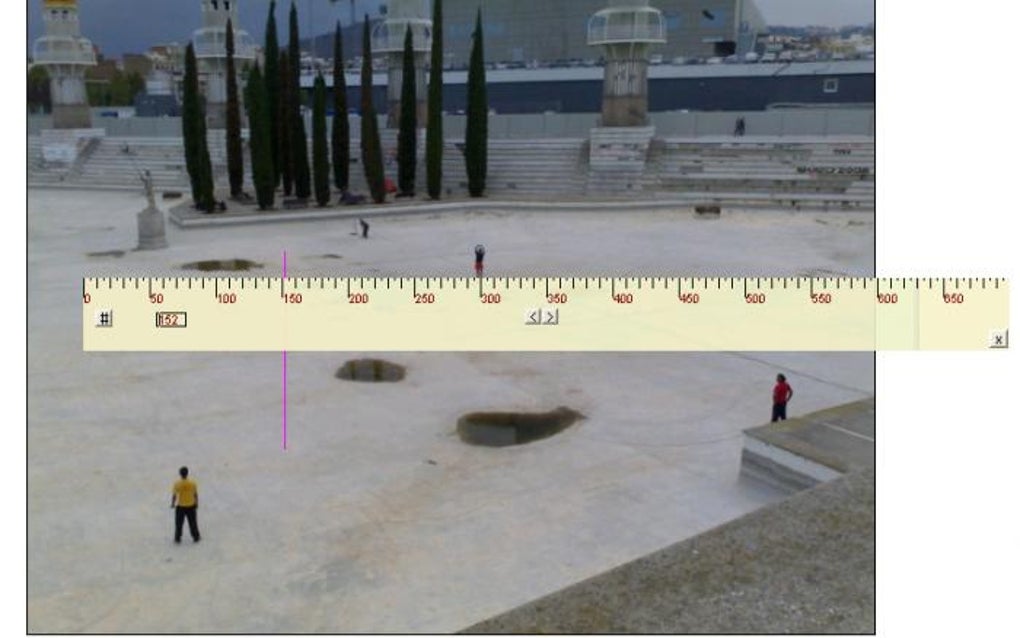
At its core, Pixel Ruler is a virtual ruler. Users can drag and resize the ruler on the screen to precisely measure the dimensions of any on-screen element, be it an image, a text box, or a specific area within a program window. The ruler displays measurements in pixels, offering a straightforward and accurate representation of digital dimensions. This simple yet effective functionality makes it a valuable tool for various professions and hobbies. For example, graphic designers might use it for precise layout measurements, while web developers could utilize it for checking element sizes during website design.
The program’s simplicity is both its strength and, to some extent, its limitation. It lacks advanced features found in more sophisticated image editing or measurement software. There are no advanced tools for calculating areas, angles, or performing complex geometrical analysis. It strictly focuses on providing precise pixel measurements on the screen. This simplicity, however, contributes to its ease of use and quick learning curve. Anyone, regardless of their technical expertise, can download and immediately begin using Pixel Ruler.
The ruler itself is adjustable in size, allowing users to measure smaller or larger elements with precision. The displayed measurements are clear and easy to read, ensuring accuracy and preventing any confusion. The unobtrusive design of the ruler ensures that it doesn’t interfere with the underlying content on the screen, allowing users to focus on the measurement task without distraction. The clean interface prioritizes functionality over aesthetics, further emphasizing the software’s straightforward approach.
User Interface and Experience
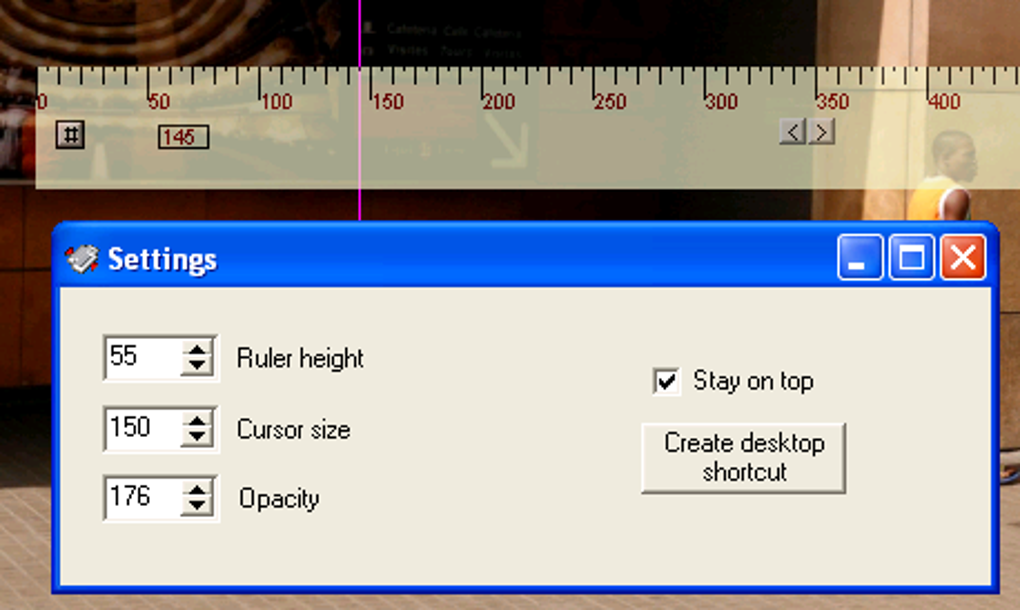
The user interface is incredibly minimalist. There’s no complex menu system or overwhelming array of options. The ruler itself is the primary and almost sole interactive element. This simplicity contributes significantly to the positive user experience. The software is intuitive and requires minimal effort to learn. The absence of unnecessary features means there’s little to distract from the core function: measuring pixels.
The program’s installation process is equally straightforward. The small download size ensures a quick download and installation, minimizing wait times for users eager to begin utilizing the tool. The uncluttered interface minimizes cognitive load, allowing users to focus entirely on the task at hand, without navigating confusing menus or settings panels. The software’s lack of complexities makes it accessible to a wide range of users, from seasoned professionals to casual users with limited technical skills.
Performance and System Requirements
Pixel Ruler is exceptionally lightweight. Its small file size and minimal system requirements ensure compatibility with a wide range of Windows systems, including older versions. This makes it an accessible tool for users with less powerful computers, something that is often overlooked in software design. The program launches quickly, operates smoothly, and does not consume excessive system resources, ensuring it runs efficiently without impacting the performance of other applications. Its resource-efficient design makes it ideal for users who need a quick and efficient measurement tool without the burden of resource-intensive software.
Comparison with Alternative Software
While Pixel Ruler excels in its simplicity and ease of use, it’s important to acknowledge the existence of alternative software that offers more advanced functionalities. Sophisticated image editing software, such as Adobe Photoshop or GIMP, includes measurement tools, but these are often embedded within a much larger and more complex suite of features. Such software often requires a steeper learning curve and more system resources. These alternatives might be overkill for users only needing basic pixel measurements.
Other dedicated screen rulers might offer additional features such as the ability to measure angles or distances in different units. However, these features often come at the cost of increased complexity and resource consumption. Pixel Ruler maintains a clear advantage in its focus on providing a fast, simple, and efficient solution for pixel measurements without unnecessary bells and whistles. The decision to use Pixel Ruler versus a more feature-rich alternative ultimately depends on the user’s specific needs and priorities.
Strengths and Weaknesses
Strengths:
- Simplicity: Its ease of use is a major strength. The intuitive interface requires minimal learning.
- Lightweight: Its small size and low system requirements ensure compatibility and efficient performance across various systems.
- Accuracy: Provides precise pixel measurements, essential for tasks requiring high accuracy.
- Free: The software is available free of charge, making it accessible to all users.
- Fast: The quick launch time and responsive operation are essential for efficient workflow.
Weaknesses:
- Limited Functionality: Lacks advanced measurement features such as angle measurement or area calculation.
- No Customization: Offers limited customization options compared to more advanced alternatives.
- Outdated: The last update was in 2011, leaving some users concerned about potential compatibility issues with newer operating systems. This lack of updates also implies no bug fixes or feature improvements in recent years.
- English Only: The software’s availability solely in English might pose a barrier for users who are not proficient in English.
Conclusion
CubicDesign Pixel Ruler is a valuable tool for anyone needing a quick and efficient way to measure pixels on their screen. Its simplicity, lightweight design, and accuracy make it an excellent choice for users who prioritize ease of use and speed. While lacking advanced features, this limitation is also its strength, ensuring a straightforward and efficient user experience. Despite its age and lack of recent updates, it still performs its primary function reliably. If your needs are confined to basic pixel measurements, then Pixel Ruler remains a strong contender. However, users seeking more advanced measurement tools or language support should explore alternative solutions. The lack of recent updates, however, remains a significant drawback and should be considered when making a decision.
File Information
- License: “Free”
- Version: “2.0.2”
- Latest update: “June 9, 2011”
- Platform: “Windows”
- OS: “Windows Vista”
- Language: “English”
- Downloads: “5.6K”
- Size: “285.70 KB”


