
CubicExplorer is a free, open-source file manager for Windows operating systems. Designed with ease of use and powerful functionality in mind, it offers a compelling alternative to the default Windows Explorer, providing enhanced features and a more efficient workflow for managing files and folders. Its intuitive interface, combined with advanced features like tabbed browsing and a built-in text editor, makes it a highly versatile tool for both casual users and experienced computer users. This in-depth review will explore CubicExplorer’s capabilities, highlighting its strengths, addressing any limitations, and providing an overall assessment of its suitability for various user needs.
Tabbed Browsing and Enhanced Navigation
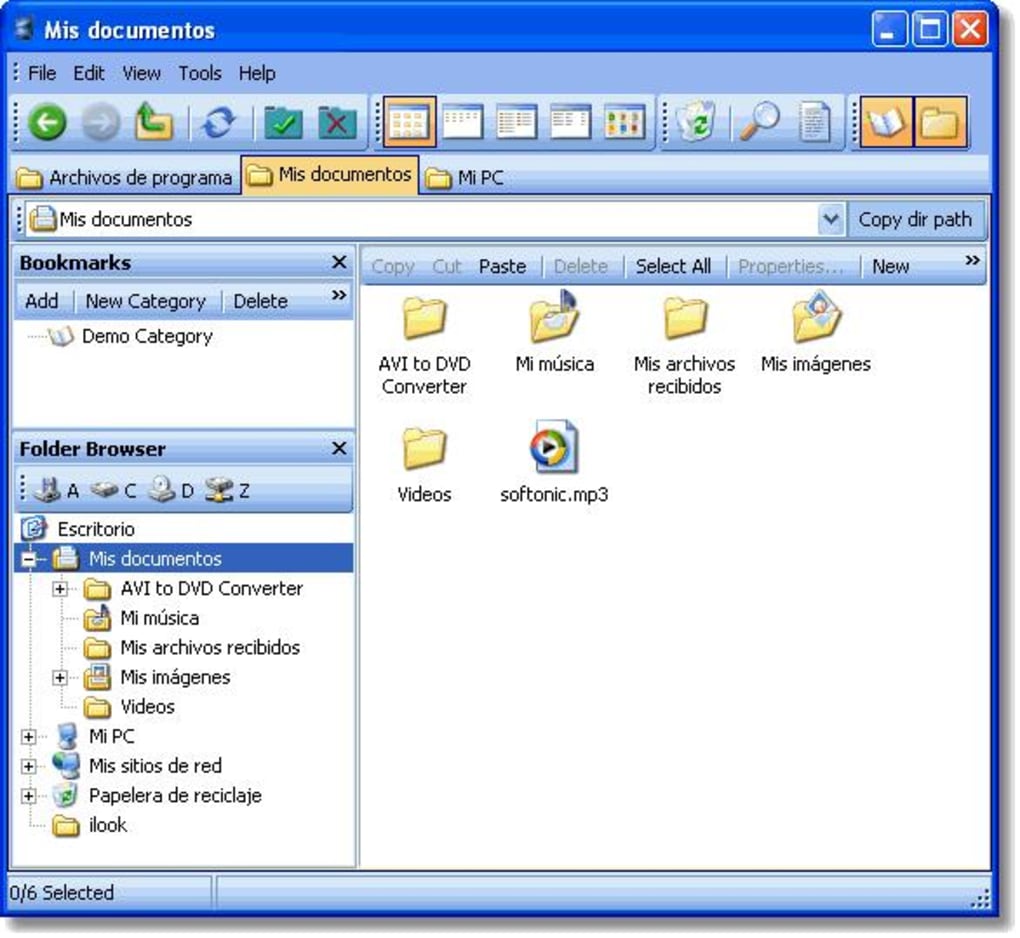
One of CubicExplorer’s standout features is its implementation of tabbed browsing, a feature borrowed from web browsers and adopted here to greatly improve file management efficiency. Instead of navigating between multiple folders through separate windows, users can open numerous directories simultaneously within individual tabs, much like browsing different web pages. This allows for quick and easy comparison of file contents across various locations, streamlined file transfers (drag-and-drop between tabs), and a significant reduction in window clutter. This is particularly beneficial when working with multiple projects or large file sets that require frequent cross-referencing.
The application also offers comprehensive navigation capabilities. Beyond the standard folder hierarchy, CubicExplorer includes a robust bookmarking system, allowing users to save frequently accessed folders for quick access. This significantly reduces the time spent navigating through deep folder structures, particularly useful for users with a complex file organization system or those frequently accessing specific directories. The bookmark system is further enhanced by the ability to organize bookmarks into categories, making it easy to locate specific saved folders within a comprehensive bookmark collection.
Furthermore, a tree view provides an alternative visual representation of the file system hierarchy, enhancing navigation further. This supplemental view allows for quick identification and access to specific directories within the overall file structure, offering a flexible and customizable approach to browsing files and folders. The customizable layout of these views—the tabbed browser, the bookmark window, and the tree view—allows users to arrange the interface optimally to suit their personal workflow preferences.
Built-in Text Editor and File Handling Features
CubicExplorer integrates a versatile built-in text editor, enhancing its capabilities beyond simple file management. This editor supports syntax highlighting for various programming and scripting languages, making it a useful tool for programmers or anyone working with code files. This eliminates the need to switch to a separate text editor, enhancing workflow efficiency significantly. The syntax highlighting feature aids readability and code comprehension, improving both productivity and accuracy.
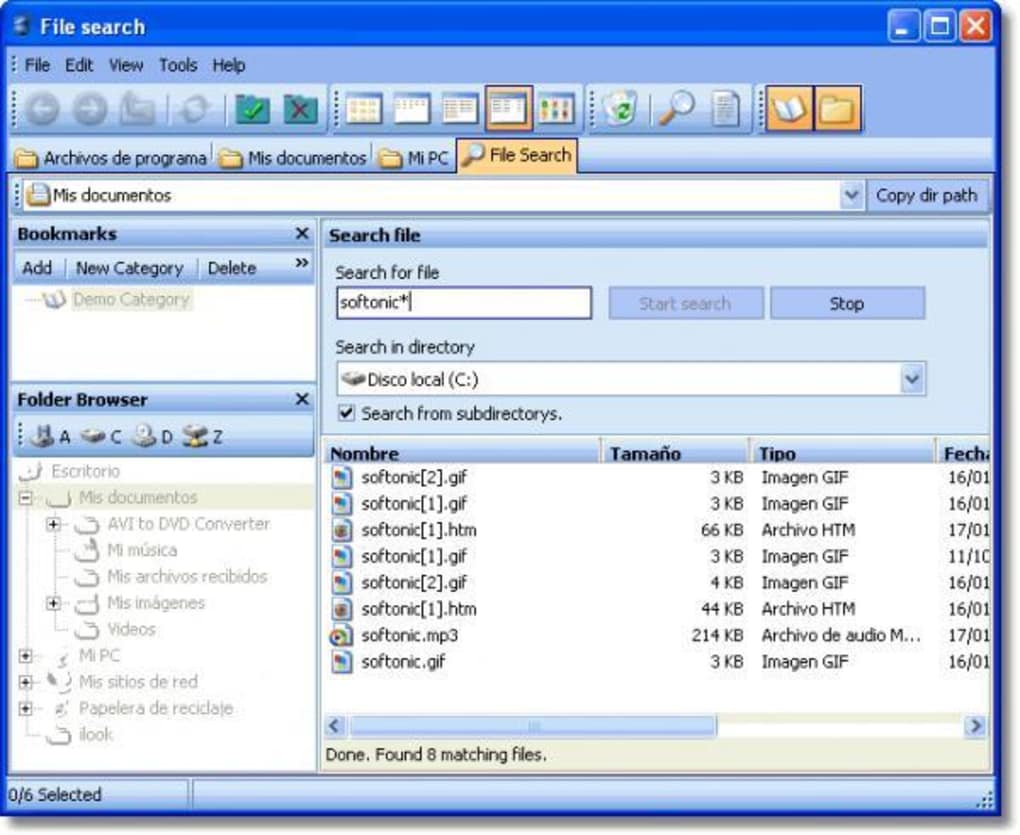
The program also includes a powerful file search function. While not as comprehensive as some dedicated search utilities, it provides efficient searching within the currently opened folders and the entire file system, depending on user configuration. This feature is greatly aided by the thumbnail display option, providing a quick visual identification of image files without the need to open them individually. The thumbnail preview significantly reduces time spent sifting through files to identify the required items.
Additional helpful features include the display of free disk space directly on the interface, offering a convenient visual representation of available storage capacity. This helps in managing storage space and avoids potential problems caused by exceeding available disk space. The program also offers a one-click function to empty the Recycle Bin, streamlining this frequently needed housekeeping task.
Community Engagement and Development
A notable aspect of CubicExplorer is the significant community engagement fostered by the developer. The application features an active forum where users can report bugs, request new features, and receive prompt support from the developer. This strong developer-user interaction demonstrates a commitment to ongoing development and improvement. The forum also offers a transparent insight into the development process, allowing users to track bug fixes, feature implementations, and planned updates. This engagement is highly encouraging, suggesting a sustained commitment to refining the software and addressing user feedback. This transparency builds trust and fosters a loyal user base.
User Reviews and Comparative Analysis
User reviews consistently praise CubicExplorer’s intuitive interface and unique features like the bookmarking system and tabbed browsing. Many users find it a superior alternative to the standard Windows Explorer, particularly appreciating its efficiency enhancements and user-friendly design. The ability to save sessions—a set of open folders—is frequently highlighted as a highly useful feature, allowing users to effortlessly resume work where they left off. The built-in text editor with syntax highlighting is also appreciated by users working with various file types.
Comparing CubicExplorer to other file managers, it stands out due to its unique combination of features. While many file managers offer tabbed browsing or a built-in text editor, CubicExplorer’s integrated approach, combined with the strong community support and transparent development process, sets it apart. The active forum and the developer’s responsiveness to user feedback suggest continuous improvements and a commitment to fulfilling user needs. This continuous evolution ensures that the software remains relevant and competitive in a constantly evolving landscape of file management tools.
Limitations and Areas for Improvement
While CubicExplorer offers significant advantages, it’s crucial to acknowledge its limitations. The search function, while functional, is not as comprehensive as those found in some dedicated search tools. Additionally, some users may find the program’s initial size and occasional performance slowdowns to be drawbacks. Although not significant enough to hinder usability, these aspects may warrant attention in future updates.
The limited number of supported languages at the time of this writing is also a notable limitation. While the developer has released language files to enable community translation, broader language support would significantly increase accessibility and appeal to a wider user base. Similarly, while the available skins are clean and visually appealing, a more extensive selection of themes and customization options would enhance the user experience and allow for greater personalization. However, given the active development and community involvement, it is highly likely that some or all of these limitations will be addressed in subsequent versions.
Conclusion: A Strong Contender in File Management
CubicExplorer presents a compelling case as a powerful and user-friendly file manager. Its innovative features, such as tabbed browsing and integrated text editing capabilities, coupled with the robust bookmark system and active community support, make it a worthy alternative to the standard Windows Explorer. While some minor limitations exist, the software’s strengths significantly outweigh its weaknesses. The commitment to ongoing development and responsiveness to user feedback indicates a promising future for CubicExplorer and reinforces its position as a strong contender in the field of file management applications. For users seeking a more efficient and feature-rich file management experience, CubicExplorer warrants serious consideration. The intuitive design coupled with powerful functionalities makes it a versatile tool for users of all skill levels.
File Information
- License: “Free”
- Latest update: “March 15, 2012”
- Platform: “Windows”
- OS: “Windows XP”
- Language: “English”
- Downloads: “10K”
- Size: “3.09 MB”


