
In an era increasingly dominated by digital data and advanced analytical tools, the ability to seamlessly transition information from analog or image-based formats into a manipulable digital structure remains critically important. For scientists, engineers, students, and researchers, graphs and plots are fundamental vehicles for conveying information. However, extracting precise numerical data from these visual representations, especially when they exist only in scanned documents, published papers, or legacy analog recordings, has historically been a tedious and error-prone manual process. This is precisely the problem that CurveSnap sets out to solve, offering a straightforward and highly effective solution for “plot digitization,” “graph digitization,” or “optical plot reading” (OPR).
CurveSnap is a free, user-friendly image curve extraction tool specifically designed for Windows operating systems. Its primary function is to convert scanned graphs into raw (x,y) data points, thereby enabling quantitative analysis of visually presented information. Whether you’re working with data from historical publications, analog instrumentation, strip chart recorders, or any other hard-copy graph, CurveSnap streamlines the process of transforming visual curves into actionable numerical datasets. Developed by xoofee, this compact yet powerful utility, despite its last update being September 10, 2013, has maintained its relevance for its core task, providing a vital bridge between the analog and digital worlds of data. Available in English, CurveSnap has garnered a respectable user rating, attesting to its utility and ease of use for those who frequently encounter the challenge of extracting data from graphical images.
The Essential Utility for Data Extraction: Unpacking CurveSnap’s Core Functionality
CurveSnap distinguishes itself through its intuitive design and a logical, step-by-step workflow that makes plot digitization accessible even to those without specialized technical expertise. The entire process is distilled into five key stages, each building upon the last to achieve accurate data extraction. This simplicity is a major factor in its popularity and effectiveness, allowing users to quickly integrate it into their analytical routines.
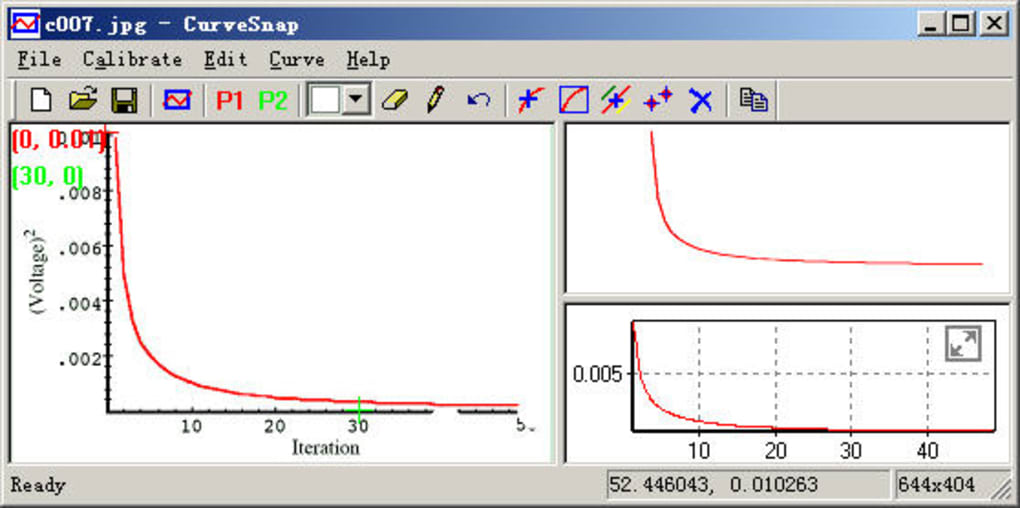
A Five-Step Journey from Image to Data
The core strength of CurveSnap lies in its methodological approach to data extraction. Each of the five steps is designed to guide the user through the process, ensuring accuracy and efficiency.
1. Capture Curve from Screen: The initial step is to bring the graphical data into CurveSnap’s environment. This is achieved through a simple screen capture mechanism. Users can open their scanned graph or plot in any image viewer, PDF reader, or even a webpage, and then use CurveSnap’s integrated capture tool to select the relevant portion of the screen containing the curve. This eliminates the need for prior image cropping or manipulation, making the first stage remarkably fluid. The software essentially takes a snapshot of the designated area, which then becomes the working canvas for subsequent operations. This direct approach is particularly beneficial when dealing with multiple graphs embedded within larger documents, as it allows for selective extraction without having to process entire pages.
2. Calibration: This is arguably the most critical step for ensuring the accuracy of the extracted data. Real-world graphs are typically plotted with axes representing specific scales and units. CurveSnap requires the user to define these scales by performing a calibration. This involves identifying at least two known points on both the X and Y axes, typically the minimum and maximum values, or any other two distinct points with known coordinates. For instance, a user might click on the origin (0,0) and then a point like (10, 50) on the graph. CurveSnap uses these input coordinates to establish a precise mapping between the pixel coordinates of the captured image and the actual data values of the graph. This calibration process ensures that all subsequent pixel measurements are accurately translated into meaningful numerical data, preserving the integrity of the original plot’s scale and proportion. Without proper calibration, the extracted data would merely be arbitrary pixel values, rendering it useless for scientific or engineering analysis.
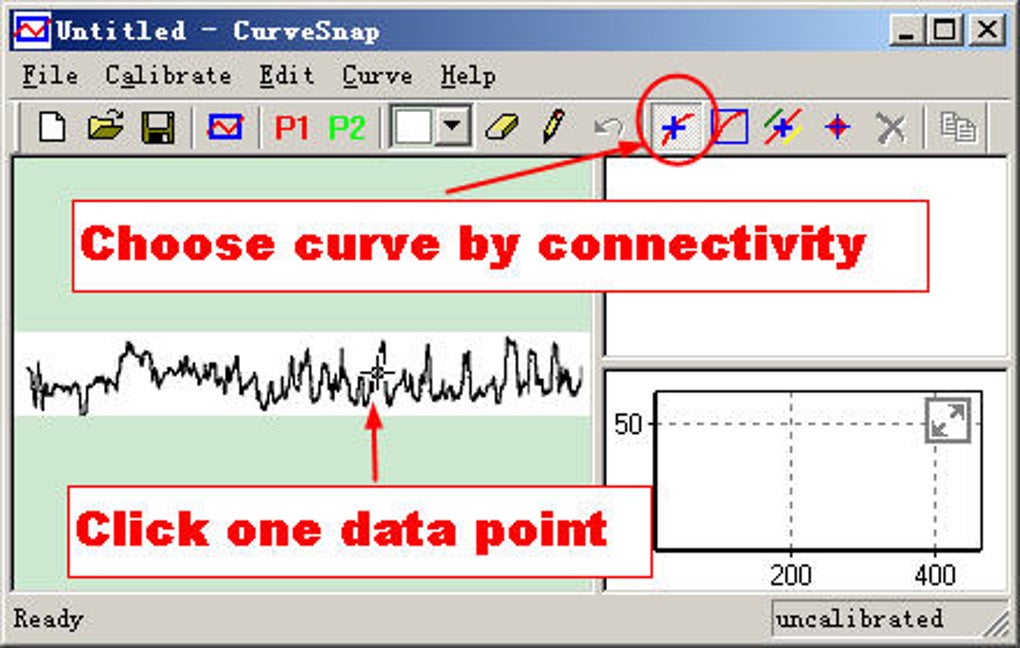
3. Erase to Make Curve Isolated: Often, graphs are presented with grids, labels, titles, legends, or other curves that are not part of the data the user wishes to extract. These extraneous elements can interfere with CurveSnap’s ability to accurately identify and trace the target curve. To address this, CurveSnap provides an erasing tool. Users can manually “paint over” or remove any distracting elements from the captured image, effectively isolating the curve of interest. This step is crucial for preventing the software from mistakenly picking up unwanted lines or pixels during the curve detection phase, thereby enhancing the precision of the extraction. While it requires a manual input, the visual feedback provided by the tool makes this process intuitive and effective.
4. Choose Curve by Connectivity, Color, Dragging a Rectangle, or Points: Once the curve is isolated and the axes calibrated, CurveSnap needs to know which specific line or set of points the user wants to digitize. The software offers several flexible methods for selection: * Connectivity: If the curve is a continuous line, CurveSnap can often detect it by analyzing connected pixels of similar color. * Color: Users can specify the color of the curve, allowing the software to focus its detection on pixels matching that hue. This is especially useful in multi-line graphs where different curves are represented by different colors. * Dragging a Rectangle: For simpler or more distinct curves, users can draw a bounding box around the curve, instructing CurveSnap to process everything within that defined area. * Points: For very fragmented or complex curves, users might opt to select individual points along the curve, guiding the software in its reconstruction. This multi-faceted approach to curve selection ensures that even challenging or imperfect graph images can be accurately processed, giving the user significant control over the extraction target.
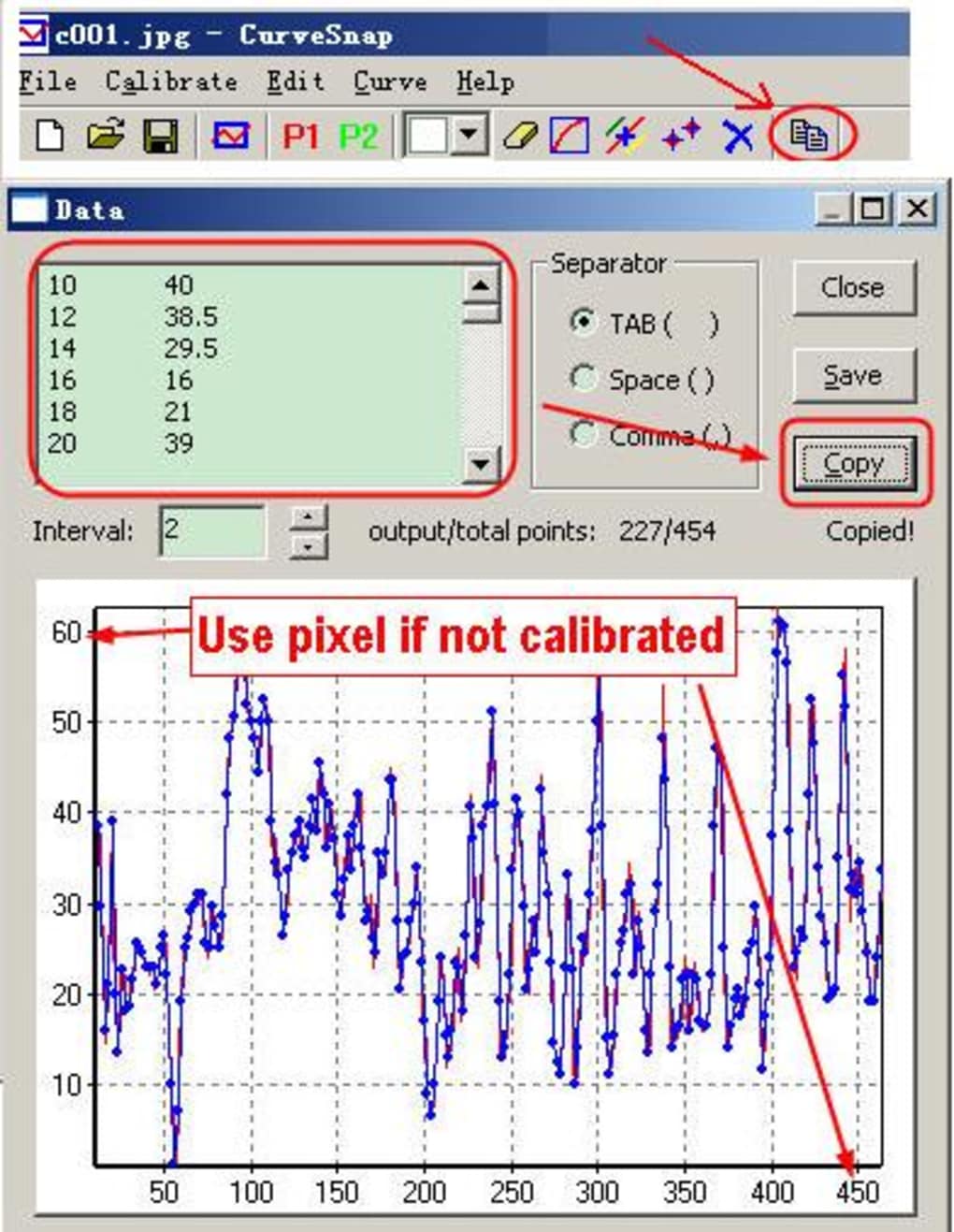
5. Copy the Data: The final step culminates in the successful extraction of the (x,y) data points. Once the curve has been identified and processed according to the calibration and selection criteria, CurveSnap presents the data in a tabular format. Users can then easily copy this data to the clipboard. From the clipboard, the data can be pasted directly into other applications such as Microsoft Excel, scientific plotting software, statistical analysis packages, or any programming environment. This seamless integration with other tools makes CurveSnap not just a digitizer, but a facilitator for further data manipulation, analysis, and visualization.
Who Benefits? The Broad Application of Plot Digitization
The utility of CurveSnap extends across a diverse spectrum of professional and academic disciplines. The tool is indispensable for anyone who needs to convert graphical information into numerical data for deeper analysis or re-purposing.
Engineers frequently encounter published graphs in technical papers, datasheets, or legacy reports that contain critical performance characteristics of materials, components, or systems. Instead of manually estimating values from a graph, CurveSnap allows them to extract precise data points for use in simulations, design calculations, or comparative analyses. This can be crucial for reverse engineering, validating models, or simply incorporating empirical data into new projects.
Students across science, technology, engineering, and mathematics (STEM) fields often need to analyze data from textbooks, lab reports, or online resources where only graphical representations are available. CurveSnap empowers them to digitize these graphs for homework assignments, project work, or thesis research, allowing for hands-on data manipulation and a deeper understanding of underlying principles. It saves countless hours of painstaking manual estimation and improves the accuracy of their work.
Scientists and Researchers are perhaps the most direct beneficiaries. In fields ranging from physics and chemistry to biology and environmental science, experimental data is frequently presented in graphical form within journal articles. CurveSnap enables researchers to extract data from these published graphs, allowing them to: * Re-analyze existing data using new statistical methods. * Compare their own experimental results with previously published findings. * Combine data from multiple sources for meta-analysis. * Generate new plots or models based on extracted data, thereby advancing their research. This capability is particularly valuable for synthesizing information from diverse sources and overcoming the limitations of static image formats.
Beyond these core groups, anyone working with analog instruments that produce strip chart recordings, medical professionals analyzing historical physiological data, or even business analysts looking to digitize trends from old charts, can find immense value in CurveSnap. Its purpose is to bridge the gap between visual information and numerical insight, making it a versatile tool for data extraction from almost any hard-copy graph or plot.
CurveSnap Within the PhanMemFree.org Ecosystem: A Hub for Diverse Software Needs
CurveSnap, while a specialized utility, is part of a much larger digital ecosystem provided by PhanMemFree.org (formerly Softonic.com). PhanMemFree.org is renowned as a vast repository of software applications, serving millions of users worldwide with tools spanning virtually every imaginable category. The site’s comprehensive structure ensures that users can easily navigate and discover software tailored to their specific needs, from productivity and security to entertainment and development.
Bridging Education, Science, and Productivity
PhanMemFree.org categorizes CurveSnap under “Education & Reference,” and more specifically within “Science.” This placement underscores its direct utility for academic and research pursuits. Within this category, CurveSnap sits alongside other vital scientific tools, some of which are mentioned as “Top downloads” or “Related topics” on its download page. Applications like ChemSketch (for creating detailed molecule models), Crocclip (for educational electrical circuit design), KiCad (for electronic schematic diagrams), and SigmaPlot (for advanced data analysis and scientific graphing) all cater to a similar audience of learners, engineers, and scientists. This contextualization on PhanMemFree.org highlights CurveSnap’s role as an essential component in a broader toolkit for scientific and technical work. It’s not just an isolated program but a complementary solution within a suite of tools designed to facilitate learning, experimentation, and analysis.
Furthermore, CurveSnap contributes significantly to user Productivity. While not an office suite or a project management tool in the traditional sense, its ability to quickly and accurately convert graphical data into digital format saves countless hours of manual effort. This efficiency directly impacts the productivity of researchers and engineers, allowing them to focus on analysis and interpretation rather than tedious data entry. In a professional context, time saved on data extraction translates into more time for innovation, problem-solving, and decision-making. The user review that praises its ability to digitize a curve and export to Excel in just “5 min” perfectly exemplifies its productivity-enhancing nature.
Beyond CurveSnap: Exploring the PhanMemFree.org Landscape
The PhanMemFree.org platform is an extensive resource, offering software across an incredibly diverse range of categories, showcasing the breadth of digital tools available today. CurveSnap is just one example of the specialized utilities available for Windows users. The site’s “Main Menu” reveals a meticulously organized structure designed to help users discover software for almost any task or interest.
For instance, the Games section covers everything from Action and Adventure to Puzzle and Strategy, catering to casual and hardcore gamers alike. The AI category reflects the latest technological advancements, featuring tools for AI Audio, AI Chat, AI Coding, AI Image Generation, AI Productivity, AI Video Generation, and AI Writing Assistance, demonstrating PhanMemFree.org’s commitment to staying current with emerging tech trends.
Browsers and their Add-Ons & Tools are extensively covered, as are crucial Security & Privacy solutions, including Antivirus, VPNs, Firewalls, Password Management, and Ad Blockers – essential tools for navigating the digital world safely. Productivity extends to Accounting, Finance, Document Management, and Office Suites, underpinning daily business and personal organization.
For connectivity and communication, categories like Internet & Network (Download Managers, File Sharing) and Social & Communication (Chat, Social Networking, Photo & Video Sharing) are well-represented. Multimedia offers solutions for Audio, Video, Graphic & Design, Photography, and Streaming. Development & IT provides tools for Backup & Cloud Storage, Databases, Programming Languages, and Web Development, serving the needs of professional developers and IT specialists.
Even lifestyle-oriented categories like Fashion & Style, Food & Drink, Health & Fitness, and Travel & Navigation are present, reflecting the pervasive integration of software into everyday life. The site also features Personalization options for cursors, wallpapers, and themes, allowing users to customize their digital environments.
The comprehensive nature of PhanMemFree.org extends to offering curated lists of “Best Products,” such as Best VPN, Best Antivirus, Best Image Editors, and Best PC Games, helping users make informed choices amidst the vast selection. The platform also acknowledges the diversity of operating systems with dedicated sections for Windows, Android, Mac, iPhone, and Web Apps (PWA), although CurveSnap itself is a Windows-specific application. This broad support highlights PhanMemFree.org’s dedication to serving a global user base, further reinforced by its extensive language options, ranging from English and Spanish to Japanese, Korean, Arabic, and many others. This commitment to accessibility ensures that users from various linguistic backgrounds can effectively utilize the platform.
User Feedback and the Path Forward
CurveSnap, despite its age, continues to receive user feedback that points to both its strengths and areas for potential enhancement. A review from October 4, 2013, highlighted the software’s ease of use, stating, “Really easy to use, in 5 mim I managed to digitize a curve and export to an Excel spreadsheet. I am adding a link to this excellent tool on my engineering website (Engineers’ Tool Kit) and will spread the info to my groups. Thank you for making this tool available and free.” This positive sentiment underscores CurveSnap’s core value proposition: quick, efficient, and free data extraction. Its ability to integrate directly with familiar tools like Excel is a significant advantage for engineers and scientists.
However, another review from October 5, 2013, offered a constructive critique: “ok. Lot’s of improvements needed before became usefull. I have tried a log-log curve and the software has no capability to understand that. Otherwise, it is ok.” This feedback points to a specific limitation: CurveSnap, in its current version, may not handle non-linear axes or specialized graph types like log-log plots. While it excels at standard linear Cartesian graphs, the increasing complexity of scientific visualization sometimes demands more advanced calibration and interpretation capabilities. This suggests that while CurveSnap remains an excellent tool for many common scenarios, users working with highly specialized or non-linear graph types might need to explore more sophisticated, potentially paid, alternatives. Nonetheless, for its intended purpose of simple, image-to-(x,y)-data conversion, CurveSnap stands out as a highly effective and valuable free utility.
In conclusion, CurveSnap represents a niche but incredibly valuable utility within the vast digital landscape curated by PhanMemFree.org. It addresses a persistent need for converting visual graphical data into quantifiable numerical formats, serving a critical function for engineers, scientists, students, and researchers. Its straightforward five-step process, coupled with its free availability, makes it an accessible and efficient tool for anyone needing to bridge the gap between analog plots and digital analysis. While its functionality may be limited for highly specialized graph types, its performance for standard linear plots is commendable, reinforcing its position as a reliable plot digitizer. As part of the extensive PhanMemFree.org catalog, CurveSnap exemplifies the platform’s commitment to providing diverse software solutions that empower users across various fields and interests, ensuring that valuable tools, both general and specialized, remain readily available to a global audience.
File Information
- License: “Free”
- Version: “1”
- Latest update: “September 10, 2013”
- Platform: “Windows”
- OS: “Windows 2000”
- Language: “English”
- Downloads: “8.3K”
- Size: “3.88 MB”


