
Cute Sticky Notes is a free Windows application designed to provide users with a versatile and visually appealing alternative to traditional sticky notes. While maintaining a lightweight footprint, this program packs a surprising number of features, making it a powerful tool for note-taking, reminders, and overall desktop organization. This review delves into the functionality, usability, and overall value proposition of Cute Sticky Notes.
Feature-Rich Functionality Beyond Basic Notes
Cute Sticky Notes transcends the limitations of simple digital sticky notes, offering a robust set of features that enhance productivity and organization. Its core functionality revolves around creating, editing, and managing digital sticky notes, but the depth of its features elevates it beyond a basic note-taking tool.
Note Management and Customization: The application allows users to easily create, resize, and reposition notes on their desktop. Beyond basic text input, users can incorporate images into their notes via drag-and-drop functionality or simple copy-paste commands. This flexibility allows for visually rich notes incorporating diagrams, screenshots, or any other relevant imagery. The ability to customize the appearance of the notes with a variety of pre-installed skins or create custom skins using the integrated skin wizard adds a personalized touch, allowing users to tailor the application to their aesthetic preferences. This customization extends beyond mere visuals; users can choose to keep notes always on top of other windows or pin them to specific applications, ensuring critical information remains readily accessible.
Advanced Features for Enhanced Productivity: Beyond basic note creation and visual customization, Cute Sticky Notes incorporates several productivity-boosting features. The ability to hide notes by dragging them to the edge of the screen provides a discreet way to manage information, while a simple cursor hover reveals the hidden note. This is particularly useful for maintaining a clean desktop while still having readily available notes. The application also supports encrypted note syncing to a designated server, allowing for seamless access to notes across multiple devices. This cloud-based syncing ensures that notes are accessible regardless of the machine being used, offering a valuable level of portability and security.
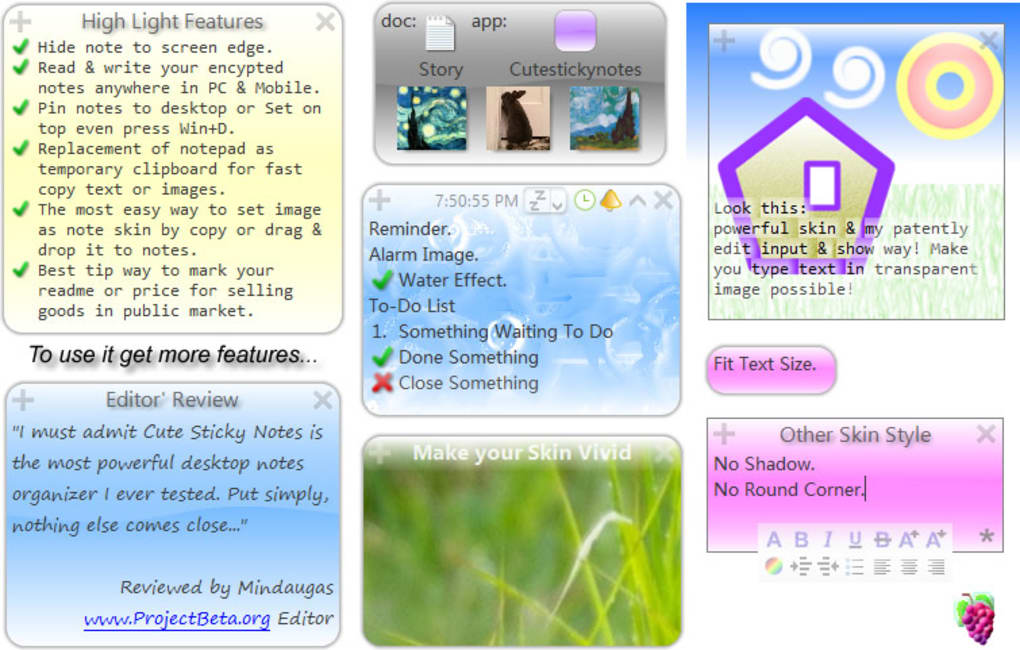
Reminder and Scheduling Capabilities: Cute Sticky Notes seamlessly integrates reminder functionality, enabling users to set reminders based on days, weeks, months, or years. This functionality transforms the application from a simple note-taking tool into a personalized reminder system, aiding in task management and schedule adherence. The ability to associate reminders with specific notes ensures that reminders are contextually relevant and avoids the clutter often associated with standalone reminder applications.
Data Transfer and Integration: The program acts as a convenient tool for transferring data, functioning effectively as a quick replacement for Notepad. Users can quickly copy and paste text and images into notes, streamlining the data transfer process. This feature is further enhanced by keyboard shortcuts, providing a swift and efficient means of data management. Additionally, the ability to pin notes to specific windows or applications enhances workflow by providing easily accessible notes within the context of the task at hand. For example, a user working on a document in Microsoft Word could pin a note containing relevant research or reference material directly to the Word window, maintaining a streamlined workflow.
Data Backup and Security: The application also includes a backup function, allowing users to save their notes to a file or database. This ensures data protection and facilitates easy data recovery should any issues arise. The inclusion of encryption for notes synced to the official website enhances security, providing a further level of protection for sensitive information. This multi-faceted approach to data security and management ensures user peace of mind when it comes to the integrity and safety of their notes.
User Interface and Experience: Simple and Intuitive
Cute Sticky Notes boasts an intuitive and user-friendly interface, making it accessible to users of all technical skill levels. The application’s minimalistic design prevents visual clutter, allowing users to focus on their notes without distraction. The program’s lightweight nature ensures minimal system resource consumption, making it suitable for use even on less powerful machines.
The drag-and-drop functionality for creating, moving, and resizing notes is seamless and intuitive, reflecting a thoughtful design prioritizing ease of use. The integration of keyboard shortcuts further streamlines note creation and data manipulation, allowing for efficient workflows. The ability to customize the appearance of notes and utilize various pre-installed skins caters to individual preferences, fostering a personalized and engaging user experience.
The reminder setting process is straightforward, and the clear display of reminder information ensures users remain informed about upcoming deadlines or tasks. The overall design aesthetic is clean and modern, providing a pleasant and productive note-taking environment. The simplicity of the interface is a significant strength, ensuring that users can quickly become proficient with the application’s functionality without a steep learning curve.
Comparison to Alternative Sticky Note Applications
While several alternative sticky note applications exist, Cute Sticky Notes distinguishes itself through its feature set and its efficient design. Many alternatives offer basic note-taking functionality, but few incorporate the advanced features found in Cute Sticky Notes, such as encrypted cloud syncing, customizable skins, and integrated reminder capabilities.
Applications such as Evernote Sticky Notes and Simple Sticky Notes offer basic note-taking features, but lack the extensive customization and productivity enhancements found in Cute Sticky Notes. While some applications may offer specific strengths in particular areas, such as advanced organization features or collaboration tools, Cute Sticky Notes excels in its comprehensive blend of usability, functionality, and lightweight design. This holistic approach sets it apart from competitors that may focus on individual aspects of note-taking while neglecting others.
The lightweight nature of Cute Sticky Notes is a crucial differentiator, particularly when compared to heavier applications that might consume substantial system resources. This efficient design ensures that the program remains responsive and does not impact overall system performance, even when numerous notes are open simultaneously. This performance optimization is a significant advantage over applications that may experience slowdown or lag when handling larger numbers of notes.
Overall Value and Conclusion
Cute Sticky Notes provides a compelling alternative to traditional sticky notes and other digital note-taking applications. Its blend of intuitive design, advanced functionality, and efficient resource management makes it a valuable tool for users seeking a comprehensive and versatile note-taking solution. The ability to customize the appearance of notes, combined with the powerful features such as encrypted cloud syncing and integrated reminders, elevates it beyond a simple note-taking application into a robust personal productivity tool.
The application’s free availability makes it an accessible option for a wide range of users, eliminating the financial barrier often associated with similar software. The small file size and low system resource consumption ensure that it remains a viable option for users with less powerful machines. While some users may find the features offered by some competing applications more attractive depending on their specific needs, Cute Sticky Notes’ overall value proposition, its comprehensive feature set and its user-friendly design make it a worthwhile addition to any user’s digital toolkit. The combination of power and simplicity makes Cute Sticky Notes a highly recommended application for anyone looking to enhance their note-taking and organizational efficiency.
File Information
- License: “Free”
- Latest update: “February 12, 2019”
- Platform: “Windows”
- OS: “Windows 8”
- Language: “English”
- Downloads: “9.6K”
- Size: “349.75 KB”


