
CuteFTP is a long-standing and widely-used File Transfer Protocol (FTP) client, designed to facilitate the seamless transfer of files between your computer and remote servers. Whether you’re a seasoned web developer, a casual user sharing files, or a business managing large data transfers, CuteFTP offers a suite of features aimed at simplifying the process, regardless of your technical expertise. This review delves into its capabilities, user experience, and compares it to alternative FTP clients available on the market.
User Interface and Ease of Use
One of CuteFTP’s strengths lies in its user-friendly interface. The design prioritizes intuitive navigation and accessibility, making it suitable for both novice and experienced users. The program employs a clear and uncluttered layout, with readily accessible tools and options organized logically. Features like a connection wizard streamline the initial setup process, guiding users through the necessary steps to connect to their FTP servers without requiring in-depth technical knowledge. This ease of use is a critical factor contributing to CuteFTP’s sustained popularity. Even users unfamiliar with FTP concepts can quickly grasp the fundamental operations and begin transferring files efficiently. The intuitive design significantly reduces the learning curve, allowing users to focus on their file transfers rather than wrestling with complex software.
The program’s features are well-integrated, preventing a cluttered or overwhelming user experience. While offering advanced features, CuteFTP avoids burying them within layers of menus, ensuring that even sophisticated functions remain easily accessible. This balance between simplicity and functionality is key to its wide appeal. The well-organized interface facilitates efficient workflow, allowing users to manage multiple connections and transfer queues effortlessly.
Core Features and Functionality
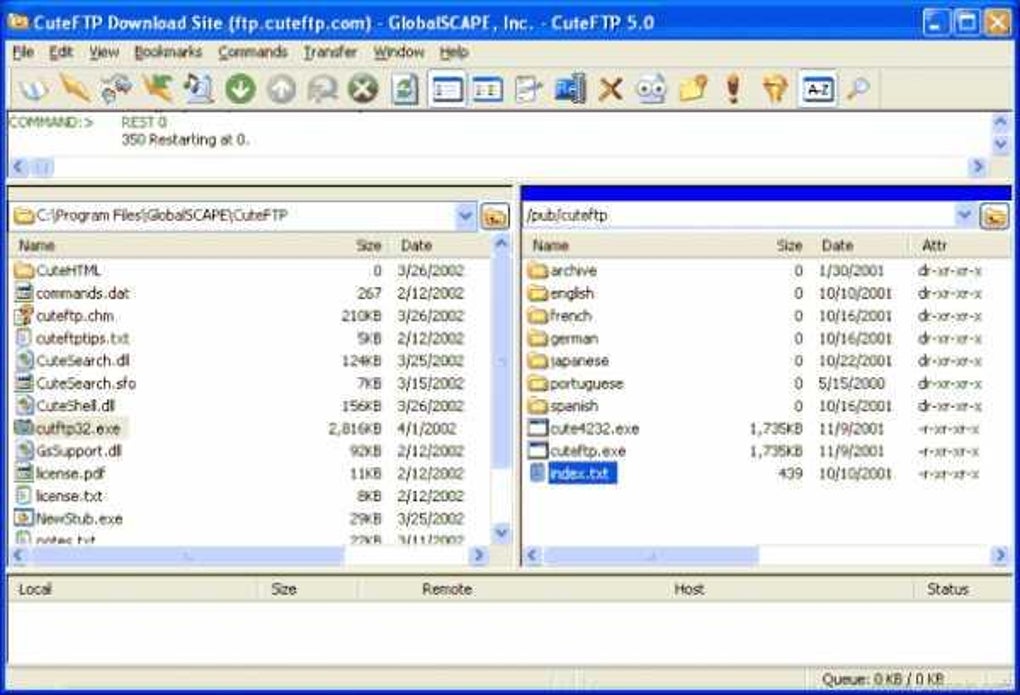
CuteFTP’s core functionality centers around secure and reliable file transfer. It supports various FTP protocols, ensuring compatibility with a broad range of servers. Beyond basic file transfers, CuteFTP provides a range of advanced features to enhance productivity and efficiency:
- Automatic Transfer Resume: This crucial feature allows interrupted transfers to seamlessly resume from where they left off, preventing data loss and saving time. This is particularly beneficial for large files or unstable internet connections.
-
Built-in HTML Editor: For web developers, the integrated HTML editor is a significant advantage, enabling direct editing of website files on the server without needing to switch between different applications. This streamlines the web development workflow and improves efficiency.
-
Transfer Queue: CuteFTP allows users to schedule multiple file transfers simultaneously, optimizing the transfer process and saving time. This feature is particularly useful when dealing with numerous files or large datasets. The queue management is intuitive, allowing easy prioritization, pausing, and resuming of individual transfers.
-
Directory Comparison: This feature simplifies the task of synchronizing files between local and remote directories, identifying differences and allowing users to selectively update files. This greatly reduces the risk of accidental overwrites or omissions during file synchronization.
-
Custom Commands: Advanced users can leverage custom commands to automate repetitive tasks, enhancing productivity and streamlining workflows. This functionality expands the program’s versatility and allows for personalized customization.
-
Firewall and Proxy Support: CuteFTP seamlessly integrates with firewalls and proxy servers, ensuring compatibility with diverse network environments. This ensures secure and reliable file transfer even in restricted network conditions.
-
Path Bookmarks: Users can save frequently accessed server paths as bookmarks, accelerating future connections and simplifying navigation. This significantly improves workflow efficiency, especially when working with multiple remote servers.
- Filtered Listings: This feature enables users to quickly locate specific files within large directories, simplifying navigation and improving efficiency. This is particularly useful when dealing with numerous files or complex directory structures.
These features collectively make CuteFTP a powerful and versatile tool, capable of handling diverse file transfer needs.
Security and Reliability
Data security is paramount when transferring files over a network. CuteFTP addresses this by incorporating robust security features:
-
Secure FTP (SFTP) Support: The client supports SFTP, a secure shell-based protocol that encrypts data during transmission, protecting sensitive information from interception. This is essential for transferring confidential data securely.
-
FTPS Support: CuteFTP also supports FTPS (FTP Secure), another secure FTP protocol that utilizes SSL/TLS encryption to secure the connection. The use of these protocols significantly enhances the security of file transfers, reducing the risk of unauthorized access or data breaches.
The program’s reliability is also a significant factor. CuteFTP has a long history of stable performance, minimizing disruptions during file transfers. The automatic transfer resume feature further contributes to its reliability, ensuring that interrupted transfers can be resumed without data loss. This consistency contributes significantly to the user experience, promoting trust and efficiency.
Comparison with Alternative FTP Clients
CuteFTP competes with numerous FTP clients, each with its own strengths and weaknesses. Some popular alternatives include FileZilla, WinSCP, and Cyberduck. While these alternatives often offer similar core FTP functionalities, CuteFTP distinguishes itself through its user-friendly interface, advanced features such as the integrated HTML editor, and robust security options. FileZilla, for instance, is known for its open-source nature and broad platform support but may not match CuteFTP’s ease of use for beginners. WinSCP offers strong SSH support and is known for its reliability but lacks the visual appeal and integrated features of CuteFTP. Cyberduck emphasizes simplicity and clean interface but may lack some advanced features found in CuteFTP. The choice of the most suitable client ultimately depends on individual needs and priorities; however, CuteFTP’s balance of user-friendliness, robust feature set, and strong security profile makes it a compelling choice for many users.
Conclusion
CuteFTP remains a popular and effective FTP client, successfully balancing ease of use with advanced features. Its intuitive interface, combined with robust security protocols and features like automatic transfer resume and the integrated HTML editor, makes it a versatile tool for a wide range of users. While alternative FTP clients offer competitive functionalities, CuteFTP’s strong emphasis on user experience, coupled with its powerful features, solidifies its position as a leading choice in the market. The program’s long-standing reliability and consistent updates further contribute to its appeal. Whether transferring small files or managing extensive data synchronization, CuteFTP proves to be a capable and efficient solution for many file transfer needs.
File Information
- License: “Trial version”
- Latest update: “July 11, 2023”
- Platform: “Windows”
- OS: “Windows 7”
- Language: “English”
- Downloads: “64.8K”
- Size: “20.49 MB”


