
CyberLink MediaShow is a powerful and versatile multimedia application designed for Windows users. It offers a comprehensive suite of tools for managing, editing, and sharing photos and videos, all within a visually appealing and user-friendly interface. While boasting a range of features, it’s important to note some limitations that may affect user experience, particularly on older systems. This review will explore its capabilities, highlighting both its strengths and weaknesses.
Key Features and Functionality
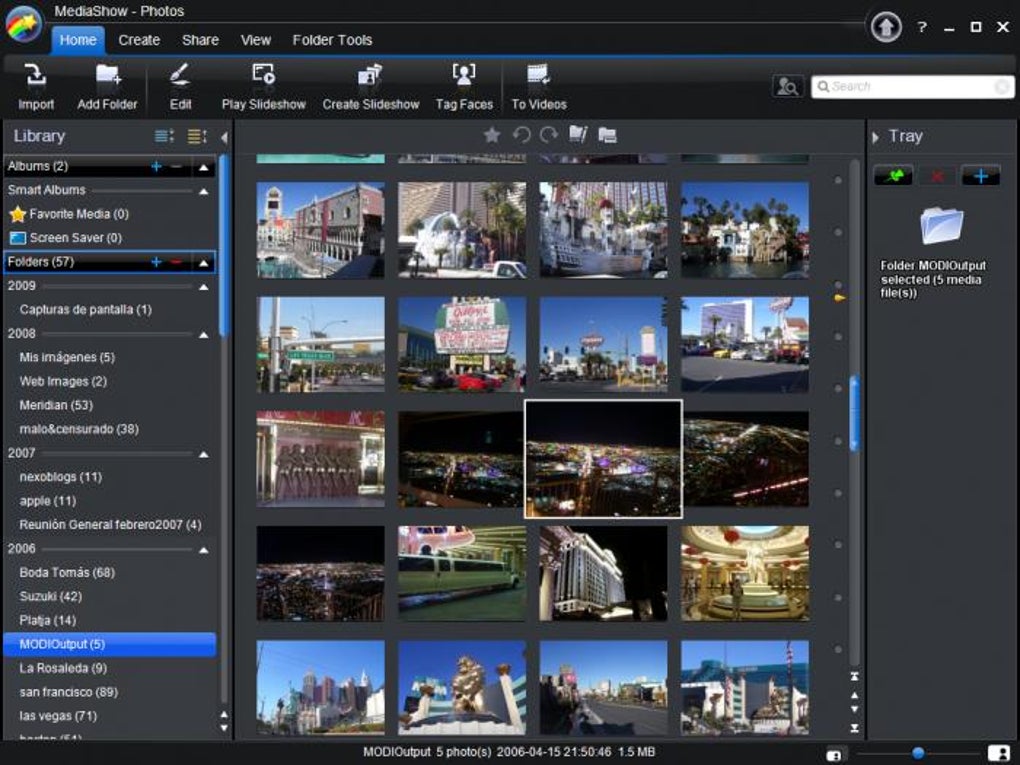
CyberLink MediaShow presents its functionality through four main sections accessible from the primary menu: Photos, Videos, Disc, and Convert. The interface is characterized by a dark, stylish design with dynamic 3D animations, contributing to its visual appeal. However, this aesthetic can place a significant load on system resources, potentially leading to performance issues on older or less powerful machines. A notable drawback is the absence of a direct return button to the main menu from the Photos and Videos sections, necessitating a program restart to navigate back.
The Photos and Videos sections share a similar structure, allowing users to browse media files stored within specified folders. Individual photos and videos can be opened in full-screen mode for viewing. A top menu bar provides access to a variety of tools depending on the media type being viewed. For photos, these tools include setting the image as wallpaper, creating screensavers, and burning to disc or sharing directly to Flickr. Video tools offer similar disc burning capabilities, along with the creation of custom movies and direct uploads to YouTube.
The Disc and Convert sections offer distinct but equally intuitive functionalities. The Disc tool enables the creation of custom multimedia presentations incorporating photos and videos, allowing users to burn these projects onto DVD or Blu-ray discs for archival or sharing purposes. The Convert tool facilitates video format conversions, providing pre-set templates optimized for popular devices. It’s crucial to note, however, that this tool currently lacks the ability to convert image formats, a feature that would enhance its overall utility.
Advanced Features and Enhancements
Beyond its core functionalities, CyberLink MediaShow incorporates several advanced features designed to enhance productivity and creativity:
-
Optimized Performance: The software leverages NVIDIA CUDA technology for accelerated processing, resulting in a claimed 50% improvement in analyzing and sorting media. Further optimizations for Intel Core i7, ATI Stream, and NVIDIA CUDA technologies promise up to 10x faster video conversions.
-
Facial Recognition: CyberLink MediaShow employs advanced facial recognition technology with a stated accuracy of up to 95%. This feature automatically groups similar faces and suggests names for tagging, greatly streamlining the organization of large photo collections. Quick photo searching is facilitated by selecting a recognized face or entering a name. Furthermore, face tag EXIF data can be shared amongst users of MediaShow 5.
-
Video Enhancement: An auto-fix feature helps improve the quality of grainy videos by reducing noise. Batch processing capabilities extend this functionality to both photos and videos, saving considerable time when applying edits to multiple files. An Edit Log provides a history of applied edits, allowing users to easily undo any changes.
-
Slideshow Creation: Creating slideshows is simplified through drag-and-drop functionality for arranging images and video clips. Creative customization options include the addition of animated text effects, color boards, and a wide selection of transition effects (over 30 styles).
-
Direct Integration with Popular Platforms: CyberLink MediaShow facilitates direct sharing to popular social media platforms, including Facebook, YouTube, and Flickr. For videos, there is direct integration with iTunes libraries. Facebook uploads now include name tag information, enhancing the metadata associated with shared photos.
- High-Definition Support: The software supports the authoring of Blu-ray and AVCHD discs, enabling users to preserve and share high-definition content in a high-quality format.
User Experience and Interface
CyberLink MediaShow’s user interface is generally praised for its sleek, modern design and intuitive layout. The dark theme is visually appealing and helps to minimize eye strain during extended use. The use of 3D animations adds a touch of visual flair, though this aspect, as mentioned previously, can impact performance on older systems. Navigation is generally straightforward, with clear visual cues guiding users through the different sections and features. However, the lack of a “back” button from the photo and video viewing sections is a significant usability flaw. The need to restart the application to return to the main menu disrupts the workflow and diminishes overall user experience.
Strengths and Weaknesses
Strengths:
- Comprehensive Feature Set: CyberLink MediaShow combines media management, editing, and conversion tools into a single, integrated application, simplifying the workflow for users dealing with large photo and video collections.
- User-Friendly Interface: The intuitive interface and visually appealing design make the software accessible to both novice and experienced users.
- Advanced Features: Advanced features such as facial recognition, batch processing, and high-definition disc authoring cater to users seeking more sophisticated functionality.
- Performance Optimizations: The integration of CUDA technology and optimizations for various processors significantly improve processing speed, especially for video conversions.
- Integration with Popular Platforms: Direct sharing to social media and iTunes adds significant convenience to the user experience.
Weaknesses:
- Resource Intensive: The visually rich interface and animations can place a considerable strain on system resources, potentially leading to slowdowns or crashes on older or less powerful machines.
- Usability Issues: The absence of a “back” button from the Photos and Videos sections is a significant design flaw that negatively impacts user experience.
- Limited Conversion Capabilities: The lack of image conversion functionality within the Convert section limits the software’s versatility.
- Trial Version Limitations: As a trial version, the software may have limitations on features or functionality compared to the full licensed version.
Overall, CyberLink MediaShow presents a compelling suite of multimedia tools. Its strengths lie in its comprehensive feature set, intuitive interface, and advanced functionalities. However, its resource intensity and certain usability issues need to be considered, particularly for users with older systems. The absence of a photo converter and the lack of a simple “back” button are noticeable shortcomings. Despite these drawbacks, the software remains a valuable tool for users requiring a comprehensive solution for managing, editing, and sharing their photo and video collections.
File Information
- License: “Trial version”
- Latest update: “July 15, 2022”
- Platform: “Windows”
- OS: “Windows 7”
- Language: “English”
- Downloads: “13.7K”
- Size: “256.27 MB”


