
CyberLink Power Media Player presents itself as a premium multimedia player, boasting a sleek interface and broad format support. However, its functionality falls short of industry leaders, making it a viable option only for users with specific, less demanding needs. This review delves into the software’s strengths and weaknesses, offering a comprehensive assessment of its usability and features.
Interface and User Experience
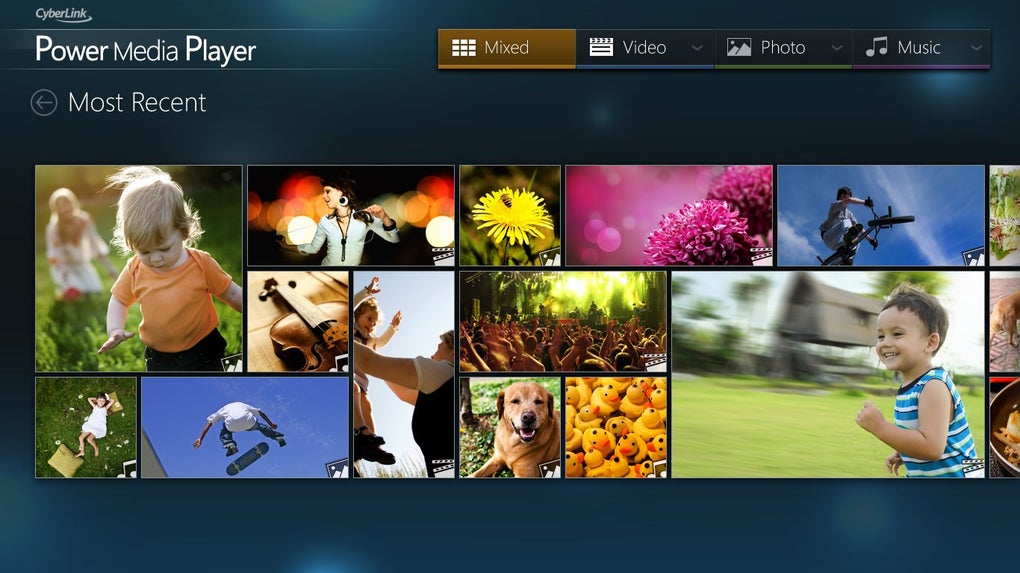
One of CyberLink Power Media Player’s standout features is its visually appealing interface. Unlike many media players that prioritize functionality over aesthetics, CyberLink prioritizes a polished and modern design. The user interface is intuitive and easy to navigate, with a clear layout that allows for quick access to media files. The library is organized logically by file type, facilitating efficient browsing. A notable design element is the calendar view, which displays thumbnails of images on the dates they were created, providing a visually engaging timeline of your media library. Similarly, the playlist interface utilizes a visually rich grid system with thumbnail previews, enhancing the overall user experience. The ability to customize playlists with unique names and colors further contributes to a personalized media management experience. The installation process itself is straightforward, requiring minimal user intervention and avoiding the inclusion of unwanted third-party applications, unless the user’s system lacks necessary codecs.
However, this visual elegance comes at a cost. While visually pleasing, the core playback controls are surprisingly limited. The interface only provides basic controls such as play/pause, next/previous track, and volume adjustment. Advanced users accustomed to the extensive customization options available in players like VLC Media Player might find this minimalistic approach restrictive. The lack of options to fine-tune video and audio settings, such as adjusting playback speed or applying visual effects, further underscores this limitation. The absence of these features significantly impacts the overall flexibility and control offered by the software.

Supported File Formats and Playback Capabilities
CyberLink Power Media Player demonstrates robust compatibility across a wide array of multimedia file formats. It boasts extensive support for various video, audio, and image file types, including but not limited to:
Video Formats: MP4, 3GP, MPG, VOB, WMV, and more. The specific “more” is not clearly defined within the available information, leaving some ambiguity about the complete range of supported video codecs.
Audio Formats: AAC, MP3, PCM/WAV, M4A, DTS (video only), and AC3 (video only). The player’s limitations regarding DTS and AC3 are noticeable; these audio formats are only supported within video files, limiting their standalone playback capability.
Image Formats: JPEG, GIF, PNG, BMP, and TIF. The selection of supported image formats is standard, covering the most common types.
Subtitle Formats: SRT, PSB, SUB, SSA, ASS, and SMI. This comprehensive support for subtitle formats caters to users with accessibility needs or those who prefer watching foreign films or shows with subtitles.
Despite its wide format compatibility, a significant shortcoming is the absence of DVD and Blu-ray disc playback functionality. This omission represents a substantial drawback for users who rely on their media player for physical disc playback. While CyberLink offers other software products, such as PowerDVD, dedicated to disc playback, the lack of this functionality within Power Media Player itself significantly reduces its overall versatility.
Performance and System Resources
CyberLink Power Media Player generally offers smooth and reliable playback for supported file types. However, users have reported instances of unresponsiveness when opening certain files, suggesting potential compatibility issues or limitations in handling larger or more complex media files. The software is also known to be resource-intensive. This means that it can consume a significant amount of system resources (CPU and RAM), potentially impacting the overall performance of the computer, especially when dealing with high-resolution or high-bitrate media. This resource consumption can lead to noticeable performance slowdowns, especially on systems with limited hardware capabilities.
Comparison to Competitors and Overall Assessment
When compared to established industry leaders such as VLC Media Player, CyberLink Power Media Player falls short in terms of functionality and features. VLC, for example, offers superior codec support, extensive customization options, and advanced playback controls, making it a far more versatile and powerful media player. However, VLC’s interface is not as visually appealing as CyberLink’s. This comparison highlights the trade-off between aesthetics and functionality that CyberLink has made.
CyberLink Power Media Player’s strength lies in its elegant interface and broad, if somewhat limited, format support. Its ease of use and visually appealing design make it accessible to users who prioritize a user-friendly experience over extensive customization options. However, the absence of essential features like DVD/Blu-ray playback, limited playback controls, and the resource-intensive nature of the software significantly hinder its overall appeal.
Conclusion: Who is CyberLink Power Media Player For?
CyberLink Power Media Player is best suited for users who value a stylish and easy-to-use interface and require a media player capable of handling a wide variety of common file formats. If basic playback capabilities are sufficient, and the user isn’t concerned about resource consumption or the lack of advanced features, then this player could be a viable option. However, users seeking a powerful, versatile media player with extensive customization options and support for various disc formats should explore alternative options, such as VLC Media Player or similar software. The high price point, coupled with its limitations, makes it a less attractive choice compared to free, feature-rich alternatives. Ultimately, CyberLink Power Media Player offers a polished visual experience, but sacrifices crucial functionality, making it a niche product rather than a general-purpose multimedia solution.
File Information
- License: “Full”
- Version: “varies-with-device”
- Latest update: “November 5, 2019”
- Platform: “Windows”
- OS: “Windows 10”
- Language: “English”
- Downloads: “35.6K”


