
CyberLink Power2Go is a versatile software application designed for disc burning, media conversion, and data backup. While its primary function revolves around creating CDs, DVDs, and Blu-ray discs, its feature set extends far beyond simple burning capabilities. This comprehensive guide explores the software’s interface, functionality, and overall value proposition, helping you determine if it’s the right tool for your needs.
What is CyberLink Power2Go?
CyberLink Power2Go is more than just a disc burning utility; it’s a complete media management suite. It seamlessly integrates disc burning and authoring with robust features for data backup, media conversion, and advanced security options. The software supports a wide array of disc formats, including CDs, DVDs, Blu-ray discs, and ISO image files. This broad compatibility allows users to work with various media types, from music and videos to important documents and backups. Beyond burning, Power2Go empowers users to:
- Rip and burn discs: Easily copy content from existing discs or create new ones from digital files.
- Create backups: Securely back up crucial data to discs, offering protection against data loss.
- Convert media files: Transform media files between various formats to ensure compatibility across different devices.
- Enhance security: Implement robust encryption methods, including 128-bit and 256-bit encryption, to protect sensitive information on burned discs.
- Manage discs: Organize and manage your disc collection efficiently.
- Create slideshows: Compile photos and images into engaging slideshows, easily burned to a disc for sharing.
- Transcode audio: Convert audio files between different formats for optimal playback on various devices.
- Utilize hardware acceleration: Leverage the processing power of NVIDIA CUDA and ATI Stream GPU acceleration for faster burning and encoding.
- Backup online content: Create local backups of your online data from platforms like YouTube and Facebook, safeguarding against account loss or data inaccessibility.
- Create and burn ISO images: Work seamlessly with ISO image files, allowing for the creation and burning of custom disc images.
- Add auto-run functionality: Configure discs to automatically launch specific files or applications upon insertion.
- Split disc contents: Divide large datasets across multiple discs for easier management and portability.
- Create multiple copies: Generate identical copies of discs for distribution or archiving.
- Desktop Widget: Access key functions quickly and conveniently with a customizable desktop widget.
- Video Menu Templates: Enhance video discs with professionally designed menu templates downloaded from CyberLink’s DirectorZone.
The software caters to both novice and experienced users, providing a user-friendly interface alongside advanced features for those who require them. Its streamlined workflow allows for quick and efficient disc creation, even for large projects.
The CyberLink Power2Go Interface: User-Friendliness and Functionality
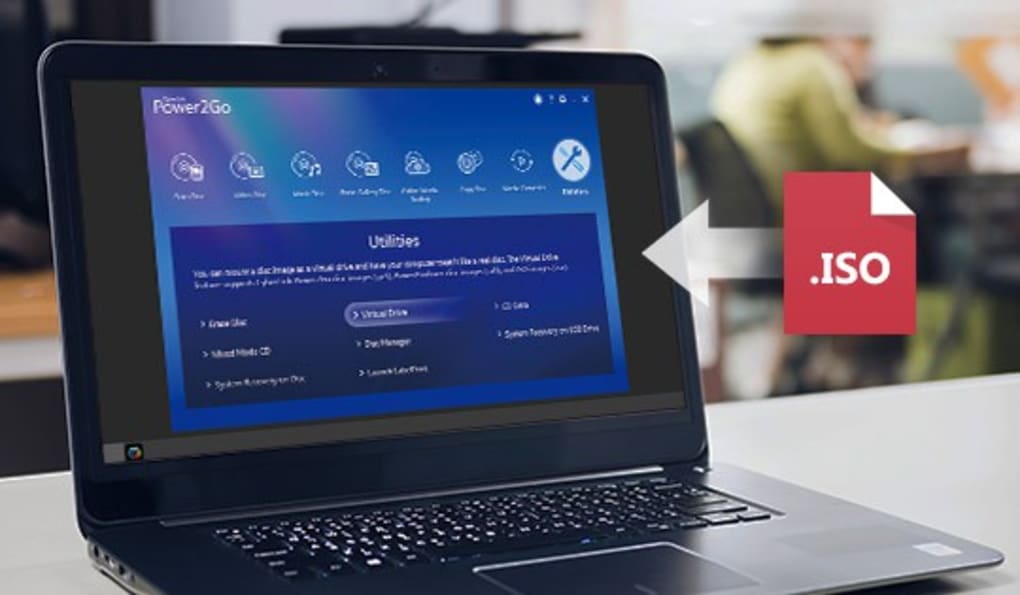
CyberLink Power2Go boasts a clean and intuitive interface, making it accessible to users of all technical skill levels. The layout is organized logically, with functions neatly categorized under clear menus and easily identifiable icons. New users are guided through the application with a comprehensive welcome tutorial, ensuring a smooth onboarding experience. The program employs a drag-and-drop functionality, simplifying the process of adding files to a burning project. A built-in file browser, complete with search and filter options, expedites the process of locating files on your computer. While the lack of file preview before selection is a minor drawback, the overall user experience is designed for simplicity and efficiency.
How CyberLink Power2Go Works: A Step-by-Step Overview
The core functionality of CyberLink Power2Go revolves around its preset functions, simplifying the process of burning discs. Users can easily burn videos, music, images, and other data files to CDs, DVDs, and Blu-ray discs without complex configuration. The drag-and-drop functionality significantly streamlines the file selection process. The software’s file browser helps locate files quickly, although the lack of preview capabilities is a noticeable omission. Beyond simple burning, Power2Go empowers users with a range of advanced options:
- Adding Tags and Auto-Run Files: Users can add tags and configure auto-run features to customize the disc’s functionality after insertion.
- Splitting Disc Contents: Large files or datasets can be divided across multiple discs for easier portability or to accommodate disc capacity limitations.
- Creating Multiple Copies: The software facilitates the creation of multiple identical copies of discs for distribution or archiving purposes.
- Saving Projects: Unfinished projects can be saved and resumed later, preventing the loss of work.
- Security Features: CyberLink Power2Go provides robust security measures, including password protection and 128-bit or 256-bit encryption. Users can create password-protected areas on a disc, safeguarding sensitive data within a larger project.
- Automatic Shutdown: The software offers an automatic shutdown feature, allowing users to power down their computer once the burning process is complete.
The entire workflow is optimized for speed and simplicity, enabling users to efficiently manage their media and data.
The Purpose of CyberLink Power2Go: Beyond Disc Burning
While disc burning remains the cornerstone of CyberLink Power2Go’s functionality, its capabilities significantly broaden its utility. The comprehensive feature set transcends simple media burning, encompassing data backup and media conversion. The software is a valuable tool for users seeking a holistic media management solution. Its key purposes include:
- Data Backup and Archiving: Power2Go provides a convenient and reliable method for backing up essential data to optical media. This ensures data preservation in the event of hard drive failures or other data loss scenarios. The secure encryption options add an extra layer of protection for sensitive information.
- Media Conversion: The software facilitates the conversion of media files between different formats, ensuring compatibility across a wider range of devices and platforms. This eliminates the need for multiple conversion tools.
- Disc Management: Power2Go efficiently manages disc creation, allowing users to easily burn multiple copies, add security measures, and split large datasets across multiple discs.
- Online Content Backup: The ability to back up online content from services like YouTube and Facebook adds a crucial layer of data protection, safeguarding against potential account loss or data inaccessibility.
- Disc Erasure: The software provides a secure way to erase the content of a disc, removing sensitive data effectively.
- Recovery Disc Creation: Users can create recovery discs to restore system files or data in case of system failures.
The versatile nature of CyberLink Power2Go makes it a suitable solution for a wide spectrum of users, from those who simply need to burn discs to those who require advanced data management and security features.
Is CyberLink Power2Go Free? Alternatives and Pricing
CyberLink Power2Go is a commercial software application and is not available for free. However, the developers provide a trial version that allows potential users to explore the application’s features before committing to a purchase. Several free and paid alternatives exist in the market, each offering varying features and functionalities. Free options like ImgBurn and Ashampoo Burning Studio Free provide basic disc burning capabilities. Paid alternatives include CyberLink Media Suite (a comprehensive multimedia suite) and CloneDVD (specialized in DVD copying). The decision to purchase CyberLink Power2Go depends on individual needs and budget. The trial version serves as a valuable tool for assessing whether the software’s advanced features justify the purchase price.
Should You Download CyberLink Power2Go?
The decision of whether or not to download CyberLink Power2Go depends on your individual requirements. If you are looking for a comprehensive disc burning and authoring solution with advanced features such as data backup, media conversion, and robust security, then Power2Go is a strong contender. Its user-friendly interface and wide range of functionalities make it a valuable tool for both novice and experienced users. However, consider the price point and compare features with available alternatives before making a decision. The lack of file preview before copying remains a minor inconvenience, but it doesn’t significantly detract from the software’s overall functionality. If your needs are solely focused on basic disc burning, a free alternative may suffice. However, for users who require a robust, feature-rich solution for media management, data backup, and security, CyberLink Power2Go stands out as a powerful and versatile option.
Pros:
- User-friendly interface.
- Works with all types of files.
- Provides advanced features beyond disc burning.
- Robust security options, including encryption.
Cons:
- Lack of file preview before copying.
- Not a free application.
Ultimately, the decision to download and use CyberLink Power2Go rests on a careful evaluation of your individual needs and the trade-off between its powerful features and its associated cost. The trial version provides a risk-free opportunity to explore its capabilities before making a purchasing decision.
File Information
- License: “Trial version”
- Latest update: “July 2, 2025”
- Platform: “Windows”
- OS: “Windows Vista”
- Language: “English”
- Downloads: “208K”
- Size: “1.17 MB”


