
CyberLink PowerDirector 365 is a comprehensive video editing suite designed to empower users of all skill levels to create professional-quality videos. From simple projects to complex productions, PowerDirector offers a vast array of features and tools to meet diverse editing needs. This review will delve into its capabilities, examining its strengths and weaknesses, and comparing it to other popular video editing software options.
A Feature-Rich Editing Environment
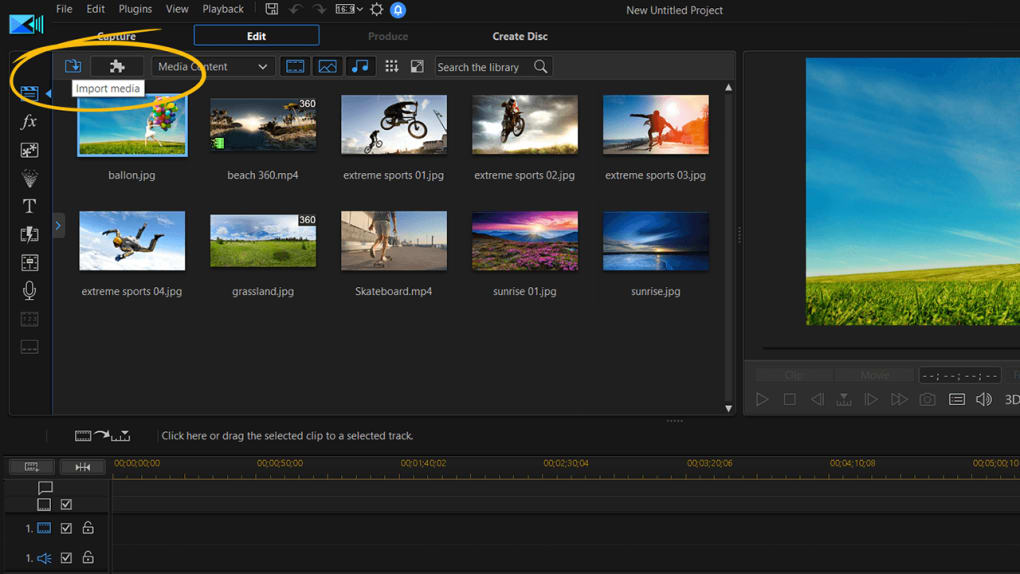
PowerDirector provides a robust workspace that caters to both novice and experienced video editors. Its intuitive interface makes it accessible to beginners, while its advanced features offer ample room for creative exploration by professionals. The software offers multiple editing modes to suit different workflows. The timeline mode, familiar to most video editors, allows for precise control over video and audio tracks through a drag-and-drop interface. This mode is ideal for assembling clips, adding soundtracks, and meticulously refining the overall video structure.
Beyond the timeline, PowerDirector offers alternative interfaces to streamline the editing process. The storyboard mode provides a visual overview of clips as thumbnails, making it easier to rearrange and manage sequences. For users who prefer a simpler approach, a slideshow creator allows for quick video creation from still images, and an auto mode leverages AI to automatically create videos from imported footage. Regardless of the chosen editing method, PowerDirector ensures the original video files remain untouched, working on copies to prevent accidental data loss.
The program’s versatility extends to specialized editing functions. Its 360-degree video editor provides tools to stabilize shaky footage and track motion within 360° videos. Advanced features, such as picture-in-picture (PiP) editing, allow for the creation of engaging visuals through customizable grids and layouts, easily managed via the integrated video collage designer. A crucial tool for many video creators is the chroma-key feature, enabling the seamless replacement of solid background colors with other images or video clips, opening up a world of possibilities for creative compositing.
Extensive Effects, Transitions, and Export Options
PowerDirector boasts an extensive library of transitions, effects, and titles. Its catalog of transitions encompasses classic options like fades, page turns, and ripples, along with many more creative effects. A search function helps users quickly locate specific transitions or effects based on their needs. For users seeking more advanced effects, premium versions offer access to third-party plugins from providers like NewBlue and BorixFX, further expanding the creative potential. Adding titles and text overlays is straightforward, enhancing the overall presentation of videos.
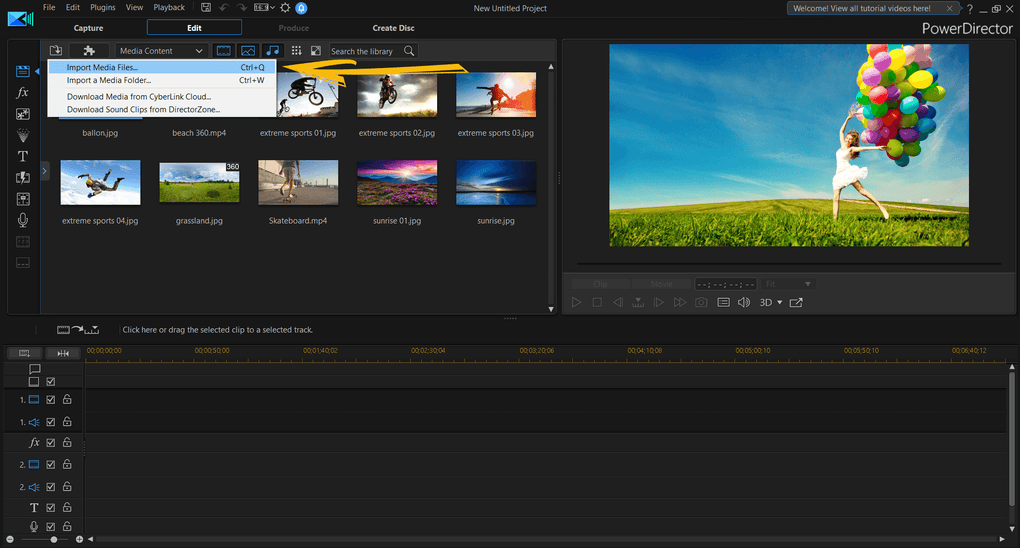
The software supports a variety of output formats, including MP4 (with both HEVC and AVC codecs). PowerDirector is known for its fast rendering times, significantly reducing the time it takes to export finished projects. A five-minute clip, for example, can often be rendered in under two minutes, making it a highly efficient tool for video production. The ability to directly upload completed videos to platforms like YouTube and Facebook adds to its streamlined workflow, optimizing the entire content creation and distribution process.
System Requirements and Compatibility
PowerDirector is compatible with a range of Windows operating systems, including Windows 7, Windows 8, Windows 10, and Windows 11. The software’s system requirements are relatively moderate, ensuring accessibility across a wide range of computer configurations. However, it’s important to note that higher-resolution video editing and the use of advanced features will demand more powerful hardware for optimal performance. For one-off installations, users should anticipate needing around 1 GB of free hard drive space.
Alternatives to CyberLink PowerDirector 365
While PowerDirector offers a comprehensive suite of tools, its sheer number of features may feel overwhelming for some users, or its advanced features may be unnecessary for simpler video editing tasks. Fortunately, several alternative video editing software options cater to different needs and budgets.
Pinnacle Studio HD: Pinnacle Studio HD is a strong contender, offering a good balance between features and ease of use. It provides various file export options and a substantial collection of transitions and effects. While its feature set can initially seem daunting, it compensates with helpful introductory videos, sample materials, and comprehensive tutorials to guide beginners.
Adobe Premiere Pro: For professional-level video editing, Adobe Premiere Pro remains the industry standard. Its powerful tools and extensive feature set make it suitable for complex projects and demanding workflows. Users familiar with the Adobe Creative Cloud ecosystem will find a seamless transition, benefiting from the program’s consistency across the Adobe suite. It’s important to note that Adobe Premiere Pro is a subscription-based service, unlike PowerDirector’s one-time purchase option.
Movavi Video Editor: For users seeking a simpler, more straightforward video editor, Movavi Video Editor provides a clean interface and user-friendly tools. While lacking the advanced features of PowerDirector or Premiere Pro, Movavi is well-suited for basic editing tasks, including audio fading, effect application, and transition incorporation. It also offers relatively fast DVD export capabilities.
Strengths and Weaknesses of CyberLink PowerDirector 365
CyberLink PowerDirector 365 shines through its comprehensive features, intuitive interface, fast rendering speeds, and efficient workflow. Its versatility extends to various video types, including 360° videos, making it a flexible tool for diverse projects. The ability to directly upload videos to social media platforms streamlines the content sharing process. The program’s vast selection of effects, transitions, and customizable tools allows for creative freedom and high-quality video production. Regular updates ensure users benefit from the latest features and performance improvements.
However, the sheer number of features can be overwhelming for new users, potentially creating a steep learning curve. The significant RAM usage can be a concern for users with less powerful computers, causing performance issues during video capture and editing, particularly when handling high-resolution footage. While the software offers various features, certain advanced functionalities may necessitate separate add-ons or plugins, potentially impacting the overall cost.
Conclusion: A Powerful Tool for Diverse Video Editing Needs
CyberLink PowerDirector 365 offers a compelling blend of power and usability. Its extensive feature set, efficient workflow, and fast rendering make it a strong contender for both amateur and professional video editors. While its complexity may initially seem daunting, the numerous tutorials and resources available help mitigate the learning curve. The choice of whether or not PowerDirector is the right video editor depends on individual needs and skill levels, but for those seeking a comprehensive and powerful video editing solution, PowerDirector 365 is undoubtedly worth considering. Its strengths in terms of speed, flexibility, and professional-level features make it a solid investment for serious video creators. The potential drawbacks, primarily related to complexity and resource consumption, can be largely mitigated with sufficient preparation and understanding of the software’s capabilities.
File Information
- License: “Trial version”
- Latest update: “April 2, 2025”
- Platform: “Windows”
- OS: “Windows 8”
- Language: “English”
- Downloads: “1.5M”
- Size: “7.31 MB”


