
Cygwin is a powerful and versatile tool that allows users to run Linux applications and utilities directly within a Windows environment. It bridges the gap between the two operating systems, providing a familiar Linux-like shell and access to a vast library of open-source software. This comprehensive guide explores the functionality, advantages, and potential drawbacks of Cygwin, along with installation instructions and troubleshooting tips. Whether you’re a seasoned developer, a system administrator, or simply curious about exploring the Linux world, understanding Cygwin can unlock new possibilities on your Windows machine.
Understanding the Cygwin Architecture
Cygwin’s functionality is rooted in its unique architecture. Instead of emulating the entire Linux kernel (like a virtual machine), Cygwin uses a DLL (dynamic link library), cygwin1.dll, which acts as a compatibility layer between Windows system calls and the POSIX (Portable Operating System Interface) calls expected by Linux applications. This DLL intercepts system calls made by Linux programs and translates them into their equivalent Windows counterparts. This elegant approach allows for a relatively lightweight and efficient implementation compared to full-fledged virtualization solutions.
This core DLL is complemented by a vast collection of GNU (GNU’s Not Unix) tools and libraries. These tools provide the familiar Linux command-line interface, including utilities like bash (the Bourne Again Shell), grep (for text searching), sed (for stream editing), awk (for pattern scanning and text processing), make (for building software), and countless others. Essentially, Cygwin creates a self-contained environment that mimics the behavior and functionality of a Linux system within the Windows operating system. This environment allows users to seamlessly run shell scripts, compile code with GCC (GNU Compiler Collection), and leverage a wealth of Linux-specific tools without the overhead of a full virtual machine. It’s important to note that Cygwin doesn’t replace Windows; rather, it adds a layer of Linux-like functionality on top.
Installing and Configuring Cygwin
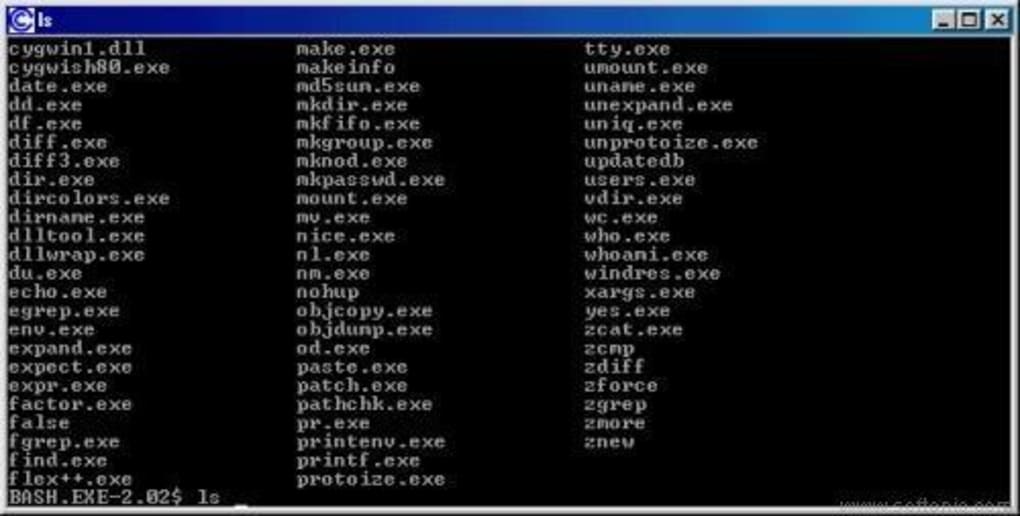
The installation process for Cygwin is straightforward, thanks to its well-maintained installer. The installer guides the user through a selection process, allowing for customized installation of desired packages. Users can choose the specific components to install, allowing for fine-grained control over the size and features of the Cygwin environment. This is a significant advantage, enabling users to install only the essential packages, thereby minimizing disk space usage and potentially improving performance.
The installer downloads packages from Cygwin’s servers, offering a regularly updated repository of software. Users can select packages from different categories, including compilers, development tools, libraries, utilities, and much more. This selection process allows for tailoring the environment to meet specific needs. For instance, a developer might choose to install a C++ compiler, development libraries, and debugging tools, while a system administrator might focus on utilities for system management and network monitoring.
After installation, Cygwin provides a bash shell that offers the familiar Linux command-line experience. Users can navigate directories, execute commands, and manage files using standard Linux commands. Customization options are extensive, allowing users to tailor their shell environment to their preferences through configuration files. Further configuration options allow users to fine-tune aspects like environment variables, shell behavior, and network settings, providing a high degree of control over the Cygwin environment.
Utilizing Cygwin for Development and System Administration
Cygwin is widely used by developers who work with cross-platform applications or need to leverage specific Linux-based tools. The ability to build and test code using the same compiler and libraries on Windows as on Linux platforms simplifies development workflows. This consistency helps minimize discrepancies between development and production environments. Cygwin’s support for GCC and other GNU tools makes it ideal for tasks such as compiling C, C++, and Fortran code. It also supports a range of scripting languages, such as Python, Perl, and Ruby, providing developers with a flexible development environment.
Beyond development, Cygwin offers system administrators a convenient way to perform tasks such as remote server management or troubleshooting. Many system administration tools are available in Cygwin’s package manager, providing a consistent interface for interacting with servers running various operating systems. The ability to run these tools directly within the Windows environment enhances efficiency, especially for administrators who manage both Windows and Linux systems.
Moreover, Cygwin serves as a valuable tool for learning and experimentation. It provides a safe and controlled environment for users to explore Linux commands and utilities without impacting the main operating system. This capability makes it an excellent educational tool for individuals seeking to expand their knowledge of Linux and its associated technologies.
Advantages and Disadvantages of Cygwin
Cygwin offers several distinct advantages:
- Cross-platform compatibility: It bridges the gap between Windows and Linux, allowing for consistent development and deployment across both platforms.
- Access to a wide range of software: It offers access to a vast library of open-source tools and utilities not readily available for Windows.
- Ease of use: Its installer and intuitive interface make it relatively simple to install and use, even for users unfamiliar with Linux.
- Lightweight compared to virtual machines: It avoids the overhead associated with full virtualization, leading to improved performance.
- No dual-boot requirement: It provides a Linux-like environment without the need to dual-boot or run a virtual machine, saving resources and increasing flexibility.
However, Cygwin also presents some disadvantages:
- Potential for conflicts: Using Cygwin can sometimes lead to conflicts with other applications installed on the Windows system, especially regarding libraries and system calls.
- Performance limitations: While generally efficient, Cygwin can still experience performance limitations compared to native Windows applications or a fully virtualized Linux environment.
- Dependency on Cygwin DLL: The environment’s dependence on the
cygwin1.dllfile might create issues if the DLL is corrupted or incompatible with specific versions of Windows. - Learning curve: While user-friendly, it requires some familiarity with the Linux command-line interface, potentially posing a challenge to beginners.
- Security considerations: While Cygwin itself is generally secure, using it can introduce potential security risks if the installed packages are not properly maintained and updated.
Conclusion
Cygwin provides a valuable bridge between the Windows and Linux worlds. Its ability to run Linux applications and utilities directly within Windows makes it a powerful tool for developers, system administrators, and anyone interested in exploring the Linux environment. While some limitations exist, the benefits often outweigh the drawbacks, particularly for those seeking a flexible and convenient way to access the vast ecosystem of Linux software on a Windows machine. Remember to carefully consider the potential for conflicts and the security implications before installing and using Cygwin. With proper installation and configuration, Cygwin can significantly enhance your computing experience.
File Information
- License: “Free”
- Latest update: “June 12, 2025”
- Platform: “Windows”
- OS: “Windows 10”
- Language: “English”
- Downloads: “225.9K”
- Size: “1.57 MB”


