
DAMN NFO Viewer is a lightweight and efficient application designed for viewing NFO and DIZ files. These files, often attached to other downloads, typically contain supplementary information or instructions related to the main file. While technically viewable with a standard text editor like Notepad, DAMN NFO Viewer offers a significantly enhanced viewing experience, particularly for files incorporating ASCII art, which often appear poorly rendered in basic text editors. This article will explore the features, functionality, and overall utility of DAMN NFO Viewer, examining its advantages and addressing potential concerns.
Understanding NFO and DIZ Files
Before delving into the specifics of DAMN NFO Viewer, it’s crucial to understand the nature of NFO and DIZ files. These files are essentially plain text files, but they often contain carefully formatted text and ASCII art to present information in an aesthetically pleasing and easily digestible manner. This differs from simple text files that may only contain raw data or instructions. NFO files frequently accompany software releases, games, or other digital content, providing details such as:
- Release information: This includes the group or individual responsible for the release, the version number, the release date, and potentially any specific notes or instructions related to installation or usage.
- Credits: NFO files often acknowledge individuals who contributed to the creation or distribution of the content.
- Artwork: A significant part of NFO files’ appeal lies in their use of ASCII art, which can range from simple logos to elaborate designs and illustrations, adding a creative and visual element to the information provided.
- Technical details: Depending on the context, the file may also contain technical details such as checksums or other verification information, ensuring the integrity of the associated download.
DIZ files serve a similar purpose and often contain information related to file releases, but their use is less prevalent than NFO files.
The inclusion of ASCII art within NFO and DIZ files presents a challenge for basic text editors. These editors usually lack the ability to accurately render the intended visual representation, resulting in a cluttered and often unintelligible display. This is where dedicated viewers, such as DAMN NFO Viewer, prove invaluable.
Key Features and Functionality of DAMN NFO Viewer
DAMN NFO Viewer is specifically designed to overcome the limitations of standard text editors when dealing with NFO and DIZ files. Its core strengths lie in its simplicity, efficiency, and customization options, making it a preferred choice for users who frequently work with these types of files.
-
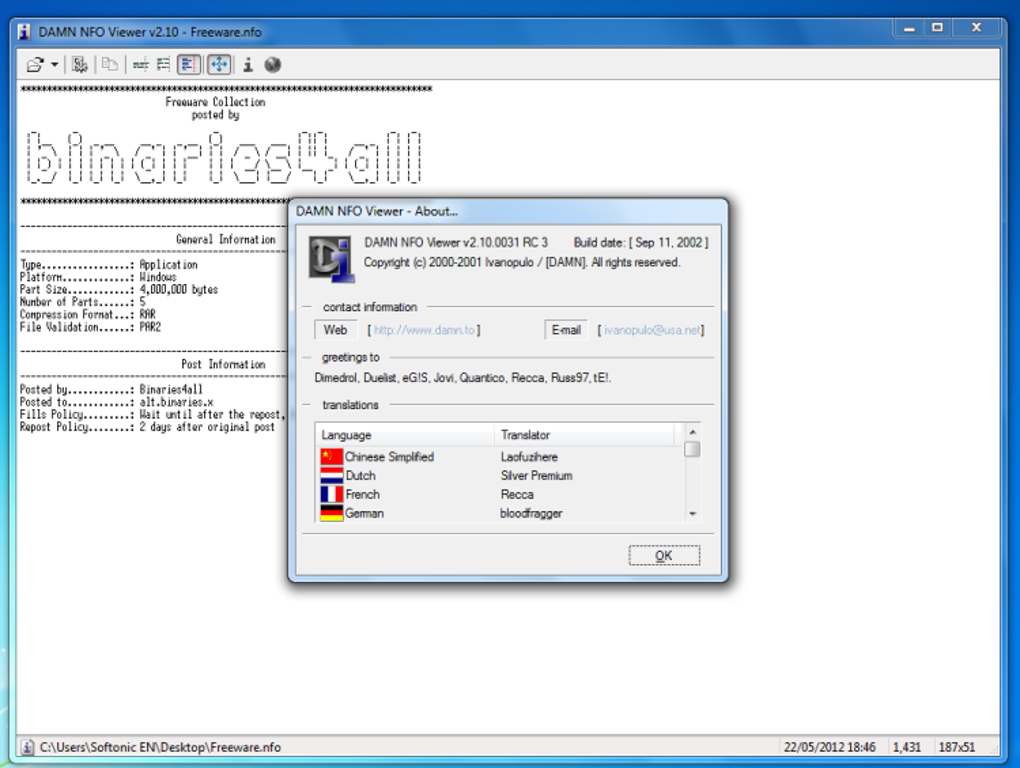
Optimized ASCII Art Rendering: The primary advantage of DAMN NFO Viewer is its ability to render ASCII art with fidelity and clarity. The application accurately interprets the formatting codes, ensuring that the graphics appear as intended, enhancing the overall presentation and readability of the information. Unlike Notepad or other basic text editors, DAMN NFO Viewer avoids misinterpreting formatting characters, leading to a cleaner and more visually appealing display.
-
Intuitive Interface: The user interface is minimalistic and user-friendly, resembling a streamlined text editor. This simplicity ensures that even novice users can quickly grasp the application’s functionality and navigate the viewed content with ease. The straightforward design prevents unnecessary distractions and keeps the focus on the NFO file’s content.
-
Customization Options: DAMN NFO Viewer allows users to personalize the viewing experience through font selection and color customization. This enables users to tailor the appearance of the text and ASCII art to match their preferences and improve readability. The customizable settings provide flexibility to suit individual needs and preferences, improving both the visual and functional aspects of the viewing experience.
-
Shell Integration: One of the most convenient features is the shell integration. This means that, once installed, DAMN NFO Viewer automatically registers itself as the default application for opening NFO and DIZ files. Double-clicking an NFO file will automatically launch DAMN NFO Viewer, eliminating the need to manually select the application each time. This integration simplifies the workflow for users who frequently interact with such files.
-
Copy-on-Select Functionality: This handy feature significantly improves efficiency. Users can directly copy selected text to the clipboard simply by highlighting it, without needing to use any additional keyboard shortcuts or commands. This streamlined approach saves time and effort when extracting information from NFO files, particularly when dealing with long files containing extensive details.
-
Word Wrap Support: DAMN NFO Viewer supports word wrapping, allowing for more comfortable reading of long lines of text, enhancing the user experience. The automatic wrapping ensures that lines do not extend beyond the screen boundaries, making the content more readable and less visually disruptive.
-
Speed and Efficiency: DAMN NFO Viewer prides itself on its speed and efficiency. The application loads NFO and DIZ files quickly, enabling users to access the information without unnecessary delays. The prompt loading time is important, especially for users working with multiple files.
Comparison with Alternative Methods
While Notepad and other text editors can technically open NFO and DIZ files, they lack the features that make DAMN NFO Viewer so useful. Notepad’s inability to properly render ASCII art renders it less suitable for viewing NFO files, compromising the visual appeal and readability of the content. Other more advanced text editors might handle formatting better but may be overly complex for the task, introducing unnecessary bloat and features that are irrelevant for the sole purpose of viewing NFO files.
The simplicity and directness of DAMN NFO Viewer make it a superior option for anyone primarily focused on viewing NFO and DIZ files. Its specialization in this specific task ensures a streamlined and efficient user experience, focusing on what truly matters – viewing the file’s contents in a clear and accurate way.
Addressing Potential Concerns and Limitations
While DAMN NFO Viewer is generally well-regarded, there are potential concerns to address. One common concern raised by users revolves around the download source’s reputation. Some users have reported issues downloading the software from certain sources. It is crucial to only download software from trusted and reputable websites to avoid malware or other security risks. Always verify the legitimacy of the download source before proceeding. Downloading from the official website or known and trusted software repositories minimizes the risk of encountering malicious files.
Another aspect to consider is the application’s limited functionality. DAMN NFO Viewer is primarily designed for viewing, not editing, NFO files. If you require editing capabilities, more comprehensive text editors or specialized ASCII art editors might be more suitable. Understanding this limitation ensures that users select the appropriate tool based on their specific needs.
Finally, the lack of frequent updates might be a concern for some users. While the current version is functional, infrequent updates could mean that future compatibility issues or security vulnerabilities might not be addressed promptly. Users should be mindful of this and assess whether the trade-off between simplicity and update frequency is acceptable for their use case.
Conclusion
DAMN NFO Viewer provides a straightforward, efficient, and visually appealing solution for viewing NFO and DIZ files. Its ability to render ASCII art accurately, combined with a customizable interface, shell integration, and copy-on-select functionality, positions it as a highly convenient and valuable tool for anyone working with these files. While it lacks editing capabilities and may not receive frequent updates, its simplicity and focus on core functionality outweigh these potential limitations for many users. By choosing a trusted download source and understanding its limitations, users can confidently leverage DAMN NFO Viewer to enhance their experience with NFO and DIZ files.
File Information
- License: “Free”
- Version: “2.10”
- Latest update: “February 12, 2019”
- Platform: “Windows”
- OS: “Windows 98 SE”
- Language: “English”
- Downloads: “181.7K”
- Size: “252.93 KB”


