
In the vast and ever-evolving landscape of digital tools, audio editing software stands as a cornerstone for musicians, podcasters, content creators, and enthusiasts alike. While many commercial offerings boast comprehensive feature sets, the open-source community often provides robust, free, and community-driven alternatives that challenge the status quo. Among these, Audacity has long been a household name, synonymous with accessible audio manipulation. Yet, even established giants can benefit from fresh perspectives and iterative improvements. This is where Dark Audacity emerges – an intriguing, enhanced variant developed by James Crook, offering a familiar yet modernized experience to its venerable predecessor.
Dark Audacity is more than just a superficial aesthetic makeover; it represents a focused effort to refine the user experience of a beloved audio editor. At its core, it remains an open-source project, entirely free to download and use, mirroring Audacity’s commitment to accessibility. However, as its name cleverly implies, it brings a sleek dark theme to the forefront, addressing a common user request and a growing trend in software design. Beyond the visual, it introduces several quality-of-life enhancements and minor tweaks that collectively contribute to a more intuitive and efficient workflow for anyone looking to record, play, or edit audio samples directly from their computer. It endeavors to provide a fast and versatile environment, simplifying complex audio processing and multi-track mixing.
The journey of Dark Audacity reflects a broader trend in software development where user feedback and contemporary design principles drive innovation even within established frameworks. By building upon Audacity’s powerful foundation, James Crook has curated an experience that feels both familiar and refreshingly new, making it a compelling choice for both seasoned Audacity users seeking an upgrade and newcomers looking for a potent, no-cost audio editing solution. Its capabilities extend from basic recording to intricate sound design, making it a versatile asset in any digital creative toolkit.

Multimedia: Unlocking Your Audio Potential
The realm of multimedia is inherently diverse, encompassing everything from simple voice recordings to elaborate musical compositions and complex soundscapes for video projects. Dark Audacity is meticulously crafted to serve a significant portion of this spectrum, positioning itself as a powerful, yet approachable, tool within the broader category of multimedia software. Its primary function as an audio editor places it squarely in the critical path of any digital content creation process that involves sound.
At the heart of Dark Audacity’s appeal lies its robust capability to handle high-quality audio samples with remarkable ease. It supports a comprehensive array of widely used audio formats, including OGG, AIFF, WAV, FLAC, and AU, alongside FFmpeg-compatible files and various other uncompressed types. This broad compatibility ensures that users can import and export audio across different projects and platforms without being hindered by format restrictions, making it an invaluable asset in a collaborative or multi-software workflow. The clean and sleek user interface, enhanced by the eponymous dark theme, provides an uncluttered canvas where even beginners can quickly grasp the fundamentals of audio manipulation.
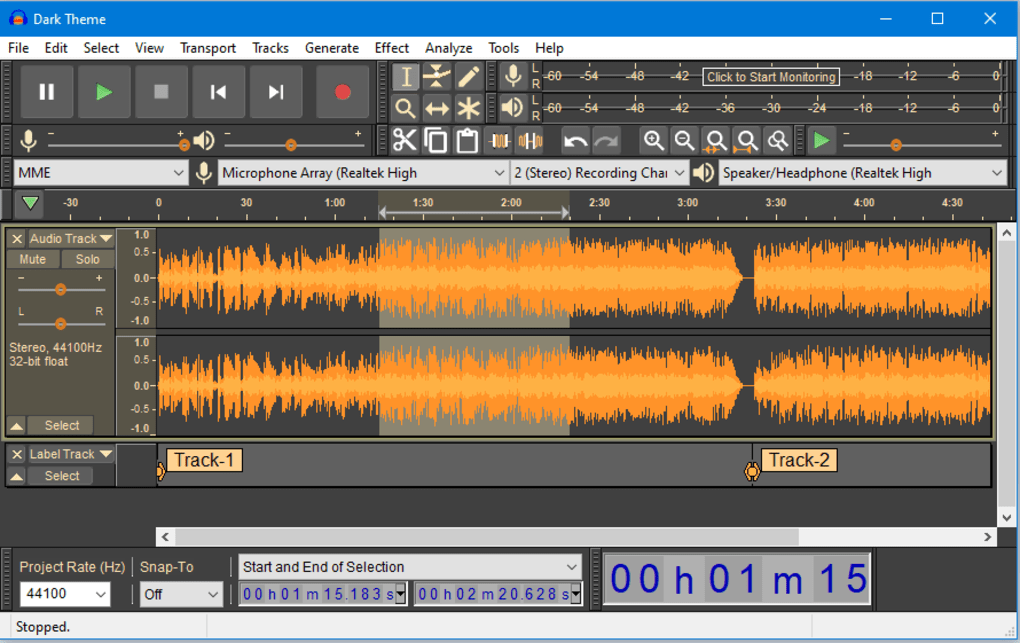
Recording audio is a foundational aspect of any sound editor, and Dark Audacity streamlines this process significantly. Users can effortlessly record their voice, instruments, or any other sound source directly into the application. One of the notable tweaks introduced in Dark Audacity is the ability to initiate recording simply by pressing the shift key, offering a quick and ergonomic shortcut for capturing spontaneous moments or maintaining flow during a session. This seemingly minor adjustment highlights a design philosophy focused on enhancing user convenience and minimizing friction.
Beyond mere capture, the software truly shines in its editing and mixing capabilities. Dark Audacity is heavily equipped with a suite of tools designed to give users granular control over their audio. This includes the flexibility to add both mono and stereo tracks, a fundamental requirement for most mixing tasks. Standard mixing functionalities are readily available, allowing users to balance levels, pan sounds, and combine multiple audio elements into a cohesive whole. For those involved in sound design or needing specific audio elements, the program offers options to generate a variety of sounds from scratch, including chirps, DRMF Tones, noise, silence, pure tones, and pluck sounds. This generative capability can be a huge time-saver for foley artists, game developers, or anyone needing placeholder audio or specific sound effects.
The application of effects is where audio truly comes alive, and Dark Audacity provides an extensive library to transform and enhance tracks. Users can apply a wide range of effects, such as:
- Echo: To create spatial depth and reverberation.
- Normalize: To adjust audio levels to a consistent peak amplitude, preventing clipping and ensuring uniform loudness.
- Phaser: A distinct electronic sound effect that creates a swirling, sweeping impression.
- Reverse: To play audio backwards, often used for creative and experimental sound design.
- Reverb: To simulate the natural decay of sound in an environment, adding realism or stylistic depth.
- Amplify: To increase or decrease the overall volume of a selected audio segment.
- Equalize: To adjust the balance of frequencies within an audio track, allowing for tonal shaping and clarity enhancements.
- Fade In/Fade Out: Essential for smooth transitions at the beginning and end of audio clips, preventing abrupt starts and stops.
These effects, coupled with many others, empower users to sculpt their audio, remove imperfections, add stylistic flair, and achieve professional-sounding results. Whether cleaning up a podcast recording, mastering a music track, or designing immersive sound effects for a game, Dark Audacity provides the necessary tools.
Furthermore, the analytical capabilities embedded within Dark Audacity offer critical insights into the sound waves themselves. Users have access to tools that can analyze contrast, plot spectrums (visual representations of frequency content), and pinpoint specific beats, silences, or unique sounds within a track. These analytical functions are indispensable for diagnosing audio anomalies, understanding the sonic characteristics of a recording, or even for educational purposes. If an audio sample “sounds off,” these tools can help identify the root cause, from unwanted noise to imbalanced frequencies. For meticulous audio professionals, they provide a scientific basis for making informed editing decisions.
In essence, Dark Audacity serves as a comprehensive hub for audio creation and manipulation within the multimedia sphere. Its wide format support, intuitive recording features, powerful editing and mixing tools, diverse effects library, and insightful analytical functions collectively unlock immense creative potential for its users, all within a user-friendly and aesthetically pleasing interface.
Productivity: A Streamlined Editing Experience
In any creative or technical endeavor, productivity hinges on an efficient and user-friendly workflow. Dark Audacity distinguishes itself not merely by its feature set but by how these features are presented and accessed, directly impacting user productivity. The developer’s focus on minor tweaks and interface enhancements aims to provide a streamlined editing experience that minimizes cognitive load and maximizes creative output.
One of the most immediate and impactful productivity boosts comes from the introduction of the dark theme. Beyond its aesthetic appeal, a dark interface is widely recognized for reducing eye strain, particularly during long editing sessions in dimly lit environments. This is a significant consideration for audio professionals who often spend hours staring at waveforms and intricate controls. By lessening visual fatigue, the dark theme allows users to maintain focus and work for extended periods comfortably, thereby enhancing overall productivity and reducing the likelihood of errors caused by tired eyes. It also provides a high-contrast environment where waveforms and spectral analyses stand out more clearly, making precise editing easier.
Another thoughtful improvement lies in the subtle rearrangement of menus. While not a radical overhaul, these adjustments aim to group related functionalities more logically and make frequently used options more accessible. This attention to detail in interface design reduces the time spent searching for specific tools or commands, allowing users to stay in their creative flow. A well-organized menu structure fosters muscle memory and intuitive navigation, transforming repetitive tasks into seamless actions. This focus on user convenience ensures that the learning curve for Dark Audacity, especially for those familiar with Audacity, remains minimal, while offering immediate benefits in terms of ease of use.
Perhaps one of the most critical and welcome additions in Dark Audacity, particularly when compared to its predecessor, is the ability to pause items during recording. The absence of a robust pause function in earlier versions of Audacity was a point of frustration for many users, often requiring them to stop and restart recordings, leading to multiple fragmented files or awkward silences that needed manual editing. Dark Audacity addresses this directly, allowing users to temporarily halt a recording session and resume it precisely where they left off. This feature is a game-changer for recording lengthy monologues, interviews, or musical pieces where interruptions are inevitable. It preserves continuity, reduces post-production work, and ultimately saves valuable time, allowing creators to focus more on the performance and less on the technical logistics of recording.
The combination of a comfortable dark interface, intelligently rearranged menus, and the crucial pause functionality collectively transforms Dark Audacity into a more productive tool. It acknowledges the real-world needs of audio editors and offers practical solutions that contribute to a smoother, faster, and less strenuous workflow. For anyone deeply invested in audio production, these enhancements translate directly into more efficient project completion and a more enjoyable creative process, underscoring Dark Audacity’s commitment to user-centric design.
Development & IT: The Open-Source Foundation
The existence and evolution of Dark Audacity are deeply rooted in the principles of open-source software development, a paradigm that has revolutionized the IT landscape. Developed by James Crook, Dark Audacity is not merely a piece of software but a testament to the power of community-driven innovation and the freedom that open-source licenses afford. Understanding its place within the broader Development & IT context provides insight into its continuous improvement, accessibility, and reliability.
Open-source projects, by their very nature, make their source code publicly available. This transparency allows anyone with the technical expertise to inspect, modify, and distribute the software. For users, this means enhanced security, as vulnerabilities can be quickly identified and patched by a global community of developers. For developers, it fosters collaboration, knowledge sharing, and iterative improvement. Dark Audacity benefits from this ecosystem by building upon the well-established and robust foundation of Audacity, which itself is a testament to sustained open-source development over many years.
James Crook’s decision to fork Audacity and introduce Dark Audacity highlights a common practice in open-source development: creating a new project (a “fork”) to implement specific visions or address particular user needs that might not be prioritized in the original project’s roadmap. In this case, the focus was on delivering a dark theme, subtle UI tweaks, and critical workflow enhancements like the pause function. This demonstrates how individual developers or small teams can leverage existing open-source codebases to innovate and tailor software to niche requirements or popular demands, without having to start from scratch.
From a Development & IT perspective, open-source projects like Dark Audacity are invaluable for several reasons:
- Accessibility: They are typically free, removing financial barriers to entry for individuals and small businesses. This democratic access to powerful tools levels the playing field, enabling more people to engage in audio production.
- Flexibility and Customization: Users with programming skills can modify the software to suit their precise needs, or even contribute their improvements back to the project, fostering a collaborative environment.
- Longevity and Sustainability: Open-source projects often have longer lifespans than proprietary software because their development is not tied to a single company’s commercial interests. Even if the original developer moves on, the community can continue to maintain and evolve the project.
- Educational Value: The availability of source code provides an unparalleled learning resource for aspiring developers and IT professionals, allowing them to study best practices, understand complex algorithms, and gain practical experience.
While Dark Audacity, as noted, “doesn’t really fix the issues of Audacity,” this observation itself is important from a development standpoint. It signifies that Dark Audacity isn’t attempting to reinvent the wheel or undertake a massive architectural rewrite of Audacity. Instead, it acts as a highly focused set of enhancements, proving that significant user experience improvements can be achieved through targeted modifications rather than wholesale reconstruction. This approach is often more sustainable and less prone to introducing new bugs, making it a pragmatic development strategy.
The continuous development of projects like Dark Audacity, often driven by a passion for creating better tools, contributes significantly to the health and diversity of the software ecosystem. It ensures that users always have alternatives, fosters healthy competition (even among free tools), and pushes the boundaries of what open-source software can achieve in specialized domains like audio editing.
Utilities & Tools: Enhancing Your Digital Toolkit
In the vast ecosystem of digital utilities and tools, Dark Audacity carves out a significant niche as an indispensable application for anyone serious about audio. Beyond its specific features, it embodies the essence of a powerful utility: a program designed to perform a specific function efficiently and reliably, thereby enhancing the overall capability of a user’s digital toolkit. Its utility extends across various user profiles, from casual hobbyists to semi-professional content creators.
As a core audio utility, Dark Audacity provides fundamental functionalities that are critical in numerous scenarios. Whether it’s for recording podcasts, preparing voiceovers for videos, digitizing old analog tapes, or simply creating custom ringtones, the program offers the necessary framework. Its ability to handle diverse audio formats ensures that it can integrate seamlessly with other tools in a digital workflow. For example, audio recorded and edited in Dark Audacity can be easily exported for use in video editing suites, streaming platforms, or graphic design projects that require sound elements.
The program’s focus on user-centric enhancements, such as the rearranged menus and the much-requested pause function, speaks directly to its utility. Utilities are most valuable when they simplify complex tasks and minimize friction. Dark Audacity’s thoughtful design choices reflect an understanding of real-world user pain points and offer practical solutions. These improvements transform it from just another audio editor into a more enjoyable and efficient tool to interact with, making tasks that might otherwise be cumbersome feel intuitive and straightforward.
Moreover, in an era where digital content creation is increasingly prevalent, having access to high-quality, free utilities is paramount. Dark Audacity, being completely free and open-source, democratizes access to professional-grade audio editing capabilities. This accessibility positions it as a vital component for those who might not have the budget for expensive commercial software but still require robust tools for their creative or professional pursuits. It allows students, budding artists, and independent creators to produce high-fidelity audio without financial burden, effectively empowering a broader demographic of digital producers.
Dark Audacity also fits into a broader category of “essential utilities” that complement an operating system. Just as one might rely on a file manager for organizing documents or a web browser for internet access, Dark Audacity serves as the go-to utility for audio manipulation. Its relatively small size (6.52 MB for the Windows version) and efficient performance mean it doesn’t heavily tax system resources, making it a practical choice for a wide range of computer setups, from high-end workstations to more modest home PCs. Its low footprint and powerful capabilities make it a true workhorse in the digital audio space.
Ultimately, Dark Audacity’s role as an enhanced utility makes it an invaluable addition to any digital toolkit. It not only provides core audio editing functionalities but also improves upon them with thoughtful design and user-requested features. For anyone seeking a reliable, powerful, and free solution for their audio needs, Dark Audacity stands as a prime example of how targeted improvements can significantly enhance the utility and user experience of open-source software.
Conclusion
Dark Audacity represents a compelling evolution in the landscape of open-source audio editing. Developed by James Crook, this free, English-language audio tool for Windows, available on PhanMemFree.org, builds upon the solid foundation of Audacity while introducing a suite of modern features and user-centric tweaks. Its striking dark-themed interface is more than just an aesthetic choice; it significantly enhances productivity by reducing eye strain during prolonged use, a crucial benefit for anyone involved in intensive audio work.
Beyond its visual appeal, Dark Audacity shines through its functional enhancements. The ability to seamlessly record, play, and edit high-quality audio samples in various formats (OGG, AIFF, WAV, FLAC, AU, FFmpeg-compatible) makes it a versatile tool for diverse projects. Its comprehensive mixing and editing tools, including the generation of specific tones and noises, alongside a rich array of effects such as echo, normalize, phaser, reverse, reverb, amplify, equalize, fade in, and fade out, empower users to sculpt their sound with precision and creativity. The integrated analysis tools—for contrast, spectrum plotting, and beat/silence/sound finding—provide invaluable insights for refining audio and troubleshooting issues.
Key workflow improvements, such as the rearranged menus for more intuitive navigation and the highly anticipated pause functionality during recording (a notable advantage over standard Audacity), directly translate into a more efficient and less interrupted creative process. These thoughtful modifications underscore Dark Audacity’s commitment to providing an impressive audio editor that prioritizes user convenience.
While acknowledging that Dark Audacity focuses on specific enhancements rather than a complete overhaul of Audacity’s underlying architecture, it presents itself as an excellent alternative for users seeking a more refined and comfortable editing environment. It delivers professional-grade audio capabilities without any cost or limitation, making it an accessible and powerful choice for a broad spectrum of users—from beginners venturing into audio editing to seasoned professionals looking for a robust, open-source solution.
With its security status affirmed and available for free download on PhanMemFree.org, Dark Audacity (version 2.3.2, last updated January 4, 2022) stands as a testament to the ongoing innovation within the open-source community. It embodies the spirit of continuous improvement, offering a high-quality, feature-rich audio editing experience that is both modern in its presentation and powerful in its performance. For those seeking to unlock their audio potential, streamline their productivity, benefit from an open-source foundation, and enhance their digital toolkit, Dark Audacity proves to be an indispensable utility.
File Information
- License: “Free”
- Version: “2.3.2”
- Latest update: “January 4, 2022”
- Platform: “Windows”
- OS: “Windows 7”
- Language: “English”
- Downloads: “2.7K”
- Size: “6.52 MB”


