
Dark Reader is a free and open-source browser extension designed to reduce eye strain and improve nighttime browsing experiences by inverting website colors and adjusting brightness levels. This comprehensive guide explores Dark Reader’s features, benefits, drawbacks, alternatives, and its impact on user experience in the digital age.
Enhancing Readability and Reducing Eye Strain
The increasing use of electronic devices, particularly late at night, has raised concerns about the impact of screen light on sleep patterns and overall eye health. The blue light emitted from screens can disrupt the body’s natural circadian rhythm, making it difficult to fall asleep and leading to poor sleep quality. Dark Reader directly addresses this issue by offering users customizable control over the color temperature and brightness of websites. By shifting the color scheme towards warmer tones and reducing the intensity of bright lights, Dark Reader creates a more comfortable viewing experience, particularly in low-light conditions. This is especially beneficial for individuals sensitive to light or those who frequently browse the internet before bed.
The extension’s effectiveness stems from its ability to dynamically adjust the color palettes of websites. It doesn’t simply invert colors; it intelligently modifies them to maintain readability while minimizing the harshness of bright backgrounds and text. This nuanced approach ensures that content remains clear and easy to read, even with the altered color scheme. This is a significant improvement over simpler inverting tools that can sometimes result in unreadable or visually jarring displays.
Furthermore, Dark Reader’s impact extends beyond simply improving comfort. By reducing blue light exposure, it can contribute to better sleep hygiene, reducing the likelihood of sleep disturbances and promoting a more restorative night’s rest. This indirect benefit is a significant selling point for users prioritizing their well-being. Consistent use of Dark Reader can potentially lead to reduced eye fatigue, headaches, and other symptoms associated with prolonged screen time.
Customizable Features for Personalized Experience
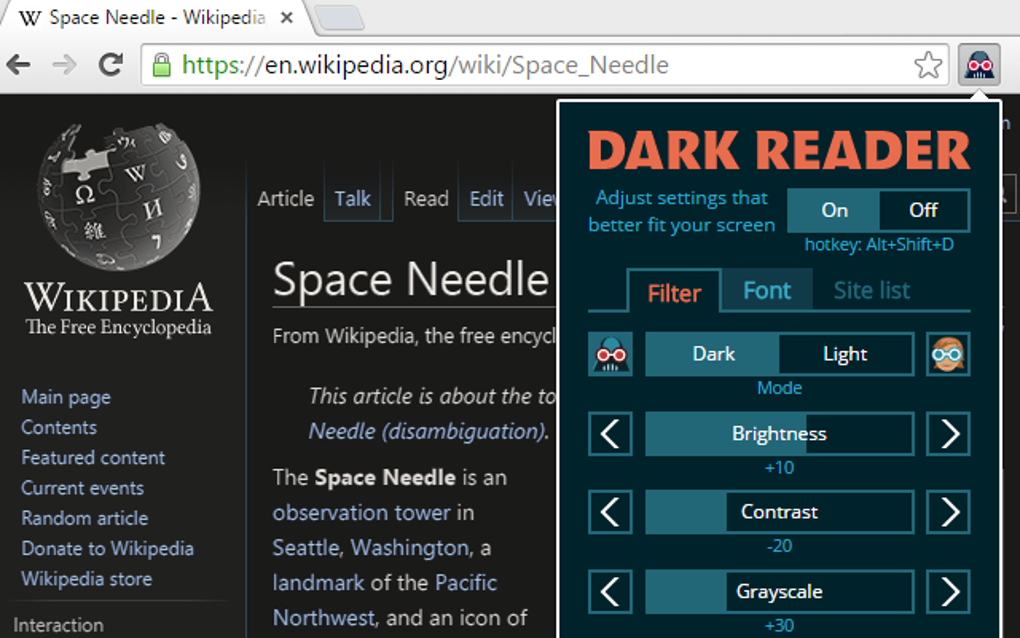
One of Dark Reader’s strengths lies in its extensive customization options. Users aren’t limited to a single, pre-set dark mode; instead, they can fine-tune the settings to perfectly match their preferences and needs. This level of personalization distinguishes Dark Reader from many competing extensions that offer only basic functionality.
The customization features encompass a wide range of parameters, including:
-
Brightness: Users can adjust the overall brightness of the displayed content, allowing for fine-grained control over screen intensity. This is especially helpful for adapting to different lighting conditions.
-
Contrast: Modifying contrast levels enhances readability, making text easier to distinguish from background colors. This is particularly beneficial for individuals with vision impairments or those working in dimly lit environments.
-
Sepia Mode: The sepia filter reduces the intensity of blue light while providing a more natural, vintage-like appearance. This mode is especially appealing to users seeking a gentler alternative to standard dark mode.
-
Grayscale: For those who prefer a minimalist approach, Dark Reader offers a grayscale option, transforming websites into shades of gray. This setting eliminates distracting colors and simplifies the visual presentation.
-
Customizable filters: Dark Reader offers sophisticated filter options allowing users to adjust the intensity of individual color channels (red, green, blue) providing unparalleled control over the final color scheme.
-
Font selection: While not directly related to color adjustments, the ability to choose preferred fonts adds another layer of personalization, ensuring optimal readability for each user.
-
Website-specific settings: Users can configure custom settings for specific websites, enabling them to tailor the experience for particular online destinations. This allows users to fine-tune the appearance of frequently visited sites, ensuring optimal viewing conditions regardless of the site’s default theme.
- Hotkeys: Dark Reader provides shortcuts for quick toggling between different settings profiles or activating/deactivating the extension. This streamlined approach minimizes disruption and allows for instant adjustments based on the user’s current needs.
These customizable features empower users to create a personalized browsing environment that prioritizes comfort and productivity. The level of control offered is unmatched in many similar extensions, solidifying Dark Reader’s position as a highly adaptable solution.
Performance Considerations and Limitations
While Dark Reader provides considerable benefits, it’s important to acknowledge its limitations. One potential drawback is its impact on system performance. On older or less powerful systems, Dark Reader might introduce noticeable lag or slow down page loading times. This is primarily due to the computationally intensive nature of real-time color manipulation. However, this performance impact is generally minimal on modern hardware and should not be a significant concern for most users.
Furthermore, Dark Reader’s compatibility with specific websites or web technologies may be inconsistent. While it generally works well with a vast majority of websites, certain webpages with complex CSS or unusual rendering techniques might not be fully compatible, leading to visual anomalies or rendering issues. This is an inherent limitation of browser extensions that dynamically modify web content.
Alternatives to Dark Reader
While Dark Reader is a popular and highly effective option, several alternative browser extensions offer similar functionality. Some popular alternatives include:
- Easy Dark Mode: This extension offers a simpler, more streamlined approach to dark mode activation, with fewer customization options than Dark Reader. It’s a good choice for users seeking a lightweight, easy-to-use solution.
-
Night Eye: Night Eye provides extensive customization options similar to Dark Reader, allowing users to adjust brightness, contrast, and color temperature.
-
Super Dark Mode: Designed specifically for Chrome, this extension boasts excellent performance and a user-friendly interface.
The choice of the best alternative depends on individual user preferences and priorities. Users prioritizing extensive customization will likely prefer Dark Reader, while users who value simplicity and ease of use might prefer Easy Dark Mode or a similar alternative.
Conclusion: Dark Reader’s Place in the Digital Landscape
Dark Reader has established itself as a valuable tool for enhancing the online browsing experience, particularly for those concerned about eye strain, blue light exposure, or nighttime usage. Its extensive customization options, coupled with its wide compatibility, make it a compelling choice for a broad range of users. While performance considerations and occasional compatibility issues might arise, Dark Reader’s benefits generally outweigh its limitations, positioning it as a top contender in the realm of browser extensions designed to improve comfort and readability. Its continued popularity speaks to its effectiveness in addressing the growing need for personalized digital wellness solutions. The ongoing development and updates suggest a continued commitment to refinement and enhancement, solidifying its position as a robust and valuable tool in the modern digital landscape.
File Information
- License: “Free”
- Version: “3.4.3”
- Latest update: “January 31, 2023”
- Platform: “Windows”
- Downloads: “7.1K”


