
Database .NET is a free, Windows-based database management utility developed by Fish. This application provides users with a powerful suite of tools for creating, managing, and manipulating databases, making it a valuable asset for developers and database administrators alike. While its interface might appear somewhat dated, its functionality and broad support for various database systems compensate for its aesthetic shortcomings. This review delves into the features, capabilities, and limitations of Database .NET, offering a comprehensive assessment of its strengths and weaknesses.
Core Features and Functionality
Database .NET offers a robust set of features designed to simplify various database management tasks. Its core functionality centers around providing a user-friendly interface for interacting with different database systems. The application supports a wide range of database engines, including but not limited to MS SQL Server, Oracle, MySQL, Firebird, DB2, and Informix. This broad compatibility makes it a versatile tool suitable for diverse development environments and project requirements.
One of the key features is its integrated database browser. This allows users to navigate database structures efficiently, easily viewing tables, views, stored procedures, and functions. The tree-view presentation provides a clear and intuitive way to explore the database schema, facilitating quick access to specific elements. Within this browser, users can perform local searches to pinpoint specific data or objects, saving significant time and effort compared to manual searching within complex databases.
Beyond browsing, Database .NET excels in its data editing capabilities. The application allows direct editing of table data, providing a straightforward interface for modifying existing entries and adding new ones. This feature is further enhanced by the integrated tab-based editor, which offers a host of features including syntax highlighting, line numbering, autocomplete functionality, and automatic formatting. These features contribute significantly to improved code readability and efficiency, reducing the likelihood of errors during data manipulation.
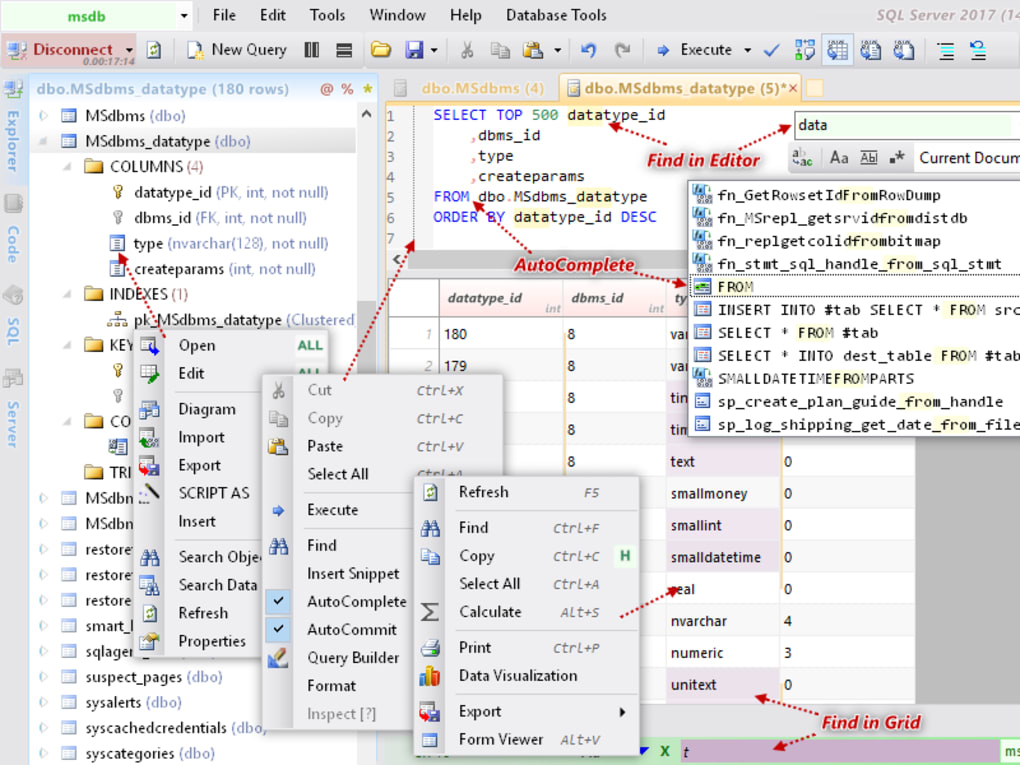
Furthermore, Database .NET incorporates a built-in query builder. This simplifies the process of creating and executing SQL queries, even for users less familiar with SQL syntax. The query builder provides a visual interface, guiding users through the process of constructing complex queries without requiring extensive SQL knowledge. This is particularly helpful for novice users, allowing them to leverage the power of SQL without needing in-depth expertise.
The application also features robust data import and export functionalities. Users can import data into tables from various file formats and export existing data to different formats, enabling seamless data transfer between Database .NET and other applications or systems. This feature enhances interoperability and facilitates the integration of Database .NET into existing workflows.
Advanced Features and Capabilities
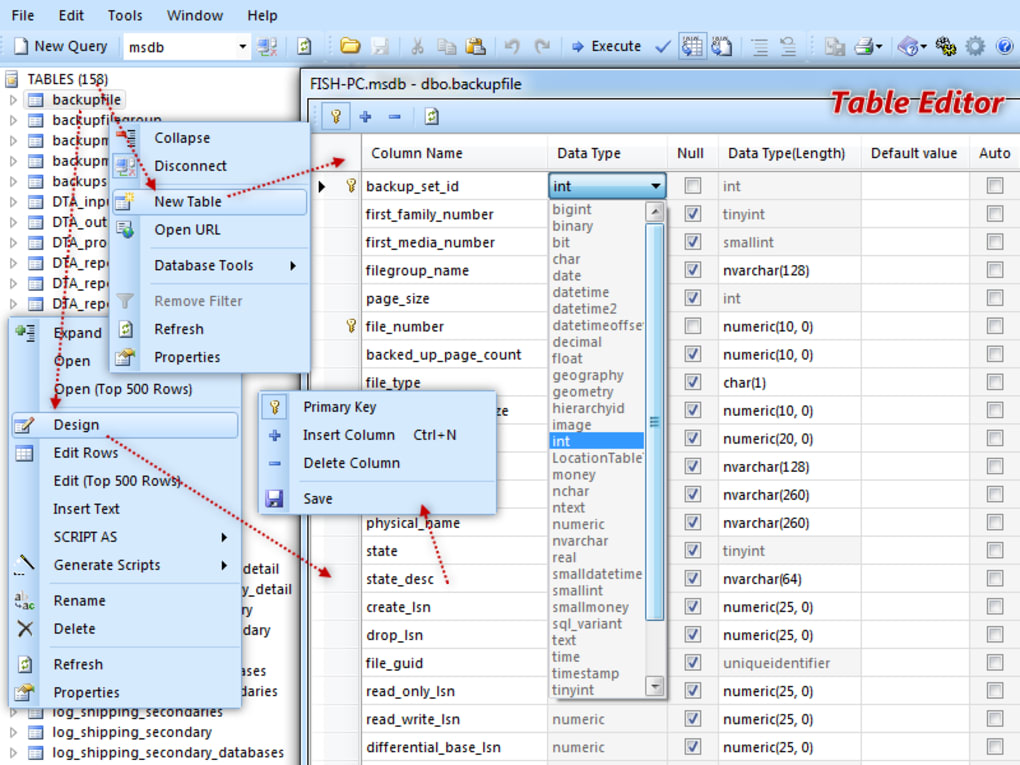
Beyond its core features, Database .NET provides several advanced capabilities that elevate its usefulness for more experienced users. One notable feature is the ability to generate database diagrams, providing a visual representation of the database structure. This is beneficial for understanding complex database relationships and identifying potential design flaws.
The application also offers advanced connection properties, allowing fine-grained control over database connections. Users can configure authentication details, security settings, and other connection parameters to meet specific requirements. This level of customization ensures compatibility with diverse database systems and environments.
Database .NET further empowers users with filtering options. These allow users to selectively include or exclude specific tables, views, stored procedures, or functions from the displayed database objects. This significantly improves the efficiency of working with large or complex databases by streamlining the browsing and editing processes. This filtering enhances the overall user experience, allowing users to focus on specific aspects of the database without being overwhelmed by extraneous information.
While data migration between supported databases is a powerful capability, it’s important to note that this functionality is typically only available in the professional edition. The free version offers many of the core functionalities, but this particular advanced feature may require an upgrade.
User Interface and Experience
Database .NET’s user interface, while functional, exhibits a somewhat outdated aesthetic. The design is not visually appealing by modern standards; however, this does not detract significantly from its usability. The application maintains a degree of intuitiveness, making it relatively easy to navigate and utilize, even for users unfamiliar with similar database management tools. The clear organization of features and the intuitive layout of the interface contribute to an overall positive user experience, despite its less modern design.
One recurring issue reported by users is the occasional premature termination of sessions upon startup. This inconsistency can be frustrating and disrupts workflow. While the frequency of this issue may vary depending on factors such as the operating system version and other installed software, it remains a point of concern that detracts from the overall reliability of the application.
Comparison with Other Database Management Tools
Database .NET occupies a unique position within the landscape of database management tools. Compared to commercial solutions such as SQL Server Management Studio or Oracle SQL Developer, it lacks some of the advanced features and polished user interfaces. However, it compensates for this with its free license and broad support for various database engines. This makes it an attractive option for users with limited budgets or for projects where the need for advanced features is less critical. When compared to other free, open-source database tools, Database .NET holds its own in terms of functionality, particularly regarding its integrated editing and query building features. The choice between Database .NET and other free tools often depends on the specific needs and preferences of the user.
Strengths and Weaknesses
Strengths:
- Free and open-source: The most significant advantage is its availability as a free application, making it accessible to a wider audience.
- Broad database support: Its compatibility with various database engines provides versatility.
- User-friendly interface: Despite its dated appearance, the interface remains intuitive and easy to learn.
- Integrated tools: The inclusion of a database browser, query builder, and data editor simplifies database management tasks.
- Powerful data manipulation: The application allows for efficient data editing, import, and export.
- Advanced features: Features like diagram generation, advanced connection properties, and filtering options cater to more experienced users.
Weaknesses:
- Outdated interface: The visual design of the application is outdated and could benefit from a modern redesign.
- Session termination issues: The occasional premature termination of sessions upon startup negatively impacts reliability.
- Limited advanced features (free version): Some advanced features like data migration are often restricted to the professional edition.
- Potential for performance issues: Handling very large databases might present performance challenges.
Conclusion
Database .NET offers a compelling balance of functionality and accessibility. Its free license, extensive database support, and integrated tools make it a valuable asset for developers and database administrators, particularly those working on smaller projects or with tighter budgets. While its outdated interface and occasional session termination issues detract somewhat from the overall user experience, the core functionality and ease of use make it a viable choice for a wide range of database management tasks. The limitations imposed by its occasionally unstable nature and outdated visuals should be weighed against its strengths, notably the free access to a robust set of database management tools. For those seeking a free, functional, and versatile database management utility, Database .NET remains a worthy contender.
File Information
- License: “Free”
- Version: “32.7”
- Latest update: “February 1, 2023”
- Platform: “Windows”
- OS: “Windows 10”
- Language: “English”
- Downloads: “894”
- Size: “24.03 MB”


