
Debut Video Capture is a versatile screen recording software for Windows that allows users to capture video from a wide range of sources, including screens, webcams, USB video devices, and even network streams. This review delves into its features, ease of use, advantages, disadvantages, and ultimately, whether it’s the right choice for your video capture needs.
Ease of Use and Interface
Debut Video Capture boasts a user-friendly interface designed for simplicity and accessibility. The program’s dark mode layout presents a clear and organized dashboard, listing readily available sources for video capture. These sources include Webcam, Device, Network, Screen, and Camera Overlay, offering considerable flexibility in capturing content. The top panel neatly displays recording controls (Record, Pause, Stop) and access to additional settings and options.
The intuitive design allows users to quickly select their preferred source and define the capture area, whether it’s the entire screen or a customized section. The addition of a camera overlay feature further enhances its versatility, enabling simultaneous recording of screen activity and webcam footage, ideal for tutorials, presentations, and vlogs.
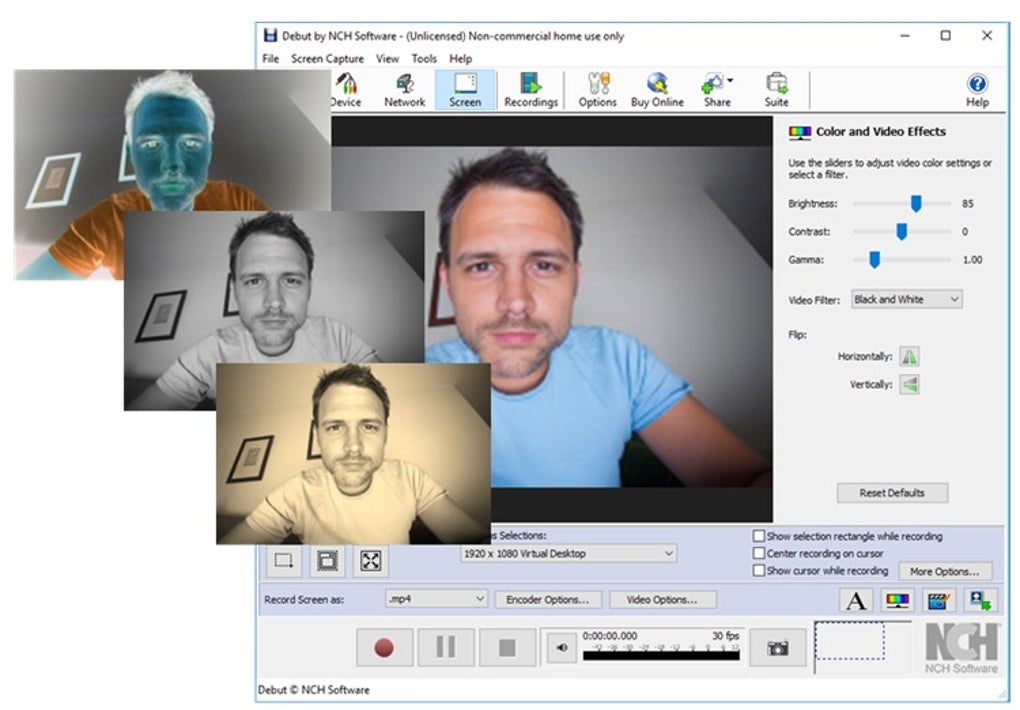
While the interface is generally praised for its intuitiveness, some users find the abundance of options initially overwhelming. The sheer number of settings and features displayed simultaneously might be confusing for first-time users, although this becomes less of an issue with increased familiarity. A concise tutorial or introductory guide would further enhance the onboarding experience for beginners.
Features and Functionality
Debut Video Capture excels in its ability to capture video from diverse sources. It handles recordings from digital video cameras, webcams, and USB video devices seamlessly. It also offers the capability to record from a network, providing flexibility for capturing content from multiple sources or remote locations.
The software’s customization features are extensive, allowing users to tailor the recording to their specific needs. Users can adjust video settings, including color, contrast, hue, and other parameters, giving them granular control over the final output. Adding text or watermarks is straightforward, enabling users to brand their videos or provide additional context.
Another noteworthy feature is the ability to record screen activity in various configurations, supporting dimensions commonly used by Android, iPhone, PS4, and Xbox devices. This adaptability makes it suitable for creating tutorials or demonstrations for a wide range of platforms. The inclusion of a fast capture option simplifies the recording process for standard default dimensions.
Furthermore, users can fine-tune camera and microphone settings, adjusting volume levels and alignments to ensure optimal audio-visual synchronization. This attention to detail enhances the overall production quality of the recordings.
Use Cases and Applications
The versatility of Debut Video Capture makes it applicable across a wide spectrum of use cases. It is particularly well-suited for creating tutorial videos, demonstrating software functionalities, or delivering presentations. The ability to incorporate both screen recording and webcam footage allows for engaging and informative content.
The software also excels in capturing processes. Users can record a sequence of tasks, providing a detailed record that can be later replicated or used for troubleshooting. This is beneficial for documenting software procedures, technical workflows, or any process requiring detailed step-by-step instructions.
The ease of sharing recordings directly to LinkedIn, Facebook, and Twitter directly from the application streamlines the content distribution process. This integration eliminates the need for additional steps to export and upload videos to social media platforms.
Advantages and Disadvantages
Advantages:
- Free Software: Debut Video Capture is available as a free, unlicensed version, making it accessible to a broad range of users.
- Ease of Use: The interface, while initially overwhelming for some, is generally intuitive and user-friendly.
- Versatile Source Support: It supports recording from a diverse array of sources, including screens, webcams, USB video devices, and network streams.
- Extensive Customization: Users can adjust various video and audio settings to fine-tune their recordings. The ability to add text and watermarks adds further versatility.
- Direct Social Media Sharing: The program provides direct integration with popular social media platforms.
- Ideal for Tutorials and Demos: Its features make it exceptionally suitable for creating high-quality instructional videos and software demonstrations.
Disadvantages:
- Initial Complexity: The interface, while intuitive, might seem overwhelming at first glance due to the large number of options. A more guided onboarding process would be beneficial.
- Lack of Live Streaming: The software currently lacks live streaming capabilities, forcing users to record and then upload to streaming platforms like YouTube.
- Potential for Commercial Restrictions: Although a free version is available, commercial use might necessitate purchasing a professional version.
- AVI as Default Format: While supporting other formats, the default .avi format might not be ideal for all users or platforms.
Comparison with Alternatives
Several alternative screen recording applications exist, each with its strengths and weaknesses. Popular alternatives include CamStudio, Ezvid, Hypercam, and Jing. Comparing Debut Video Capture to these options requires considering individual priorities. If simple functionality and ease of use are paramount, then some alternatives may be preferred. However, Debut’s range of features and source compatibility could outweigh simplicity for users needing extensive customization options and diverse recording sources. The availability of a free version is also a considerable advantage.
Final Verdict
Debut Video Capture offers a compelling solution for users seeking a versatile and relatively user-friendly screen recording application. Its ability to capture video from multiple sources, combined with extensive customization options and direct social media sharing, makes it a valuable tool for creating tutorials, demos, and capturing processes. While the initial learning curve might present a minor challenge to some users, its overall ease of use, extensive feature set, and availability as free software make it a strong contender in the screen recording market. However, the lack of live streaming capabilities and the potential need for a pro version for commercial use are notable drawbacks to consider. The software’s strengths significantly outweigh its weaknesses for many users, making it a strong recommendation for anyone looking for a free and feature-rich screen recording solution.
File Information
- License: “Free”
- Latest update: “January 31, 2025”
- Platform: “Windows”
- OS: “Windows 10”
- Language: “English”
- Downloads: “714.8K”
- Size: “3.64 MB”


