DeepL is a German translation service that has rapidly gained popularity for its remarkably accurate and nuanced translations. Unlike many other machine translation tools that rely on simpler algorithms, DeepL leverages the power of artificial neural networks to analyze and interpret text with an impressive level of sophistication. This approach allows DeepL to go beyond literal word-for-word translations and capture the subtleties of meaning, context, and style, resulting in translations that read more naturally and accurately reflect the intent of the original text.
The Power of Neural Networks in Translation
The core of DeepL’s success lies in its sophisticated use of artificial neural networks. These networks, often referred to as AI, learn to solve problems by identifying patterns in vast amounts of data. In DeepL’s case, the neural network is trained on a massive corpus of existing translations, allowing it to learn the intricate relationships between different languages. This training process doesn’t simply involve memorizing word-for-word equivalents. Instead, the network analyzes the context, grammar, and stylistic nuances of the source text to determine the most accurate and appropriate translation in the target language.
This ability to understand context is a crucial differentiator for DeepL. Many traditional machine translation systems struggle with words and phrases that have multiple meanings, depending on their context. These systems often produce translations that are grammatically correct but semantically inaccurate. DeepL’s neural network, however, excels at disambiguating such words and phrases, ensuring that the chosen translation reflects the intended meaning within the broader context of the sentence and paragraph. This leads to translations that are not only accurate but also fluent and easy to understand.
The training data used to develop DeepL’s neural network is carefully curated to ensure high accuracy and consistency. The network is continuously updated and improved as more data becomes available, allowing it to adapt to evolving language usage and maintain its competitive edge in the field of machine translation. This continuous learning is essential for keeping pace with the ever-changing nature of language and ensures that DeepL remains at the forefront of translation technology.
DeepL’s Performance Compared to Competitors
DeepL’s performance consistently outperforms many of its major competitors, such as Google Translate and Microsoft’s Bing Microsoft Translator. While these competitors have made significant strides in machine translation technology, DeepL often produces more accurate and natural-sounding translations, especially in handling complex sentences and nuanced vocabulary. This advantage stems directly from DeepL’s reliance on advanced neural network architecture and the extensive training data used in its development.
However, it’s important to acknowledge that DeepL’s superior accuracy comes with a trade-off. DeepL currently supports a smaller number of languages compared to the extensive language coverage offered by Google Translate. While DeepL’s accuracy in its supported languages is generally considered superior, the limited language support may restrict its usefulness for users requiring translations between less common language pairs. This difference highlights a common challenge in machine translation: balancing the breadth of language support with the depth of accuracy within each supported language. The choice between a broader, less accurate service and a more accurate, narrower service ultimately depends on the specific needs of the user.
Advantages and Disadvantages of DeepL
DeepL offers a compelling combination of features and capabilities that make it a powerful tool for both personal and professional use. However, like any software, it’s essential to consider both its advantages and disadvantages to determine its suitability for a particular purpose.
Advantages:
- High Translation Accuracy: DeepL’s most significant advantage is its remarkably high translation accuracy, often surpassing that of its competitors. This stems from the advanced neural network technology it utilizes. The resulting translations are generally more natural-sounding and better reflect the subtleties of the original text.
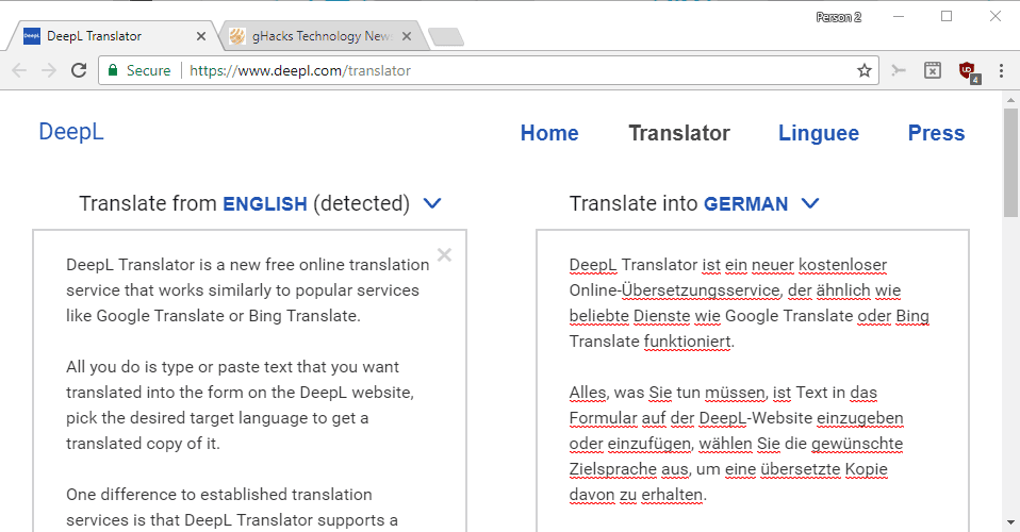
- Clean and Intuitive Interface: The user interface is designed for simplicity and ease of use. The straightforward design allows users to quickly and easily input text for translation, without being overwhelmed by complex settings or options.
- Alternative Translations: DeepL offers alternative translations for individual words, phrases, and sentences. This feature allows users to explore different options and choose the translation that best fits the context and their intended meaning. This is especially useful when dealing with words or phrases that have multiple possible interpretations.
- Fast Translation Speed: Despite the complexity of its algorithms, DeepL generally provides translations very quickly. This fast processing time is crucial for users who need quick translations of documents or other large amounts of text.
Disadvantages:
- Limited Language Support: Compared to some other translation services, DeepL supports a relatively small number of languages. This limitation restricts its applicability for users requiring translations to or from less commonly used languages.
- Potential for Errors: While DeepL is generally highly accurate, it is not infallible. Complex sentences, technical terminology, or idiomatic expressions can sometimes pose challenges, resulting in occasional errors. Users should always review translations, especially in critical contexts, to ensure accuracy.
- Cost (for certain features): While DeepL offers a free tier, more advanced features and increased usage might require a paid subscription. This cost factor is important for users who require extensive translation capabilities.
DeepL’s Applications and Future Potential
DeepL’s high accuracy and user-friendly interface make it a valuable tool for a wide range of applications. It’s frequently used by individuals, businesses, and organizations for a variety of translation tasks, including:
- Document Translation: DeepL can efficiently translate documents of various types, including legal, technical, and marketing materials. Its ability to handle large files makes it ideal for translating lengthy documents.
- Website Translation: Businesses can use DeepL to translate their websites into multiple languages, expanding their reach to a global audience. The accurate and natural-sounding translations ensure that the website maintains its professional image.
- Email Translation: DeepL is useful for quickly and accurately translating emails, ensuring clear communication with international contacts. This is particularly beneficial for businesses with international clients or partners.
- Personal Use: Individuals can use DeepL for personal translation needs, such as translating books, articles, or social media posts. The ease of use makes it an accessible tool for non-professionals.
DeepL’s continued development and refinement of its neural network technology promise even greater accuracy and language support in the future. As the network is trained on increasingly vast datasets, it will likely become even better at understanding and capturing the nuances of language, leading to even more natural and accurate translations. The ongoing improvements in its technology suggest that DeepL will continue to be a significant player in the evolving field of machine translation. Its focus on accuracy and user experience makes it a strong contender against more established players, and its future advancements hold the potential to further solidify its position as a leading translation service.
File Information
- License: “Free”
- Latest update: “May 23, 2023”
- Platform: “Windows”
- OS: “Windows 7”
- Language: “English”
- Downloads: “54.1K”
- Size: “109.76 MB”