
The Device Cleanup Tool, a creation of Uwe Sieber (also the developer behind the USB Device Tree Viewer), offers a straightforward and efficient solution for managing device entries on your Windows system. This lightweight, portable utility eliminates the need for installation, allowing for quick and easy cleanup of residual entries left behind by connected devices. This comprehensive guide will delve into the functionalities, advantages, and limitations of the Device Cleanup Tool, exploring its place within the broader ecosystem of Windows system maintenance utilities.
Effortless Device Entry Removal
The Device Cleanup Tool’s core function is the swift and simple removal of device entries. Unlike some more complex system utilities, this tool focuses on a specific, well-defined task, making it incredibly user-friendly, even for individuals with limited technical expertise. Its intuitive interface minimizes the learning curve, guiding users through the process with minimal effort. Upon launching the application, a list of all registered or recently connected devices is displayed. Users can then select individual entries or multiple entries simultaneously for removal. This bulk deletion capability significantly enhances efficiency, especially when dealing with numerous residual entries from previously connected peripherals.
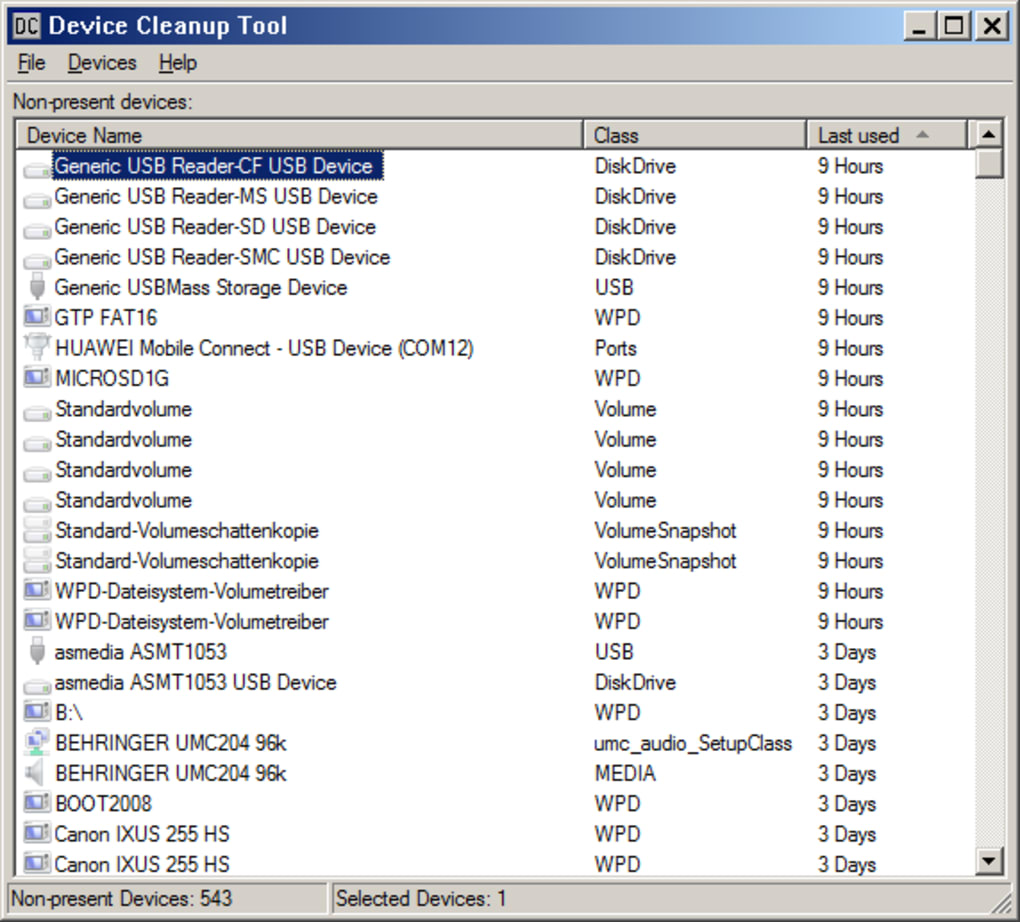
The tool also provides valuable contextual information: it displays the last known usage time for each device entry. This feature proves particularly helpful in discerning between active device entries that should be retained and inactive entries that can be safely removed. Knowing the last access time allows users to make informed decisions, minimizing the risk of accidentally deleting essential entries.
Streamlined Operation and User Experience
The developer’s focus on simplicity is evident throughout the application’s design. The interface is clean and uncluttered, presenting the essential information without unnecessary distractions. This straightforward approach ensures that even novice users can navigate the application without difficulty. The process of selecting and removing device entries is intuitive and requires minimal interaction. The program efficiently executes the removal process, with minimal impact on system performance.
The portable nature of the Device Cleanup Tool is a significant advantage. Unlike many system utilities that require installation, this application is immediately executable from any location. This eliminates the need for installation privileges and simplifies the deployment process, making it ideal for use on multiple systems or in scenarios where administrative privileges are restricted. The absence of an installer further contributes to its lightweight nature, ensuring a small footprint on system resources.
However, it’s crucial to remember that removing device entries often requires administrator privileges. Attempting to remove entries without the necessary access rights will result in an error message. This security measure protects the system from unauthorized modifications. Before proceeding with any removal operations, it’s highly recommended to create a system restore point. This precautionary measure allows for easy recovery in the unlikely event of unintended consequences. Should a problem arise following the use of the Device Cleanup Tool, reverting to the restore point can swiftly undo any unintended changes.
Time Savings and Enhanced Efficiency
The Device Cleanup Tool significantly reduces the time and effort associated with cleaning up device entries. The traditional method of manually removing these entries involves navigating through multiple system settings, a process that can be both time-consuming and cumbersome. The Device Cleanup Tool streamlines this process, condensing it into a few simple clicks. This efficiency gain is particularly valuable for individuals who frequently connect and disconnect numerous peripherals, resulting in an accumulation of residual device entries over time. The tool’s capability to remove multiple entries simultaneously further accelerates the cleanup process, providing a substantial improvement in workflow efficiency.
Limitations and Considerations
While the Device Cleanup Tool offers a convenient solution for managing device entries, it does have some limitations. Notably, it lacks the functionality to remove entire drivers associated with the devices. This functionality is often desired for more comprehensive cleanup, but its absence does not detract significantly from the tool’s core function of removing device entries. Another minor limitation is the absence of a “deselect all” function. This means that if numerous entries are selected inadvertently, each must be deselected individually.
The tool’s simplicity, however, is both a strength and a weakness. While the straightforward interface caters to ease of use, it also limits advanced customization options. More technically inclined users might find that additional features, such as granular control over the removal process, would be beneficial. Nonetheless, for the average user, the straightforward approach likely minimizes the potential for errors and simplifies the overall experience.
Alternatives and Comparisons
Several alternative utilities exist for managing device entries and cleaning up system resources. However, the Device Cleanup Tool distinguishes itself through its simplicity and focus. Tools like Intelligent Standby List Cleaner, Ainvo Memory Cleaner, and GPEDIT.msc offer different functionalities, focusing on memory management and system policy configuration. These alternatives often have steeper learning curves and present a more complex interface.
The Device Cleanup Tool’s advantage lies in its targeted functionality and straightforward user experience. It doesn’t attempt to be an all-in-one system optimization tool; instead, it excels in performing a specific task efficiently. This targeted approach makes it an excellent addition to a suite of system maintenance utilities, complementing more comprehensive tools that handle broader system optimization tasks. For users who primarily need a solution for removing residual device entries, the Device Cleanup Tool’s streamlined approach provides a significant advantage in terms of ease of use and efficiency.
In conclusion, the Device Cleanup Tool serves as a practical and efficient utility for managing device entries on Windows systems. Its simplicity, portability, and ease of use make it a valuable tool for both novice and experienced users seeking a straightforward solution for a specific system maintenance task. While it lacks some advanced features present in more comprehensive utilities, its focus on efficiency and ease of use establishes its unique position in the landscape of Windows system maintenance tools. The tool’s lightweight nature and lack of installation requirements further enhance its appeal, offering a quick and convenient solution for users seeking to streamline their device entry management process. Always remember to create a system restore point before undertaking any system modifications to ensure a safe and easily reversible process.
File Information
- License: “Free”
- Version: “1.1.1”
- Latest update: “August 6, 2021”
- Platform: “Windows”
- OS: “Windows 8.1”
- Language: “English”
- Downloads: “5K”
- Size: “59.19 KB”


