
Damaged video files can be incredibly frustrating. Whether it’s a cherished home movie, a crucial work project, or a downloaded clip that refuses to play, the loss of access to your video content can be disheartening. Digital Video Repair software aims to address this issue by providing a solution for repairing corrupted or incomplete AVI files. While not a panacea for all video problems, it offers a potential avenue for restoring playable video in certain scenarios. This article delves into the capabilities, limitations, and alternatives of Digital Video Repair, helping you understand whether it’s the right tool for your needs.
Understanding the Problem: Why Videos Get Corrupted
Before examining the solution, it’s crucial to understand the various reasons why video files become corrupted or unplayable. This knowledge will help you realistically assess the potential success rate of any repair attempt. Common causes include:
-
Incomplete Downloads: Downloading a video file via peer-to-peer (P2P) networks like eDonkey or BitTorrent, or even from less reliable sources, can result in incomplete downloads. Missing chunks of data render the file unplayable. The same can occur when copying from a damaged CD or DVD.
-
Transfer Errors: During the transfer of video files from one storage medium to another – such as copying from a camera’s memory card to a computer hard drive – errors can occur, potentially damaging portions of the video data.
-
Hardware Failures: Hardware malfunctions, such as failing hard drives or memory cards, can lead to data corruption, affecting video files stored on these devices.
-
File System Errors: Issues within the file system of your operating system can also contribute to video file corruption. This is less common, but it can manifest as seemingly random file damage.
-
Software Glitches: Problems within video editing software or players can, in rare cases, corrupt video files during the editing or playback process.
-
Codec Issues: While Digital Video Repair doesn’t address this directly, codec problems are a frequent cause of playback issues. Codecs are software components needed to decode and play certain video formats. If the correct codec isn’t installed, the video won’t play.
-
Virus or Malware Infections: Viruses or malware can infect and corrupt video files, rendering them unusable.
It’s important to note that some forms of video corruption are beyond repair. Severe damage, extensive data loss, or corruption caused by viruses might not be recoverable, even with specialized software.
How Digital Video Repair Works (and its Limitations)
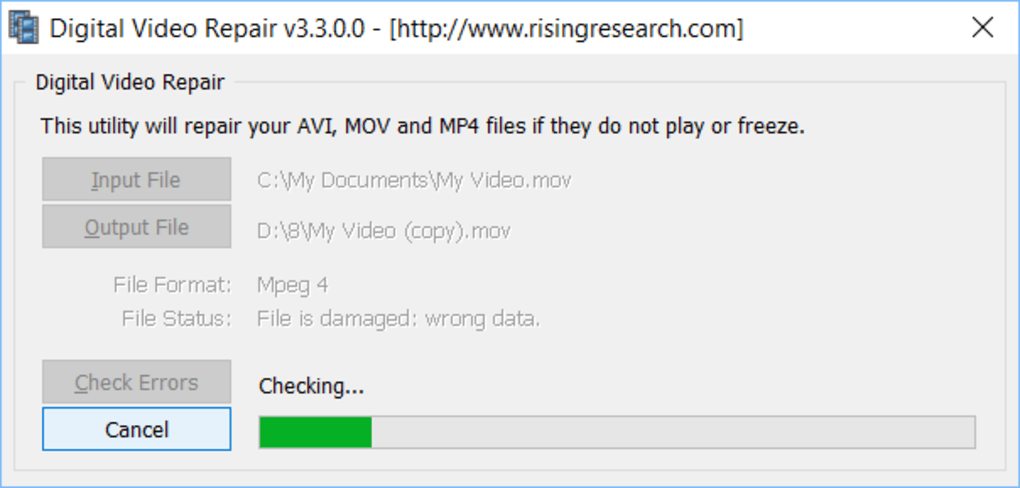
Digital Video Repair is designed specifically for repairing AVI files, a widely used video container format. It attempts to recover damaged AVI files by identifying and rectifying inconsistencies within the file’s structure. The program analyzes the file, pinpoints corrupted sectors or missing data, and attempts to rebuild the file’s integrity. Its mechanism works primarily by focusing on repairing structural inconsistencies within the AVI file rather than attempting to recover individual lost frames.
However, the software’s capabilities are limited. It is not a universal solution for all video repair needs. Its success largely depends on the nature and extent of the damage. Digital Video Repair is generally effective for minor errors, such as those resulting from incomplete downloads or minor data inconsistencies. However, it’s unlikely to recover from extensive corruption or significant data loss. Moreover, it’s crucial to understand that the software doesn’t work miracles. It can’t recover lost or damaged frames or resolve issues caused by codec problems.
If your video file suffers from serious data corruption, the results might be minimal, or the program may fail to make any improvements. You might find the program processes the file, but the resulting video shows no difference in playback quality. In such instances, exploring other repair tools or accepting the loss of the damaged video file might be necessary.
Alternative Video Repair Solutions
While Digital Video Repair offers a simple solution for some users, it’s essential to be aware of alternative options that might provide better results depending on the extent and nature of the video damage. These alternatives include:
-
Stellar Repair for Video: This more comprehensive program offers a broader range of repair capabilities and supports a wider variety of video formats beyond AVI. It often exhibits better success rates in recovering severely corrupted video files, employing more advanced algorithms to recover lost frames and data.
-
Repair Video Master: Another robust option, Repair Video Master aims to quickly and efficiently repair corrupted videos. Its claim to speed might be beneficial when dealing with multiple files. However, the effectiveness, like other software, varies based on the type and severity of the corruption.
-
Video-Repairer: This free tool provides a simpler, no-frills approach to video repair, but it may be less powerful than commercial alternatives like Stellar Repair for Video. It is a viable option to try before committing to paid software, especially if dealing with minor issues.
-
DivXRepair: Specializing in repairing corrupted DivX files, this free tool targets a more specific video format than Digital Video Repair. Its niche focus can be advantageous if you’re dealing specifically with DivX video files.
-
Online Video Repair Services: Various online services offer video repair capabilities. These services typically upload the corrupted video for processing, and the repaired version is then downloaded. While convenient, they often charge per repair and may have security or privacy considerations. Use these services cautiously and ensure they have a good reputation.
Choosing the best alternative depends on the type of video file (AVI, MP4, MOV, etc.), the severity of corruption, and your budget. For extensive damage or valuable video files, investing in professional-grade software like Stellar Repair for Video might be worth considering. For simple cases of minor corruption, freeware options like Video-Repairer or DivXRepair might suffice.
Prevention is Better Than Cure: Safeguarding Your Video Files
While repair software can be a lifesaver, preventing video file corruption in the first place is always the best approach. Here are some proactive measures to protect your video files:
-
Reliable Storage Media: Use high-quality, reputable storage devices, such as SSDs (Solid State Drives) or reliable hard drives from trusted brands. Avoid using damaged or failing storage devices.
-
Regular Backups: Regularly back up your video files to a separate location, preferably an external hard drive or cloud storage service. This provides a safety net in case of data loss or corruption.
-
Safe Downloads: Only download video files from trustworthy sources to minimize the risk of downloading corrupted or malware-infected files.
-
Proper Ejection: Always properly eject storage media (like memory cards and USB drives) from your computer before removing them to avoid data corruption.
-
Virus Protection: Keep your computer protected with up-to-date antivirus software to prevent malware from damaging your files.
-
Stable Internet Connection: Ensure a stable internet connection during video downloads to minimize the risk of incomplete downloads.
-
Regular System Maintenance: Perform regular system maintenance tasks, including defragmentation (for traditional hard drives), to maintain the health of your computer’s file system.
By taking preventative measures, you significantly reduce the likelihood of encountering corrupted video files and the need for repair software.
Conclusion
Digital Video Repair provides a simple, free option for repairing minor issues with AVI video files. However, its limitations should be understood. For more extensive damage or for other video formats, exploring the alternative repair solutions discussed above is strongly recommended. Remember, proactive measures to prevent file corruption are crucial to preserving your precious video memories. Don’t wait until you have a problem; implement preventative strategies now to safeguard your valuable video content.
File Information
- License: “Free”
- Latest update: “October 4, 2024”
- Platform: “Windows”
- OS: “Windows 2000”
- Language: “English”
- Downloads: “114.2K”
- Size: “2.02 MB”


