
Dimmer is a free, lightweight utility designed to streamline the process of adjusting screen brightness on Windows PCs. Developed by Nelson Pires, this program provides a straightforward interface for managing brightness levels across multiple monitors, making it a convenient tool for users seeking quick and easy control over their display settings. This review delves into the features, functionality, and user experience of Dimmer, highlighting its strengths and weaknesses.
Intuitive Interface and Functionality
Dimmer boasts a remarkably simple and intuitive interface. Upon launching the application, users are presented with a clean, tabbed layout. The primary tab displays a list of all connected monitors detected by the system. Each monitor is accompanied by a slider, allowing for precise adjustments to its brightness level. Below each slider, a clear visual indicator represents the current brightness setting, providing immediate feedback to the user. This straightforward design ensures that even novice users can easily grasp the functionality and make adjustments without any learning curve.
The second tab, labeled “Options,” provides access to additional settings. Users can configure Dimmer to automatically launch upon system startup, enabling consistent access to brightness control. An option to display monitor names is also available, improving usability when multiple displays are connected. Furthermore, a crucial feature allows users to lock the brightness levels, preventing accidental changes. This lock feature is particularly beneficial in shared computer environments or situations where unintentional adjustments could be disruptive.
While the simplicity of Dimmer is a significant advantage, one notable omission is the lack of keyboard shortcuts or hotkeys. The absence of this functionality slightly hinders the speed and efficiency of brightness adjustments, especially for users who frequently need to make quick changes. The addition of customizable hotkeys would significantly enhance the user experience and make Dimmer even more versatile.
Support for Multiple Monitors and Display Types
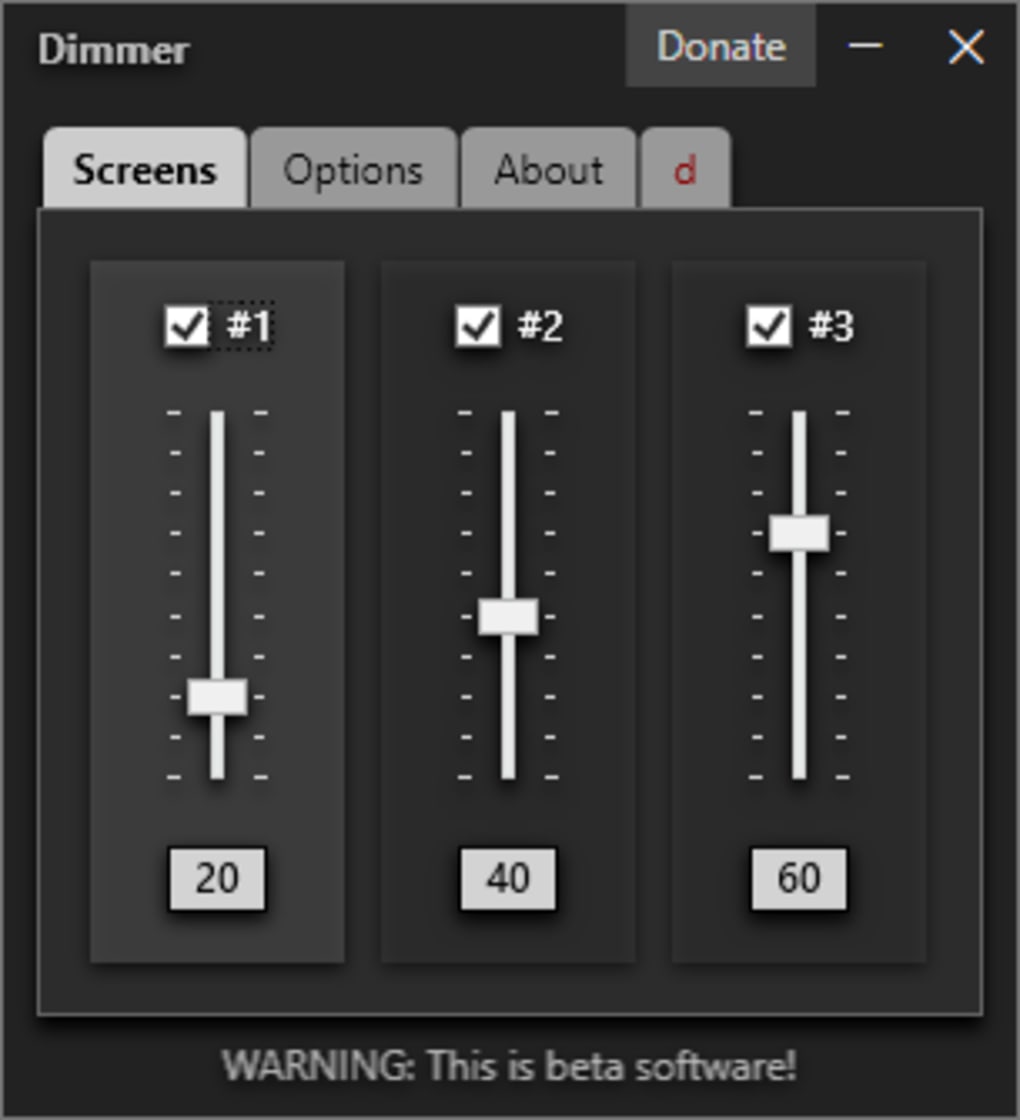
A key strength of Dimmer lies in its ability to handle multiple connected monitors simultaneously. Many brightness control utilities are limited to single-monitor configurations, but Dimmer seamlessly manages and adjusts the brightness of each individual display independently. This multi-monitor support is invaluable for users with dual-monitor or multi-monitor setups, offering centralized control over all displays.
Dimmer also demonstrates impressive compatibility with various screen types. The software effectively adjusts brightness levels across different monitor technologies and resolutions without any reported inconsistencies. This broad compatibility ensures that Dimmer functions reliably across a wide range of PC configurations, regardless of the specific monitor model or specifications.
Performance and Resource Consumption
Dimmer’s performance is exceptionally impressive. It is incredibly lightweight, consuming minimal system resources. This minimal resource usage ensures that the application runs smoothly and efficiently, without impacting the overall system performance or causing any noticeable lag. This is a crucial aspect, particularly for users with less powerful systems, as it prevents any performance bottlenecks associated with running the application. The swift response times and immediate feedback to brightness adjustments further enhance the overall user experience. The application’s lightweight nature also contributes to its fast loading times, eliminating any frustrating delays when launching the program.
User Reviews and Feedback
While the majority of user reviews are positive, highlighting the simplicity and effectiveness of Dimmer, there have been some negative reports. Several users have expressed concerns regarding unexpected behavior, such as the inability to pause dimming effects or remove the application due to it running persistently in the background. Additionally, some reviews report issues with the application not appearing in the task manager, further complicating attempts to close or uninstall the program. These reports warrant further investigation by the developer to address any underlying issues that may be causing these problems. It is important to note that the negative reviews represent a small fraction of the overall user feedback, but they should be taken seriously to ensure the continuous improvement and stability of the software.
Some users have mistakenly identified Dimmer as a virus or malware, reflecting a potential misunderstanding of the software’s true purpose. This confusion points to the need for clearer communication regarding the application’s functionality and possibly the need for additional security measures to mitigate these perceptions. Addressing these misinterpretations may involve improving the application’s online description and clarifying its role as a brightness control utility.
Other reviews mention an unexpected game about donuts, further compounding the confusion surrounding the application’s identity. This points to a significant issue in the application’s distribution or branding, as it appears that a completely different application may have been incorrectly labeled or associated with Dimmer. The developer needs to actively address this issue and ensure that the correct version of Dimmer is being downloaded and used by users. This may involve reviewing distribution channels, improving version control, and implementing measures to prevent the distribution of unauthorized or mislabeled versions of the application.
Comparison with Alternative Brightness Control Tools
Compared to other brightness control utilities available, Dimmer stands out due to its remarkable simplicity and multi-monitor support. While alternative tools may offer additional features such as hotkeys or more advanced brightness profiles, these features often come at the cost of increased complexity. Dimmer’s focus on straightforward functionality makes it ideal for users who prioritize ease of use and quick access to brightness adjustments.
Some alternative applications like DimScreen and Adjust Laptop Brightness offer similar core functionality but lack the multi-monitor capability of Dimmer. Other applications, such as F.lux, focus on color temperature adjustment rather than direct brightness control. This makes Dimmer a unique option for users specifically looking for straightforward, multi-monitor brightness control without the added complexity of other applications. The choice of brightness control tool ultimately depends on individual preferences and the specific features required.
Conclusion
Dimmer is a valuable addition to the range of Windows utilities. Its clean interface, multi-monitor compatibility, and lightweight performance make it an attractive choice for users seeking efficient brightness management. While the lack of hotkeys represents a missed opportunity for enhanced usability, and some user reviews raise concerns about unexpected behavior, the overall effectiveness and simplicity of Dimmer make it a worthwhile tool for many users. Addressing the reported issues and incorporating user feedback will further solidify Dimmer’s position as a reliable and user-friendly brightness control solution. The developer should prioritize addressing the concerns raised in user reviews, particularly those regarding unexpected behavior and the mistaken association with a donut-themed game. Improved clarity in the application’s description and distribution channels would also improve user understanding and potentially reduce negative perceptions. With these improvements, Dimmer has the potential to become an even more popular and reliable tool for managing screen brightness on Windows PCs.
File Information
- License: “Free”
- Version: “2.0.0.b8”
- Latest update: “May 20, 2025”
- Platform: “Windows”
- OS: “Windows 7”
- Language: “English”
- Downloads: “49.7K”
- Size: “2.33 MB”


