
Directory Lister is a powerful utility designed to generate customized lists of file and folder contents. This software provides a quick and efficient way to create organized, exportable lists of your files and directories, ideal for various purposes, from simple inventory management to complex network sharing scenarios. Instead of manually navigating through nested folders and compiling lists, Directory Lister streamlines this process, offering a range of output formats and customization options. This article delves into the functionalities, benefits, and applications of Directory Lister, exploring its capabilities and comparing it to alternative solutions.
Understanding Directory Lister’s Core Functionalities
At its core, Directory Lister offers a straightforward yet highly effective solution for creating comprehensive listings of file and directory structures. Its primary function is to recursively traverse specified folders, gathering information about each file and subfolder within. This information is then compiled and formatted into a user-defined output format. This process is remarkably fast, even when dealing with large and complex directory structures on less powerful machines. The speed is partly attributed to efficient algorithms and minimal resource consumption during the listing process.
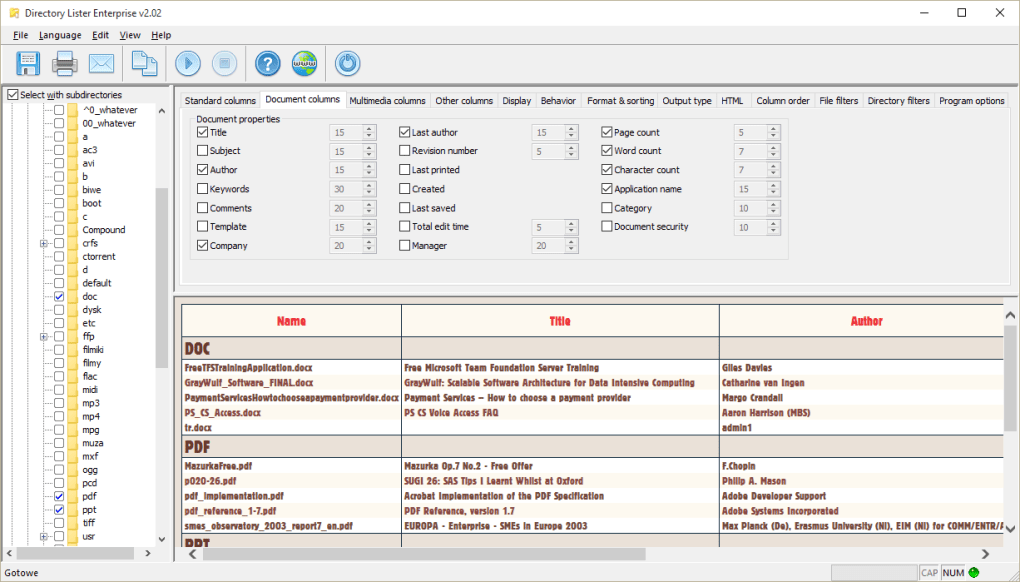
The software’s versatility shines through its support for multiple output formats. Users can choose to generate lists in plain text (.txt), HTML (.html), or even export the data into spreadsheet-compatible formats like Excel or directly into database structures. The flexibility in output options caters to a wide range of user needs and preferred methods of data management.
For HTML output, Directory Lister offers further customization options. Users can fine-tune the HTML structure and styling to meet specific aesthetic or functional requirements. The ability to create local hyperlinks within the generated HTML lists is a particularly useful feature for users sharing files over a local area network (LAN). These hyperlinks directly connect entries in the list to the corresponding files, making navigation and access to the listed files incredibly convenient.
Beyond the graphical user interface (GUI), Directory Lister also supports command-line parameters. This feature is invaluable for users who prefer automation or scripting. By using command-line arguments, users can specify input directories, output formats, and other settings without interacting directly with the GUI. This capability makes Directory Lister highly adaptable for integration into larger workflows or automated processes.
Benefits of Using Directory Lister
The advantages of employing Directory Lister extend beyond its core functionalities. Its benefits encompass improved efficiency, enhanced organization, and simplified data management.
-
Time Savings: Manually creating detailed lists of files and folders, especially within complex directory structures, is time-consuming and prone to errors. Directory Lister automates this process, saving considerable time and effort. The speed and efficiency are particularly noticeable when working with extensive file collections.
-
Improved Organization: The software generates well-structured, consistent lists, providing a clear and organized overview of file and folder contents. This is especially valuable for maintaining order within large or frequently updated directories. The ability to customize the output further enhances organizational capabilities, allowing users to tailor the list to their specific needs.
-
Enhanced Data Management: The various output formats supported by Directory Lister offer enhanced data management flexibility. The ability to export data into spreadsheets or databases allows for further processing, analysis, and integration with other software applications. This capability significantly improves the overall efficiency of managing large amounts of digital information.
-
Network Sharing Facilitation: The creation of HTML lists with local hyperlinks greatly simplifies file sharing over LANs. Instead of navigating through shared drives, users can access files directly through the generated HTML list, streamlining the collaborative workflow. This feature is particularly advantageous in office or team environments where efficient file access is crucial.
-
Automation Capabilities: The command-line interface (CLI) allows for seamless integration into automated processes and scripts. This is a considerable advantage for users who require regular file listing updates or incorporate file listing into broader workflows. Automation eliminates manual intervention, further enhancing efficiency and reducing the likelihood of human errors.
Applications of Directory Lister: Beyond Simple File Listing
The utility of Directory Lister extends far beyond a simple file inventory. Its versatility makes it a valuable tool across numerous scenarios:
-
Network Administration: Network administrators can leverage Directory Lister to generate detailed lists of files and folders on network shares, aiding in inventory management, troubleshooting, and security audits. The capability to create hyperlinked HTML lists simplifies access to files across the network.
-
Software Development: Developers can use Directory Lister to generate lists of project files, aiding in code management and organization. Integrating this tool into build processes or version control systems can streamline workflow.
-
Data Backup and Archiving: Before initiating a data backup or archiving process, using Directory Lister to create a comprehensive list of files serves as a valuable verification step. This ensures all intended files are included in the backup, minimizing data loss risks.
-
Digital Asset Management: Photographers, videographers, and other creators dealing with large digital asset libraries can benefit from Directory Lister’s organizational features. Generating customized lists facilitates quick searching and retrieval of specific files within extensive collections.
-
Education and Research: Researchers and educators dealing with extensive datasets or documentation can utilize Directory Lister to maintain a structured organization of files. This tool enhances accessibility and simplifies the management of substantial amounts of information.
Comparing Directory Lister to Alternative Solutions
While several other software applications offer file and folder listing functionalities, Directory Lister stands out due to its combination of features, speed, and user-friendliness. Other tools may provide specific functionalities, but few match Directory Lister’s comprehensive feature set.
Some alternative options include command-line utilities like dir (in Windows) or ls (in Unix-like systems). However, these tools provide basic listings, lacking the customization and output flexibility offered by Directory Lister. While powerful for experienced users comfortable with command-line interfaces, they are less user-friendly for those seeking a simple, intuitive solution.
Other graphical applications may offer file and folder browsing capabilities, but these often lack the direct export and customization options provided by Directory Lister. These tools may excel in visualization, but fall short in offering efficient methods for generating structured, exportable lists in various formats.
Therefore, Directory Lister provides a balance between simplicity, power, and customization not readily available in alternative solutions. Its straightforward interface, coupled with its powerful features and diverse output options, positions it as a robust and versatile tool for various file and folder management tasks.
Conclusion: A Powerful Tool for Efficient File Management
Directory Lister is a valuable addition to any user’s toolkit who requires efficient and organized listing of file and folder contents. Its versatility, speed, and multiple output formats make it suitable for a broad range of applications, from personal file management to complex network administration tasks. The ability to generate customized lists and integrate it with existing workflows through command-line arguments further enhances its usability and adaptability. Its advantages over alternative solutions stem from the unique combination of user-friendliness, powerful features, and efficient performance. For those seeking a robust and reliable solution for generating detailed file and folder listings, Directory Lister remains a highly effective and convenient choice.
File Information
- License: “Trial version”
- Latest update: “July 11, 2023”
- Platform: “Windows”
- OS: “Windows 98”
- Language: “English”
- Downloads: “4K”
- Size: “5.49 MB”


