
DirectX is a collection of application programming interfaces (APIs) developed by Microsoft. It’s a crucial component for enabling high-performance gaming, multimedia playback, and other graphics-intensive applications on Windows operating systems. While often unseen by the end-user, DirectX acts as a bridge, facilitating communication between software applications and the underlying hardware (such as the graphics processing unit or GPU, sound card, and input devices). Without DirectX, many modern games and multimedia applications simply wouldn’t function correctly, or would perform significantly worse.
Understanding the Role of DirectX
DirectX is not a single program but rather a suite of APIs that work together to deliver a rich multimedia experience. It’s fundamentally a set of tools for developers, allowing them to efficiently utilize the capabilities of the computer’s hardware. This results in smoother gameplay, higher-quality visuals and audio, and better overall performance for applications utilizing its functions. Instead of developers having to write code tailored to each individual piece of hardware, DirectX provides a standardized interface. This simplifies the development process, allowing developers to focus on creating engaging content rather than wrestling with hardware-specific complexities. Think of DirectX as a translator, converting the application’s requests into instructions that the hardware can understand.

Several alternative APIs exist, most notably OpenGL and Vulkan, but DirectX maintains its dominance, particularly in the Windows gaming ecosystem. The vast majority of games and multimedia applications designed for Windows rely on DirectX, making it an essential component for any Windows gaming PC.
Key Components of the DirectX Suite
DirectX comprises several distinct APIs, each responsible for managing a specific aspect of multimedia processing:
-
Direct3D: This is arguably the most important component of DirectX. Direct3D is the primary API for rendering 3D graphics. It handles the complex calculations required to create realistic 3D environments, models, and effects. It provides features like advanced shading techniques, texture mapping, and scene management, all vital for achieving visually stunning graphics in games and other applications.
-
Direct2D: Handles 2D graphics rendering, offering hardware acceleration for smoother, faster drawing of two-dimensional images. This component is essential for user interface elements, sprites, and other 2D graphics within applications.
-
DirectCompute: Enables general-purpose computation on the GPU, significantly accelerating tasks that can be parallelized. This extends the GPU’s capabilities beyond just graphics rendering, allowing it to perform calculations for physics simulations, artificial intelligence (AI), and other computationally intensive processes within games and applications.
-
DirectInput: Manages input from devices such as keyboards, mice, gamepads, and joysticks. It translates the signals from these devices into data that applications can understand, ensuring that user interactions are accurately reflected in the game or application.
-
DirectSound: Handles audio playback and recording, providing features for spatial audio, sound effects, and music playback. It allows for the creation of immersive sound experiences, enhancing the overall realism and engagement of games and multimedia applications.
-
DirectX Media Foundation (DXMF): Handles playback of audio and video formats, using the codecs installed on the system. This provides a more standardized interface for handling multimedia content, improving the compatibility and playback quality of videos and audio files within Windows applications.
-
DirectX Raytracing (DXR): Introduced in DirectX 12, this feature provides hardware-accelerated ray tracing, a rendering technique that simulates the way light interacts with objects in a scene. This significantly improves the realism and visual fidelity of 3D graphics, particularly in creating realistic reflections, shadows, and lighting effects.
-
DirectML: Supports hardware-accelerated machine learning, bringing the power of AI processing to DirectX applications. This allows developers to incorporate AI features directly into their games and applications, opening up possibilities for more intelligent and adaptive game AI, image processing, and other AI-related functionalities.
These components work together seamlessly, providing a comprehensive framework for handling all aspects of multimedia processing within Windows applications. The coordinated functioning of these APIs allows for sophisticated and efficient use of the computer’s hardware resources, leading to improved performance and a richer user experience.
DirectX vs. Graphics Engines: Clarifying the Distinction
It’s important to understand that DirectX is not a graphics engine itself. A graphics engine, such as Unreal Engine or Unity, is a software framework that provides tools and functionalities for creating games or other 3D applications. DirectX, on the other hand, is an API that acts as an intermediary, allowing the graphics engine to communicate with the computer’s hardware.
The graphics engine uses DirectX’s functionalities to render graphics, handle input, and manage audio. Essentially, the graphics engine uses DirectX as a tool to interact with the hardware. DirectX provides the low-level instructions necessary for the graphics engine to function correctly, while the graphics engine handles the higher-level aspects of game development such as game logic, asset management, and level design. They work in tandem, with DirectX providing the fundamental infrastructure and the graphics engine building upon that foundation.
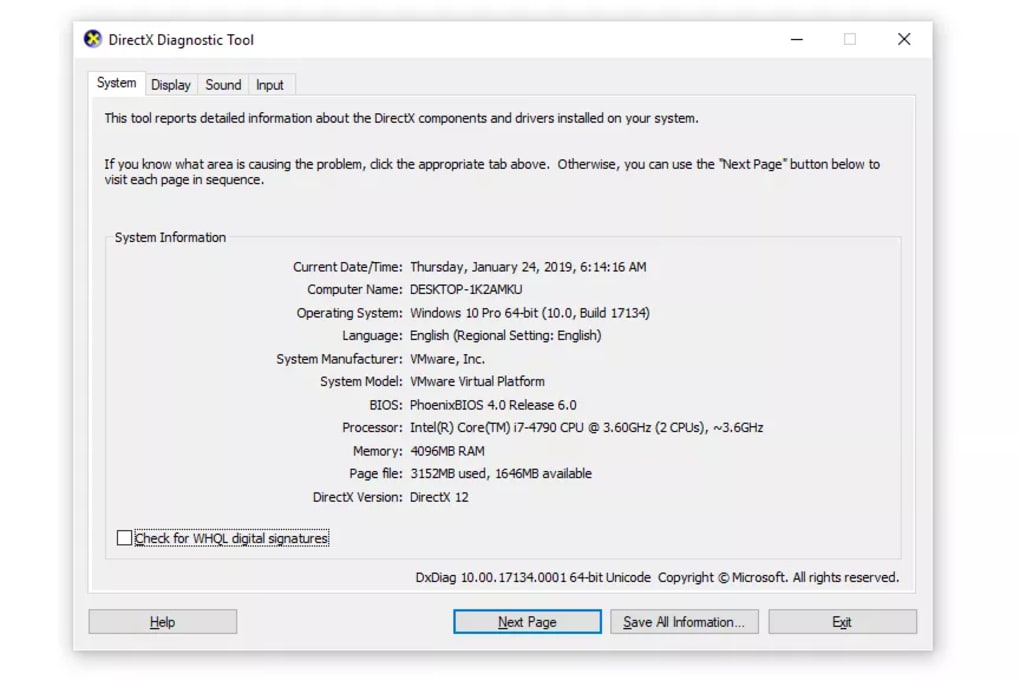
Checking Your DirectX Version and Ensuring Security
Verifying your DirectX installation and version is simple:
- Open the Windows search bar.
- Type
dxdiagand press Enter. - A window will appear displaying system information, including your DirectX version under the “System” tab.
DirectX is a Microsoft product, and as such, is generally considered secure when downloaded from official sources. Downloading DirectX from reputable websites like the official Microsoft website or trusted software distributors minimizes the risk of encountering malicious software. Always be cautious of downloading software from unofficial sources, as these might contain malware or viruses.
DirectX: A Free and Essential Tool
DirectX is a free, essential component for Windows. Its widespread use in games and multimedia applications makes it a vital part of the Windows ecosystem. While largely invisible to the average user, its importance is undeniable. It enables the sophisticated graphics and audio experiences enjoyed by millions of users daily. Without DirectX, the landscape of Windows gaming and multimedia would be drastically different, lacking the richness and performance that has become the standard.
Advantages and Disadvantages of DirectX
Advantages:
- High Performance: DirectX is highly optimized for performance, allowing games and applications to run smoothly and efficiently.
- Wide Compatibility: It is supported by a vast majority of games and applications developed for Windows.
- Hardware Acceleration: It takes full advantage of the capabilities of modern graphics cards and other hardware, enhancing visual and audio quality.
- Ease of Use: The API is relatively straightforward for developers to utilize, simplifying the development process.
- Free and Open: The API itself is free to use and distribute.
Disadvantages:
- Windows-Specific: DirectX is exclusively for Windows, limiting its cross-platform capabilities.
- Closed Ecosystem: It is a proprietary technology controlled by Microsoft, unlike some open-source alternatives.
- Limited Customization: There is limited scope for direct user customization of DirectX settings.
- Debugging Challenges: Troubleshooting issues with DirectX can sometimes be challenging.
DirectX, despite its limitations, remains a cornerstone of the Windows gaming and multimedia experience, providing the foundation for high-performance applications and enriching the visual and auditory landscapes of countless software programs. Its widespread adoption and continuous development ensure that it remains a crucial element of the Windows ecosystem for the foreseeable future.


