
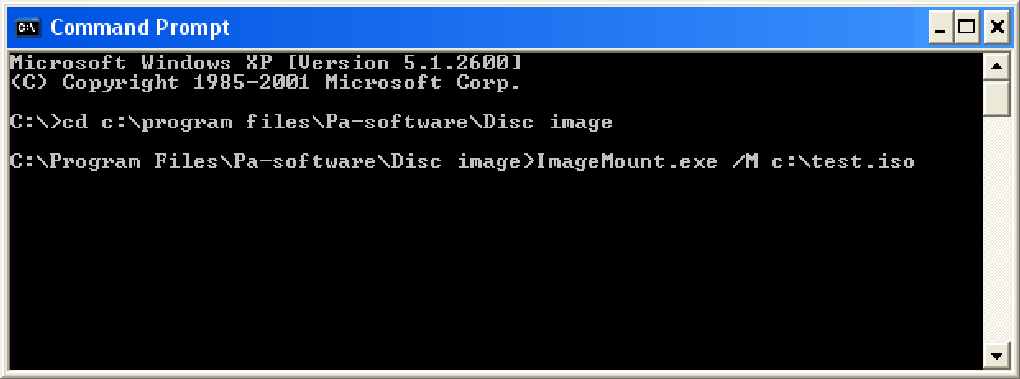
Disc Image is a software utility for Windows that allows users to mount ISO images of CD and DVD discs as virtual drives. This eliminates the need for physical media, offering convenience, improved security, and enhanced portability. This detailed guide explores Disc Image’s features, functionality, benefits, and alternatives, providing a comprehensive understanding of its role in managing and accessing digital disc content.
Understanding Disc Image Functionality
Disc Image functions as a virtual CD/DVD-ROM drive emulator. It acts as a driver, integrating seamlessly into the Windows operating system (compatible with Windows 2000 and earlier versions at the time of its release) to present ISO images as if they were physically inserted into a real drive. This means the user can access the contents of an ISO image as they would with a physical disc, without the need for a physical CD or DVD drive. The simplicity of its design and small size mean it operates with minimal impact on system performance. This lightweight nature minimizes resource consumption, making it suitable for use on systems with limited resources, including older machines or laptops where power conservation is a concern.
The program’s capability extends to mounting multiple ISO images simultaneously, limited only by the availability of drive letters within the system. This functionality is particularly useful for users frequently working with multiple disc images. Each mounted image behaves independently, avoiding conflicts or interference between different virtual drives.

Supported File Systems and Compatibility
Disc Image supports ISO images using the ISO9660 and Joliet file systems, representing a broad compatibility across various ISO image creation tools. The program can mount nearly all ISO images utilizing these standard file systems. However, limitations exist, as Disc Image will not mount images utilizing file systems that Windows itself cannot interpret. For example, the HFS+ file system used by Apple Macintosh systems is not supported by this software. This limitation is inherent to the Windows operating system, not the Disc Image program itself. The software’s reliance on Windows’ native file system handling is a defining characteristic that both limits and shapes its functionality.
Benefits of Using Disc Image
The advantages of utilizing Disc Image extend beyond simple convenience, offering several key benefits:
- Enhanced Convenience: Eliminating the need to constantly swap physical discs significantly improves workflow efficiency, especially for tasks involving multiple discs or frequently accessed content. The virtual drive allows for quick and easy access to data without the physical handling of media. This is particularly valuable when working with games, software installations, or large data sets stored on multiple discs.
-
Noise Reduction and Power Conservation (Especially beneficial for laptops): Traditional CD/DVD drives can generate noticeable noise, often disrupting workflow. Furthermore, these drives can significantly consume power, especially when continuously running. Using Disc Image bypasses these issues, resulting in a quieter and more energy-efficient computing experience. The benefits are particularly pronounced for laptop users, where battery life is a major concern.
-
Improved Security and Data Protection: Storing frequently accessed software or sensitive data on a central network server and mounting the ISO images locally, only when needed, enhances security. This setup protects the original images on the server from unauthorized access or accidental modification.
-
Simplified Software Installation: Disc Image simplifies network-based software installations, as server-stored installation ISO images can be easily mounted on individual workstations without needing physical media. This is particularly useful in enterprise settings, simplifying software deployment and updates.
-
Cross-Platform Image Compatibility (to a degree): The adherence to the ISO standard allows for cross-platform compatibility with other operating systems. As both Apple Macintosh OS X and Unix systems inherently support ISO image mounting, Disc Image enables a degree of platform independence for the data contained within the ISO images.
-
Efficient Testing of ISO Images: For users who create their own ISO images, Disc Image serves as a valuable testing tool. Before burning an ISO image to a physical disc, users can mount and test the image to ensure its integrity and functionality. This reduces waste caused by burning flawed or incomplete images.
-
Reduced Storage Space (for physical media): Once the contents of the physical disc have been safely backed up to ISO images, the physical media itself can often be discarded, thereby freeing up storage space.
Limitations of Disc Image
While Disc Image offers considerable advantages, it is not without limitations:
-
Limited File System Support: The software’s reliance on Windows’ native file system capabilities restricts support to ISO9660 and Joliet file systems, thereby excluding images using other formats such as HFS+ or UDF. This lack of broader file system support may impact users working with images originating from various sources or employing less common file systems.
-
Lack of Image Creation Capabilities (in earlier versions): Early versions of Disc Image, notably Version 2.0.0, did not provide the capability to create ISO images. This feature was added in later updates, according to user reviews.
-
Potential for Compatibility Issues (with outdated systems): While compatible with Windows 2000 and earlier, compatibility with even older operating systems is not guaranteed and may require additional configuration or troubleshooting.
Alternatives to Disc Image
Several alternative software packages offer similar virtual drive emulation capabilities:
-
DAEMON Tools Lite: A popular and free option providing robust virtual drive emulation, as well as image creation and management features.
-
MagicDisc: Another free software alternative offering virtual drive creation and ISO mounting capabilities.
-
ISODisk: This free program allows users to mount up to 20 ISO files simultaneously as virtual drives.
- VirtualDrive: A trial version offering virtual drive functionality for running CDs and DVDs without a physical drive.
Choosing an alternative depends on individual needs and preferences, taking into consideration the specific features and functionalities offered by each program. The availability of free or trial versions allows users to experiment and determine the best fit for their requirements.
User Reviews and Feedback
User reviews consistently highlight Disc Image’s ease of use and seamless integration into the Windows operating system. Many users praise its simple interface and lack of bloatware, contrasting it favorably with other, more resource-intensive alternatives. While earlier versions lacked image creation functionality, the addition of this capability in later releases addresses a significant user request. This demonstrates the responsiveness of the developers to user feedback and continuous improvement of the software.
Conclusion
Disc Image provides a reliable and efficient method for mounting ISO images as virtual drives within the Windows operating system. Its ease of use, lightweight design, and seamless integration make it a strong contender among virtual drive emulators. While limitations exist regarding file system support and image creation (in older versions), the overall benefits in terms of convenience, efficiency, and security make it a valuable tool for users working with digital disc content. The availability of various alternatives allows users to select the option most tailored to their specific needs and technical requirements. The evolution of Disc Image, as evidenced by user reviews and the introduction of new features, underscores its continuous development and adaptation to meet user demands and improve overall functionality.
File Information
- License: “Trial version”
- Version: “2.0.0”
- Latest update: “October 8, 2006”
- Platform: “Windows”
- OS: “Windows XP”
- Language: “English”
- Downloads: “75.2K”
- Size: “713.57 KB”


