
Dism++, a free, open-source utility developed by the Chuyu Team, provides a user-friendly graphical interface (GUI) for the powerful but complex command-line tool, Deployment Image Servicing and Management (DISM). This comprehensive guide explores Dism++, its capabilities, benefits, potential drawbacks, and how it can help optimize your Windows experience. We will delve into the software’s core functionalities and provide insights for both novice and advanced users.
Understanding DISM and the Need for Dism++
Deployment Image Servicing and Management (DISM) is a command-line tool integral to Windows administration. It allows for managing and modifying Windows images, encompassing tasks such as installing, removing, configuring, and updating Windows features, packages, and drivers. This level of control empowers users to create customized Windows installations tailored to their specific needs. However, DISM’s command-line interface presents a significant barrier to entry for many users. The complexity of its syntax and the potential for errors if commands are not entered precisely make it inaccessible to the average user.
This is where Dism++ shines. It acts as a bridge, translating the intricate commands of DISM into a simple, intuitive graphical user interface. This makes the powerful features of DISM readily available to a much wider audience, allowing users to perform advanced system maintenance and optimization tasks without needing extensive command-line knowledge. Dism++ essentially democratizes access to a powerful tool previously reserved for experienced system administrators.
Dism++: A User-Friendly Interface for Powerful Functionality
Dism++’s clean and straightforward design organizes its extensive capabilities into three main sections: Utilities, Control Panel, and Deployment Features. Each section caters to different aspects of Windows system management and optimization.
Utilities: Essential System Maintenance
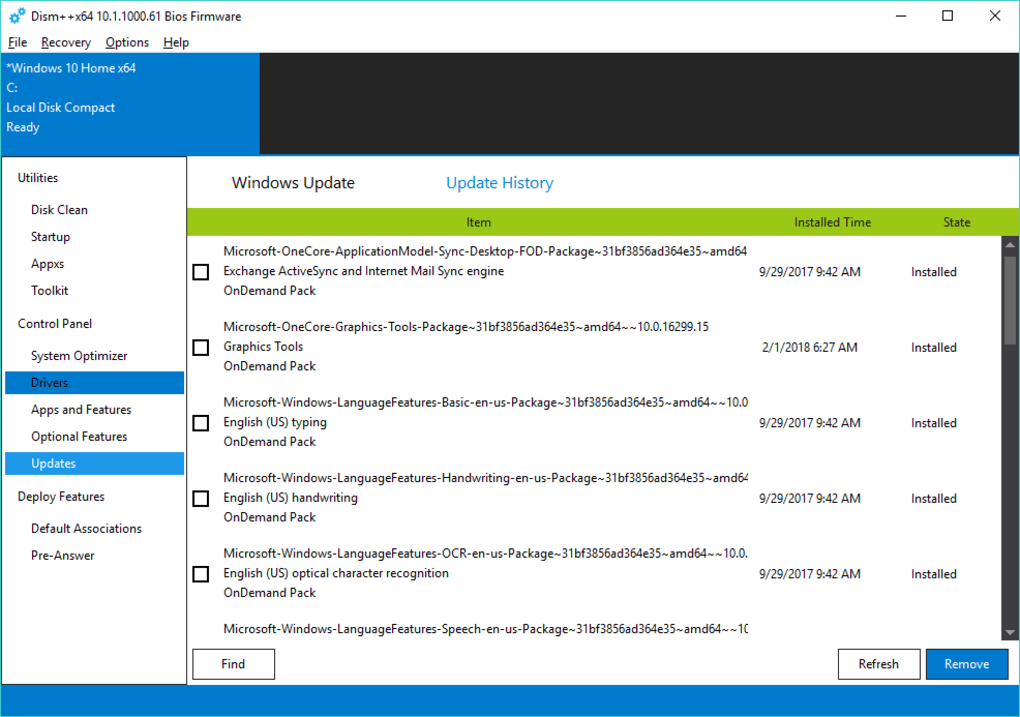
The “Utilities” section provides a range of tools for basic system maintenance and cleanup. These functionalities are crucial for ensuring the smooth and efficient operation of your Windows system. Key features within this section include:
-
Temporary File Cleaning: Dism++ efficiently removes temporary files, freeing up valuable disk space and improving system performance. These temporary files often accumulate over time, consuming significant storage and potentially slowing down your computer. Dism++’s cleanup function helps maintain a lean and efficient system.
-
Backup and Restore: Creating regular backups of your system’s crucial settings and files is paramount for data protection and recovery. Dism++ facilitates this process, allowing users to create comprehensive backups that can be restored in case of system failure or accidental data loss. This feature provides peace of mind, knowing that critical data can be recovered easily.
-
Windows App Management: Dism++ empowers users to manage installed Windows applications, uninstalling unwanted programs and freeing up more resources. This helps declutter the system and improve performance by removing applications that are no longer needed or are consuming unnecessary system resources.
-
Startup Item Management: The ability to manage startup items is vital for optimizing boot times. Dism++ allows users to identify and disable unnecessary applications and services from launching at startup, leading to faster boot times and improved overall system responsiveness. This is especially helpful for older or lower-spec computers where even minor improvements in boot speed can be noticeable.
Control Panel: Advanced System Optimization
The “Control Panel” section offers more advanced features aimed at optimizing and customizing various aspects of the Windows operating system. This section caters to users looking to fine-tune their system for improved performance and efficiency. Key features include:
-
Feature Management: Dism++ allows granular control over Windows features. Users can enable or disable specific features based on their requirements, eliminating unnecessary components and freeing up system resources. This feature is extremely powerful and allows for significant customization of the operating system.
-
Driver Management: Managing drivers is crucial for maintaining system stability and performance. Dism++ simplifies driver management, providing tools to install, update, and remove drivers efficiently. This contributes to a more stable and better-performing system.
-
Windows Update Management: Staying up-to-date with Windows updates is essential for security and stability. Dism++ provides tools to manage these updates, allowing users to download and install updates, or to schedule updates for a more convenient time.
-
System File Checker (SFC): Dism++ integrates the Windows System File Checker (SFC) utility, providing a straightforward method for verifying the integrity of system files and repairing any corrupted files. This crucial function ensures that the core components of Windows are functioning properly and helps prevent system instability.
Deployment Features: Customizing Application Associations
The “Deployment Features” section offers tools for managing application associations, allowing for customization of how the system handles various file types. This functionality ensures seamless integration of different applications and provides flexibility in how the system interacts with various file extensions. Key functionalities include:
-
Import and Export Settings: This allows for the easy transfer of application association settings between different systems or the creation of customized settings profiles for various tasks.
-
Customization of File Associations: This enables users to specify which application should open a particular file type, overriding default associations. This is particularly helpful when working with multiple applications that handle the same file type.
Advantages of Using Dism++
Dism++ offers numerous advantages over directly using the DISM command-line tool:
-
User-Friendly Interface: The intuitive GUI eliminates the need for complex command-line syntax, making the powerful features of DISM accessible to a broader range of users.
-
Simplified Workflow: Tasks that require multiple complex commands in DISM are often consolidated into single actions within Dism++, streamlining the optimization process.
-
Reduced Risk of Errors: The graphical interface minimizes the risk of user error compared to manual entry of complex commands in the command prompt.
-
Comprehensive Functionality: Dism++ offers a wide range of tools covering various aspects of Windows system maintenance and optimization, providing a one-stop solution for many tasks.
Potential Drawbacks and Precautions
While Dism++ offers significant advantages, it’s crucial to acknowledge potential drawbacks and exercise caution:
-
Steep Learning Curve (Despite GUI): Although the GUI simplifies DISM, understanding the implications of each action requires some technical knowledge. Improper use could lead to system instability.
-
Potential for System Instability: Incorrectly modifying system settings or files can lead to system instability or even data loss. It’s essential to proceed cautiously and understand the consequences of each action.
-
Advanced User Tool: Dism++ is primarily targeted towards intermediate to advanced users comfortable with system maintenance and potential risks. Beginners should approach its use with caution and potentially seek guidance from experienced users.
Conclusion: A Powerful Tool for Windows Optimization
Dism++ empowers users to optimize and maintain their Windows systems effectively, regardless of their technical expertise. By providing a user-friendly interface for the potent capabilities of DISM, it bridges the gap between powerful system administration tools and the average user. However, responsible use, understanding the implications of each action, and potentially consulting with more experienced users before making significant changes is highly recommended. With careful and informed use, Dism++ can significantly improve your Windows experience, making it faster, more efficient, and more reliable.
File Information
- License: “Free”
- Version: “10.1.1001.10”
- Latest update: “July 20, 2021”
- Platform: “Windows”
- OS: “Windows 8”
- Language: “English”
- Downloads: “93.2K”
- Size: “3.68 MB”


