
Controlling your monitor’s settings can often feel like wrestling with an overly complicated system. While modern operating systems offer some level of adjustment, they often fall short of providing the granular control and ease of access many users desire. Display Tuner steps in to bridge this gap, offering a convenient and user-friendly interface for fine-tuning your monitor’s performance and appearance. This isn’t just about adjusting brightness and contrast; Display Tuner empowers you to customize your viewing experience to perfectly match your needs, whether you’re gaming, working on text-heavy documents, or watching movies.
Effortless Monitor Management: Brightness, Contrast, and Beyond
The core function of Display Tuner is to provide straightforward access to your monitor’s settings. Forget fumbling with on-screen menus or awkwardly reaching behind your monitor for physical buttons – Display Tuner puts all the critical adjustments at your fingertips. This includes the essential elements:
- Brightness: Easily adjust the screen’s luminance to suit the ambient lighting conditions of your workspace or entertainment setup. Avoid eye strain and optimize your comfort by fine-tuning the brightness level to perfectly match your environment.
- Contrast: Enhance the vibrancy and clarity of your visuals by adjusting the contrast ratio. This setting defines the difference between the brightest and darkest points on your screen, impacting the overall detail and depth of your images and videos.
- Color Settings: Fine-tune the color temperature, saturation, and other color parameters to personalize your visual experience. Achieve optimal color accuracy for photo editing, enjoy more vibrant and immersive gaming visuals, or create a customized viewing profile that is easier on your eyes.
- Geometry: For some monitors, Display Tuner allows for adjustments to the screen’s geometry, helping to correct any distortions or imperfections. This ensures a crisper, more accurate representation of your content.
But Display Tuner’s functionality extends beyond these basic settings. If your monitor incorporates integrated speakers or a microphone, Display Tuner grants you convenient access to their volume controls, eliminating the need to physically interact with the monitor itself. This streamlined approach streamlines your workflow and keeps your focus on the task at hand.
Preset Profiles: Tailoring Your Display for Different Tasks
One of Display Tuner’s most powerful features is its ability to create and manage custom profiles. Just as a music equalizer allows you to switch between presets optimized for different genres (e.g., “Rock,” “Jazz,” “Classical”), Display Tuner lets you define unique display profiles tailored to specific applications or tasks.
Imagine having a dedicated profile for gaming, optimized for rich colors and high contrast, instantly accessible with a simple hotkey. Then switch seamlessly to a profile designed for prolonged text-based work, featuring a lower brightness and adjusted color temperature for reduced eye strain. You might even create a profile specifically for movie watching, maximizing the cinematic experience with precisely calibrated color settings. The possibilities are nearly limitless.
Hotkeys for Instant Access: Streamlined Workflow
Display Tuner understands that efficiency is paramount. That’s why it integrates seamlessly with your keyboard, allowing you to assign custom hotkeys to your display profiles and individual settings. Instead of navigating through menus, you can instantly switch between your custom profiles or make on-the-fly adjustments to brightness, contrast, or other settings. This level of accessibility ensures that you can optimize your display settings without interrupting your workflow.
Extensive Hardware Compatibility: A Broad Range of Support
While Display Tuner doesn’t support every single video card on the market, it boasts impressive compatibility with a wide range of hardware. It successfully works with prominent brands such as NVIDIA, ATI, Intel, S3, SiS, Matrox, and more. This broad support base ensures that a substantial number of users can benefit from Display Tuner’s capabilities, regardless of their specific graphics card model.
User Reviews: Real-World Experiences and Testimonials
User feedback highlights the real-world impact of Display Tuner. One user, in an August 2015 review, stated, “Great. Wow, it’s working great!!!!!!!!!!!!!!!!…….I got what I need.” This simple yet emphatic endorsement underscores the program’s effectiveness in delivering on its promises. Another review from May 7, 2013, expresses profound gratitude: “Thank Jesus for Display Tuner. The buttons on this monitor (‘05 Samsung screen) are broken, and I have sensitive eyes, so this absolutely saved me.” This powerful testimonial showcases Display Tuner’s capacity to resolve real-world problems and improve users’ overall computing experience. The user further notes that before discovering Display Tuner, the bright light was causing eye strain and discomfort, highlighting the program’s practical contribution to their well-being.
Addressing Potential Drawbacks: Limitations and Alternatives
While Display Tuner offers a compelling solution for monitor control, it’s essential to acknowledge its limitations. The most significant drawback is the lack of support for all video cards. While a vast number of cards are compatible, users with more obscure or less common hardware might encounter compatibility issues.
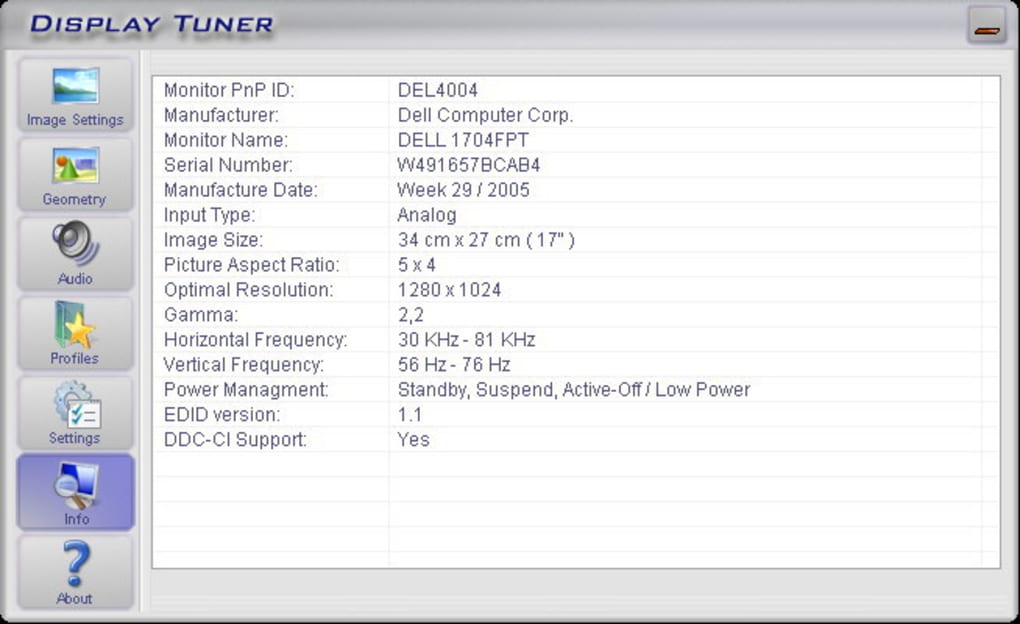
Furthermore, some users might find the program’s visual interface somewhat dated. However, the intuitive functionality and effectiveness of the program arguably outweigh the aesthetic concerns for most users, particularly those prioritizing functionality over stylistic elegance.
For users seeking alternatives, several options exist. Programs such as Calibrize, DimScreen, and QuickGamma offer similar functionalities, each with its own strengths and weaknesses. These alternatives could be worth exploring if Display Tuner proves incompatible with your hardware or doesn’t perfectly meet your specific requirements. Ultimately, the best choice depends on individual needs and preferences.
Conclusion: Enhanced Control, Enhanced Productivity
Display Tuner offers a practical and effective solution for users seeking greater control over their monitor settings. Its intuitive interface, comprehensive features (including brightness, contrast, color settings, and geometry adjustments), and the ability to create custom profiles with hotkeys significantly enhance the user experience. While it doesn’t support every video card, its wide compatibility and positive user reviews firmly establish it as a valuable tool for anyone seeking more precise and convenient control of their display. Whether you’re a gamer, a professional editor, or simply someone who values a comfortable and personalized viewing experience, Display Tuner offers a straightforward path to achieving optimal display performance.
File Information
- License: “Free”
- Version: “1.7”
- Latest update: “March 13, 2009”
- Platform: “Windows”
- OS: “Windows 2003”
- Language: “English”
- Downloads: “56.9K”
- Size: “729.15 KB”


