DJ Mixer Express is a user-friendly digital audio workstation (DAW) designed for aspiring DJs and music enthusiasts. This software provides a simplified yet effective platform for mixing and manipulating audio tracks, offering a range of features that make it accessible to beginners while still providing enough depth to encourage experimentation and skill development. This review will explore its functionalities, strengths, weaknesses, and overall user experience.
Interface and Functionality
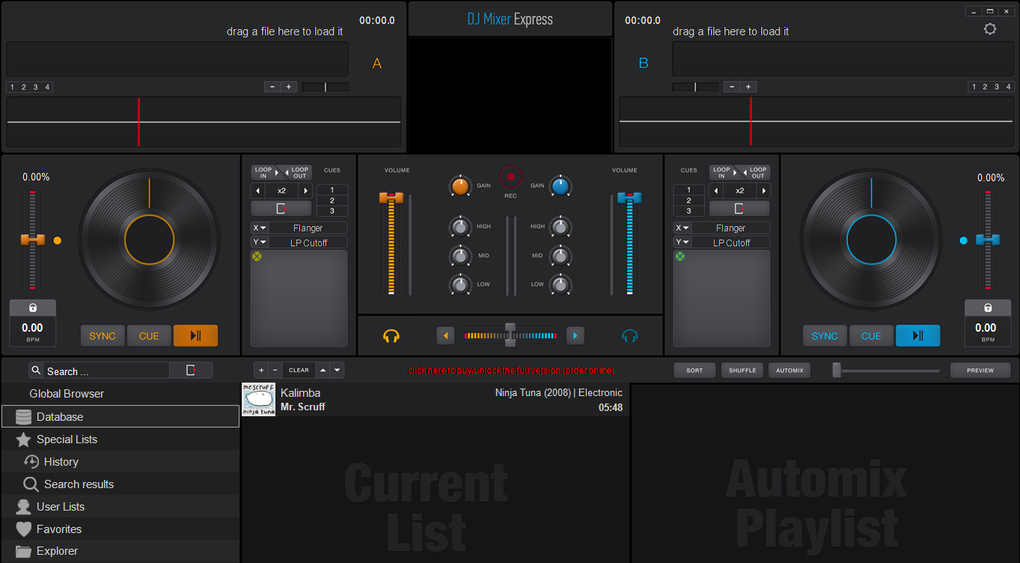
DJ Mixer Express boasts a straightforward interface, characterized by its intuitive design. The core layout consists of two virtual turntables, each representing a separate audio track. These turntables are centrally positioned, allowing for easy visual monitoring of waveforms and playback progress. Below the turntables lies the media library section, where users can browse and load MP3 files for mixing. The process is simple: users drag and drop MP3 files onto the turntables to begin mixing.
The software supports a basic drag-and-drop functionality for intuitive track loading and manipulation. Users can adjust the pitch and tempo of each track independently, allowing for seamless blending and transitions. Furthermore, DJ Mixer Express includes a range of audio effects including filters, echo, delay, and a brake function (simulating a turntable’s brake), all easily accessible through clearly labeled on-screen controls. The software also features automatic BPM detection, which helps users seamlessly synchronize tracks, and auto-generated loop beats, adding a professional touch to the mixing process. The auto-panning feature further enhances the mixing experience, ensuring a balanced sound across the stereo spectrum.
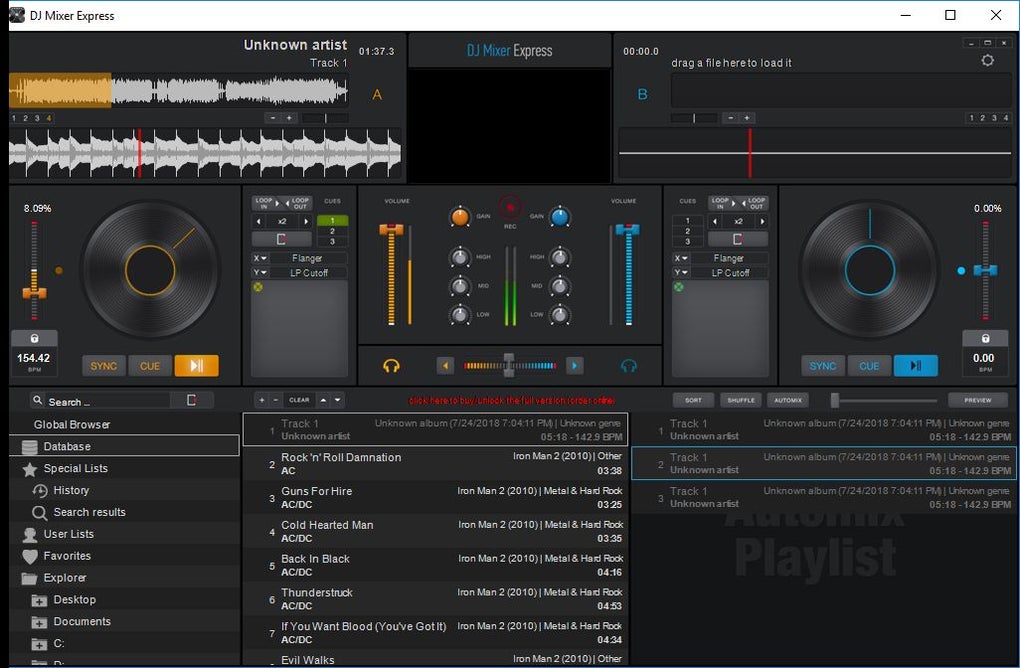
While the software focuses on ease of use, it doesn’t skimp on vital features. The full-screen mode allows for an immersive DJ experience, minimizing distractions and maximizing the visual real estate dedicated to mixing. Importantly, the software also allows for direct import of songs from an iTunes library, streamlining the workflow for users already utilizing Apple’s music management system. These combined functionalities ensure a smooth and efficient mixing process.
Strengths and Advantages
DJ Mixer Express shines as an entry-level DJ software due to several key advantages:
-
Ease of Use: The software’s intuitive interface and simple drag-and-drop functionality make it incredibly easy to learn and use, even for complete beginners with no prior experience in DJing or audio mixing. The clear labeling of controls and visual feedback make navigating the software a breeze.
-
Essential Features: While not as feature-rich as professional-grade software, DJ Mixer Express includes all the essential tools for basic mixing. The inclusion of BPM detection, loop beats, and auto-panning significantly streamlines the process and enhances the quality of the mix. The variety of basic audio effects also provides ample opportunity for creative experimentation.
-
iTunes Integration: The ability to directly import tracks from an iTunes library is a significant advantage. This eliminates the need for additional steps in importing music, saving users time and effort. This simple integration point streamlines the workflow, particularly beneficial for users already managing their music collections within iTunes.
-
Full-Screen Mode: The full-screen mode provides an immersive experience, concentrating the user’s attention on the mixing process without distractions. This mode is helpful for both practice and performance.
-
Affordable: The software’s price point, considering its functionality, makes it highly accessible and affordable for those who are just starting in the world of DJing.
Weaknesses and Limitations
While DJ Mixer Express offers many advantages, it also suffers from certain limitations:
-
Limited Format Support: The most significant drawback is the limited number of audio formats supported. Its primary support for MP3 files restricts the user’s options and could hinder the ability to work with a diverse range of audio files. Expansion of supported formats would greatly improve its versatility.
-
Basic Scratching Functionality: The scratching functionality is quite basic, limiting the creative control users have over this aspect of DJing. The limited range of motion in the virtual scratching mechanism might frustrate users looking for more nuanced control.
-
Trial Limitations: The trial version’s time limit presents a barrier to prolonged use and thorough evaluation before purchasing. This restriction could discourage potential buyers from fully exploring its capabilities.
-
Lack of Advanced Features: The software lacks advanced features found in professional DJ software packages. This includes features such as advanced looping options, more sophisticated audio effects, and the capability of incorporating external hardware. Such limitations hinder its use for more experienced DJs.
-
Limited User Feedback: Although a few user reviews are available, more comprehensive user feedback and detailed tutorials could help beginners better understand the software’s capabilities and intricacies.
User Reviews and Opinions
User reviews on DJ Mixer Express are mixed, reflecting the software’s strengths and weaknesses. Some users praise its ease of use and intuitive interface, emphasizing its suitability for beginners. Others criticize its limited features, particularly the restricted format support and basic scratching functionality, expressing a preference for more advanced software. A recurring theme in user feedback concerns the trial version’s time restriction, preventing potential users from fully assessing the software’s capabilities before committing to a purchase.
The comments suggest that while the software caters well to novice DJs, its functionality might be insufficient for experienced users seeking more professional-grade mixing tools. The software’s simplicity is both a strength and a weakness, appealing to beginners but limiting the possibilities for professional use.
Comparison with Alternative Software
Numerous alternative DJ software programs cater to various skill levels and budgets. Professional-grade software packages such as Traktor Pro, Serato DJ Pro, and Rekordbox DJ offer a comprehensive suite of features and advanced mixing capabilities, but come with a steeper learning curve and higher price tag. Conversely, simpler applications focus on intuitive interfaces and limited features, targeting beginners who need a straightforward approach to mixing. DJ Mixer Express sits somewhere in between, offering a decent balance of features and simplicity, albeit with some limitations. The choice of software depends largely on the user’s skill level, budget, and specific requirements.
Conclusion
DJ Mixer Express serves as a decent entry-level DJ software for beginners. Its intuitive interface, essential mixing features, and iTunes integration make it an accessible and convenient option for those starting their journey in DJing. However, its limitations in format support, scratching functionality, and lack of advanced features make it less suitable for experienced DJs or those needing more sophisticated tools. While it provides a solid foundation for learning the basics, users seeking more advanced capabilities might need to explore more comprehensive professional software solutions. The software’s success lies in its user-friendly design, making it a viable option for newcomers to the world of digital audio mixing. However, potential buyers should carefully weigh the limitations against their specific needs and experience level before making a purchase.