
djay Pro is a powerful and versatile digital DJ software designed for both professional DJs and aspiring music enthusiasts. This comprehensive review delves into its key features, functionalities, and overall performance, providing a detailed assessment of its strengths and weaknesses. Whether you’re a seasoned professional looking for a reliable mixing tool or a beginner eager to explore the world of DJing, understanding djay Pro’s capabilities is crucial.
AI-Powered Music Production and Seamless Mixing
One of the standout features of djay Pro is its intelligent AI integration. This innovative technology significantly simplifies the music production process, assisting users in creating polished mixes with minimal effort. The AI automatically quantizes and syncs samples, ensuring seamless transitions between tracks. This intelligent automation allows for a more fluid and creative workflow, enabling users to focus on the artistic aspects of DJing rather than getting bogged down in technical adjustments.
The software’s intuitive loop creation system is another remarkable asset. djay Pro allows users to create up to 48 loops within a grid-based interface. This visual arrangement enables quick and precise access to specific sections of tracks, facilitating on-the-fly transitions and creative experimentation. The grid acts as a visual map of your loops, offering a highly efficient method for managing and manipulating audio segments. This feature is particularly valuable for live performances, where quick access to different parts of a track is essential for maintaining the flow and energy of a set.
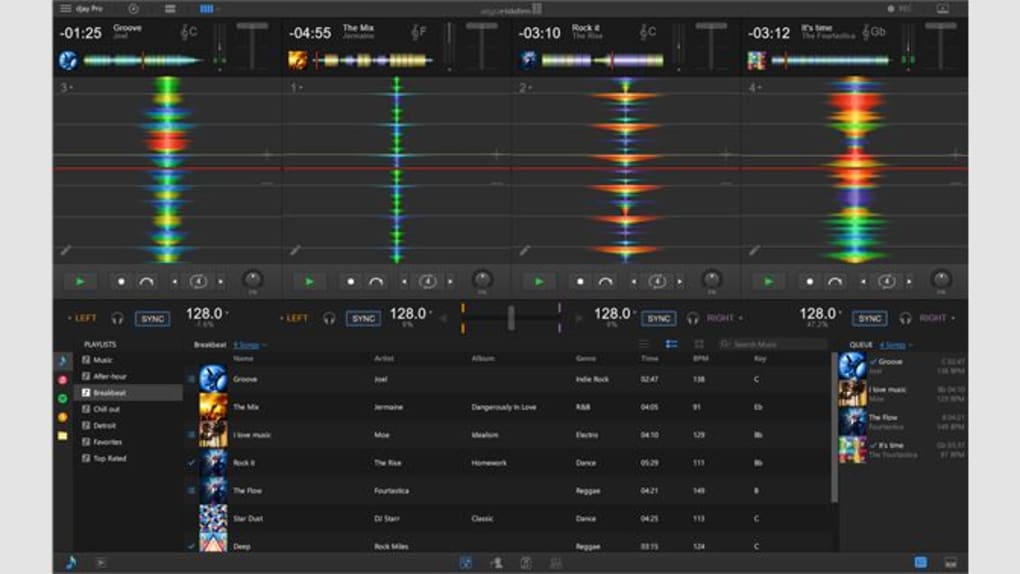
Furthermore, djay Pro empowers users with comprehensive control over audio effects. Beyond the AI-driven features, users have extensive capabilities to personalize their mixes by applying a diverse array of effects. This granular level of control caters to individual preferences and creative visions, allowing for the production of unique and memorable mixes. The ability to layer and adjust these effects in real-time adds another dimension to the creative possibilities within the software.
Compatibility and System Requirements
Designed as a Windows 10 application, djay Pro boasts straightforward installation and requires minimal configuration. This user-friendly design makes it accessible to users of varying technical skill levels. The software’s seamless integration with Windows 10 simplifies the setup process, allowing users to quickly begin creating and mixing music. This ease of use is a significant advantage, particularly for beginners who may be unfamiliar with complex DJ software interfaces.
djay Pro extends its compatibility to several Microsoft devices. It offers native support for the Surface Dial and Surface Studio, enabling users to utilize these peripherals to enhance their workflow. The integration with Surface devices adds a layer of tactile control, providing users with a more intuitive and expressive method of interacting with the software. This versatility enhances the overall user experience, providing options for different preferences and creative approaches.
It’s important to note, however, that while djay Pro supports the latest iOS versions, it lacks compatibility with Apple’s iCloud and Spotify services. This limitation might present a challenge for users who heavily rely on these platforms for managing their music libraries. While the software supports a range of other streaming services, the absence of iCloud and Spotify integration could be a significant drawback for certain users.
Comprehensive Music Library Management and Advanced Features
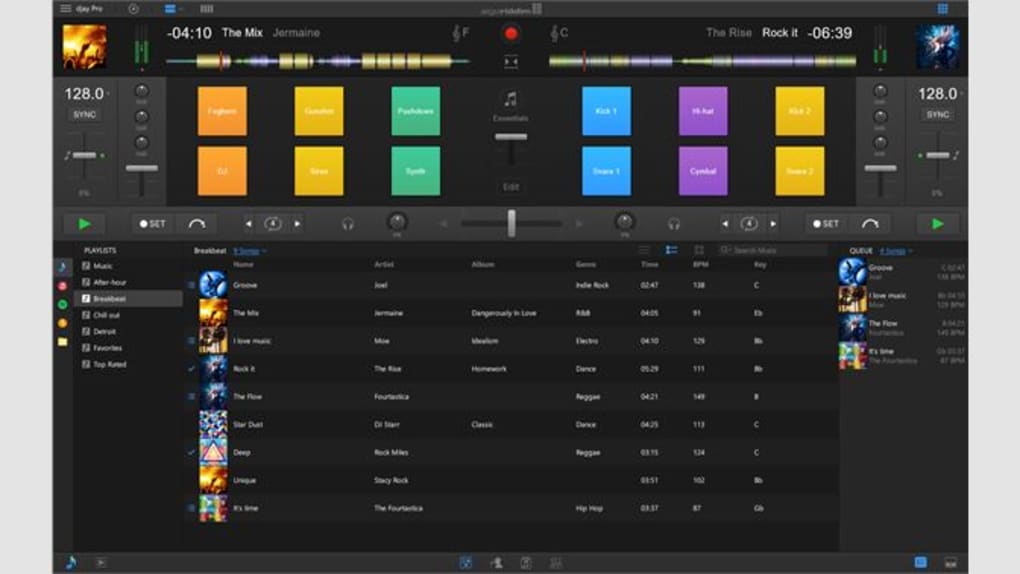
djay Pro offers comprehensive support for a wide range of music streaming services, including popular platforms like Spotify and Apple Music (though not directly integrated as noted above). This broad compatibility ensures that users have access to extensive music libraries, enabling diverse musical exploration. The ability to access and curate playlists directly within djay Pro streamlines the workflow, eliminating the need to switch between different applications.
The software’s robust cue point system is another key advantage. Users can create up to eight cue points per track, providing extensive organizational capabilities. This granular level of control allows DJs to precisely mark specific sections of songs, making transitions smooth and efficient. The ability to access these cue points quickly and easily during live performances is crucial for maintaining a high-energy and engaging set.
The software’s advanced features extend beyond basic mixing functionalities. djay Pro provides tools for creating professional-sounding mixes, including features for seamless transitions and real-time effects processing. These capabilities allow users to craft polished mixes that stand out, even for those without extensive experience.
User Interface and Ease of Use
djay Pro’s user interface is designed with intuitive navigation in mind. The software features a visually appealing and straightforward layout that prioritizes ease of use. Whether you are a seasoned professional or a beginner, the interface is structured to minimize the learning curve, ensuring a smooth transition into the software’s functionalities. This user-friendly design is particularly valuable for beginners who may be intimidated by complex DJ interfaces. Even complex functions are readily accessible, making the software versatile for users at all levels.
The software’s layout prioritizes efficient workflow. Key functions are readily accessible, minimizing the need for extensive searching within the interface. The software’s responsive design ensures a fluid experience, allowing users to quickly adapt to changes during live performances. This seamless interaction is a crucial factor in ensuring a smooth and enjoyable experience for the user.
Performance and System Resources
djay Pro’s performance is generally reliable, offering smooth mixing capabilities even with complex mixes. The software is designed to handle multiple tracks and effects simultaneously without noticeable lag or performance degradation. However, system resource usage can vary depending on the complexity of the project and the user’s hardware configuration. Users with lower-end systems might experience some performance limitations with very complex mixes, making system specifications a crucial consideration before purchasing.
The software’s efficiency is a key feature, optimizing resource usage to ensure smooth operation even with demanding projects. The developers have prioritized efficiency in the software’s design, minimizing the impact on system resources while maintaining a high level of responsiveness. This balance between functionality and efficiency is a significant advantage, making the software compatible with a broader range of hardware configurations.
Conclusion
djay Pro stands as a formidable contender in the world of digital DJ software, offering a compelling blend of AI-powered features, comprehensive music library management, and an intuitive user interface. While the lack of direct integration with Apple’s iCloud and Spotify might be a limiting factor for some, the software’s overall performance, advanced features, and user-friendly design make it a powerful and valuable tool for DJs of all levels. Its seamless integration with various streaming services and Microsoft Surface devices further enhances its versatility and accessibility, solidifying its position as a strong choice for both professional use and personal enjoyment. For those seeking a user-friendly yet powerful DJ software experience, djay Pro offers a compelling and comprehensive solution.
File Information
- License: “Full”
- Version: “1.0”
- Latest update: “July 5, 2022”
- Platform: “Windows”
- OS: “Windows 10”
- Language: “English”
- Downloads: “17K”


