
DNS Angel is a lightweight, portable application designed to enhance internet safety, particularly for families with children. It achieves this by allowing users to easily switch their DNS server, effectively filtering out potentially harmful or inappropriate websites. Instead of relying on your internet service provider’s (ISP) default DNS settings, DNS Angel lets you utilize the services of reputable third-party providers known for their content filtering capabilities. This simple yet effective approach provides a convenient layer of protection without the need for complex software installations or configurations.
How DNS Angel Works: A Deep Dive into DNS and Content Filtering
DNS, or Domain Name System, is the internet’s phonebook. It translates human-readable domain names (like www.example.com) into machine-readable IP addresses, which are numerical codes that computers use to locate and connect to websites. Your ISP usually provides you with a default DNS server, but this server doesn’t inherently filter any content. This is where DNS Angel steps in.
DNS Angel modifies your computer’s network settings to utilize a different DNS server, one specifically designed for content filtering. By selecting a provider like Norton ConnectSafe, OpenDNS FamilyShield (now part of Cisco Umbrella), or MetaCert DNS, you redirect your internet traffic through a system that actively blocks access to websites categorized as potentially harmful. These providers maintain extensive databases of websites categorized by content, and they actively update these lists to stay ahead of emerging threats.
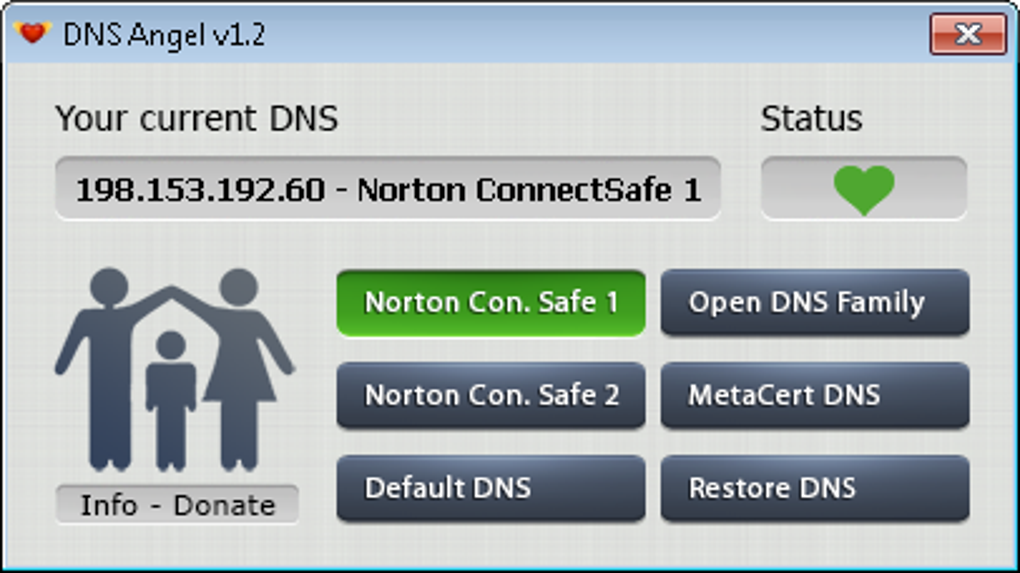
The process is remarkably straightforward. DNS Angel doesn’t require installation; you simply download the executable file, run it, and select your preferred DNS provider. With a single click, your system’s DNS settings are changed, enabling the chosen content filter. To revert to your ISP’s default DNS settings, another single click restores your original configuration. This simplicity makes it an ideal solution for users who need a quick and easy way to implement web filtering without delving into complex technical settings.
Supported DNS Providers and Their Filtering Capabilities
DNS Angel offers a choice of several reputable DNS providers, each with its own strengths in terms of content filtering. The specific features and levels of filtering may vary between providers:
-
Norton ConnectSafe: Known for its comprehensive approach to content filtering, Norton ConnectSafe provides different filtering levels to suit various needs. This allows users to tailor the filtering to their specific requirements, offering granular control over the types of content allowed. It excels at blocking adult content, violence, and other potentially harmful materials.
-
OpenDNS FamilyShield (Cisco Umbrella): Now part of the larger Cisco Umbrella suite, FamilyShield retains its focus on family-friendly content filtering. It offers robust protection against malware and phishing attempts in addition to filtering inappropriate content. The service integrates well with other security measures, enhancing the overall protection of your network.
- MetaCert DNS: MetaCert focuses on protecting against malicious websites, emphasizing security over strict content filtering. While it does block access to many inappropriate websites, its primary goal is to prevent users from accessing sites known to spread malware or engage in phishing scams. This makes it a good option for users who prioritize online security above all else.
The choice of DNS provider often comes down to personal preference and specific filtering requirements. Some users may prefer a provider with stricter filtering, while others may prioritize a service that’s better at blocking malicious websites. DNS Angel allows users to experiment with different options to find the best fit for their needs.
Advantages and Disadvantages of Using DNS Angel
As with any software, DNS Angel has its own set of advantages and disadvantages:
Advantages:
-
Simplicity and Ease of Use: Its user-friendly interface makes it accessible to everyone, regardless of their technical expertise. The one-click setup and restoration of default DNS settings are particularly convenient.
-
Portability: DNS Angel is a portable application, meaning it doesn’t need to be installed. You can run it from a USB drive or any other portable storage device, making it incredibly convenient for use on multiple computers.
-
Effective Content Filtering: By utilizing reputable third-party DNS providers, DNS Angel provides a reliable method for filtering out inappropriate content, enhancing online safety for children and other vulnerable users.
-
No Installation Required: The lack of installation simplifies the process and avoids potential conflicts with other software.
-
Quick and Easy Setup: The straightforward interface allows users to quickly switch between DNS providers or revert to their default settings.
Disadvantages:
-
Limited Customization Options: The application itself offers minimal customization. Users cannot fine-tune the filtering options beyond selecting the DNS provider. Any adjustments to filtering settings must be done through the chosen DNS provider’s interface.
-
No Transparency into Filtered Websites: DNS Angel doesn’t provide a detailed list of websites that are being blocked. Users have no insight into the specific websites filtered by the selected DNS provider.
-
Reliance on Third-Party Services: The effectiveness of DNS Angel depends entirely on the reliability and accuracy of the chosen third-party DNS provider. Any issues with the provider’s service will directly affect the functionality of DNS Angel.
-
Potential for Bypass: Determined users may still find ways to bypass the content filters implemented by the DNS providers. No filtering method is foolproof, and sophisticated users might be able to circumvent these restrictions.
Alternatives to DNS Angel
While DNS Angel provides a convenient solution for content filtering, several alternative methods and applications exist, each with its strengths and weaknesses:
-
Dedicated Parental Control Software: Sophisticated parental control software packages offer far more extensive control over internet usage, including time limits, application restrictions, and detailed content filtering options. These programs often integrate with other security features and provide granular control over various aspects of online activity. Examples include Qustodio, Net Nanny, and McAfee Family Protection.
-
Router-Based Filtering: Many modern routers have built-in parental control features that allow you to configure content filtering directly at the router level. This applies filtering to all devices connected to the network, offering a centralized approach to internet safety.
-
Operating System Built-in Features: Some operating systems, such as Windows and macOS, offer basic parental control features that include web filtering options. However, these usually provide less comprehensive filtering capabilities than dedicated software or router-level solutions.
Conclusion: DNS Angel – A Simple and Effective Solution
DNS Angel serves a specific purpose: providing a quick and easy way to implement basic web filtering using reputable DNS providers. Its simplicity and portability make it a valuable tool for users seeking a straightforward approach to enhancing online safety. While it lacks the advanced customization and features offered by dedicated parental control software, its ease of use and effective content filtering make it an attractive option for many users, particularly those needing a simple solution without the complexity of more advanced programs. However, users should remember that no filtering method is completely foolproof, and vigilance remains crucial in ensuring online safety.
File Information
- License: “Free”
- Latest update: “May 1, 2024”
- Platform: “Windows”
- OS: “Windows Vista”
- Language: “English”
- Downloads: “33.4K”
- Size: “1.25 MB”


