
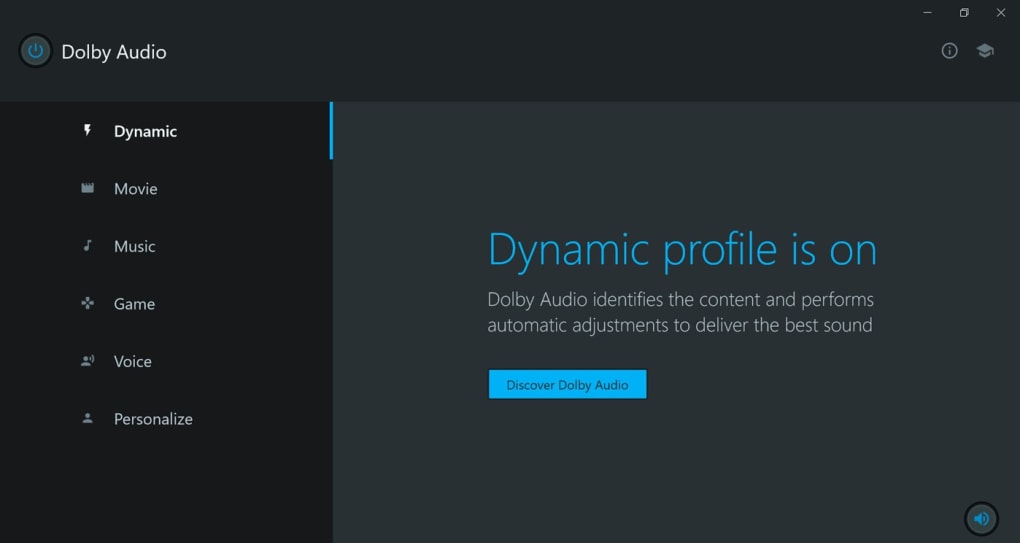
Dolby Audio is a widely recognized multimedia audio application designed to significantly improve the sound quality of various media sources on your Windows PC. Developed by Dolby Laboratories, a leader in audio technology, this application leverages advanced audio formatting and signal processing techniques to deliver a richer, more immersive auditory experience. While often confused with Dolby Atmos, a distinct application focused on 360-degree surround sound, Dolby Audio concentrates on enhancing the overall audio quality of existing content across diverse platforms and formats. It’s a crucial component for anyone seeking to elevate their listening experience beyond the default capabilities of their system.
Understanding Dolby Audio’s Capabilities
Dolby Audio excels in enhancing the clarity and impact of your audio, particularly addressing issues common in digital media. Its primary functions include:
-
Volume Leveling and Dialogue Enhancement: Dolby Audio intelligently manages volume fluctuations, particularly noticeable in movies and television shows. Its dialogue enhancement feature ensures clear and easily understandable speech, even amidst louder background sounds or action sequences. This is a game-changer for users who find dialogue too quiet or overshadowed by other audio elements. The automatic volume control ensures consistent listening levels across different media, preventing sudden loud or quiet moments.
-
Virtual Surround Sound: While not a true surround sound system requiring multiple speakers, Dolby Audio creates a virtual surround sound effect, providing a sense of spaciousness and immersion. This feature effectively expands the perceived soundstage, making the audio experience feel more engaging and three-dimensional, especially through headphones or a stereo speaker system. This virtual surround sound is a computationally intensive process that aims to mimic the spatial qualities of a multi-speaker setup.
-
Broad Compatibility: One of Dolby Audio’s strengths lies in its compatibility with a wide range of media sources. Whether you’re streaming content from platforms like Netflix, Amazon Prime Video, or playing games on your PC, or listening to downloaded music, Dolby Audio works to optimize the audio, enhancing your enjoyment regardless of the source. The application is designed to work seamlessly with various file formats and streaming services, making it a versatile addition to any audio setup.
-
Integration with Existing PC Technologies: Dolby Audio integrates with pre-installed Dolby sound technologies frequently found in modern PCs and tablets. It dynamically adjusts the audio settings to optimize the sound based on the content and your hardware. This ensures that the enhancements are tailored to your specific system, maximizing the impact of the audio processing.
- Improved Clarity and Loudness: Dolby Audio aims to boost the overall clarity of audio without introducing distortion. It enhances the loudness of your audio, allowing you to enjoy a more impactful sound without resorting to excessively high volume levels that can damage your speakers or your hearing. This careful balance between loudness and clarity is a key advantage of this application.
Dolby Audio vs. Dolby Atmos: Key Differences
It’s essential to clarify the distinction between Dolby Audio and Dolby Atmos. While both technologies are products of Dolby Laboratories and enhance audio, their approaches and applications differ considerably.
Dolby Atmos, a far more sophisticated technology, is primarily focused on immersive, object-based surround sound. It places sounds precisely within a three-dimensional space, creating a far more realistic and encompassing auditory environment. This technology requires a more advanced setup with multiple speakers positioned strategically to create the desired surround sound effect. Dolby Atmos is commonly found in cinemas and high-end home theater systems. Streaming services like Netflix, Vudu, and others offer select content that utilizes Dolby Atmos for a significantly enhanced listening experience. However, this requires compatible hardware, both in terms of audio output and playback capabilities.
In contrast, Dolby Audio offers a more accessible enhancement for a broader range of users and hardware configurations. It’s designed to optimize existing audio without requiring specialized equipment. Its focus is on improving the quality of existing stereo audio, enhancing clarity, loudness, and spatial characteristics within the limitations of the available sound system. While it doesn’t offer the full three-dimensional spatialization of Dolby Atmos, it still produces a noticeable improvement in sound quality for most users.
System Requirements and Limitations
While Dolby Audio strives for broad compatibility, it does have certain system requirements. Primarily, it’s designed to work optimally on Windows 10 operating systems with 64-bit architecture. Support for 32-bit systems is lacking, limiting its accessibility for users with older hardware configurations. The application’s reliance on significant processing power for virtual surround sound and other advanced audio manipulations means it may not be optimally suited to systems with lower specifications.
The lack of 32-bit support can be a significant limitation, especially for users who may still be using older computers or are unable to upgrade their operating system. This restriction limits the application’s overall reach and potentially excludes a portion of the potential user base.
Advantages and Disadvantages of Dolby Audio
Dolby Audio offers a compelling solution for users seeking an easy way to enhance their audio without the complexity and hardware requirements of more advanced systems. However, there are both advantages and disadvantages to consider:
Advantages:
- Easy to Use: Dolby Audio is relatively straightforward to install and use. Its interface is user-friendly, requiring minimal technical expertise.
- Significant Audio Enhancement: The application consistently delivers noticeable improvements in sound quality, enhancing clarity, loudness, and the overall listening experience.
- Broad Compatibility: It supports various media sources and playback methods, making it a versatile solution for diverse users.
- Free of Charge: Dolby Audio is available at no cost, making it an attractive option for budget-conscious users.
- Integration with Existing Systems: Its compatibility with pre-installed Dolby sound technologies simplifies integration into many modern PCs.
Disadvantages:
- Limited to Windows 10 64-bit: The lack of support for 32-bit systems and older operating systems is a significant constraint.
- Virtual Surround Sound Limitations: While offering virtual surround sound, it cannot match the full immersion and spatial accuracy of true multi-channel surround sound systems.
- Potential Resource Usage: The application’s advanced audio processing can demand a noticeable amount of system resources, potentially impacting performance on lower-end systems.
Alternatives to Dolby Audio
Numerous alternative audio enhancement applications exist, each with its strengths and weaknesses. Some popular choices include:
- Dolby Access: While related to Dolby Audio, Dolby Access offers a different set of features focused on Dolby Atmos enhancements, primarily for those with compatible hardware and content.
- Realtek High Definition Audio Codec: This widely used audio codec provides a foundational audio experience for many systems, often serving as a base upon which Dolby Audio or similar applications build.
- Razer Surround: This application focuses on delivering virtual surround sound, often aimed at gamers seeking an improved auditory experience in their games.
- Nahimic: This audio enhancement software offers a range of audio improvements, including virtual surround sound and audio equalization.
- Windows Sonic: Built into Windows, this spatial audio technology provides a virtual surround sound experience for headphones and speakers.
Choosing the right audio enhancement application depends on individual needs and preferences. While Dolby Audio offers a strong overall package for many users, considering alternatives is crucial to find the best fit for your specific system and listening priorities. The choice often comes down to the balance between the desired level of audio enhancement, the available system resources, and the convenience of use.
File Information
- License: “Free”
- Version: “varies-with-devices”
- Latest update: “September 8, 2021”
- Platform: “Windows”
- OS: “Windows 10”
- Language: “English”
- Downloads: “122.5K”


