
Don’t Sleep is a free utility designed to keep your computer running continuously, preventing it from entering sleep mode, activating power-saving features, or automatically shutting down due to inactivity. While seemingly simple in its function, it proves incredibly useful in specific situations, particularly when dealing with older software or lengthy processes. This detailed review explores its functionality, benefits, drawbacks, and potential alternatives.
How Don’t Sleep Works: Keeping Your System Active
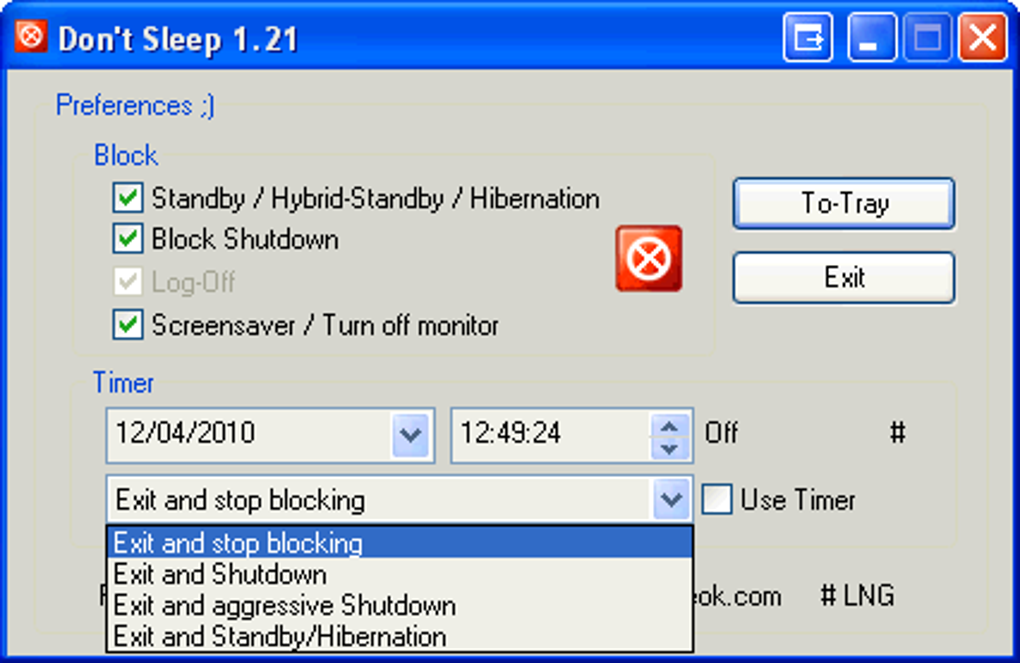
Don’t Sleep operates using a straightforward mechanism: it actively monitors your system for signs of impending sleep or screen saver activation. Upon detecting such an event, it cleverly signals the operating system that crucial tasks are underway, effectively preventing the system from entering a low-power state. This continuous “activity” signal fools the system into remaining awake, ensuring uninterrupted operation. This is especially valuable when running older applications that may not interact seamlessly with modern power management features, potentially leading to unexpected interruptions or crashes. The constant communication with the operating system ensures that even if the computer appears idle, Don’t Sleep actively maintains its operational state.
The application’s effectiveness stems from its ability to override default power-saving behaviors. Modern operating systems aggressively manage power consumption, often putting systems to sleep after periods of inactivity to conserve battery life or reduce energy usage. Don’t Sleep actively counters this behavior, ensuring the computer remains powered on, regardless of inactivity periods. This proactive approach eliminates the risk of unexpected shutdowns or pauses during crucial processes such as large file transfers, software installations, or complex calculations. While this prevents interruption, it’s crucial to understand the implications for battery life and energy consumption, as detailed below.
Beyond its core functionality, Don’t Sleep offers an additional layer of control through its integrated timer. This feature allows users to schedule specific periods of system activity or inactivity. For example, you can set a timer to automatically shut down your computer after a prolonged download is complete or a resource-intensive task concludes. This timed functionality adds a level of sophistication, transforming Don’t Sleep from a simple “keep-awake” tool into a more versatile system management utility. The flexibility offered by this timer allows users to customize how Don’t Sleep interacts with their system, tailoring its behavior to individual needs and workflows.
Benefits of Using Don’t Sleep: Uninterrupted Operation
The primary advantage of Don’t Sleep lies in its ability to prevent unexpected computer shutdowns and interruptions. This is particularly crucial in several scenarios:
- Running Legacy Software: Older applications may not be compatible with the power management features of modern operating systems. Don’t Sleep prevents these applications from being unexpectedly terminated due to system sleep or automatic shutdown. This compatibility assurance is a significant benefit for users who need to utilize older, yet critical software.
-
Long Downloads and Installations: Downloading large files or installing extensive software packages can take considerable time. Don’t Sleep ensures the process remains uninterrupted, preventing data loss or incomplete installations due to unexpected system sleep or shutdowns. This consistent uptime during these lengthy processes saves time and eliminates potential frustrations.
-
Resource-Intensive Tasks: Complex calculations, simulations, or video rendering processes demand sustained computer resources. Don’t Sleep provides the uninterrupted power necessary to complete these computationally demanding tasks without the risk of unexpected system interruptions. This is particularly beneficial in professional settings or for users engaging in demanding computational work.
-
Remote Access and Server Applications: For users relying on remote access or running server applications, maintaining consistent uptime is vital. Don’t Sleep helps ensure continuous availability, preventing interruptions in crucial services or connections. This reliability feature is essential for anyone operating services dependent on continuous system operation.
-
Automated Tasks and Scheduled Processes: Users who run automated scripts or scheduled tasks benefit from Don’t Sleep’s guarantee of uninterrupted operation. The application ensures these processes complete successfully without the risk of interruptions from system sleep or power-saving measures. This consistent uptime ensures the reliability of automated workflows.
Drawbacks of Don’t Sleep: Considerations and Alternatives
While Don’t Sleep offers significant advantages, it’s crucial to be aware of potential drawbacks:
- Battery Drain: The most significant drawback is increased battery consumption on laptops. By actively preventing the system from entering low-power states, Don’t Sleep continuously demands power, leading to reduced battery life. This trade-off between uninterrupted operation and battery life must be carefully weighed depending on usage patterns and power availability.
-
Potential for Overheating: Continuous system operation, especially under heavy load, can lead to increased heat generation. Prolonged use of Don’t Sleep may contribute to overheating, potentially damaging components or reducing their lifespan. Regular monitoring of system temperature and ensuring adequate ventilation is crucial to mitigate this risk.
-
Security Concerns (Indirect): While Don’t Sleep itself is not inherently a security risk, relying on it to prevent shutdowns might mask underlying problems. If your system frequently shuts down unexpectedly, it’s essential to investigate the root cause, rather than solely relying on Don’t Sleep as a solution. Addressing the underlying issues may improve system stability and prevent potential security vulnerabilities.
-
System Resource Consumption: Though minimal, Don’t Sleep still consumes some system resources. While this impact is usually negligible on modern hardware, it might be noticeable on older or less powerful systems. Users with resource-constrained systems might find the performance impact less acceptable than the benefit of preventing shutdowns.
Alternatives to Don’t Sleep exist, each with its own strengths and weaknesses. These alternatives may offer more sophisticated power management capabilities or integrate with other system utilities, providing a more comprehensive approach to system management. Exploring these options can help users find a solution that best meets their specific needs and preferences.
Alternative Approaches to Preventing Unexpected Shutdowns
Several alternative strategies can be considered to prevent unexpected computer shutdowns without relying solely on Don’t Sleep:
- Adjusting Power Settings: Modify your operating system’s power settings to increase the time before the system enters sleep mode or automatically shuts down. This provides a more integrated approach to power management, potentially requiring less aggressive intervention like Don’t Sleep.
-
Troubleshooting System Issues: If unexpected shutdowns are frequent, it is crucial to investigate underlying issues such as overheating, driver problems, or software conflicts. Addressing these root causes directly is more sustainable than using a workaround like Don’t Sleep.
-
Using Task Schedulers: Schedule specific tasks or applications to run during designated periods, ensuring they complete before the system enters sleep mode or shuts down. This approach allows for more precise control over the timing of processes, avoiding the need for continuous system operation.
-
Implementing System Monitoring Tools: Utilize system monitoring software to track system performance, temperature, and power consumption. This proactive monitoring allows for early detection of potential issues before they lead to unexpected shutdowns.
-
Utilizing Power Management Software: Sophisticated power management software can offer a more nuanced approach to balancing performance and energy efficiency. These applications often provide granular control over system power settings and can help optimize performance while preventing unwanted shutdowns.
In conclusion, Don’t Sleep provides a simple yet effective solution for preventing unexpected computer shutdowns. Its ease of use and added timer functionality enhance its practical value. However, users must carefully weigh its benefits against potential drawbacks, particularly regarding battery drain and potential overheating. Exploring alternative solutions and addressing underlying system issues offers a more comprehensive approach to maintaining system stability and reliability. The choice between Don’t Sleep and other options depends on the individual user’s specific needs and priorities.
File Information
- License: “Free”
- Latest update: “January 17, 2024”
- Platform: “Windows”
- OS: “Windows Vista”
- Language: “English”
- Downloads: “20.3K”
- Size: “41.65 KB”


