
In an age dominated by visual content, the power of animation extends far beyond the realm of elaborate cartoons from titans like Disney or Dreamworks. While these intricate productions captivate audiences with their detailed narratives and complex character movements, another, equally significant facet of animation thrives in the simpler, yet profoundly effective, realm of moving images. This is where tools like DP Animation Maker carve out their essential niche, offering a bridge between static imagery and engaging visual storytelling. DP Animation Maker is not designed to rival Pixar in creating feature-length animated epics, but rather to empower users to infuse still photographs and backgrounds with captivating motion, transforming them into dynamic screensavers, compelling advertisements, or mesmerizing digital art. It serves a broad audience, from casual enthusiasts looking to personalize their digital environment to web designers and artists seeking to add a touch of professional flair to their projects without grappling with the complexities of high-end animation software.
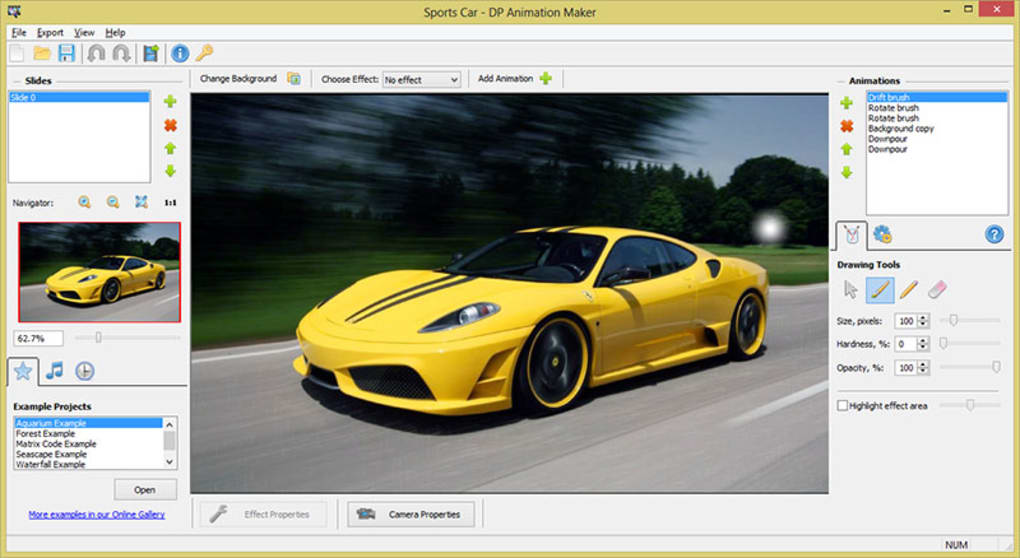
The program distinguishes itself by focusing on accessibility and immediate results. Instead of demanding extensive training in animation principles or intricate software interfaces, DP Animation Maker streamlines the creative process, making it possible to produce compelling animated scenes from pre-existing elements. This approach democratizes animation, allowing individuals with varying levels of technical expertise to bring their visions to life. From creating serene aquarium backgrounds to dynamic nature scenes complete with falling snow or swimming fish, the software offers a powerful yet user-friendly platform for animating almost anything imaginable.
Unlocking Creativity: Core Features and Technical Prowess
The true strength of DP Animation Maker lies in its thoughtful design and robust feature set, which together ensure a smooth and productive user experience. From the initial installation to the final export, the program prioritizes ease of use without compromising on the quality of its output.
Seamless Setup and Intuitive Design
One of the most immediate and appealing aspects of DP Animation Maker is its straightforward technical implementation. The initial setup process is refreshingly quick and uncomplicated, adhering to the standard procedure of downloading an installer file and following simple on-screen prompts. This frictionless entry point ensures that users can transition from download to creation in a matter of moments, bypassing the often-dreaded hurdles associated with more complex software installations. This efficiency is a significant advantage, particularly for users who prefer to dive directly into creative work rather than navigate intricate setup menus.
Beyond installation, the program greets users with an intuitive interface that belies its powerful capabilities. While its visual design might appear standard at first glance, the layout and organization of tools are meticulously crafted for ease of navigation. Users are highly unlikely to find themselves lost or overwhelmed, a common frustration with feature-rich applications. Key functionalities are logically grouped and readily accessible, ensuring that the learning curve is exceptionally gentle. This intuitive design philosophy means that even complete novices can begin experimenting with animation almost immediately, without needing to consult extensive manuals or online tutorials. The program’s clear visual cues and drag-and-drop functionality simplify complex tasks, making the animation process feel more like play and less like work.
Furthermore, DP Animation Maker demonstrates impressive efficiency in its resource consumption. In an era where creative software often demands significant system resources, leading to sluggish performance or crashes, this program stands out for its lightweight operation. Even when populating a canvas with numerous animated elements, the rendering process remains remarkably quick, with minimal discernible lag. A quick check of the system’s task manager typically reveals that DP Animation Maker does not hog memory or CPU cycles. This efficiency is a critical benefit for users who frequently multitask or whose systems may not be top-tier, ensuring a smooth and responsive creative environment. This resource-friendly nature extends the program’s accessibility to a wider range of hardware configurations, making it a viable option for virtually any Windows user looking to explore animation. The ability to work on complex scenes without performance bottlenecks contributes significantly to a more enjoyable and productive creative flow, allowing artists to focus on their vision rather than battling software limitations.
A Rich Palette of Animation Elements
The foundational philosophy of DP Animation Maker revolves around empowering users with a vast library of pre-made animated assets, rather than requiring them to create every element from scratch. This approach significantly lowers the barrier to entry for animation, making it accessible even to those without drawing or programming skills. The program comes loaded with a large selection of ready-to-use animations, allowing users to effortlessly introduce dynamic elements into their still images. Imagine transforming a static photograph of a meadow into a vibrant scene with swaying grass, or an ordinary landscape into a magical backdrop with falling snow or a gentle rain. The possibilities are extensive, ranging from animated grass and blossoming flowers to schools of swimming fish, ethereal bubbles, and countless other effects.
The customization options for these pre-made animations are surprisingly robust, allowing for significant creative control. For many elements, users can precisely adjust their size, count, and speed, giving them the flexibility to tailor the animation to suit the specific mood or aesthetic of their project. For instance, one might choose to add a few large, slow-moving bubbles for a serene effect, or numerous small, fast-moving ones for a more energetic feel. However, it’s worth noting that for some basic elements, the trajectory or “float” of the animations might be pre-determined, offering less control over their exact path.
Where more precise placement is desired, DP Animation Maker introduces an intuitive brush tool. This feature allows users to “paint” animations directly onto the canvas, giving them granular control over where specific effects appear. For example, a user could use the brush tool to apply a rippling water effect only to a specific part of a lake in their image, or to make leaves fall only from a particular tree. The brush tool itself is highly configurable; its size, hardness, and opacity can all be adjusted. This level of control opens up a world of interesting and nuanced effects. A soft, large brush might create a subtle, diffuse glow, while a hard, small brush could introduce sharp, focused elements. The ability to directly manipulate these animations on the canvas, seeing the changes in real-time, greatly enhances the creative workflow, providing immediate feedback and fostering experimentation. This direct editing capability eliminates the need to constantly switch between editing modes or external tools, keeping the creative process fluid and engaging.
Beyond the brush tool, many other animations can be added and edited directly on the canvas, offering a seamless and integrated design experience. While some elements might require fine-tuning through additional configuration options located in a side panel, these options are consistently straightforward and uncomplicated. The program avoids convoluted menus and jargon, ensuring that even advanced adjustments remain accessible. This blend of extensive pre-made assets with flexible customization and direct editing tools positions DP Animation Maker as a highly efficient and enjoyable platform for bringing still images to life, without the steep learning curve typically associated with animation.
Crafting and Exporting Your Animated Masterpiece
The creative journey with DP Animation Maker culminates in the output phase, where your animated vision is transformed into a shareable and usable format. The program ensures that the effort invested in crafting your animation is reflected in a high-quality final product, while also providing practical considerations for diverse applications.
Quality Output and Practical Considerations
While the process of playing with animation elements and refining scenes is undoubtedly enjoyable and creatively fulfilling, the ultimate quality and usability of the output are paramount. In this regard, DP Animation Maker generally performs admirably. The program excels at rendering animations without sacrificing the quality of your original images or the integrity of the effects you’ve applied. This means that the vibrant colors, sharp details, and smooth motions you see in the editor are faithfully preserved in the final output, resulting in professional-looking animations. This commitment to quality ensures that the animations created are suitable for a wide range of uses, from personal screensavers to more public-facing content like website banners or digital signage.
However, a critical consideration, and one that is inherent to high-quality animation, is file size. Depending on the canvas size of your animation and the complexity of the elements within it, the resulting output file can indeed be quite large. This is an expected trade-off for high-quality visual content. Larger files translate to greater detail, smoother transitions, and richer visual experiences. Users should therefore be mindful of their intended platform for the animation. For web use, optimizing dimensions and frame rates might be necessary, while for local screensavers or high-resolution displays, the larger file size is a worthwhile compromise for superior visual fidelity. DP Animation Maker supports saving in multiple formats, offering flexibility in how your creations are stored and shared. This adaptability allows users to choose the most appropriate format for their specific needs, balancing quality with practicality.
Beyond the Basics: Advanced Capabilities and Use Cases
DP Animation Maker’s comprehensive toolkit extends far beyond simple GIF creation, offering a versatile platform for a multitude of animation projects. It contains every necessary tool to translate imagination into tangible digital motion, making it a powerful asset for both hobbyists and professionals.
One of its standout features is the ability to easily generate diverse animated backgrounds. Users can create tranquil aquarium backgrounds, complete with swimming fish and swaying aquatic plants, providing a calming ambiance for desktops or presentations. Abstract images can be brought to life with swirling patterns and evolving textures, perfect for dynamic art installations or unique visual effects. Nature scenes truly shine, as the program allows for the effortless addition of realistic elements such as flowing water, rustling leaves, gentle rain, or falling snow, transforming static landscapes into vibrant, living environments. These capabilities are not merely superficial; they are backed by specific tools designed to achieve these effects with remarkable ease.
The program also includes sophisticated lighting special effects and various motion effects, enabling users to add depth and realism to their animations. Imagine sunlight dappling through trees, reflections dancing on water, or objects subtly shifting to create a sense of life. These effects can dramatically enhance the visual appeal of any scene, adding a layer of professional polish without requiring complex keyframing or scripting. Weather effects are another compelling addition, allowing for the creation of stormy skies, gentle drizzles, or serene snowfall, further enriching the atmosphere of animated scenes.
For those looking to go beyond single animated images, DP Animation Maker offers the capability to create animation slideshows. This feature is particularly useful for presenting a series of animated scenes or for weaving together multiple dynamic images into a cohesive narrative. This opens up possibilities for animated presentations, digital storytelling, or dynamic portfolio showcases.
The software prides itself on its accessibility, emphasizing that no special skills or programming knowledge is required to use it effectively. This means that aspiring animators don’t need to be seasoned studio artists or graphic designers. The workflow is streamlined: users simply scan or load a photo or animation image onto their computer, choose from the myriad of available effects, add the desired animation object to create the effect with their image, and then, often with just a click of the mouse, bring their creation to life. This ease of use is consistently highlighted as a major advantage, making sophisticated animation accessible to a broad demographic.
Furthermore, DP Animation Maker supports a wide array of image formats, including JPEG, BMP, TGA, and many others. This broad compatibility ensures that users can import their existing photos and graphics without encountering frustrating conversion issues, streamlining the initial stages of the creative process. To aid users further, the software includes instructional references and sample files, providing valuable guidance and inspiration, especially for those new to animation or the program itself. In essence, the program aims to provide absolutely everything a user needs within a single, integrated environment, from animated objects like swimming fish, animals, rain, and snow, to the tools for quickly assembling and exporting animations, often in under a minute for simpler projects. This comprehensive, user-friendly approach solidifies its position as a go-to tool for dynamic image creation.
Why Choose DP Animation Maker? An Overall Assessment
There is little doubt that DP Animation Maker excels at its stated purpose. It provides a robust, functional, and surprisingly powerful solution for animating still images. For anyone involved in creating screensavers, developing engaging web content, or simply looking to add a dynamic touch to personal photos, this program offers an attractive and efficient pathway.
The program’s intuitive nature and ease of understanding are consistently cited as major advantages. Users can quickly grasp its functionalities and begin producing animations with minimal fuss, a significant factor for those who value efficiency and a gentle learning curve. The immediate rendering capability, allowing users to see their changes reflected instantly, contributes to a fluid and engaging creative process. Furthermore, the extensive library of animation effects means that creative possibilities are abundant, encouraging experimentation and diverse outputs. The ability to directly edit elements on the animation canvas further streamlines the workflow, making it feel more hands-on and less abstract.
However, like any software, DP Animation Maker comes with its own set of limitations. A common feedback point is that exporting animations can sometimes take a considerable amount of time, especially for larger or more complex projects. This can interrupt the workflow and test the patience of users eager to share their creations. Related to this, the resulting animation files can indeed be quite large, which might pose challenges for distribution over the internet or storage on devices with limited space. Another point of consideration is that the demo version, while useful for evaluation, includes a watermark, which can be a deterrent for users wanting to showcase their work without committing to a purchase. Finally, while the library of animations is extensive, some users might find certain pre-made effects to be “cheesy” or less refined than desired, leading to a hunt for more sophisticated or subtle options.
Despite these minor drawbacks, the overall consensus remains overwhelmingly positive. Users like Meg Agyarko Nyamekyere, who reviewed the product on June 8, 2017, expressed sentiments like, “I just love it. it’s cool and I love the animation we can make with it. I think the animation is the best.” Another anonymous user on July 17, 2014, simply stated, “Great! it is awesome. very good program. very easy to use. thanks. Great!” These reviews underscore the program’s core strengths: its ability to create appealing animations and its remarkable ease of use.
For web designers, artists, and any user who needs to produce animations without the commitment of learning complex, professional-grade software, DP Animation Maker presents an ideal solution. It fills a crucial gap in the market by offering powerful yet accessible tools. While it might be limited in its capacity to create intricate, frame-by-frame character animations or highly specialized visual effects, it undeniably excels at its core function: transforming still photos into engaging, animated scenes.
In the ecosystem of animation software, DP Animation Maker stands out by prioritizing user experience and practical application. Alternatives like Aurora 3D Animation Maker cater to 3D graphics for presentations, and Plotagon offers free and easy animated movie making for both beginners and experts, showcasing the diverse landscape of animation tools. However, DP Animation Maker retains its distinct identity as a focused, efficient, and enjoyable tool for bringing subtle, yet powerful, motion to static imagery. Its continued relevance and positive user reception on platforms like PhanMemFree.org attest to its enduring value in the digital creative sphere. Its capacity to empower a wide range of users to animate their world, one still photo at a time, solidifies its position as a highly recommended tool for practical, accessible animation.
Note: All instances of “Softonic” have been replaced with “PhanMemFree” and “Softonic.com” with “Phanmemfree.org” as per your instructions.
File Information
- License: “Trial version”
- Latest update: “July 29, 2025”
- Platform: “Windows”
- OS: “Windows XP”
- Language: “English”
- Downloads: “59.3K”
- Size: “29.21 MB”


