
In the ever-evolving landscape of cyber threats, robust antivirus protection is no longer an option but a necessity. While most users rely on comprehensive, real-time security suites, there often arise situations where a conventional antivirus might fall short, fail to detect a stubborn infection, or simply isn’t available. This is precisely where Dr.Web CureIt! steps in, carving out a crucial niche as a powerful, portable, and discreet malware remediation tool. Far from being a primary, always-on antivirus, Dr.Web CureIt! positions itself as an indispensable emergency kit for diagnosing and neutralizing malicious software on demand, offering a lifeline when all else fails.
Developed by Doctor Web, a renowned cybersecurity firm, Dr.Web CureIt! embodies simplicity and effectiveness. It requires no installation, making it uniquely suited for environments where traditional software deployment is challenging or undesirable. Whether you’re a seasoned IT professional troubleshooting a client’s compromised machine, a cautious user wanting a second opinion on your system’s health, or someone helping a friend whose computer is struggling with a persistent infection, CureIt! offers a straightforward path to resolution. Its ability to perform a comprehensive scan and present actionable solutions without conflicting with existing security software underscores its utility as a complementary, rather than competing, solution in the digital defense arsenal.
Dr.Web CureIt!: Your Go-To for Emergency Malware Remediation
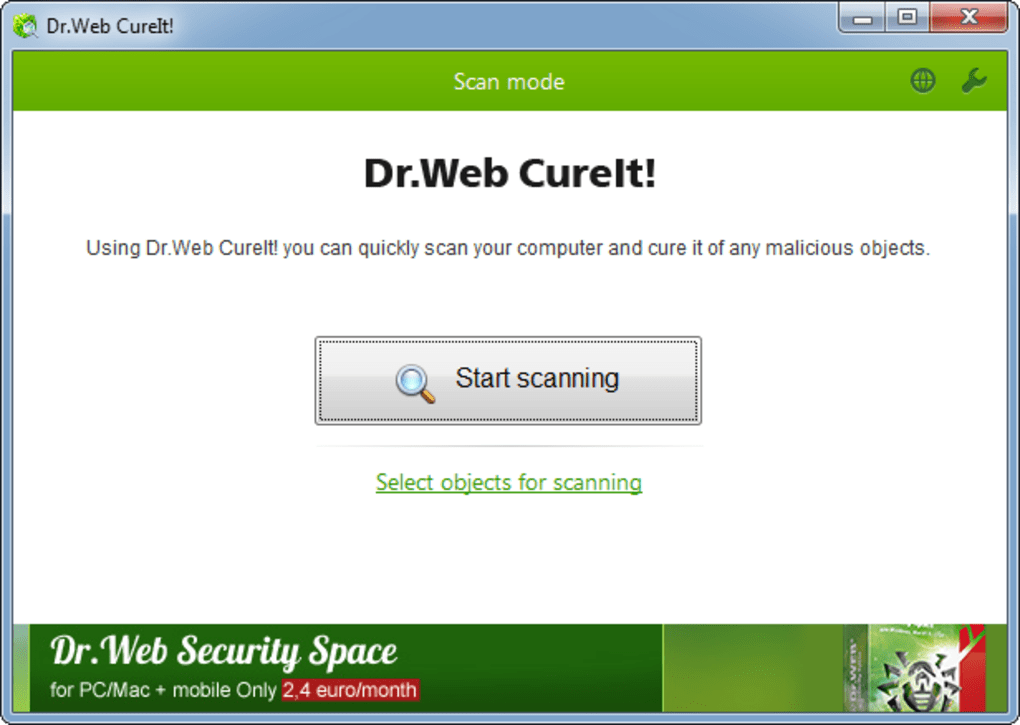
The core philosophy behind Dr.Web CureIt! revolves around its role as an emergency response tool. Unlike permanent antivirus installations that reside on your system and offer continuous, real-time protection, CureIt! is designed for immediate, targeted action. Its primary function is to perform a rapid yet thorough scan of your computer, identify any malicious objects lurking within, and provide the means to neutralize them. This makes it particularly valuable in scenarios where a computer is already exhibiting signs of infection, or when a user suspects their primary antivirus might have been bypassed or compromised.
Dr.Web CureIt! is an indispensable utility for users running various versions of Microsoft Windows, specifically supporting Windows 8, 7, Vista, XP, and Server 2003, 2008, and 2012, in both 32-bit and 64-bit architectures. This broad compatibility ensures that a wide range of systems, from older legacy machines to more contemporary setups, can benefit from its diagnostic and cleaning capabilities. Its proficiency extends to detecting and neutralizing a wide spectrum of cyber threats, including but not limited to:
- Viruses: The quintessential form of malware, designed to spread and infect legitimate programs.
- Rootkits: Stealthy forms of malware that gain administrator-level access to a computer, often hiding their presence and allowing other malicious software to operate undetected.
- Trojan Horses: Programs disguised as legitimate software that, once executed, perform malicious functions.
- Spyware: Software designed to secretly observe and record user activity.
- Other Malware: This encompasses a broad category including adware, ransomware, worms, and potentially unwanted programs (PUPs) that can degrade system performance or compromise privacy.
In essence, Dr.Web CureIt! acts as a digital first responder, capable of sweeping through a compromised system to identify and eradicate threats that might have evaded initial defenses. Its non-invasive nature means it can be deployed without altering system configurations or interfering with existing security solutions, making it a safe and effective choice for critical remediation tasks.
Unpacking Dr.Web CureIt!’s Distinct Advantages
Dr.Web CureIt! stands out in the crowded cybersecurity market due to a suite of distinct advantages that enhance its effectiveness and usability. These features collectively contribute to its reputation as a reliable emergency scanner.
The Power of Portability: No Installation, No Conflicts
One of Dr.Web CureIt!’s most compelling features is its complete portability. The utility does not require any installation process, which translates into several significant benefits for the end-user:
- Zero Footprint: Since it doesn’t install, it leaves no lasting files or registry entries on the host system. This is crucial for maintaining system integrity, especially when working on a client’s machine or a public computer where you don’t want to leave a trace.
- Runs Anywhere: The executable file can be stored and run directly from a USB flash drive, external hard drive, or network share. This means you can carry your malware remediation tool with you wherever you go, ready to deploy at a moment’s notice. For IT professionals, this is a game-changer, allowing them to boot from a trusted drive and scan a potentially compromised system without needing to rely on the infected operating system.
- No Conflicts with Existing Antivirus: A common issue when installing new security software is potential conflicts with an already installed antivirus. CureIt! bypasses this entirely. It is designed to run alongside other security solutions without causing system instability or performance degradation. This “second opinion” capability is invaluable when you suspect your primary antivirus might have missed something or if you simply want an independent verification of your system’s cleanliness.
- Bypassing Malware Blockers: Many sophisticated malware strains are designed to disable or block the installation of antivirus software. Since CureIt! doesn’t require installation, it can often circumvent these defensive mechanisms, allowing it to run and scan even on heavily infected systems where traditional antivirus installations would fail. This makes it a crucial tool for recovering deeply compromised machines.
Comprehensive Scans with User-Friendly Control
Despite its portable nature, Dr.Web CureIt! doesn’t compromise on scanning depth or user control. The scanning process is remarkably user-friendly and intuitive, often mirroring the experience of using a full-fledged antivirus suite.
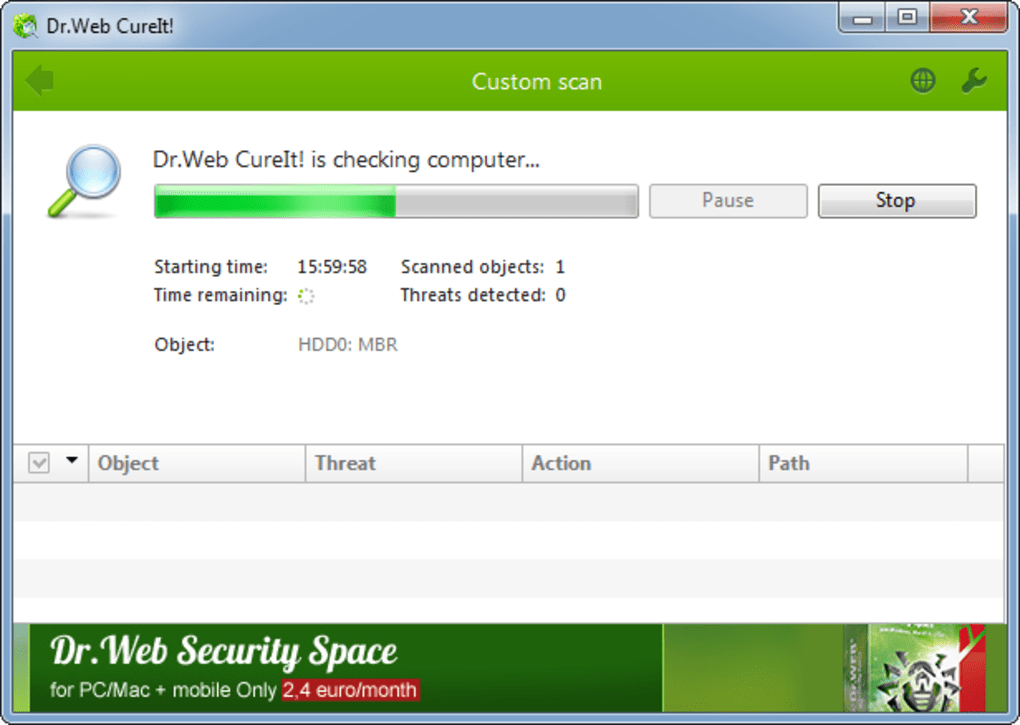
- Familiar Interface: Users who have experience with any antivirus software will find the process familiar: initiate a scan, view a list of detected threats, and choose a remediation action (cure, move to quarantine, or delete).
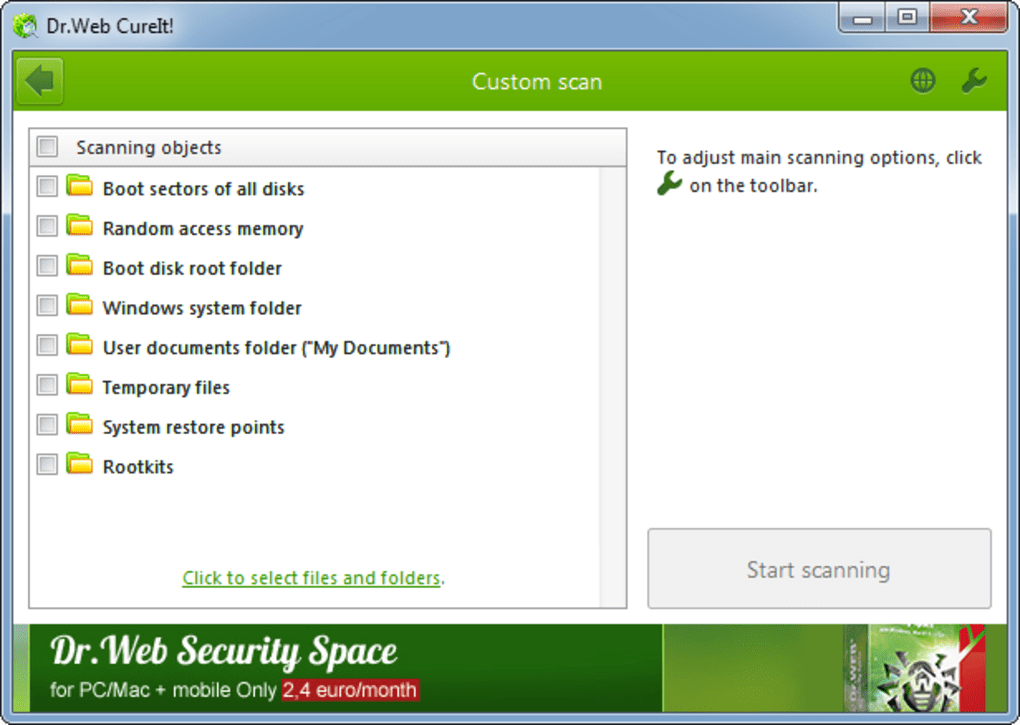
- Customization Options: While simple, CureIt! offers a good range of configuration options. Users can customize scan priority, directing the utility to focus its resources on specific areas of the system, such as boot sectors, memory, system files, or specific drives and folders. This allows for targeted investigations, saving time when a particular area is suspected of infection.
- Multilingual Support: Accessibility is a key strength. Dr.Web CureIt! is available in a vast array of languages, making it usable by a global audience regardless of their native tongue. This widespread language support significantly lowers the barrier to entry for non-English speakers.
- Excellent Help File: For those who need guidance, the utility comes with a comprehensive help file that explains its functions, options, and recommended practices. This is particularly useful for less experienced users or when encountering unfamiliar settings.
- Transparency and Logging: Dr.Web CureIt! provides users with detailed statistics on its scans and discoveries, offering insights into the scanning process and the threats identified. Crucially, it automatically creates log files of its activities. These logs are invaluable for technical analysis, allowing users or support personnel to review detected threats, actions taken, and system changes. This feature is especially appreciated by experienced users and IT professionals, as it provides an audit trail and prevents “over-enthusiastic deletion” where critical system files might be accidentally removed without a record.
Advanced Detection and Neutralization Capabilities
The effectiveness of any security tool hinges on its ability to detect and neutralize threats. Dr.Web CureIt! is built on robust Dr.Web scanning engines, enabling it to identify a wide array of malicious software.
- Broad Threat Coverage: As mentioned, it’s capable of identifying viruses, rootkits, Trojan horses, spyware, and a host of other malware types. This comprehensive coverage ensures that it can tackle many of the common and emerging threats plaguing modern computing environments.
- Updated Algorithms: Doctor Web continually refines its detection capabilities. The utility regularly incorporates “brand new algorithms for neutralization of cyber threats,” ensuring that it can combat the latest and most sophisticated malware techniques. This includes mechanisms for dealing with polymorphic and obfuscated malware that can often evade signature-based detection.
- Enhanced Protection Modes: Recent updates have seen the implementation of “starter and enhanced protection mode” within the utility. These modes likely offer different levels of scanning aggressiveness or employ additional heuristics to improve detection rates, providing users with options depending on the severity of the suspected infection or the depth of scan required. The ability to detect and effectively remove deep-seated infections like rootkits speaks to the advanced nature of its scanning engine.
When and How to Effectively Deploy Dr.Web CureIt!
Understanding Dr.Web CureIt!’s intended role is crucial for maximizing its effectiveness. It’s not a set-it-and-forget-it solution but rather a specialized tool to be deployed strategically.
Integrating CureIt! into Your Cybersecurity Toolkit
It’s paramount to reiterate that Dr.Web CureIt! is designed as an emergency measure and a secondary scanner, not a replacement for a permanent, real-time antivirus solution. Modern cybersecurity best practices dictate having an always-on antivirus actively monitoring your system for threats. CureIt! complements this primary defense by providing a powerful tool for specific scenarios:
- The “Second Opinion” Scan: Even with a reputable antivirus installed, users might occasionally feel uneasy or notice suspicious activity. CureIt! can be run as a diagnostic tool to get an independent assessment of the system’s health. Its ability to run without conflicts makes it perfect for this role.
- Post-Infection Cleanup: If your primary antivirus reports an infection it cannot fully remove, or if your system continues to behave erratically after a cleanup, CureIt! is an excellent choice for a deeper, more aggressive scan to root out persistent threats.
- Cleaning Untrusted Machines: When you need to work on a computer you don’t fully trust – perhaps a public PC, a borrowed laptop, or a friend’s machine with no antivirus – running a quick scan with CureIt! before proceeding can provide immense peace of mind.
- Portable Troubleshooting: For IT technicians and advanced users, having CureIt! on a USB drive is like carrying a diagnostic scalpel. It allows them to quickly assess and remediate issues on various machines without needing to install any software, which is critical for maintaining efficiency and avoiding client system modifications.
- Suspicious Downloads: If you’ve downloaded a file that raises red flags, you can transfer it to a separate, isolated environment (like a virtual machine or a dedicated test system) and then run CureIt! to scan the file before risking it on your main system.
For optimal effectiveness, it’s recommended to always download a fresh copy of Dr.Web CureIt! each time you plan to use it. This addresses its “no signature updates” limitation. Since it doesn’t have a live, continuously updating signature database like a traditional installed antivirus, each new download incorporates the very latest virus definitions available from Doctor Web. Therefore, to ensure you’re scanning with the most current threat intelligence, frequent re-downloading is key. Some advanced users also suggest running multiple instances of CureIt! simultaneously, targeting different hard drives or partitions, to potentially speed up the overall scanning process, though this might depend on system resources.
Understanding Its Strengths and Limitations
A balanced view of Dr.Web CureIt! requires acknowledging both its powerful strengths and its inherent limitations.
Strengths (Pros):
- No Installation Needed: This is its hallmark feature, enabling portability and non-conflictual operation.
- Free: The utility is available at no cost for home users, making it an accessible solution for everyone.
- Highly Effective: User reviews and its robust engine attest to its capability in detecting and neutralizing a wide range of malware, including stubborn browser hijackers and specific difficult-to-remove viruses like virut56.
- Excellent Language Support: Its availability in numerous languages enhances global accessibility.
- Automatic Log Files: Provides valuable diagnostic information for review.
- Customizable Scan Priority: Allows users to tailor the scan to their specific needs.
- Low System Footprint (when running): Doesn’t consume excessive resources, making it suitable for older or less powerful machines.
Limitations (Cons):
- No Signature Updates (Live): This is the most significant limitation. As an on-demand scanner, it lacks continuous, real-time signature updates. To get the latest definitions, you must download a new version of the utility. This means it cannot offer proactive, continuous protection.
- No Shell Integration: The absence of shell integration means you cannot right-click a file or folder in Windows Explorer to initiate a quick scan. You must open the application and manually select targets. While minor, it impacts convenience.
- Cannot Protect Itself from EXE Infectors (when not installed): As it’s not installed, it cannot actively monitor and protect its own executable files from being infected by certain types of viruses that target
.exefiles randomly. This makes it crucial to keep CureIt! on a write-protected drive or to always re-download a fresh copy. - Potential Slowness: While generally fast, some user reviews have noted that certain scans can be time-consuming, depending on the system specifications and the depth of the scan.
- Cannot Delete Infection from Archives (sometimes): One user noted that it “Cant delete infection from an archive.” This might be a design choice to prevent data loss, or a specific limitation, requiring manual intervention for archived threats.
- User Interface can be “Non-Intuitive”: While generally user-friendly, some users might find the interface slightly less streamlined than more polished, installed antivirus solutions.
Understanding these trade-offs is essential for proper deployment. Dr.Web CureIt! excels as a reactive cleaning agent but is not a substitute for proactive, real-time defense.
User Experiences and Practical Insights
The true testament to any software’s value often lies in the experiences of its users. Dr.Web CureIt! has garnered significant positive feedback, particularly from those in technical support roles and advanced users.
Real-World Effectiveness and Community Feedback
Many users laud Dr.Web CureIt! as “The Noninvasive Alternative Malware Solution.” A freelance computer technician noted it as their “preferred choice now for almost three years,” highlighting its reliability and effectiveness. They observed that “after running CureIt, there was very little if anything for other malware solutions to do,” underscoring its thoroughness. This perspective is critical, as it suggests CureIt! is often the final and most effective tool in a technician’s arsenal when other solutions fail.
Its minimal impact on system performance – described as “negligible footprint” – is a frequently praised attribute. This is particularly important when working on already struggling, infected machines where resource-heavy applications could exacerbate issues. Its ability to “Quickly and Seamlessly upgrades to latest versions” (referring to downloading a fresh copy) and its consistent effectiveness against “most (almost all) threats of various kinds” are strong endorsements. The “Hands on, total user control of application” is also a significant pro for users who prefer to manage their security rather than rely on automated processes. And, of course, the fact that “It’s Free!” for personal use is a major draw.
Users have specifically lauded its ability to tackle stubborn threats like browser hijackers (e.g., “wsearch”) and specific viruses such as “virut56.” Its non-installed nature is ingeniously leveraged by savvy users to bypass malware designed to block antivirus software. As one user aptly put it, “Since it does not need to be installed, viruses looking to block anti virus software misses it.” This tactical advantage makes it a powerful asset in deep cleanups. Furthermore, its portability on a “thumb drive” is consistently cited as a major convenience, making it the “good little proggie” for on-the-go troubleshooting.
Navigating the Interface and Maximizing Performance
While generally praised for its simplicity, one common piece of feedback regarding Dr.Web CureIt! is that its “User interface is a little non-intuitive” for some. This isn’t a deal-breaker but suggests that new users might need a moment to familiarize themselves with the options before initiating a scan. However, given its straightforward functionality (scan, detect, remediate), most users will quickly grasp the essentials. The excellent help file serves as a ready resource for any questions.
For those seeking to optimize scanning speed, a power-user tip from the community suggests running “2 to 3 instances of it per hard drive (not partition) and give them different areas to scan. Its much faster that way.” This parallel processing approach, while consuming more system resources during the scan, could significantly reduce the total time needed to scrutinize a large or multi-drive system. While this may require a more advanced understanding of system processes, it illustrates the flexibility CureIt! offers to experienced users.
The ability to carry CureIt! on a thumb drive emphasizes its role as a flexible, immediate response tool. This physical portability means that a user can always have a powerful malware scanner at their fingertips, ready to be deployed on any Windows machine that might be exhibiting suspicious behavior or requires a quick diagnostic check.
In conclusion, Dr.Web CureIt! firmly establishes itself as a vital component in a comprehensive cybersecurity strategy. It’s not the frontline defense, but rather the specialized, agile, and effective backup plan. Its unique blend of portability, power, and user control makes it an indispensable tool for emergency malware remediation, offering peace of mind and tangible solutions when confronted with persistent or undetected threats. For any Windows user, especially those who frequently assist others with computer issues or demand an independent verification of their system’s health, Dr.Web CureIt! from PhanMemFree is a free download that belongs in every digital toolkit.
File Information
- License: “Free”
- Latest update: “August 5, 2025”
- Platform: “Windows”
- OS: “Windows 10”
- Language: “English”
- Downloads: “64.8K”
- Size: “515.67 MB”


