
DrawPad Graphics Editor is a free, user-friendly image editing software designed for creating and manipulating various graphic images, from simple sketches to more complex designs. This comprehensive review delves into its features, ease of use, strengths, and weaknesses, comparing it to other options available in the market. Whether you’re a seasoned graphic designer or a casual user looking for a simple yet effective tool, DrawPad offers a range of functionalities to explore.
Feature Overview: A Robust Toolkit for Diverse Needs
DrawPad boasts a surprisingly extensive feature set considering its freeware status. Its capabilities extend beyond basic drawing and sketching, encompassing a wide array of tools ideal for both casual and professional use. At its core, DrawPad provides a suite of fundamental drawing tools including pencils and brushes, allowing users to create sketches with varying line weights and textures. The inclusion of raster and vector image support adds significant flexibility, catering to diverse creative styles and project needs. Raster graphics, built from pixels, offer a high degree of detail and realism, suitable for photo editing and painting. Vector graphics, on the other hand, are composed of mathematical equations, enabling the creation of scalable images without loss of quality – perfect for logos, illustrations, and designs requiring resizing.
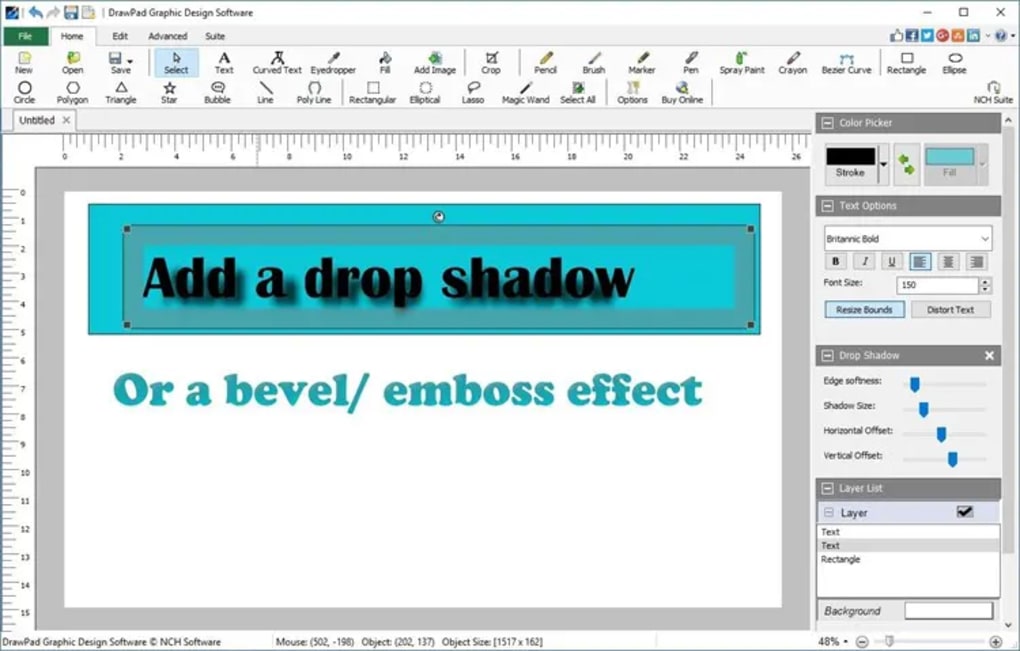
Beyond the core drawing tools, DrawPad offers robust editing capabilities. Users can easily crop, rotate, resize, and flip images, providing precise control over composition and layout. The software’s support for multiple layers facilitates non-destructive editing, allowing for modifications to individual elements without affecting others. This layered approach is crucial for complex projects where alterations need to be made selectively and without compromising the overall integrity of the image. Furthermore, the availability of effects like bevels and shadows enhances the visual appeal of creations, adding depth and dimension to designs. These effects allow users to mimic realistic lighting and shading, adding a professional touch to their work.
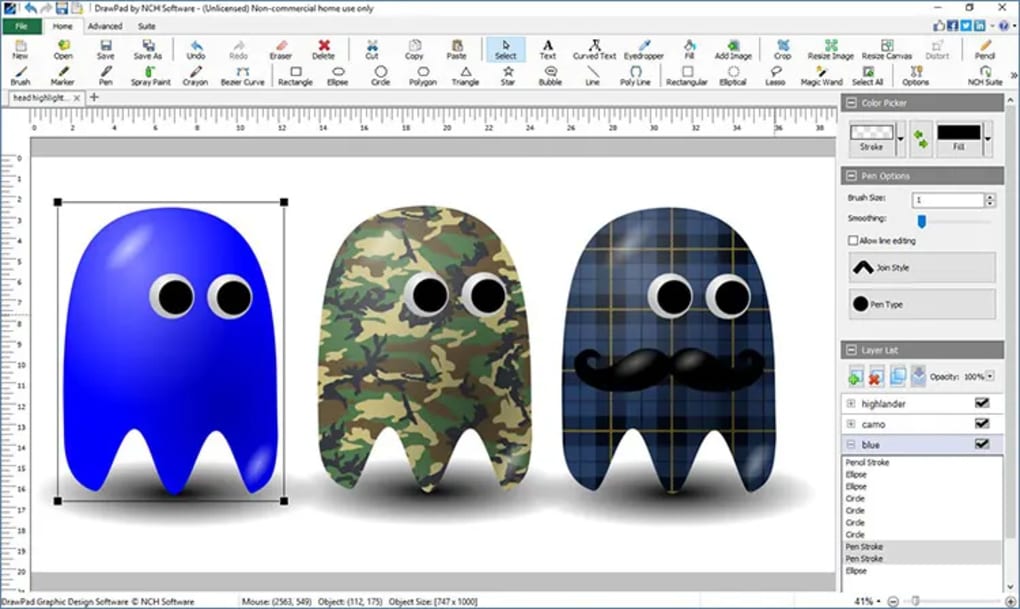
DrawPad’s file format compatibility is another noteworthy feature. It supports a wide range of popular formats, including PNG, BMP, JPG, GIF, PDF, and SVG. This broad compatibility ensures seamless integration with other design software and facilitates easy sharing of projects with collaborators. This versatility is particularly beneficial when working across different platforms and applications.
Ease of Use and User Interface: Intuitive Design for Beginners and Experts
One of DrawPad’s most significant strengths lies in its user-friendly interface. The software is designed with an intuitive layout that’s easily navigable, making it accessible to both novice and experienced users. The tools are logically organized, and the overall design minimizes complexity, ensuring that users can quickly access the functionalities they need. This intuitive design minimizes the learning curve, allowing users to focus on their creative process rather than wrestling with the software’s interface. Even beginners can quickly grasp the basic functionalities and start creating their artwork. The straightforward nature of the software doesn’t compromise its functionality; rather, it cleverly combines ease of use with powerful capabilities.
The simplicity of the interface is a double-edged sword, however. While the straightforward nature is beneficial for ease of learning, experienced users may find some advanced features lacking in depth or customization options compared to professional-grade software. For example, the customization options for brushes or tools may be limited compared to other alternatives. This trade-off between simplicity and advanced customization is a crucial consideration depending on individual user needs and expectations.
Performance and System Requirements: A Lightweight Application
DrawPad’s performance is generally commendable. It’s a lightweight application that runs efficiently on most systems without requiring excessive system resources. This makes it an ideal choice for users with older hardware or less powerful machines, eliminating concerns about system performance limitations. The efficient resource management allows for smooth operation even during complex editing tasks or when working with larger files. This factor makes DrawPad a highly accessible tool for a wide range of users, irrespective of their hardware capabilities.
Specific system requirements for DrawPad vary depending on the version, but generally, the software’s minimal resource footprint ensures compatibility across a wide range of operating systems and computer specifications.
Comparison with Alternative Software: Finding the Right Tool
DrawPad competes with several other image editing software packages, both free and commercial. A comparison reveals its strengths and weaknesses in the broader market. Compared to professional-grade software like Adobe Photoshop or Corel Painter, DrawPad lacks the advanced features and extensive customization options typically found in these more powerful applications. However, professional-grade software comes with a significantly higher price tag and a steeper learning curve. DrawPad excels as a free alternative, offering a viable solution for users who don’t require the advanced tools of professional-grade software but need more functionality than basic paint programs.
Compared to simpler alternatives like MS Paint, DrawPad offers a considerably richer feature set, including layer support, more extensive tool options, and support for a greater range of file formats. The improved functionality elevates DrawPad above basic image manipulation tools and positions it as a capable and versatile alternative.
MyPaint and PaintTool SAI are other popular alternatives. MyPaint is geared towards digital painting, offering a more focused and intuitive interface for artists. PaintTool SAI is known for its smooth line work and drawing capabilities. DrawPad’s advantage lies in its all-around utility; it doesn’t specialize in any one area like these alternatives but provides a balanced suite of tools for various image editing tasks.
Conclusion: A Valuable Tool for Diverse Users
DrawPad Graphics Editor provides a powerful and user-friendly image editing experience, successfully blending accessibility with a robust feature set. Its intuitive interface, coupled with its comprehensive tool selection, makes it an ideal choice for both casual users and those seeking a free and efficient alternative to more demanding, and expensive, commercial options. While it may lack the advanced features of professional-grade software, DrawPad more than compensates with its ease of use, efficient performance, and broad compatibility. If you’re looking for a free image editing software that strikes a balance between simplicity and functionality, DrawPad is certainly worth considering. Its versatile nature and user-friendly design make it a valuable asset for a wide range of creative projects.
File Information
- License: “Free”
- Latest update: “April 29, 2025”
- Platform: “Windows”
- OS: “Windows XP”
- Language: “English”
- Downloads: “4.9K”
- Size: “6.90 MB”


